
IdaiKuri (Generic Simple Template Engine)
- A Generic Simple Template Engine which maps Function Calls and Variables in templates(based on regex pattern) with code to create Files as variants of the Template Choosen.
- Check out the example code in repo ( https://github.com/Palani-SN/IdaiKuri ) for reference
Filler
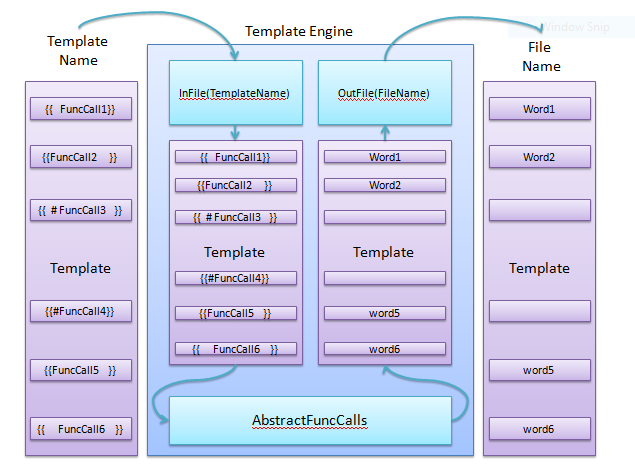
- To be used to fill a template from code using
- variables and function definitions in code and
- function calls in template
- Sample usage of the file is as given below (Refer TemplateFiles for template examples)
from IdaiKuri.Filler import FillerTemplateEngine as TemplateEngine
from IdaiKuri.Filler import Interface

TE = TemplateEngine();
TE.InFile("TemplateFiles/Template_DefaultCase1.html", True);
temp_vars = TE.VARS();

temp_vars.Portrait = "images/GuidoVanRossum.png";
temp_vars.Logo = "images/PythonLogo.png";
temp_vars.FullName = "Guido Van Rossum";
temp_vars.Position = "Python's Benevolent Dictator for life";
temp_vars.Quote = "In Python, every symbol you type is essential.";
temp_vars.Author = "Guido van Rossum";
result_dict = TE.OutFile(temp_vars, "GeneratedFiles/GuidoVanRossum_DefaultCase1.html");
CodeFlow
Interface (Decorator)
- Interface is the decorator to be used to define methods in child class extended from Filler.py/TemplateEngine class
- Sample code for using Interface decorator is shown below (Refer Examples for more understanding)
from IdaiKuri.Filler import FillerTemplateEngine as TemplateEngine
from IdaiKuri.Filler import Interface

class AdvancedTemplate(TemplateEngine):
    @Interface
    def get_portrait(self, name):
        return "images/"+name.replace(" ","")+".png";
    @Interface
    def get_logo(self, contrib):
        return "images/"+contrib+"Logo.png"
TemplateEngine (class from Filler.py)
- Initialising class helps to configure the RegexEdges and it also validates the pattern based on the second parameter FuncCallTemplate
- Arguments
- Arg1 - RegexEdges (a tuple with start and end delimiters)
- Arg2 - FuncCallTemplate is the sample string with "self.FUNC_CALL()" keyword to validate the RegexEdges
- Sample regex configurations in TemplateEngine Initialisation is shown below.
## Default RegexEdges=("{{", "}}"),
## FuncCallTemplate="{{self.FUNC_CALL()}}"
TE1 = TemplateEngine();

## RegexEdges=("_StArT_", "_eNd_"),
## FuncCallTemplate="_StArT_self.FUNC_CALL()_eNd_"
TE2 = TemplateEngine(("_StArT_", "_eNd_"), "_StArT_self.FUNC_CALL()_eNd_");

## RegexEdges=("<<", ">>"),
## FuncCallTemplate="<<self.FUNC_CALL()>>"
TE3 = TemplateEngine(("<<", ">>"), "<<self.FUNC_CALL()>>");

## RegexEdges=("\\[\\[", "\\]\\]"),
## FuncCallTemplate="[[self.FUNC_CALL()]]"
TE4 = TemplateEngine(("\\[\\[", "\\]\\]"), "[[self.FUNC_CALL()]]");

## RegexEdges=("{\\[<{\\[", "}\\]>}\\]"),
## FuncCallTemplate="{[<{[self.FUNC_CALL()}]>}]"
TE5 = TemplateEngine(("{\\[<{\\[", "}\\]>}\\]"), "{[<{[self.FUNC_CALL()}]>}]");
InFile()
- Gets the Template Name/Path of the template function calls that is going to be used.
- Will initialize the MapDict for updating the function calls in the template.
## Definition
def InFile(self, TemplateName, DebugTokens=False):
- Arguments
- Arg1 - TemplateName (a String that contains the Path/Name of the template)
- Arg2 - DebugTokens (If True prints the function calls of template, If false doesnt print)
VARS()
- Returns an Instance of the an empty class, for argument variables storage.
OutFile()
- Defines the file Name/Path that needs to be generated with the filled content from the template.
- It edits the template based on the dependencies/arguments of the template function calls.
## Definition
def OutFile(self, FuncArgVars, UniqueName):
- Arguments
- Arg 1 - FuncArgVars (an instance of class with appropriate members filled)
- Arg 2 - UniqueName (filename to be generated with the edited template content)
- Returns
- MapDict - the result as a dictionary ( keys : func_calls and values : Return_values)
Parser
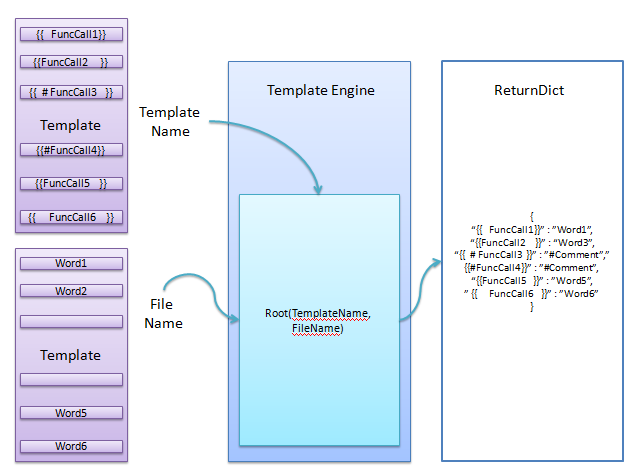
- To be used to parse a file by comparing
- function calls in a template and
- file that is generated using the template
- Sample usage of the file is as given below (Refer TemplateFiles for template examples)
from IdaiKuri.Parser import ParserTemplateEngine as TemplateEngine

PE = TemplateEngine();
print("\n", "Template_DefaultCase1.html", "GuidoVanRossum_DefaultCase1.html", "\n");
diffdict = PE.Root("TemplateFiles/Template_DefaultCase1.html", "GeneratedFiles/GuidoVanRossum_DefaultCase1.html");
for key in diffdict.keys():
    print("   ", key, "->", diffdict[key]);
CodeFlow
TemplateEngine (class from Parser.py)
- Initialising class helps to configure the RegexEdges and it also validates the pattern based on the second parameter FuncCallTemplate
- Arguments
- Arg1 - RegexEdges (a tuple with start and end delimiters)
- Arg2 - FuncCallTemplate is the sample string with "self.FUNC_CALL()" keyword to validate the RegexEdges
- Sample regex configurations in TemplateEngine Initialisation is shown below
## Default RegexEdges=("{{", "}}"),
## FuncCallTemplate="{{self.FUNC_CALL()}}"
TE1 = TemplateEngine();

## RegexEdges=("_StArT_", "_eNd_"),
## FuncCallTemplate="_StArT_self.FUNC_CALL()_eNd_"
TE2 = TemplateEngine(("_StArT_", "_eNd_"), "_StArT_self.FUNC_CALL()_eNd_");

## RegexEdges=("<<", ">>"),
## FuncCallTemplate="<<self.FUNC_CALL()>>"
TE3 = TemplateEngine(("<<", ">>"), "<<self.FUNC_CALL()>>");

## RegexEdges=("\\[\\[", "\\]\\]"),
## FuncCallTemplate="[[self.FUNC_CALL()]]"
TE4 = TemplateEngine(("\\[\\[", "\\]\\]"), "[[self.FUNC_CALL()]]");

## RegexEdges=("{\\[<{\\[", "}\\]>}\\]"),
## FuncCallTemplate="{[<{[self.FUNC_CALL()}]>}]"
TE5 = TemplateEngine(("{\\[<{\\[", "}\\]>}\\]"), "{[<{[self.FUNC_CALL()}]>}]");
Root()
- Parses the template Name/Path and file Name/Path.
- Returns the differences between them as a dict.
## Definition
def Root(self, TemplateName, FileName):
- Arguments
- Arg 1 - TemplateName (Name of the template to be edited)
- Arg 2 - FileName (filename to be generated with the edited template content)
- Returns
- RootDict - the result as a dictionary (keys : func_calls and values : Return_values)
1 maintainer

Metadata
1 maintainer
Release files for IdaiKuri 1.0.0
For a detailed explanation of source distributions (sdists) and built distributions (wheels), please see the package formats documentation.
Source distribution (sdist)
| File | Size | Uploaded | Provenance | Actions |
|---|---|---|---|---|
| IdaiKuri-1.0.0.tar.gz | 93.7 kB | Without provenance | Details for IdaiKuri-1.0.0.tar.gz |
Built distribution (wheel)
| File | Interpreter | ABI | Platform | Actions Reset |
|---|---|---|---|---|
| IdaiKuri-1.0.0-py3-none-any.whl | Python 3 | none | any | Details for IdaiKuri-1.0.0-py3-none-any.whl |
Total release size: 113.2 kB
Release files / IdaiKuri-1.0.0.tar.gz
| Download URL | IdaiKuri-1.0.0.tar.gz |
|---|---|
| Size | 93.7 kB |
| Tags | Source |
|
SHA-256 checksum How to use checksums |
ac466749742ff4f5625d7289c4f40e63d36342ca60ddbcad5165875302621ad9
|
|
BLAKE2b-256 checksum How to use checksums |
95b03275c7bf8105c42d2a6325bab1aee7a7b4f875de38f21ce3aa1dbb98daaa
|
| Upload date | |
|
Uploaded using Trusted Publishing? What is trusted publishing? |
No |
| Uploaded via |
twine/3.4.2 importlib_metadata/4.8.1 pkginfo/1.7.1 requests/2.26.0 requests-toolbelt/0.9.1 tqdm/4.62.2 CPython/3.7.6
|
Release files / IdaiKuri-1.0.0-py3-none-any.whl
| Download URL | IdaiKuri-1.0.0-py3-none-any.whl |
|---|---|
| Size | 19.4 kB |
| Tags | Python 3 |
|
SHA-256 checksum How to use checksums |
a990547d5be8dbb3a08c500b2be5a74e8fb7fac8c0e0f30b70a934536b0c0bde
|
|
BLAKE2b-256 checksum How to use checksums |
ccab9b0d7bf8c29bf7306528f6f449bec9b6b9f567449ac159979ab31816631e
|
| Upload date | |
|
Uploaded using Trusted Publishing? What is trusted publishing? |
No |
| Uploaded via |
twine/3.4.2 importlib_metadata/4.8.1 pkginfo/1.7.1 requests/2.26.0 requests-toolbelt/0.9.1 tqdm/4.62.2 CPython/3.7.6
|
Security for IdaiKuri 1.0.0
Provenance
Provenance describes where a file came from. On PyPI, provenance is shared via attestations, which provide a verifiable record of the build or publishing details. View details, limitations and caveats.
No provenance found
None of the files in this release were uploaded with provenance metadata.
A note on package security
PyPI is a repository for distributing packages, not a service for auditing them. While third-party security researchers and our staff do their best to detect and remove malicious packages, PyPI cannot guarantee the quality, security or suitability of any given package.
To learn more about protecting yourself from malicious actors, visit our package security documentation.














