
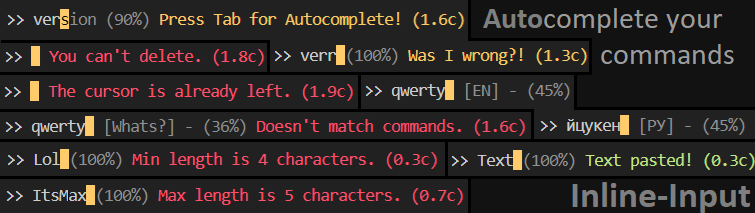
Inline-Input
Install library:
pip install inline-input
The simplest example:
import inline #Import inline module
input = inline.input #replace default input

while True:
    print("Say 'Yes' or 'No'")
    inp = input("Input: ", command=["Yes", "No"], free=False)
Use:
# Preparing:
import inline #Import inline module
input = inline.input #replace default input

# Examples with new input:
inp = input(prefix=None) # default ">> "
inp = input(free=False) # or free=True, default is True
inp = input(minLength=2, maxLength=10) # default minLength=0, maxLength=0
inp = input(cursor=False) # show or hide cursor, default True
inp = input(secret=True) # hide input and predictions text, default False
inp = input(cursorVisibleTime=0.9, cursorNotVisibleTime=0.6) # СЃursor blink speed
inp = input(timeInfo=5) # display time of tooltips, default is 2 second
inp = input(timer=False) # setting the timer for tips
inp = input(iHelp=2) # How many characters must the user type to be prompted to use the Autocomplete
inp = input(inp="Start text") # text that will be entered for the user (the user can delete or edit it)

#Functions:
inline.clear_console(lineDel=1) #Delete one line of console
inline.predict(text, list) # Predicting a similar word
inline.isCommand(text, list) # Does the command exist on the list
Commands options:
#1
import inline #Import inline module
input = inline.input #replace default input

inline.commands = ["Info", "Help", "Version"]

answer = input()
OR:
#2
import inline #Import inline module
input = inline.input #replace default input

commands = ["Info", "Help", "Version"]

answer = input(command=commands)
Autocomplete on Enter:
inline.autoCompleteOnEnter = True # Autocomplete on Enter and Tab, default False - only on Tab
inp = input(free=False) # Only your commands are allowed!
Examples code:
#Navigating through folders
import os
import inline #Import inline module
input = inline.input #replace default input
path = "C:\\" #Default path

while True:
    commands = os.listdir(path)
    print("Choose directory:")

    for command in commands:
        if not command.startswith("$"):
            print(f"- {command}")
        else:
            commands.remove(command)

    inp = input(command=commands, cursor=False)
    os.system('cls')

    if inp == "." or inp.lower() == "return": # go back
        path = path[:-(len(path.split("\\")[-2]) + 2)] + "\\"
    elif os.path.isdir(path + inp + "\\"):
        path += inp + "\\"
    else:
        if os.path.isfile(path + inp):
            print("You want open the file?")
            inp_ = input(command=["Yes", "No"], free=False) # Free=False forces the user to use strictly our commands
            if inp_.lower() == "yes":
                os.system(path + inp)
        else:
            print("Directory does not exist:", path + inp + "\\", end="\n\n")
Another simple example:
import inline #Import inline module
input = inline.input #replace default input
commands = ["Exit"] #Default commands

while True:
    print("What kind of command do you want to create?")
    command = input(prefix="Name command: ")

    print("\nTry using your command!")
    if inline.isCommand(command, commands):
        inline.clear_console(lineDel=4) #delete last 4 lines
        print("Command already exists!")
        continue
    else:
        commands.append(command)
    inp = input(command=commands, free=False)

    print(f"\nGreat, {inp} is working!\n- What the command will print?")
    text = input("Enter text: ")

    print("\nTry using your command or write 'Exit'")
    inp = input(free=False, command=commands)
    if inp.lower() == commands[-1].lower(): # First try
        print(f"Printed: {text}")
    else:
        break

    print("\nDo you want to create another command?")
    inline.autoCompleteOnEnter = True
    inp = input(free=False, command=["Yes", "No"])
    inline.autoCompleteOnEnter = False
    if inline.isCommand(inp, "No"): #Best try
        print("Bye - bye!")
        break
1 maintainer

Download files
Download the file for your platform. If you're not sure which to choose, learn more about installing packages.
Source Distribution
Inline-input-1.1.tar.gz
(6.1 kB
view details)
File details
Details for the file Inline-input-1.1.tar.gz.
File metadata
- Download URL: Inline-input-1.1.tar.gz
- Upload date:
- Size: 6.1 kB
- Tags: Source
- Uploaded using Trusted Publishing? No
- Uploaded via:
twine/4.0.0 CPython/3.9.9
File hashes
| Algorithm | Hash digest | |
|---|---|---|
| SHA256 |
8a3f30e9d78764fadcd193f66725c0e74f5ace1e1bca2890267b52ce3fc98a69
|
|
| MD5 |
87210168f202391622e2e86b259e6bbe
|
|
| BLAKE2b-256 |
0ebda16948f18bac345fd64b5b7a1028e27138d83ed80bf630ee369bd59f1f47
|














