
KorAP web service client package for Python








Description
Python client wrapper package to access the web service API of the KorAP Corpus Analysis Platform developed at IDS Mannheim. Currently, this is no native Python package. Internally, it uses KorAP's client package for R via rpy2. The latter also automatically translates between R data frames (or tibbles) and pandas DataFrames.
Installation
1. Install latest R version for your OS, following the instructions from CRAN
Linux only: Install system dependencies
#### Debian / Ubuntu
sudo apt install r-base-dev r-cran-rcpp r-cran-cpp11 libcurl4-gnutls-dev libxml2-dev libsodium-dev libsecret-1-dev libfontconfig1-dev libssl-dev python3-dev python3-pip python3-rpy2 python3-pandas python3-pytest libdeflate-dev r-cran-rcpparmadillo

#### Fedora / CentOS / RHEL
sudo yum install -y R R-devel libcurl-devel openssl-devel libxml2-devel libsodium-devel python3-pandas
2. Install the RKorAPClient package
Start R and run:
install.packages('RKorAPClient', repos='https://cloud.r-project.org/')
or install RKorAPClient from the package installation menu entry.
3. Install the Python package
PythonKorAPClient requires Python 3.10 or newer.
On Linux and macOS:
# py -m pip install KorAPClient -U
python3 -m pip install KorAPClient -U # --break-system-packages
On Windows:
# py -m pip install pip -U
py -m pip install KorAPClient -U
Documentation
The core classes and methods to access the KorAP API are documented in the KorAPClient API documentation. For additional, mostly static helper functions, please refer to the Reference Manual of RKorAPClient for now. For translating R syntax to Python and vice versa, refer to the rpy2 Documentation.
Please note that some arguments in the original RKorAPClient functions use characters that are not allowed in Python keyword argument names.
For these cases, you can however use Python's **kwargs syntax.
For example, to let frequencyQuery interpret queries as queries for alternative variants and make it return their proportions instead of relative frequencies,
you can write:
from KorAPClient import KorAPConnection
KorAPConnection(verbose=True) \
    .frequencyQuery(['"Wissenschaftler.*"', '"Wissenschafter.*"'],\
                    **{"as.alternatives": True})
| query | totalResults | vc | webUIRequestUrl | total | f | conf.low | conf.high | |
|---|---|---|---|---|---|---|---|---|
| 1 | "Wissenschaftler.*" | 942053 | https://korap.ids-mannheim.de/?q=%22Wissenschaftler.%2a%22&ql=poliqarp | 1080268 | 0.872055 | 0.871423 | 0.872684 | |
| 2 | "Wissenschafter.*" | 138215 | https://korap.ids-mannheim.de/?q=%22Wissenschafter.%2a%22&ql=poliqarp | 1080268 | 0.127945 | 0.127316 | 0.128577 |
Labelling virtual corpora
If you pass a dict of virtual corpus definitions to frequencyQuery, corpusStats, collocationScoreQuery or collocationAnalysis,
its keys are used as labels in a label column:
from KorAPClient import KorAPConnection

vc = {"Germany": "pubPlaceKey=DE", "Switzerland": "pubPlaceKey=CH"}
KorAPConnection().frequencyQuery("Ameisenplage", vc=vc)[["query", "label", "totalResults"]]
| query | label | totalResults | |
|---|---|---|---|
| 1 | Ameisenplage | Germany | 178 |
| 2 | Ameisenplage | Switzerland | 27 |
In general, Python dicts are passed to R as named vectors (or named lists, if the values are not all strings).
Caching results with cacheAs
frequencyQuery, corpusStats, collocationScoreQuery, collocationAnalysis and textMetadata accept a cacheAs argument
with the path to an RDS file. If the file exists and records the same call, the result is read from it instead of contacting the server;
otherwise the query is run and its result stored there. This keeps analyses reproducible, even once the corpus has grown:
from KorAPClient import KorAPConnection

kcon = KorAPConnection(verbose=True)
df = kcon.frequencyQuery("Ameisenplage", vc=["pubDate in 2010", "pubDate in 2020"], cacheAs="ameisenplage.rds")
Authorization
In order to retrieve KWIC data from copyrighted texts, you need to authenticate yourself and authorize the client to act on behalf of you.
There are different ways to do this (see Authorization Section of RKorAPClient).
The easiest way is to use the auth() method of the KorAPConnection class. This will open a browser window and ask you to log in with your KorAP account.
from KorAPClient import KorAPConnection
kcon = KorAPConnection().auth()
Examples
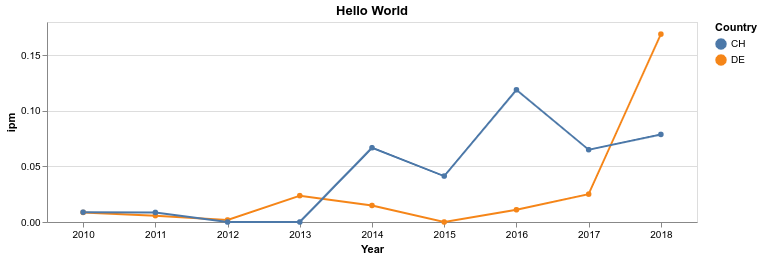
Frequencies of "Hello World" over years and countries
from KorAPClient import KorAPClient, KorAPConnection
import altair as alt
import pandas as pd

QUERY = "Hello World"
df = pd.DataFrame(range(2010, 2019), columns=["Year"], dtype=str) \
    .merge(pd.DataFrame(["DE", "CH"], columns=["Country"]), how="cross")
df["vc"] = "textType=/Zeit.*/ & pubPlaceKey = " + df.Country + " & pubDate in " + df.Year
df = KorAPClient.ipm(KorAPConnection().frequencyQuery(QUERY, df.vc)).merge(df)

alt.Chart(df).mark_line(point=True).encode(y="ipm", x="Year:T", color="Country", href="webUIRequestUrl") \
    .properties(title=QUERY).show()
Identify in … setzen light verb constructions by the collocationAnalysis method

from KorAPClient import KorAPConnection

kcon = KorAPConnection(verbose=True).auth()
results = kcon.collocationAnalysis("focus(in [tt/p=NN] {[tt/l=setzen]})",
                                   leftContextSize=1,
                                   rightContextSize=0,
                                   exactFrequencies=False,
                                   searchHitsSampleLimit=1000,
                                   topCollocatesLimit=20)
results['collocate'] = "[" + results['collocate'] +"](" + results['webUIRequestUrl'] +")"
print(results[['collocate', 'logDice', 'pmi', 'll']].head(10).round(2).to_markdown(floatfmt=".2f"))
| collocate | logDice | pmi | ll | |
|---|---|---|---|---|
| 1 | Szene | 10.37 | 11.54 | 824928.58 |
| 2 | Gang | 9.65 | 10.99 | 366993.93 |
| 3 | Verbindung | 9.20 | 10.34 | 347644.75 |
| 4 | Kenntnis | 9.15 | 10.67 | 206902.89 |
| 5 | Bewegung | 8.80 | 9.91 | 264577.07 |
| 6 | Brand | 8.76 | 9.97 | 210654.43 |
| 7 | Anführungszeichen | 8.06 | 12.52 | 54148.31 |
| 8 | Kraft | 7.94 | 8.91 | 189399.70 |
| 9 | Beziehung | 6.92 | 8.29 | 37723.54 |
| 10 | Relation | 6.64 | 10.24 | 17105.84 |
Querying and fetching annotations
To fetch the annotations for all matches in a KorAPQuery object, use the fetchAnnotations() method (defaults to "tt" (TreeTagger) as foundry):
from KorAPClient import KorAPConnection

# Authentication might be required for snippets and annotations
kcon = KorAPConnection(verbose=True).auth()

# Perform a query and fetch all matches
q = kcon.corpusQuery("Ameisenplage", metadataOnly=False).fetchAll()

# Fetch annotations for the matches
q = q.fetchAnnotations()

# Display the collected matches with new annotation columns
q.slots['collectedMatches'][['snippet', 'lemma.left', 'lemma.match', 'lemma.right']].head()
The annotations (here: lemmas) are stored in q.slots['collectedMatches'][['lemma.left', 'lemma.match', 'lemma.right']].
Command Line Invocation
The Python KorAP client can also be called from the command line and shell scripts:
$ korapclient -h
usage: python -m KorAPClient [-h] [-v] [-l QUERY_LANGUAGE] [-u API_URL] [-c VC [VC ...]] [-q QUERY [QUERY ...]]

Send a query to the KorAP API and print results as tsv.

optional arguments:
  -h, --help            show this help message and exit
  -v, --verbose
  -l QUERY_LANGUAGE, --query-language QUERY_LANGUAGE
  -u API_URL, --api-url API_URL
                        Specify this to access a corpus other that DeReKo.
  -c VC [VC ...], --vc VC [VC ...]
                        virtual corpus definition[s]
  -q QUERY [QUERY ...], --query QUERY [QUERY ...]
                        If not specified only the size of the virtual corpus will be queried.

example:
  python -m KorAPClient -v --query "Hello World" "Hallo Welt" --vc "pubDate in 2017" "pubDate in 2018" "pubDate in 2019"
Accessed API Services
By using the KorAPClient you agree to the respective terms of use of the accessed KorAP API services which will be printed upon opening a connection.
Development and License
Authors: Marc Kupietz, Tim Feldmüller
Copyright (c) 2026, Leibniz Institute for the German Language, Mannheim, Germany
This package is developed as part of the KorAP Corpus Analysis Platform at the Leibniz Institute for the German Language (IDS).
It is published under the BSD-2 License.
Contributors: Ines Pisetta, Nils Diewald
To cite this work, please refer to: Kupietz et al. (2020, 2022), below.
Contributions
Contributions are very welcome!
Your contributions should ideally be committed via our Gerrit server to facilitate reviewing (see Gerrit Code Review - A Quick Introduction if you are not familiar with Gerrit). However, we are also happy to accept comments and pull requests via GitHub.
Please note that unless you explicitly state otherwise any contribution intentionally submitted for inclusion into this software shall – as this software itself – be under the BSD-2 License.
References
-
Kupietz, Marc / Diewald, Nils / Margaretha, Eliza (2020): RKorAPClient: An R package for accessing the German Reference Corpus DeReKo via KorAP. In: Calzolari, Nicoletta, Frédéric Béchet, Philippe Blache, Khalid Choukri, Christopher Cieri, Thierry Declerck, Sara Goggi, Hitoshi Isahara, Bente Maegaard, Joseph Mariani, Hélène Mazo, Asuncion Moreno, Jan Odijk, Stelios Piperidis (eds.): Proceedings of The 12th Language Resources and Evaluation Conference (LREC 2020). Marseille: European Language Resources Association (ELRA), 7017-7023.
-
Kupietz, Marc / Diewald, Nils / Margaretha, Eliza (2022): Building paths to corpus data: A multi-level least effort and maximum return approach. In Fišer, Darja / Witt, Andreas (eds.): CLARIN. The infrastructure for language resources. Berlin: deGruyter.
2 maintainers


Metadata
2 maintainers
Release files for KorAPClient 1.4.1
For a detailed explanation of source distributions (sdists) and built distributions (wheels), please see the package formats documentation.
Source distribution (sdist)
| File | Size | Uploaded | Provenance | |
|---|---|---|---|---|
| korapclient-1.4.1.tar.gz | 22.0 kB | Without provenance | Details |
Built distribution (wheel)
| File | Interpreter | ABI | Platform | Reset |
|---|---|---|---|---|
| korapclient-1.4.1-py3-none-any.whl | Python 3 | none | any | Details |
Total release size: 47.4 kB
Release files / korapclient-1.4.1.tar.gz
| Download URL | korapclient-1.4.1.tar.gz |
|---|---|
| Size | 22.0 kB |
| Tags | Source |
|
SHA-256 checksum How to use checksums |
b8d80cb40faef777eb9458fe23d8b8b6e786dfb78d6a12094a87f6bd4b93b02b
|
|
BLAKE2b-256 checksum How to use checksums |
307eef093ee22e8cb91d8e7f68fd7e790f1d026e82d2515db5ff1994d7a9f977
|
| Upload date | |
|
Uploaded using Trusted Publishing? What is trusted publishing? |
No |
| Uploaded via |
twine/7.0.0 CPython/3.14.7
|
Release files / korapclient-1.4.1-py3-none-any.whl
| Download URL | korapclient-1.4.1-py3-none-any.whl |
|---|---|
| Size | 25.4 kB |
| Tags | Python 3 |
|
SHA-256 checksum How to use checksums |
4936b715f6b1b90cc68bce2c63ffe1de472f3317fc74340f89843061d3c95cc4
|
|
BLAKE2b-256 checksum How to use checksums |
dcb3a4c505eabff71ed5386b630881d63f18c05800487ea637b16961a66b7559
|
| Upload date | |
|
Uploaded using Trusted Publishing? What is trusted publishing? |
No |
| Uploaded via |
twine/7.0.0 CPython/3.14.7
|
Security for KorAPClient 1.4.1
Provenance
Provenance describes where a file came from. On PyPI, provenance is shared via attestations, which provide a verifiable record of the build or publishing details. View details, limitations and caveats.
No provenance found
None of the files in this release were uploaded with provenance metadata.
A note on package security
PyPI is a repository for distributing packages, not a service for auditing them. While third-party security researchers and our staff do their best to detect and remove malicious packages, PyPI cannot guarantee the quality, security or suitability of any given package.
To learn more about protecting yourself from malicious actors, visit our package security documentation.














