
LDAP Watchdog
Overview
LDAP Watchdog is a tool designed to monitor record changes in an LDAP directory in real-time. It provides a mechanism to track and visualize modifications, additions, and removals to user and group entries, allowing users to correlate expected changes with actual changes and identify potential security incidents. It was created with OpenLDAP and Linux in mind, however it may work in other implementations of LDAP. It is written in Python and only requires the ldap3 library.
This software was written by Joshua Rogers.
If you're interesting in any of the following, then LDAP Watchdog is for you:
- Know what's going on in your LDAP directory on-demand with Slack webhook integration.
- See new hires, leavers, and promotions as they appear in LDAP.
- Monitor when and what HR is doing.
- Detect unauthorized changes in LDAP.
- Monitor for accidentally leaked data.
- Detect when users are logging in and out of LDAP.
In addition to monitoring for modifications, additions, and removals in an LDAP directory, it can be configured to ignore specific attributes, or even fine-tuned to ignore fine-grained attributes depending on their old/new values.
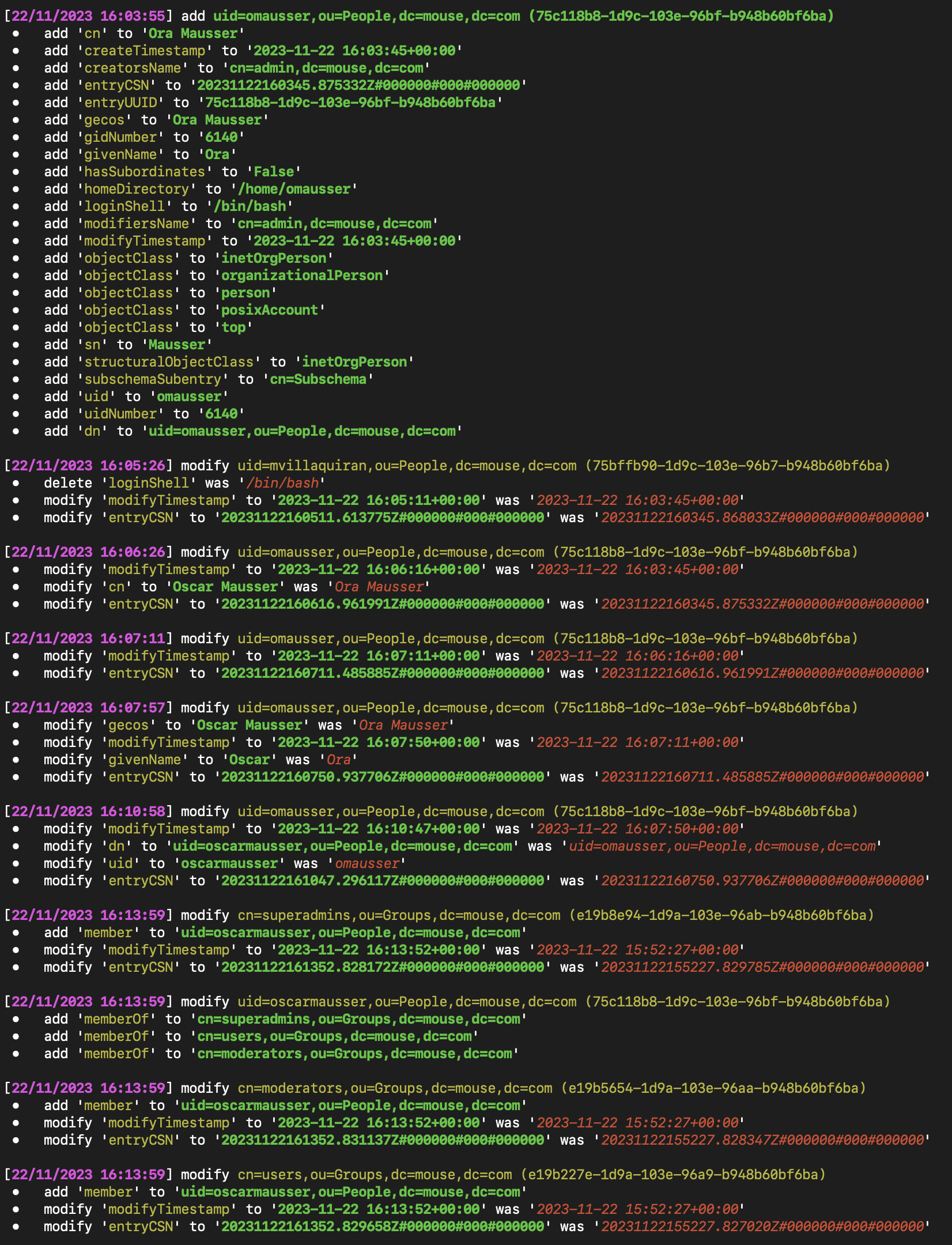
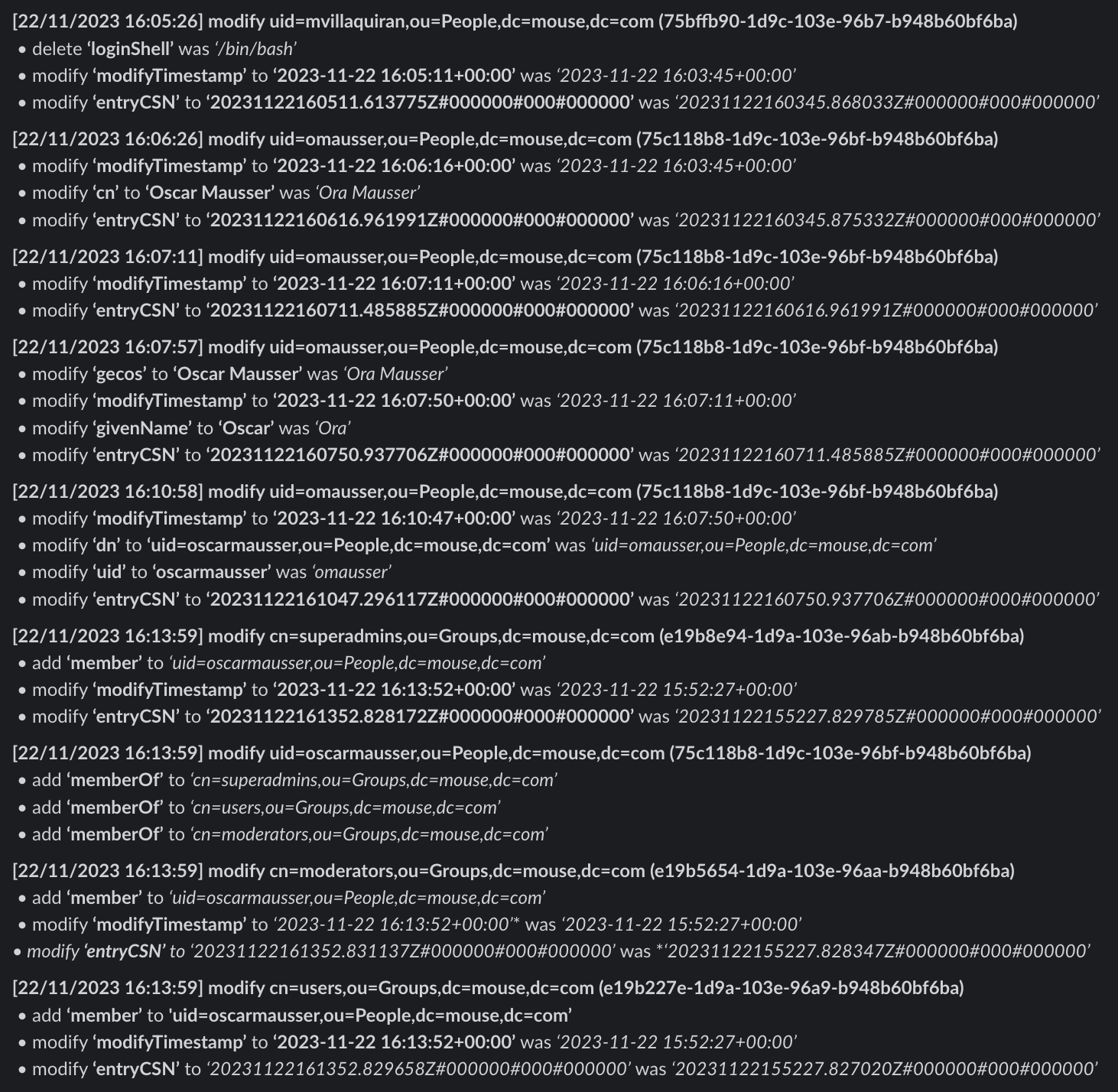
The changes that are monitored can either be forwarded to a slack webhook or output to the terminal (or both). Optional colored output is also supported.
Previously named LDAP-Stalker (because monitoring changes of an LDAP directory is an excellent way to stalk changes in a company: learn about promotions before they're announced, new hires, leavers, etc.), a blog post about the details and history of this project can be found here.
Examples (No Filtering)
Note: in the below examples, changes to entryCSN and modifyTimestamp on existing entries can be ignored by setting LDAP_WATCHDOG_IGNORED_ATTRIBUTES=entryCSN,modifyTimestamp.
Terminal (with color) output:
Slack output:
Features
-
Real-time Monitoring: LDAP Watchdog continuously monitors an LDAP directory for changes in user and group entries.
-
Change Comparison: The tool compares changes between consecutive LDAP searches, highlighting additions, modifications, and deletions.
-
Control User Verification: LDAP Watchdog supports a control user mechanism, triggering an error if the control user's changes are not found.
-
Flexible LDAP Filtering: Users can customize LDAP filtering using the
LDAP_WATCHDOG_SEARCH_FILTERenvironment variable to focus on specific object classes or attributes. -
Slack Integration: Receive real-time notifications on Slack for added, modified, or deleted LDAP entries.
-
Customizable Output: Console output provides clear and colored indications of additions, modifications, and deletions for easy visibility.
-
Ignored Entries and Attributes: Users can specify UUIDs and attributes to ignore when comparing changes to existing entries.
-
Conditional Ignored Attributes: Conditional filtering allows users to ignore specific attributes based on change type (additions, modifications, deletions).
Requirements
- Python 3.10+.
- The
ldap3package. If using a Slack webhook, therequestspackage is also required.
Installation
PyPI
pip install LDAP-Monitor
To include Slack webhook support:
pip install LDAP-Monitor[slack]
Docker
docker pull megamansec/ldap-monitor
Or from GitHub Container Registry:
docker pull ghcr.io/megamansec/ldap-monitoring-watchdog
From Source
git clone https://github.com/MegaManSec/LDAP-Monitoring-Watchdog.git
cd LDAP-Monitoring-Watchdog
pip install ".[slack]"
Usage
Running with pip install
export LDAP_WATCHDOG_SERVER='ldaps://ldaps.intra.lan'
export LDAP_WATCHDOG_BASE_DN='dc=mouse,dc=com'
export LDAP_WATCHDOG_USERNAME='Emily'
export LDAP_WATCHDOG_PASSWORD='qwerty123'
ldap-watchdog
Or using python -m:
python -m ldap_watchdog
Running with Docker
docker run -d \
  -e LDAP_WATCHDOG_SERVER='ldaps://ldaps.intra.lan' \
  -e LDAP_WATCHDOG_BASE_DN='dc=mouse,dc=com' \
  -e LDAP_WATCHDOG_USERNAME='Emily' \
  -e LDAP_WATCHDOG_PASSWORD='qwerty123' \
  -e SLACK_WEBHOOK_URL='https://hooks.slack.com/services/[...]' \
  -e LDAP_WATCHDOG_IGNORED_ATTRIBUTES='modifyTimestamp,phoneNumber,officeLocation,gecos' \
  megamansec/ldap-monitor
Systemd Installation (Debian-based)
A Debian-based installation script, install.sh, is provided. When run as root from a clone of this repository, this script:
- Creates (if necessary) a Python virtual environment in
/opt/ldap-watchdog. - Installs LDAP Watchdog from the clone into that virtual environment, with the dependency versions pinned in
requirements.txt. - Creates an environment file at
/etc/ldap-watchdog.envfor configuration. - Installs and enables a systemd service (
/etc/systemd/system/ldap-watchdog.service) that runs ldap-watchdog in the background. - Configures logging to
/var/log/ldap-watchdog.logand/var/log/ldap-watchdog-error.log. - Sets up log rotation in
/etc/logrotate.d/ldap-watchdog.
You may optionally pass a single argument to install.sh to set the SLACK_WEBHOOK_URL:
sudo ./install.sh "https://hooks.slack.com/services/[...]"
After installation, edit /etc/ldap-watchdog.env to configure the LDAP connection settings, then restart the service:
sudo systemctl restart ldap-watchdog
Configuration
All configuration is done via environment variables. The following variables are supported:
General Settings
| Environment Variable | Description | Default |
|---|---|---|
LDAP_WATCHDOG_SERVER |
LDAP server URL (e.g. ldaps://ldaps.intra.lan) |
"" |
LDAP_WATCHDOG_BASE_DN |
Base Distinguished Name for LDAP searches | "" |
LDAP_WATCHDOG_USERNAME |
LDAP username for authentication. Leave empty for anonymous bind. | "" |
LDAP_WATCHDOG_PASSWORD |
LDAP password for authentication. Leave empty for anonymous bind. | "" |
LDAP_WATCHDOG_USE_SSL |
Set to true to use SSL, false otherwise |
true |
LDAP_WATCHDOG_CA_CERTS_FILE |
Optional PEM CA bundle for verifying the LDAP server certificate. If unset, system trust roots are used. | Unset |
LDAP_WATCHDOG_TLS_VERIFY |
Set to false to skip verifying the LDAP server certificate and host name. The connection is still encrypted but not authenticated. |
true |
LDAP_WATCHDOG_SEARCH_FILTER |
LDAP filter for user and group entries | (&(|(objectClass=inetOrgPerson)(objectClass=groupOfNames))) |
LDAP_WATCHDOG_SEARCH_ATTRIBUTE |
Comma-separated list of attributes to retrieve. *,+ is used by default to include operational attributes. entryUUID is always requested and must be readable for every entry. |
*,+ |
LDAP_WATCHDOG_REFRESH_RATE |
Time interval in seconds between consecutive LDAP searches | 60 |
LDAP_WATCHDOG_NETWORK_TIMEOUT |
Positive integer timeout in seconds for LDAP and Slack connection/read operations. This limits individual waits, not the total duration of a poll. | 30 |
LDAP_WATCHDOG_DISABLE_COLOR_OUTPUT |
Set to true to disable colored terminal output |
false |
LDAPS connections verify the server certificate and check that it is valid for the host name or IP address in LDAP_WATCHDOG_SERVER. For a private CA, set LDAP_WATCHDOG_CA_CERTS_FILE to a readable PEM CA bundle; in Docker, mount the bundle into the container and use its container path. A self-signed server certificate can be used as the bundle itself. If the certificate can't be provided or doesn't match the server's name, LDAP_WATCHDOG_TLS_VERIFY=false turns verification off; anyone on the network path can then impersonate the server and capture the bind password. For a server without TLS, use an ldap:// URL or set LDAP_WATCHDOG_USE_SSL=false.
Control User
| Environment Variable | Description | Default |
|---|---|---|
LDAP_WATCHDOG_CONTROL_UUID |
UUID of a control user whose changes trigger an error if not found. If set, this user should always have some type of change when the LDAP directory is retrieved. | "" |
LDAP_WATCHDOG_CONTROL_USER_ATTRIBUTE |
Specific attribute to check in the control user. If set, it must exist in both snapshots and its value must differ. | "" |
A failed control check logs an error and skips that comparison. The next poll compares against the most recent successfully retrieved snapshot; changes from a rejected comparison are not replayed. A failed LDAP retrieval instead preserves the previous snapshot and is retried on the next poll. Failure to retrieve the initial snapshot stops the process.
Slack Integration
| Environment Variable | Description | Default |
|---|---|---|
SLACK_WEBHOOK_URL |
Slack Webhook URL for notifications. Requires the slack extra (pip install LDAP-Monitor[slack]). |
None |
LDAP_WATCHDOG_SLACK_BULLETPOINT |
Bullet point character used in Slack and console output | \u2022 |
Slack delivery is best effort: HTTP and network failures are logged to stderr, and monitoring and console output continue. Failed notifications are not queued or retried.
Ignored Entries and Attributes
These filters apply to attribute changes on entries present in both snapshots. Entry additions and deletions are always announced with all retrieved attributes, including for ignored UUIDs.
| Environment Variable | Description | Default |
|---|---|---|
LDAP_WATCHDOG_IGNORED_UUIDS |
Comma-separated list of UUIDs whose attribute changes are ignored | "" |
LDAP_WATCHDOG_IGNORED_ATTRIBUTES |
Comma-separated list of attributes whose changes are ignored on existing entries | "" |
LDAP_WATCHDOG_CONDITIONAL_IGNORED_ATTRIBUTES |
JSON string of attributes to conditionally ignore (see below) | {} |
Conditional Ignored Attributes
The LDAP_WATCHDOG_CONDITIONAL_IGNORED_ATTRIBUTES variable accepts a JSON string where keys are attribute names and values are lists of values to ignore:
export LDAP_WATCHDOG_CONDITIONAL_IGNORED_ATTRIBUTES='{
  "objectClass": ["posixAccount"],
  "memberOf": ["cn=mailing-list-user,ou=Accessgroups,dc=mouse,dc=com", "cn=interns,ou=Accessgroups,dc=mouse,dc=com"],
  "organizationalStatus": ["researcher"]
}'
Example Configuration
export LDAP_WATCHDOG_CONTROL_UUID='a71c6e4c-8881-4a03-95bf-4fc25d5e6359'
export LDAP_WATCHDOG_SERVER='ldaps://ldaps.intra.lan'
export LDAP_WATCHDOG_BASE_DN='dc=mouse,dc=com'
export LDAP_WATCHDOG_USERNAME='Emily'
export LDAP_WATCHDOG_PASSWORD='qwerty123'
export LDAP_WATCHDOG_USE_SSL='true'
export LDAP_WATCHDOG_TLS_VERIFY='true'
export LDAP_WATCHDOG_REFRESH_RATE='60'
export LDAP_WATCHDOG_NETWORK_TIMEOUT='30'
export LDAP_WATCHDOG_DISABLE_COLOR_OUTPUT='false'
export LDAP_WATCHDOG_IGNORED_UUIDS='e191c564-6e6d-42c1-ae51-bda0509fe846,8655e0d9-ecdc-46ce-ba42-1fa3dfbf5faa'
export LDAP_WATCHDOG_IGNORED_ATTRIBUTES='modifyTimestamp,phoneNumber,officeLocation,gecos'
export LDAP_WATCHDOG_CONDITIONAL_IGNORED_ATTRIBUTES='{"objectClass":["posixAccount"],"memberOf":["cn=mailing-list-user,ou=Accessgroups,dc=mouse,dc=com","cn=interns,ou=Accessgroups,dc=mouse,dc=com"],"organizationalStatus":["researcher"]}'
export SLACK_WEBHOOK_URL='https://hooks.slack.com/services/[...]'

ldap-watchdog
Limitations
- The LDAP_WATCHDOG_CONDITIONAL_IGNORED_ATTRIBUTES configuration may unfortunately hide important changes that are not intended to be hidden. This may happen if an attribute has a single value which is changed. This is because conditional ignored attributes will hide changes to the attribute both when the value is changed to as well as from the ignored value; for example, if a user is a memberOf cn=mailing-list-user,ou=Accessgroups,dc=mouse,dc=com which gets changed to cn=super-administrator,ou=Accessgroups,dc=mouse,dc=com, it will be missed.
- Similar to #1, there is no real way to determine whether a change is really a change in some cases, or a removal and then addition in the same time. In theory, it doesn't really matter, however it's important to note.
Development
Install the package with Slack support and run the regression tests:
pip install ".[slack]"
python -m unittest discover -s tests
requirements.txt pins every dependency for the Docker image and install.sh. After changing the dependencies in setup.py, regenerate it with pip-compile --extra=slack --output-file=requirements.txt setup.py.
License
This project is licensed under GPL3.0.
1 maintainer

Metadata
1 maintainer
Release files for LDAP-Monitor 2.0.0
For a detailed explanation of source distributions (sdists) and built distributions (wheels), please see the package formats documentation.
Source distribution (sdist)
| File | Size | Uploaded | Provenance | Actions |
|---|---|---|---|---|
| ldap_monitor-2.0.0.tar.gz | 32.9 kB | With provenance | Details for ldap_monitor-2.0.0.tar.gz |
Built distribution (wheel)
| File | Interpreter | ABI | Platform | Actions Reset |
|---|---|---|---|---|
| ldap_monitor-2.0.0-py3-none-any.whl | Python 3 | none | any | Details for ldap_monitor-2.0.0-py3-none-any.whl |
Total release size: 57.9 kB
Release files / ldap_monitor-2.0.0.tar.gz
| Download URL | ldap_monitor-2.0.0.tar.gz |
|---|---|
| Size | 32.9 kB |
| Tags | Source |
|
SHA-256 checksum How to use checksums |
dc5e9f1179a86e8b3eb04acfb8b2df990b94220ac20b2b18a8967d633bb92be7
|
|
BLAKE2b-256 checksum How to use checksums |
be92057294cb2cf8d2d5c77244a56339ea42373ff7124615ce3eb9a5f50ffc38
|
| Upload date | |
|
Uploaded using Trusted Publishing? What is trusted publishing? |
Yes |
| Uploaded via |
twine/7.0.0 CPython/3.13.16
|
Provenance
Provenance describes where a file came from. On PyPI, provenance is shared via attestations, which provide a verifiable record of the build or publishing details. View details, limitations and caveats.


PyPI Publish Attestation
PyPI verified that this artifact, at this checksum, originated from the publisher listed below.
Signed by GitHub Actions, verified by PyPI on Oct 30, 2026.
Transparency logRelease files / ldap_monitor-2.0.0-py3-none-any.whl
| Download URL | ldap_monitor-2.0.0-py3-none-any.whl |
|---|---|
| Size | 25.0 kB |
| Tags | Python 3 |
|
SHA-256 checksum How to use checksums |
df434549ac92a150bae52032266a5448a208e61ac56203297f2549a0fc35877f
|
|
BLAKE2b-256 checksum How to use checksums |
63c1d8a21725ebb12296b0f9d1d83538d765d6ec2484afe0189acb8efed7dd9b
|
| Upload date | |
|
Uploaded using Trusted Publishing? What is trusted publishing? |
Yes |
| Uploaded via |
twine/7.0.0 CPython/3.13.16
|
Provenance
Provenance describes where a file came from. On PyPI, provenance is shared via attestations, which provide a verifiable record of the build or publishing details. View details, limitations and caveats.
PyPI Publish Attestation
PyPI verified that this artifact, at this checksum, originated from the publisher listed below.
Signed by GitHub Actions, verified by PyPI on Oct 30, 2026.
Transparency logSecurity for LDAP-Monitor 2.0.0
Provenance
Provenance describes where a file came from. On PyPI, provenance is shared via attestations, which provide a verifiable record of the build or publishing details. View details, limitations and caveats.
Full provenance
Both files in this release have been uploaded with provenance metadata.
Attestation for ldap_monitor-2.0.0.tar.gz
PyPI Publish Attestation
PyPI verified that this artifact, at this checksum, originated from the publisher listed below.
Signed by GitHub Actions, verified by PyPI on Oct 30, 2026.
Transparency logA note on package security
PyPI is a repository for distributing packages, not a service for auditing them. While third-party security researchers and our staff do their best to detect and remove malicious packages, PyPI cannot guarantee the quality, security or suitability of any given package.
To learn more about protecting yourself from malicious actors, visit our package security documentation.














