





Sponsor:

LabQuiz is a Python package that allows to seamlessly integrate interactive quizzes directly into Jupyter notebooks — useful for labs, tutorials, practical assignments, continuous assessment, and controlled exams.
- 👉🏼
Live versionTry it in binder !
It combines:
- ✅ Multiple-choice and numerical questions
- 🧩 Template-based parameterized questions
- 🔁 Configurable number of attempts
- 💡 Hints and detailed feedback
- 📊 Automatic scoring
- 🌐 Optional remote logging (Google Sheets)
- 📈 Real-time monitoring dashboard (if logging)
- 🔐 Integrity checks and anti-tampering mechanisms
And it comes with two optional companion tools:
- ✏️
quiz_editor— Create, edit, encrypt, and export question banks streamlit app | src code - 📊
quiz_dash— Monitor, correct, and analyze results in real time streamlit app | src code
flowchart LR
    %% Nodes
    A["YAML Quiz<br/>(Quiz-as-Code)"]
    B["quiz_editor<br/>Authoring Interface<br/>(optional)"]
    C["Jupyter Notebook<br/>+ Interactive Quizzes"]
    D["Remote Backend<br/>(e.g., Google Sheets)"]
    E["quiz_dash<br/>Monitoring Dashboard"]
    F[Analytics]
    G[Marks Table]
    H[Student Reports]
    I[Exports: <br/>Web-based Training Quizzes <br/>AMC / LaTeX Paper Quizzes]

    %% Flows
    B -.-> A
    A ---> C
    C -.-> D
    D --> E
    E --> F
    E --> G
    E --> H
    A -.-> I


    %% Styles
    classDef authoring fill:#e3f2fd,stroke:#1e88e5,stroke-width:1px;
    classDef runtime fill:#e8f5e9,stroke:#43a047,stroke-width:1px;
    classDef backend fill:#fff3e0,stroke:#fb8c00,stroke-width:1px;
    classDef dashboard fill:#f3e5f5,stroke:#8e24aa,stroke-width:1px;
    classDef outputs fill:#fce4ec,stroke:#d81b60,stroke-width:1px;
    classDef export fill:#e0f7fa,stroke:#00838f,stroke-width:1px;

    %% Assign classes
    class A,B authoring;
    class C runtime;
    class D backend;
    class E dashboard;
    class F,G,H outputs;
    class I,J export;
Figure: Overview of the LabQuiz ecosystem. Dashed arrows indicate optional components. YAML quizzes drive both interactive notebooks and exports, monitored via a dashboard producing analytics, marks tables, and student reports.
Installation:
# From source
   pip install git+https://github.com/jfbercher/labquiz.git
# or from PyPI
   pip install labquizbundle
🚀 Why LabQuiz?
LabQuiz is designed for active learning and controlled assessment in computational notebooks.
It helps instructors:
- Increase student engagement with embedded exercises
- Provide structured feedback during lab sessions
- Monitor progress in real time
- Run controlled tests and exams
- Detect configuration tampering or integrity violations
It helps students:
- Learn through interaction and immediate feedback
- Track their progress
- Work within structured assessment modes
🚠 What LabQuiz Does
Inside your notebook, you can:
- ✅ Add multiple-choice questions (
mcq) - 🔢 Add numerical questions with tolerance (
numeric) - 🧩 Create parameterized template questions
- 🔁 Limit attempts
- 💡 Provide hints and corrections
- 📊 Compute automatic scores
- 🌐 Log all activity to a Google Sheet backend (optional)
- 🔐 Enable exam mode with integrity checks
Example:
from labquiz import QuizLab

quiz = QuizLab(URL, "my_quiz.yml", retries=2, exam_mode=False)
quiz.show("quiz1")
📸 Examples
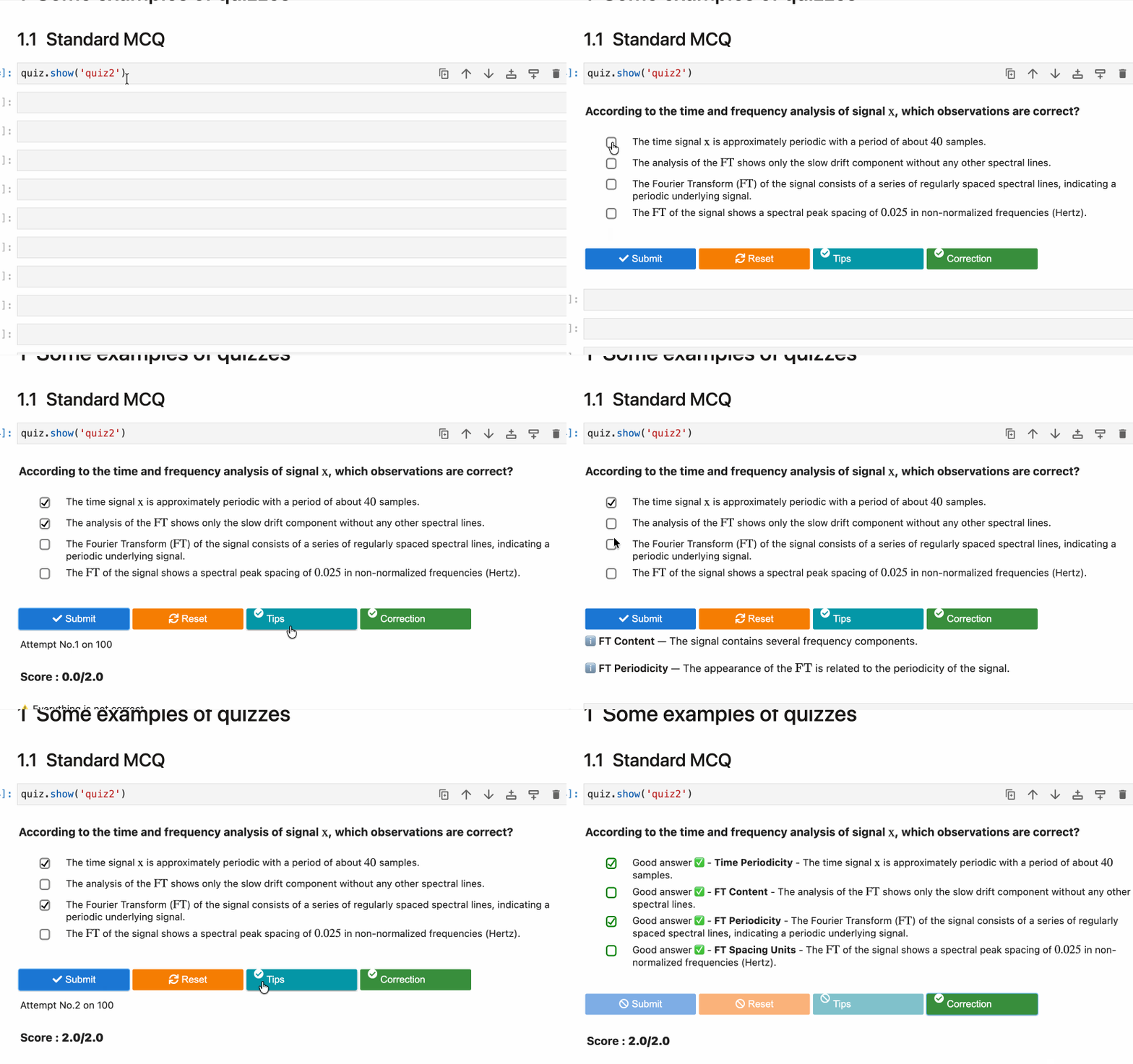
Multiple-choice question (with hints & correction)
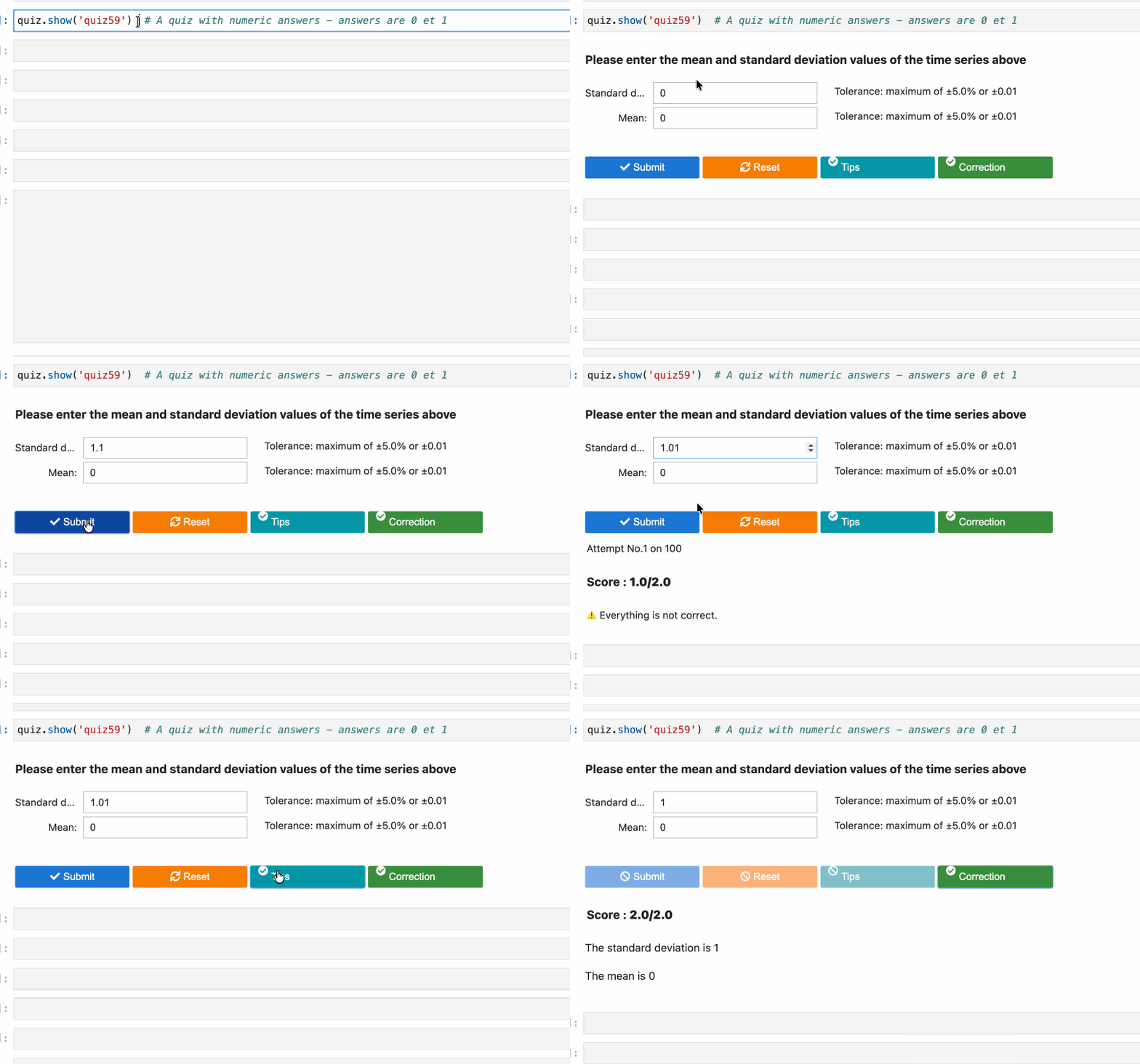
Numerical question
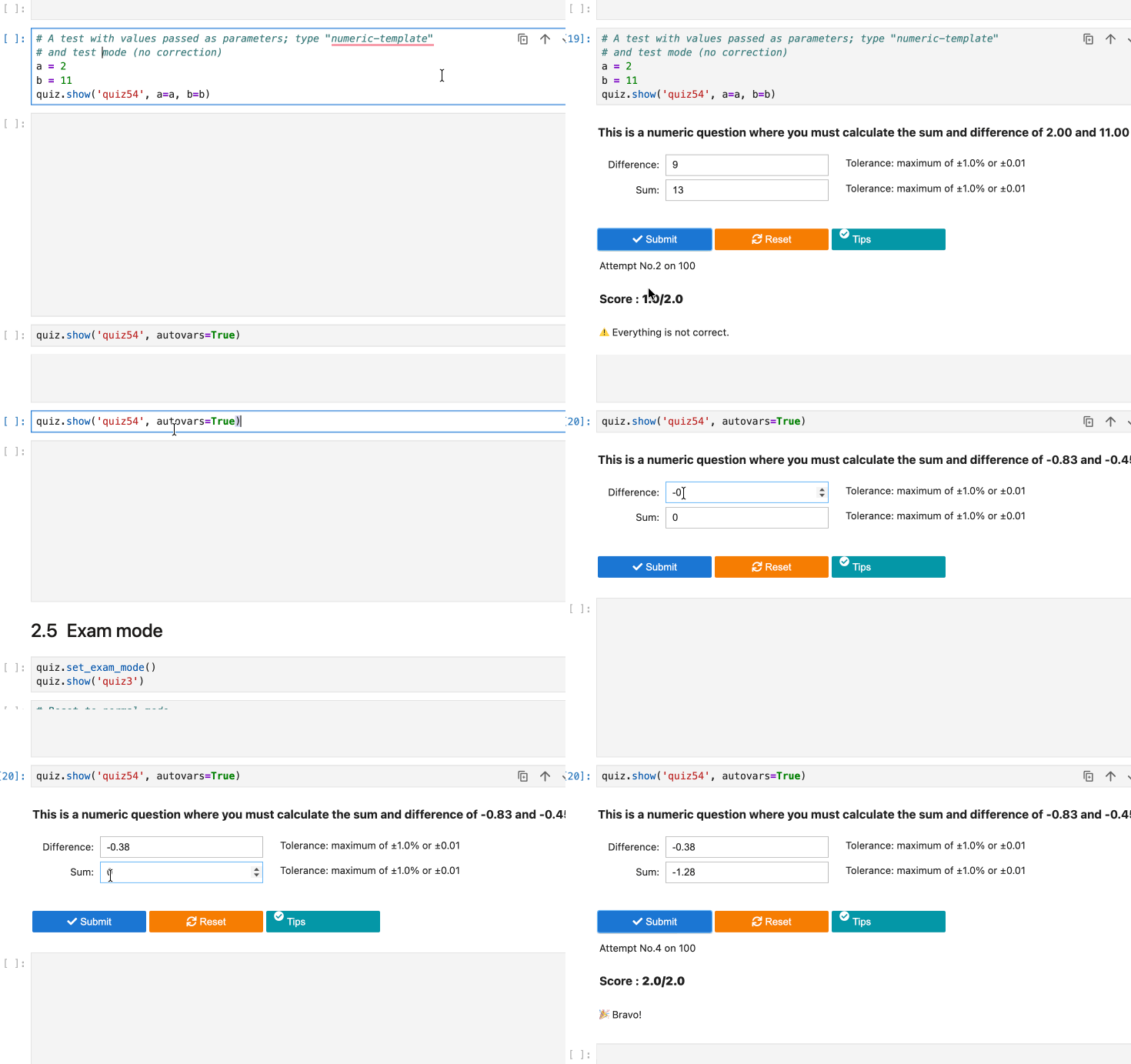
Template-based question (dynamic variables)
🧩 Question Types, Pedagogical modes, Logging
Question types
LabQuiz supports four types:
| Type | Description |
|---|---|
mcq |
Standard multiple-choice |
numeric |
Numerical answers with tolerance |
mcq-template |
Context-dependent MCQ |
numeric-template |
Context-dependent numerical questions |
Template questions allow dynamic evaluation based on runtime variables — ideal for practical lab computations.
Example:
quiz.show("quiz54", a=res1, b=res2)
Variables can also be generated dynamically
quiz.show("quiz54", autovars=True)
The expected solution is dynamically computed using Python expressions.
Pedagogical modes
LabQuiz supports three pedagogical modes:
- Learning mode (hints + correction available, score display)
- Test mode (limited attempts, score display but no correction)
- Exam mode (no feedback, secure logging)
Quizzes are defined in simple YAML format and support
- Logical constraints (XOR, IMPLY, SAME, IMPLYFALSE)
- Bonuses and penalties
- Relative and absolute tolerances
- Variable generation for templates
📊 Remote Logging & Dashboard
All data can be stored in a Google Sheet backend.
LabQuiz can log: Validation events, Parameters, User answers, Integrity hashes... LabQuiz also includes multiple anti-cheating mechanisms (Machine fingerprinting, Source hash verification, Detection of parameter tampering, Optional encrypted question files, Runtime integrity daemon...)
⚙️ Installation
From PyPI
pip install labquiz
From source:
pip install git+https://github.com/jfbercher/labquiz.git
Import:
import labquiz
from labquiz import QuizLab
Instantiate:
quiz = QuizLab(URL, QUIZFILE,
               retries=2,
               needAuthentication=True,
               mandatoryInternet=False)
🛠 Additional Tools
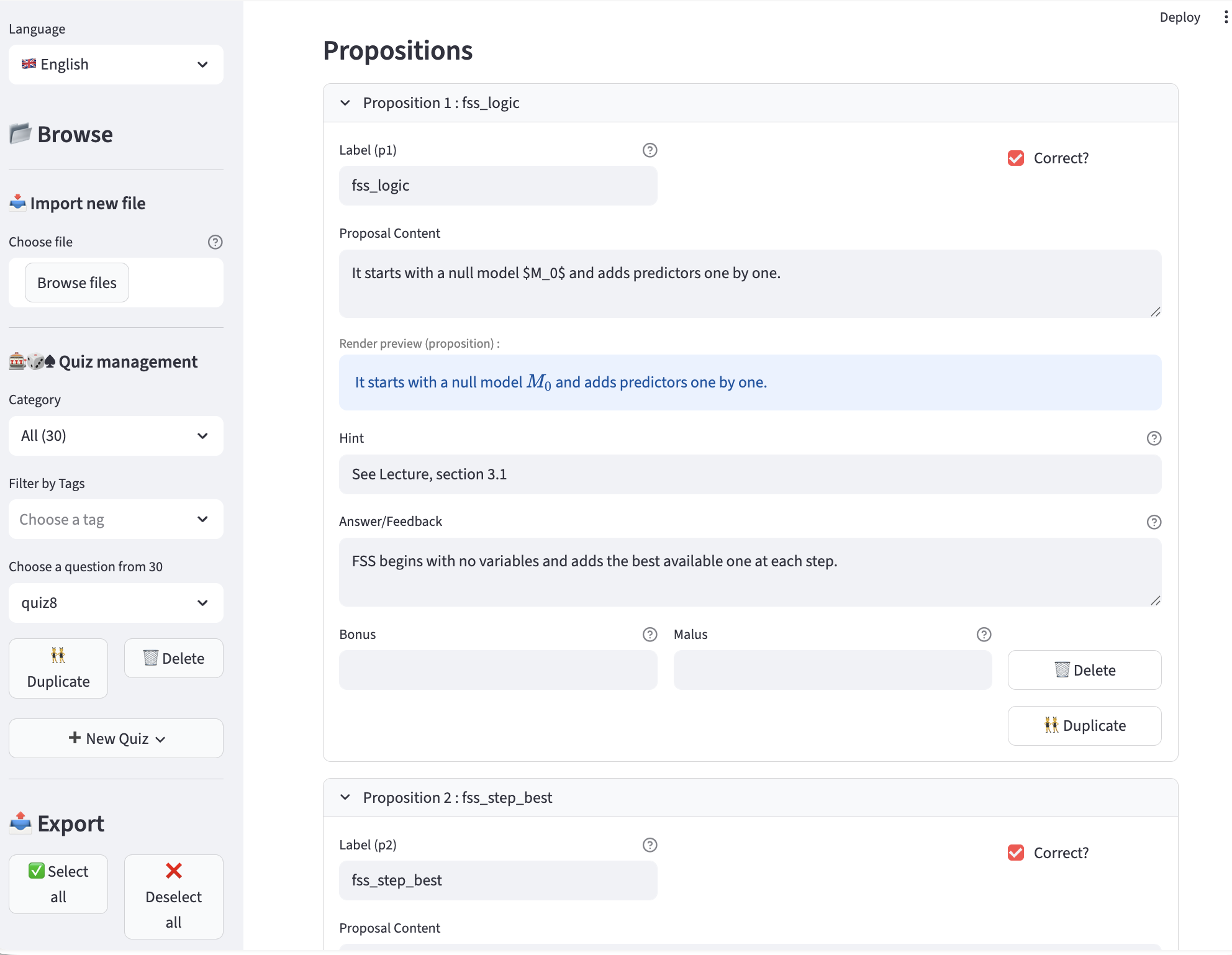
✏️ quiz_editor — Build & Export Question Banks
Creating YAML files manually works — but quiz_editor is intended to makes it easier. It can also be useful outside ob LabQuiz as a general quiz-editor with export capabilities.
Key features:
-
Visual question editing (MCQ, numeric, templates)
-
Categories & tags
-
Variable generation for templates
-
Bonus / malus configuration
-
Logical constraints (XOR, IMPLY, SAME, etc.)
-
One-click export to:
- ✅ YAML
- 🔐 Encrypted version
- 🌍 Interactive HTML (training mode)
- 📝 HTML exam version (Google Sheet connected)
- 📄 AMC–LaTeX format (paper exams)
Online version: 👉 https://jfb-quizeditor.streamlit.app/
Install locally:
pip install quiz-editor
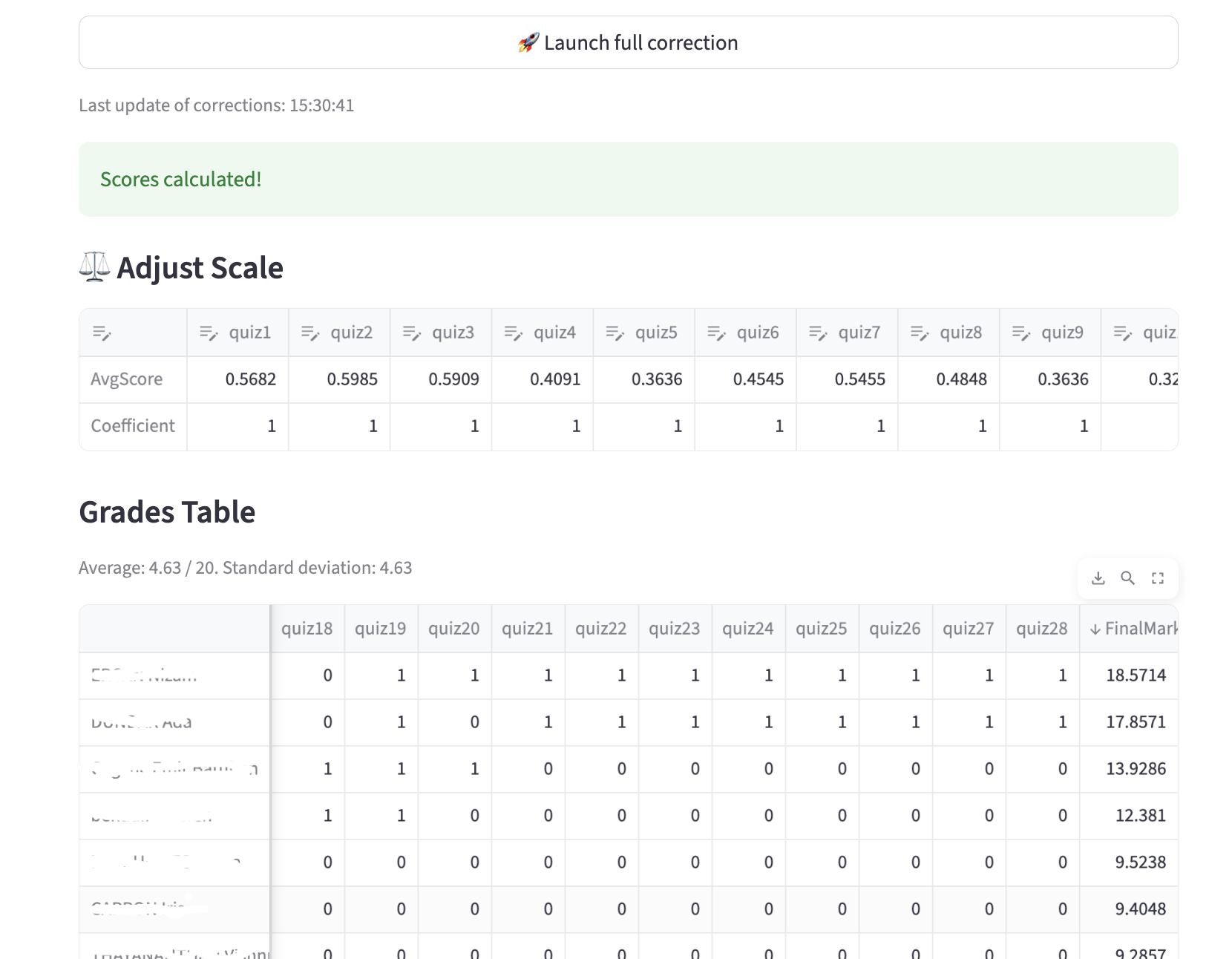
📊 quiz_dash — Real-Time Monitoring & Correction
quiz_dash is the companion dashboard for instructors.
It connects to your Google Sheet backend and provides:
- 📈 Live tracking of submissions
- Live class overview
- 👤 Student-by-student monitoring
- 🔍 Integrity checks (mode changes, retries tampering, hash verification)
- ⚖ Adjustable grading weights
- 🔄 Automatic recalculation
- 📥 CSV export of results
Online version: 👉 https://jfb-quizdash.streamlit.app/
Install locally:
pip install quiz-dash
🌍 Optional: Zero Installation with JupyterLite
LabQuiz can run entirely in the browser using JupyterLite (WASM). Perfect for fully web-based lab environments.
📦 Ecosystem
| Tool | Purpose |
|---|---|
| labquiz | Notebook quiz engine |
| quiz_editor | Question bank creation & export |
| quiz_dash | Monitoring & correction dashboard |
📦 Repositories:
Online tools:
🎯 Typical Workflow
- Prepare questions (YAML or
quiz_editor) - Optionally encrypt file
- Create Google Sheet backend
- Instantiate
QuizLabin notebook - Run lab / test / exam
- Monitor using a python console or with
quiz_dash - Post-correct with adjustable grading
🏁 Demonstration
See:
labQuizDemo.ipynbinextras/- 👉🏼
Live version👈 Try it in binder
📜 License
GPL-3.0 license
1 maintainer

Metadata
1 maintainer
Release files for LabQuizBundle 1.2.14
For a detailed explanation of source distributions (sdists) and built distributions (wheels), please see the package formats documentation.
Source distribution (sdist)
| File | Size | Uploaded | |
|---|---|---|---|
| labquizbundle-1.2.14.tar.gz | 5.6 kB | Details |
Built distribution (wheel)
| File | Interpreter | ABI | Platform | Reset |
|---|---|---|---|---|
| labquizbundle-1.2.14-py3-none-any.whl | Python 3 | none | any | Details |
Total release size: 10.7 kB
Release files / labquizbundle-1.2.14.tar.gz
| Download URL | labquizbundle-1.2.14.tar.gz |
|---|---|
| Size | 5.6 kB |
| Tags | Source |
|
SHA-256 checksum How to use checksums |
6e2e164508de0e3be7796a9fb6696ca909629908e0c401bb88825e6b38948605
|
|
BLAKE2b-256 checksum How to use checksums |
7e8acbe79d05ca76a1d85cd08e0d5a9a093cd8c36ede1deab048ad5e9e062c5c
|
| Upload date | |
|
Uploaded using Trusted Publishing? What is trusted publishing? |
No |
| Uploaded via |
twine/6.2.0 CPython/3.9.23
|
Release files / labquizbundle-1.2.14-py3-none-any.whl
| Download URL | labquizbundle-1.2.14-py3-none-any.whl |
|---|---|
| Size | 5.1 kB |
| Tags | Python 3 |
|
SHA-256 checksum How to use checksums |
153bbc18a6e2343265947e2a363b2d7d1eea379c13712754b33834ca95fd6b2b
|
|
BLAKE2b-256 checksum How to use checksums |
28f2c42c9a2ed8bf4e1b44538857f26c8ec6f434ea7715bbaa5e6d928d4c413d
|
| Upload date | |
|
Uploaded using Trusted Publishing? What is trusted publishing? |
No |
| Uploaded via |
twine/6.2.0 CPython/3.9.23
|














