
1 file was added to this release more than 14 days after its initial publication. Inspect the release files before installing.
LaptopControlPanel
The official LaptopControlPanel Home Page is located at http://fabricesalvaire.github.io/LaptopControlPanel
The latest documentation build from the git repository is available at readthedocs.org

Written by Fabrice Salvaire.

Introduction
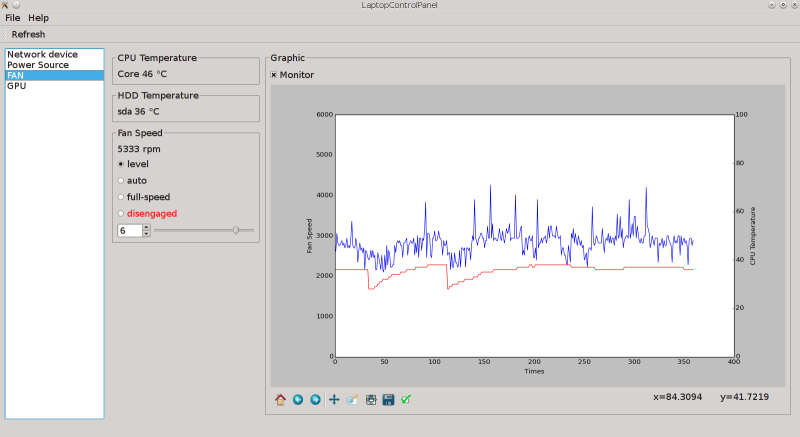
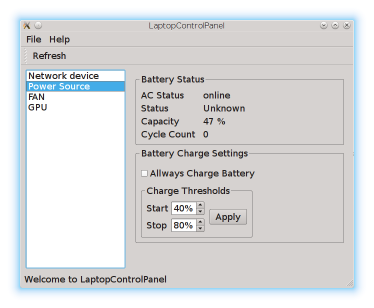
LaptopControlPanel is a Python module that provides a Graphical Control Panel for Lenovo Thinkpad Laptop and a console tool to monitor and manage the battery. Such functions are not provided by standard control panels like those of the KDE desktop.
The source code is licensed under GPL V3.
The control panel features:
switch on/off network interfaces (wifi and bluetooth)
switch on/off Nvidia GPU using /proc/acpi/bbswitch
fan control using thinkpad-acpi module and /proc/acpi/ibm/fan
battery control through ACPI calls
The battery management tool permits:
to set the start and stop capacity threshold to charge the battery,
to switch on battery when AC power is plugged,
to setup a “peak shift” procedure.
Some usages of these functions are:
to switch off the Nvidia GPU to save battery
to speed-up the fan to cool the hard drive located under the left hand
The source of the ACPI calls for the battery management is unknown and comes from the repository tpacpi-bat. For reference, this discussion Laptop shock detection and harddisk protection on LKML illustrates the legal concern for such information.
The battery is managed by ACPI calls through the Low Pin Count bus and the Embedded Controller (ASL base is \_SB.PCI0.LPC.EC.HKEY). ACPI is an abstraction layer to set and get registers on the computer busses. The (acpi_call) module, which is not included in the kernel, is required to perform these calls. This module must be used carefully.
Installation
Dependencies
LaptopControlPanel requires the following dependencies:
Python 2.7
PyQt 4.9
Installation from PyPi Repository
LaptopControlPanel is made available on the PyPI repository at https://pypi.python.org/pypi/LaptopControlPanel
Run this command to install the last release:
pip install LaptopControlPanelInstallation from Source
The LaptopControlPanel source code is hosted at https://github.com/FabriceSalvaire/LaptopControlPanel
To clone the Git repository, run this command in a terminal:
git clone git@github.com:FabriceSalvaire/LaptopControlPanel.gitThen to build and install LaptopControlPanel run these commands:
python setup.py build
python setup.py install1 maintainer

Metadata
1 maintainer
Release files for LaptopControlPanel 0.1.0
For a detailed explanation of source distributions (sdists) and built distributions (wheels), please see the package formats documentation.
File added late
1 file was uploaded more than 14 days after the first file in this release.
While project maintainers occasionally add legitimate files to an existing release, late additions can also indicate a security compromise.
We recommend inspecting the release files before installing.
Source distribution (sdist)
| File | Size | Uploaded | |
|---|---|---|---|
| LaptopControlPanel-0.1.0.tar.gz | 243.0 kB | Details |
Release files / LaptopControlPanel-0.1.0.tar.gz
File added late
This file was uploaded more than 14 days after the first file in this release.
While project maintainers occasionally add legitimate files to an existing release, late additions can also indicate a security compromise.
We recommend inspecting the release file before installing.
| Download URL | LaptopControlPanel-0.1.0.tar.gz |
|---|---|
| Size | 243.0 kB |
| Tags | Source |
|
SHA-256 checksum How to use checksums |
f822de9ecc9a5cd8d45408bbf3ec8350b808ec4e61dc099d7c1e5eaebb81a3ba
|
|
BLAKE2b-256 checksum How to use checksums |
78108af06f515a7ce6c6efae0ed576320b5bd88b02bf2c19f8c058c4a759d509
|
| Upload date | |
|
Uploaded using Trusted Publishing? What is trusted publishing? |
No |













