
A network based light effect controller

Project description






What is LedFx?
LedFx makes your LEDs dance to audio! What LedFx offers is the ability to take audio input, and instantaneously processes the audio into realtime light show to multiple LED strips/matrix. No need to spend hours on end to program one song to program your LEDs, as LedFx will do this all for you!
LedFx real-time LED strip music visualization effect controller using is a network based devices (ESP8266/ESP32/Raspberry Pi 4) with support for advanced real-time audio effects! LedFx can control multiple devices and works great with cheap ESP8266/ESP32 nodes allowing for cost effective synchronized effects across your entire house!
Ledfx comes with a browser based front end for configuration, control and live visualisation on port 8888 by default.
Demos
Visit and join our Discord where community members show off their projects. Check out the #projects or #show-and-tell channels.
📑 Quick start guide and documentation📖
Head over to releases to get the latest releases for Windows and Mac. For linux, use pip.
Bleeding edge (Experimental)
If you want the absolute bleeding edge and are not afraid of using the terminal, take a look at the detailed installation instructions here: Installation documentation.
Documentation
Documentation for the latest release can be found here: Stable documentation
Documentation built against this repository can be found here: Latest documentation
😍 Show me how to make one!
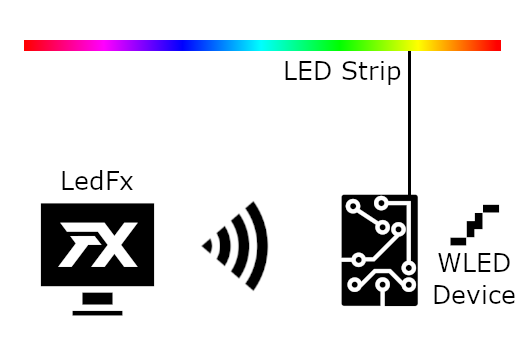
The below image describes a basic setup - LedFx running on PC, communicating with a WLED Device controlling an LED strip.
Component |
Example |
|---|---|
Computer running LedFx |
Windows 10, LedFx.exe |
Browser to access the LedFx web interface |
Chrome/Edge/Firefox/Safari |
Networked device controlling LED Strip |
ESP8266 NODEMCU v3 running WLED |
Addressable LED strip |
DC5V WS2812B 5 meters 60LED/m IP67 |
Power supply for LED Strip and ESP |
5V 10 amps LED Power Supply |
Something to connect the wires together! |
Soldering iron/solder |
- Build your networked LED Strip.
For most, this is the difficult step. Don’t worry! There’s guides here and online, and plenty of people able to help on WLED and LedFx Discord.
Follow the WLED guide to connect the LED strip and ESP together.
Ensure all WLED devices are powered on, and connected to your Wi-Fi.
Test you can access the WLED web interface from your PC. If so, then you’re good to go!
- Install LedFx.
For PC and Mac, see our releases, or see the installation documentation for more information.
For linux, you can use pip to install ledfx - however you may need to install some dependencies first. See the installation documentation for more information.
- Direct computer audio output to LedFx.
By default on Windows LedFx will attempt to listen to your system audio.
More information for Linux and macOS users here.
Play some music in the background.
- Start LedFx.
With any desired launch options. See Command Line Options.
Use –open-ui to open the web interface automatically in your default browser, or navigate to http://127.0.0.1:8888 directly.
Your WLED devices should appear in LedFx, automagically configured and ready to go! 🎆🔥
If not, on the bottom click Home, -> Scan for WLED devices button, or click on the big plus sign and Add Device to add them manually.
If they’re still not showing up, make sure they’re powered on and properly connected to your WiFi.
- Start using effects!
Click on the device, select an effect eg scroll under Classic
Your lights should now be reacting realtime to your music! Enjoy the show 🌈
🧑💻 Join the LedFx Community
Join the Discord server to discuss everything about LedFx!
To join, click on the Discord button below:

Contributing
Pull requests are welcome. Once tested, contact LedFx developer community on Discord to discuss the next step.
Please read our Contributing Guidelines for detailed information on contribution expectations, code quality requirements, and community standards.
We expect and require all contributors to read, understand and follow our Code of Conduct.
Credits: Contributors-&-About
License
Release history Release notifications | RSS feed


Download files
Download the file for your platform. If you're not sure which to choose, learn more about installing packages.
Source Distribution
Built Distribution
Filter files by name, interpreter, ABI, and platform.
If you're not sure about the file name format, learn more about wheel file names.
Copy a direct link to the current filters
File details
Details for the file ledfx-2.1.6.tar.gz.
File metadata
- Download URL: ledfx-2.1.6.tar.gz
- Upload date:
- Size: 27.2 MB
- Tags: Source
- Uploaded using Trusted Publishing? No
- Uploaded via: twine/6.1.0 CPython/3.13.7
File hashes
| Algorithm | Hash digest | |
|---|---|---|
| SHA256 |
0fd6caf293ef4230fade5e2f36b0c07df9f299db84d9be884312919171c0e9d2
|
|
| MD5 |
2256ac9b145ed0bfd8ddc2c082f83981
|
|
| BLAKE2b-256 |
ed6b05e8d59f5b07c7023347811b445275d5735e7235833979857c84c7d316cb
|
File details
Details for the file ledfx-2.1.6-py3-none-any.whl.
File metadata
- Download URL: ledfx-2.1.6-py3-none-any.whl
- Upload date:
- Size: 27.2 MB
- Tags: Python 3
- Uploaded using Trusted Publishing? No
- Uploaded via: twine/6.1.0 CPython/3.13.7
File hashes
| Algorithm | Hash digest | |
|---|---|---|
| SHA256 |
6604576420c31776118e9391ccfa0b9b7564039efb0cfc1cfd12230a78e15653
|
|
| MD5 |
82a658a97aa019332b5dd24e53b841a0
|
|
| BLAKE2b-256 |
600372ce42f28fe28ae13a80f974b33f7bd2d5d3428f1fc4ba839f2f63f835e5
|






