
A research-purposed, GUI-powered, Python-based framework that allows easy development of dynamic point-cloud (and accompanying image) data processing pipelines.

Project description

A Research-Purposed Framework for Processing LIDAR and Image Data
Installation | Usage | Documentation | Contributing | License



Introduction
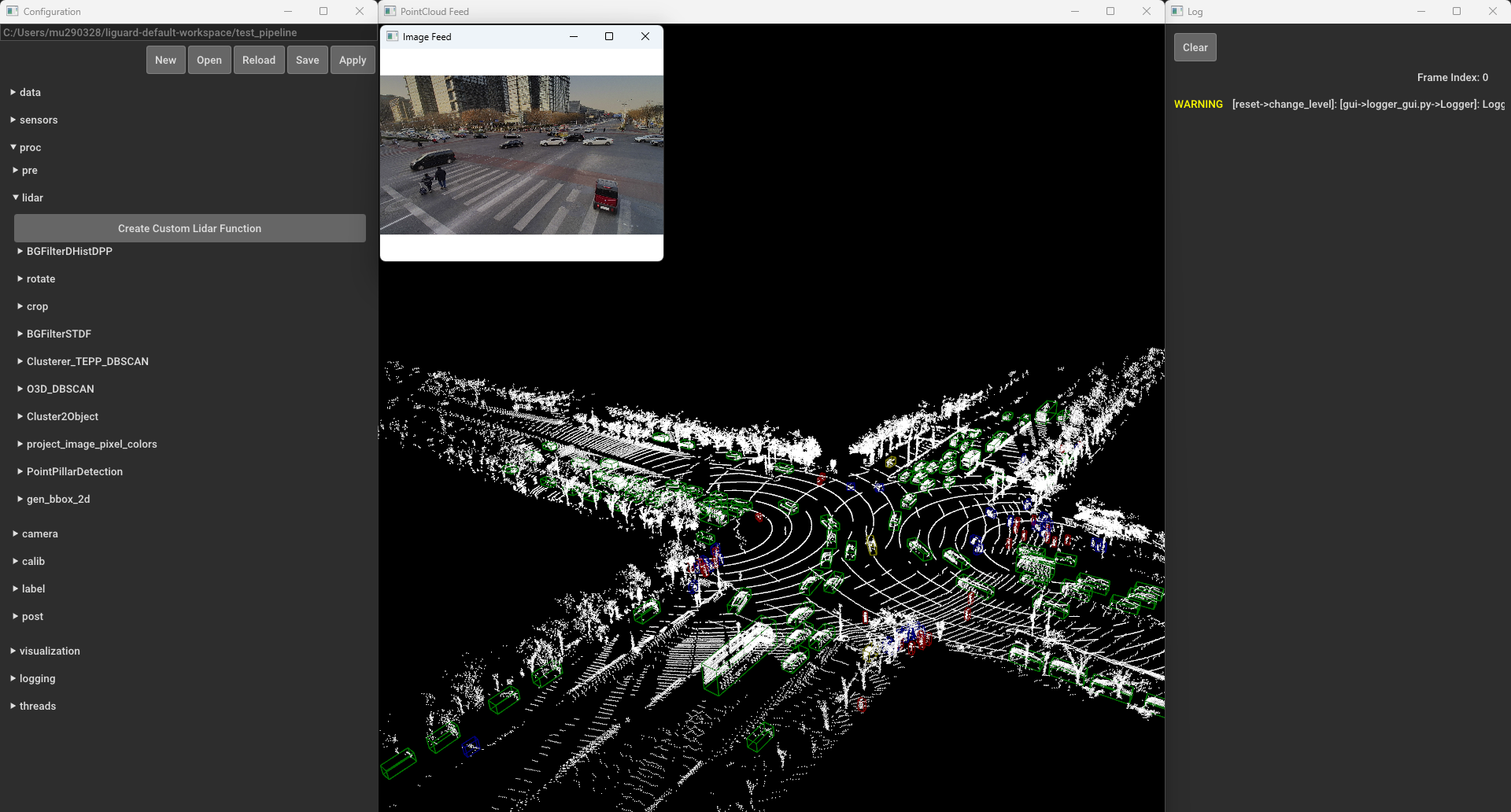
LiGuard is a research-purposed framework for LiDAR (and corresponding image) data. It provides an easy-to-use graphical user interface (GUI) that helps researchers interactively create algorithms by allowing them to dynamically create, enable or disable components, adjust parameters, and instantly visualize results.
LiGuard features, out of the box, data reading for many common dataset formats including support for reading calibration and label data. Moreover, it provides (an increasing list of) commonly used algorithm components ranging from basic data preprocessors to advanced object detection and tracking algorithms. Additionally, it establishes a straightforward standard for adding custom functions/algorithms, allowing users to integrate unique components into their pipelines. Pipelines created in LiGuard are saved in structured directories, making it easy to share and reproduce results.
Installation
Requirements:
- OS
- Windows 10 or later
- macOS 10.14Â Mojave or later
- Python 3.8, 3.9, 3.10, or 3.11
Install LiGuard with pip (from PyPI):
pip install LiGuard
Run LiGuard by executing the following command in the terminal:
liguard-gui
Note to macOS Users: When launching liguard-gui for the first time on macOS, liguard-gui may request accessibility permissions in order to control this computer. This is a requirement for the keybindings to function properly. To grant these permissions, go to System Preferences > Privacy & Security > Accessibility and toggle the button next to "Terminal".
Usage
Test an example pipeline:
- In the
Configurationwindows, click theOpenbutton. - Navigate to
examples/simple_pipeline, click open, and then clickApply. - Explore various functions under
procdropdown in theConfigurationwindow. For example, underproc/lidar/crop, check theenabledcheckbox, and clickApplyto see the cropped LIDAR data. - Press
left arroworright arrowto navigate through the frames. A list of all key bindings is available here. - To save the pipeline, click the
Savebutton in theConfigurationwindow.
For more details on pipelines, see LiGuard Pipelines.
Documentation
A detailed documentation for LiGuard is available at GitHub Pages.
Contributing
We welcome contributions to the LiGuard framework. Please follow the guidelines below to contribute to the framework:
- Fork the repository.
- Create a new branch for your feature or bug fix.
- Make your changes and add comments.
- Write tests for your changes.
- Run the tests.
- Create a pull request.
License
MIT License Copyright (c) 2024 Muhammad Shahbaz - see the LICENSE file for details.
Release history Release notifications | RSS feed


Download files
Download the file for your platform. If you're not sure which to choose, learn more about installing packages.
Source Distribution
Built Distribution
Filter files by name, interpreter, ABI, and platform.
If you're not sure about the file name format, learn more about wheel file names.
Copy a direct link to the current filters
File details
Details for the file liguard-2.1.4.post3.tar.gz.
File metadata
- Download URL: liguard-2.1.4.post3.tar.gz
- Upload date:
- Size: 11.5 MB
- Tags: Source
- Uploaded using Trusted Publishing? No
- Uploaded via: twine/6.1.0 CPython/3.8.20
File hashes
| Algorithm | Hash digest | |
|---|---|---|
| SHA256 |
cfe471c37f26106384b9b278e9d03e7aac177105dff820907a321a0c5b32b6f6
|
|
| MD5 |
5a15e6ed00fe69790ec2d2a99b52aab7
|
|
| BLAKE2b-256 |
04da5c75f30d539db7003d5d6f7c18a8bae78baeee84cc78db3510ee446c4c52
|
File details
Details for the file liguard-2.1.4.post3-py3-none-any.whl.
File metadata
- Download URL: liguard-2.1.4.post3-py3-none-any.whl
- Upload date:
- Size: 11.5 MB
- Tags: Python 3
- Uploaded using Trusted Publishing? No
- Uploaded via: twine/6.1.0 CPython/3.8.20
File hashes
| Algorithm | Hash digest | |
|---|---|---|
| SHA256 |
d83a387752bd5ab659f4af8486d14329d5e0b53db104554b7da384c3dcf1436a
|
|
| MD5 |
2bec1d7c3f87424269df0c711c2e038d
|
|
| BLAKE2b-256 |
afe37596c5607d4041fdae4adf57c33da62af1e8767b573493a64e614102f0d2
|






