




LightWave2D is a software designed for comprehensive 2D Finite-Difference Time-Domain (FDTD) simulations, featuring a user-friendly installation and operation process. The characterization of wave propagation, scattering, and diffraction within LightWave2D is determined by a set of specific components, as illustrated in the subsequent figure.
LightWave2D integrates various components, including waveguides, scatterers (squares, circles, ellipses, triangles, lenses), gratings, and resonators. Additional parameters governing the simulation are contingent upon the attributes of the components and the simulation setup.
Documentation
All the latest available documentation is available here or you can click the following badge:
Installation
For common versions of Windows, Linux, and macOS, (on x86_64 architecture), the package can readily be installed using pip;
>>> pip install LightWave2DCoding examples
LightWave2D was developed with the aim of being an intuitive and easy to use tool. Below are two examples that illustrate this:
# Spherical scatterer
from LightWave2D.grid import Grid
from LightWave2D.experiment import Experiment
from MPSPlots import colormaps

grid = Grid(
    resolution=0.1e-6,
    size_x=32e-6,
    size_y=20e-6,
    n_steps=300
)

experiment = Experiment(grid=grid)

scatterer = experiment.add_circle(
    position=('30%', '50%'),
    epsilon_r=2,
    radius=3e-6
)

source = experiment.add_line_source(
    wavelength=1550e-9,
    point_0=('10%', '100%'),
    point_1=('10%', '0%'),
    amplitude=10,
)

experiment.add_pml(order=1, width=70, sigma_max=5000)

experiment.run_fdtd()

animation = experiment.render_propagation(
    skip_frame=5,
    unit_size=5,
    colormap=colormaps.polytechnique.red_black_blue
)

animation.save('./spherical_scatterer.gif', writer='Pillow', fps=10)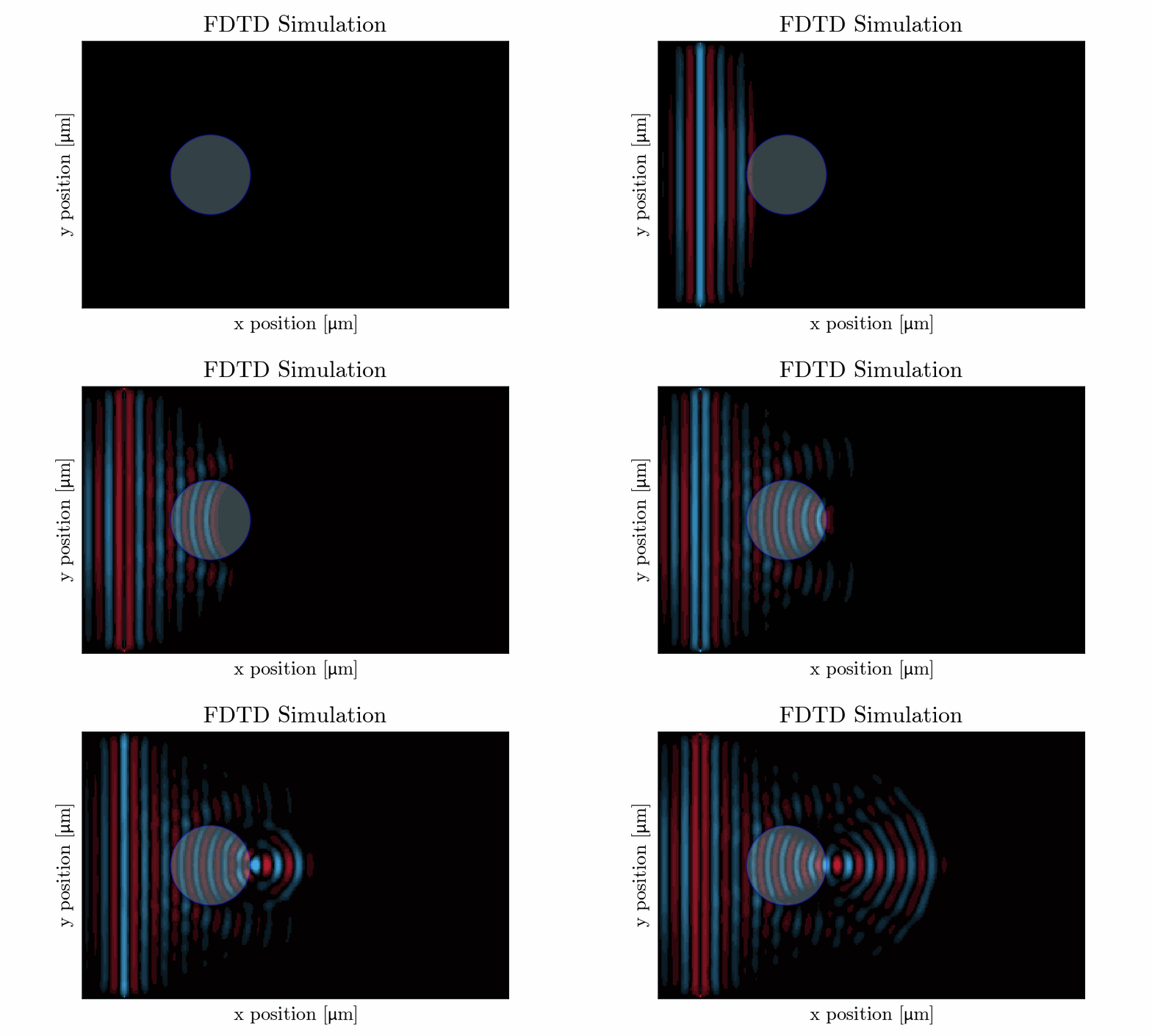
# Ring resonator
from LightWave2D.grid import Grid
from LightWave2D.experiment import Experiment
from MPSPlots.colormaps import polytechnique

grid = Grid(
    resolution=0.1e-6,
    size_x=50e-6,
    size_y=30e-6,
    n_steps=800
)

experiment = Experiment(grid=grid)


scatterer = experiment.add_ring_resonator(
    position=('35%', '50%'),
    epsilon_r=1.5,
    inner_radius=4e-6,
    width=2e-6
)

source = experiment.add_point_source(
    wavelength=1550e-9,
    position=('25%', '50%'),
    amplitude=100,
)

pml = experiment.add_pml(order=1, width=70, sigma_max=5000)

experiment.run_fdtd()

animation = experiment.render_propagation(skip_frame=5, colormap=polytechnique.red_black_blue)

animation.save('./resonator.gif', writer='Pillow', fps=10)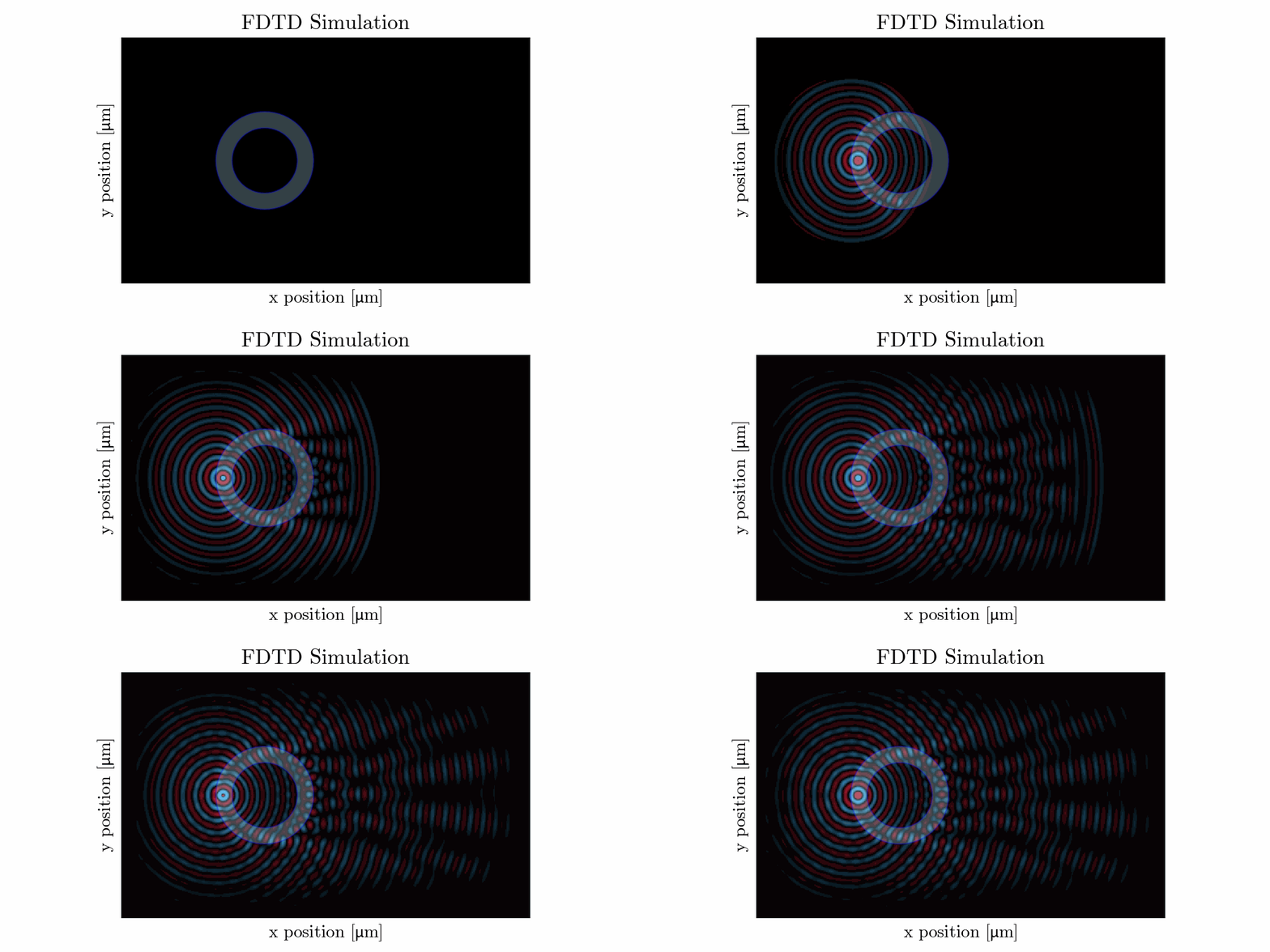
# Ring resonator
from LightWave2D.grid import Grid
from LightWave2D.experiment import Experiment
from MPSPlots import colormaps

grid = Grid(
    resolution=0.1e-6,
    size_x=60e-6,
    size_y=30e-6,
    n_steps=1200
)

experiment = Experiment(grid=grid)

scatterer = experiment.add_lense(
    position=('35%', '50%'),
    epsilon_r=2,
    curvature=10e-6,
    width=5e-6
)

source = experiment.add_point_source(
    wavelength=1550e-9,
    position=('10%', '50%'),
    amplitude=10,
)


experiment.add_pml(order=1, width=50, sigma_max=5000)

experiment.run_fdtd()

experiment.plot_frame(
    frame_number=-1,
    scale_max=5,
    colormap=colormaps.polytechnique.red_black_blue
)

animation = experiment.render_propagation(
    skip_frame=5,
    unit_size=5,
    colormap=colormaps.polytechnique.red_black_blue
)

animation.save('./lense.gif', writer='Pillow', fps=10)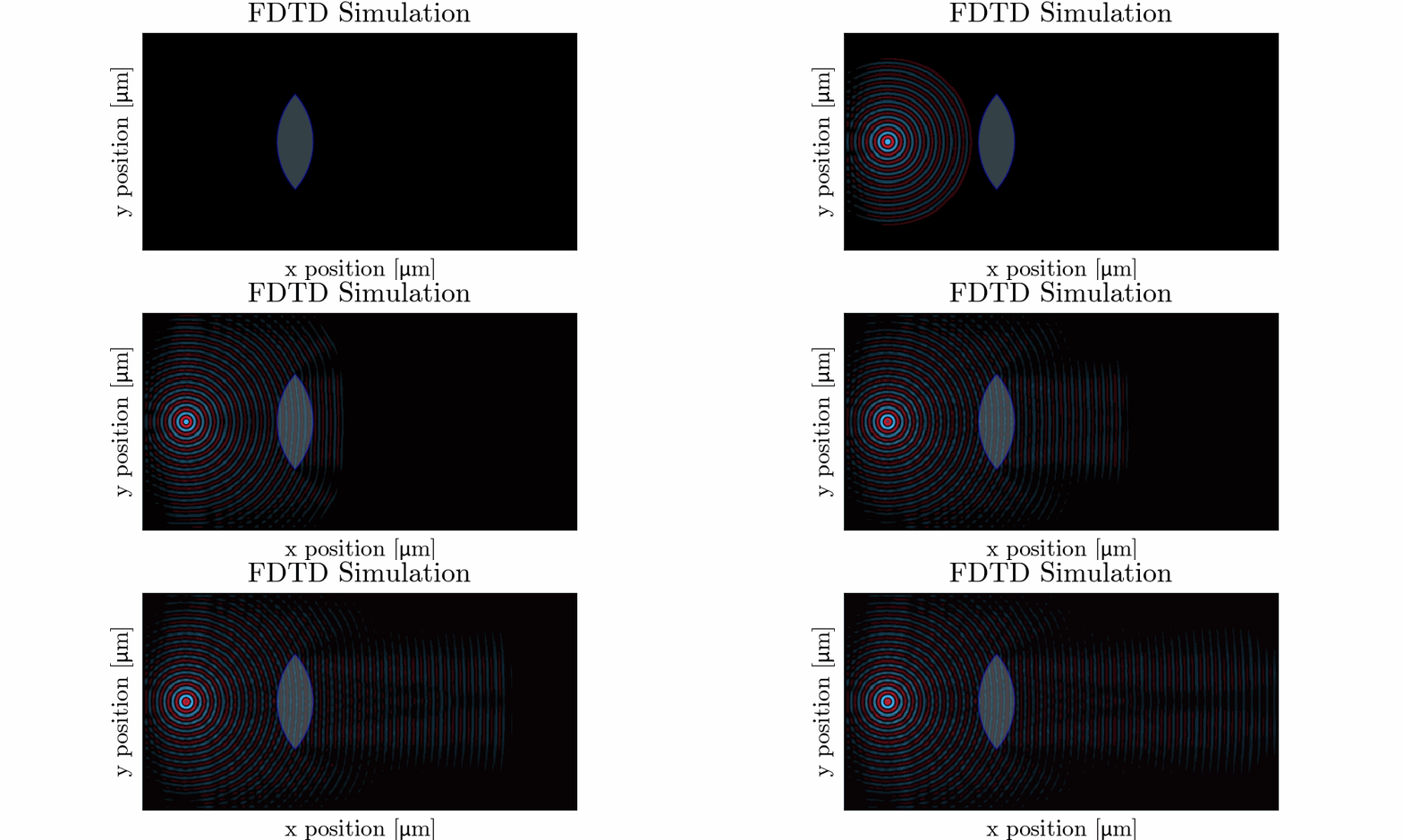
Plenty of other examples are available online, I invite you to check the examples section of the documentation.
Testing
To test localy (with cloning the GitHub repository) you’ll need to install the dependencies and run the coverage command as
>>> git clone https://github.com/MartinPdeS/LightWave2D.git
>>> cd LightWave2D
>>> pip install -r requirements/requirements.txt
>>> coverage run --source=LightWave2D --module pytest --verbose tests
>>> coverage report --show-missing
Contact Information
As of 2024 the project is still under development if you want to collaborate it would be a pleasure. I encourage you to contact me.
LightWave2D was written by Martin Poinsinet de Sivry-Houle .
1 maintainer

Metadata
1 maintainer
Release files for LightWave2D 0.1.6.post10
For a detailed explanation of source distributions (sdists) and built distributions (wheels), please see the package formats documentation.
Built distributions (wheels)
Total release size: 7.1 MB
Release files / lightwave2d-0.1.6.post10-cp312-cp312-win_amd64.whl
| Download URL | lightwave2d-0.1.6.post10-cp312-cp312-win_amd64.whl |
|---|---|
| Size | 914.2 kB |
| Tags | CPython 3.12 Windows x86-64 |
|
SHA-256 checksum How to use checksums |
3a648278232f8b4fa060efe4e8cbe35742dc8c03186528cbb5f27a57c88cc2ea
|
|
BLAKE2b-256 checksum How to use checksums |
6c2dc6a9f17ebab478dbab1f8ea2c6e0876ead642b00fb0d123f9657bfdd6824
|
| Upload date | |
|
Uploaded using Trusted Publishing? What is trusted publishing? |
No |
| Uploaded via |
twine/5.1.1 CPython/3.9.19
|
Release files / lightwave2d-0.1.6.post10-cp312-cp312-manylinux_2_17_x86_64.manylinux2014_x86_64.whl
| Download URL | lightwave2d-0.1.6.post10-cp312-cp312-manylinux_2_17_x86_64.manylinux2014_x86_64.whl |
|---|---|
| Size | 627.6 kB |
| Tags | CPython 3.12 Linux glibc 2.17+ x86-64 |
|
SHA-256 checksum How to use checksums |
f121138e25660f404dfcb655d8cf69eab8226cab36d8dfb370bd9aca1ff632ae
|
|
BLAKE2b-256 checksum How to use checksums |
1957f207cb662e21a915e89f2017ed4148ccadf8291b71a59283f5d60a477d0a
|
| Upload date | |
|
Uploaded using Trusted Publishing? What is trusted publishing? |
No |
| Uploaded via |
twine/5.1.1 CPython/3.9.19
|
Release files / lightwave2d-0.1.6.post10-cp312-cp312-macosx_11_0_arm64.whl
| Download URL | lightwave2d-0.1.6.post10-cp312-cp312-macosx_11_0_arm64.whl |
|---|---|
| Size | 1.5 MB |
| Tags | CPython 3.12 macOS 11.0+ ARM64 |
|
SHA-256 checksum How to use checksums |
2a47777ecbd66aa6613f09d5eef1e37e856d0ec03c0918572564b3153764842c
|
|
BLAKE2b-256 checksum How to use checksums |
a686bf5cb6d770593d32742cd9b1989ecf9410030add7f7622b7385a1e3cd69c
|
| Upload date | |
|
Uploaded using Trusted Publishing? What is trusted publishing? |
No |
| Uploaded via |
twine/5.1.1 CPython/3.9.19
|
Release files / lightwave2d-0.1.6.post10-cp311-cp311-win_amd64.whl
| Download URL | lightwave2d-0.1.6.post10-cp311-cp311-win_amd64.whl |
|---|---|
| Size | 616.0 kB |
| Tags | CPython 3.11 Windows x86-64 |
|
SHA-256 checksum How to use checksums |
c002ce0392b551ab41074e409a428e6555912b5bf30ae7a2b857534a07e0143b
|
|
BLAKE2b-256 checksum How to use checksums |
9df896fb6517b9c0761737f3e1928ac8f46d0d2e5791e7a4c69dceafa2b3e989
|
| Upload date | |
|
Uploaded using Trusted Publishing? What is trusted publishing? |
No |
| Uploaded via |
twine/5.1.1 CPython/3.9.19
|
Release files / lightwave2d-0.1.6.post10-cp311-cp311-manylinux_2_17_x86_64.manylinux2014_x86_64.whl
| Download URL | lightwave2d-0.1.6.post10-cp311-cp311-manylinux_2_17_x86_64.manylinux2014_x86_64.whl |
|---|---|
| Size | 425.7 kB |
| Tags | CPython 3.11 Linux glibc 2.17+ x86-64 |
|
SHA-256 checksum How to use checksums |
b51c00bc5c61b2f7474fbed39cf88f7afd395c2bb8bd4f888f39b844e50c6b9e
|
|
BLAKE2b-256 checksum How to use checksums |
b1d75ba90d091374b04040dde7780df674eb55d10bb211d5cdfa7a6c9be87820
|
| Upload date | |
|
Uploaded using Trusted Publishing? What is trusted publishing? |
No |
| Uploaded via |
twine/5.1.1 CPython/3.9.19
|
Release files / lightwave2d-0.1.6.post10-cp311-cp311-macosx_11_0_arm64.whl
| Download URL | lightwave2d-0.1.6.post10-cp311-cp311-macosx_11_0_arm64.whl |
|---|---|
| Size | 1.3 MB |
| Tags | CPython 3.11 macOS 11.0+ ARM64 |
|
SHA-256 checksum How to use checksums |
d19a3b45811937fe27739bb8f9e38d6e5eeb7826289cf9f0f4ddc9a1a7a698ae
|
|
BLAKE2b-256 checksum How to use checksums |
9a08c049b738c51e1cd8045090b5dfc504a9ad41eea955dbcdef43f900fd3a19
|
| Upload date | |
|
Uploaded using Trusted Publishing? What is trusted publishing? |
No |
| Uploaded via |
twine/5.1.1 CPython/3.9.19
|
Release files / lightwave2d-0.1.6.post10-cp310-cp310-win_amd64.whl
| Download URL | lightwave2d-0.1.6.post10-cp310-cp310-win_amd64.whl |
|---|---|
| Size | 317.8 kB |
| Tags | CPython 3.10 Windows x86-64 |
|
SHA-256 checksum How to use checksums |
9be23476d82064c9d9b9666472e974b732bdd487912912af578fb966e4513fd6
|
|
BLAKE2b-256 checksum How to use checksums |
795576c11c957d57214103b9ee7279265fa5c056bb9af801e5eca936fcd5424a
|
| Upload date | |
|
Uploaded using Trusted Publishing? What is trusted publishing? |
No |
| Uploaded via |
twine/5.1.1 CPython/3.9.19
|
Release files / lightwave2d-0.1.6.post10-cp310-cp310-manylinux_2_17_x86_64.manylinux2014_x86_64.whl
| Download URL | lightwave2d-0.1.6.post10-cp310-cp310-manylinux_2_17_x86_64.manylinux2014_x86_64.whl |
|---|---|
| Size | 222.0 kB |
| Tags | CPython 3.10 Linux glibc 2.17+ x86-64 |
|
SHA-256 checksum How to use checksums |
a9d937de9561b188e5852c94de086ef7b6cfd6b30c6fabc70158880962e5d689
|
|
BLAKE2b-256 checksum How to use checksums |
081c68e6ca8e3b5b01da623a2a7e62c3d838e8d8c764c9c7860039da880694ca
|
| Upload date | |
|
Uploaded using Trusted Publishing? What is trusted publishing? |
No |
| Uploaded via |
twine/5.1.1 CPython/3.9.19
|
Release files / lightwave2d-0.1.6.post10-cp310-cp310-macosx_11_0_arm64.whl
| Download URL | lightwave2d-0.1.6.post10-cp310-cp310-macosx_11_0_arm64.whl |
|---|---|
| Size | 1.2 MB |
| Tags | CPython 3.10 macOS 11.0+ ARM64 |
|
SHA-256 checksum How to use checksums |
c54974baaaa175f8d13992e2915afeee8cd215b5bf19b4a3d96649133a19929b
|
|
BLAKE2b-256 checksum How to use checksums |
1989a6962a547d89227f01b79b8130f7a4b0fcc3e08af189ba38036f9df28df7
|
| Upload date | |
|
Uploaded using Trusted Publishing? What is trusted publishing? |
No |
| Uploaded via |
twine/5.1.1 CPython/3.9.19
|














