
MCPI Addons
A Minecraft Pi Edition: Reborn mod to add more features to the API.
Note: requires Reborn v2.4.8 or later.
Installing
First you will need to install the frontend from pip, to do that you can use pip3 install mcpi-addons.
If you don't want to (or can't) compile the backend then you can grab the newest version from the releases page.
Compiling
Just run ./build.sh to create the binary and run mv libextrapi.so ~/.minecraft-pi/mods to install the mod, this is needed because MCPI doesn't support any of these extensions that this api adds, so a C++ mod is loaded to intercept CommandServer::parse.
How to use
Here is a simple "Hello World" example:
# Import the api
from mcpi_addons.minecraft import Minecraft
# Initialize the api (MCPI must be open and in a world at this time)
mc = Minecraft.create()

# Post to chat
mc.postToChat("Hello world!")
For a tutorial see the 'Using the API' section of stuffaboutcode.com.
What does it do?
It adds these:
custom.logcustom.log.debug(mc.logging.debug(msg)) Logs a message in debug mode.custom.log.info(mc.logging.info(msg)) Logs a message.custom.warn(mc.logging.warn(msg)) Logs a warning.custom.log.error(mc.logging.error(msg)) Logs an error.
custom.inventorycustom.inventory.getSlot(mc.inventory.getHeldItem()) Gets the id, auxiliary, and count of the current slot.custom.inventory.unsafeGive(mc.inventory.unsafeGive(id=-2, auxiliary=-2, count=-2)) give the player the item without safety checking (-2 means don't change)custom.inventory.give(mc.inventory.give(id=-2, auxiliary=-2, count=-2)) give the player the item without safety checking (-2 means don't change)
custom.overridecustom.override.reset(mc.resetOverrides()) resets all tile and item overrides.custom.override(mc.override(before, after)) overrides the idbeforewith the id ofafter.
world.getBlocksworld.getBlocks(mc.getBlocks(x, y, z, x2, y2, z2)) Gets a flat list of the blocks between (x, y, z) and (x2, y2, z2).world.getBlocks.3D(mc.getBlocks3D(x, y, z, x2, y2, z2)) Gets a 3D list of the blocks between (x, y, z) and (x2, y2, z2).
custom.postcustom.post.client(mc.postToClient(msg)) Posts the message to the chat client side.custom.post.noPrefix(mc.postWithoutPrefix(msg)) Posts the message without the username prefix.
custom.keycustom.key.press(mc.player.press(key)) Presses a key.custom.key.release(mc.player.release(key)) Releases a key.
world.getPlayerId(mc.getPlayerEntityId(name)) Gets the id of a player from the name.custom.usernamecustom.username(mc.player.getUsername()) Gets the local players username.custom.username.all(mc.getUsernames()) Gets a list of player usernames.
custom.worldcustom.world.particle(mc.particle(x, y, z, particle)) Spawns the particle at (x,y,z).custom.world.dir(mc.world.dir()) Get the world folder.custom.world.name(mc.world.name()) Get the world name.custom.world.servername(mc.world.server_name()) Get the last joined server name.
custom.playercustom.player.getHealth(mc.player.getHealth()) Returns the players health.custom.player.setHealth(mc.player.setHealth(health)) Sets the players health.custom.player.closeGUI(mc.player.closeGUI()) Closes the current screen.custom.player.getGamemode(mc.player.getGamemode()) Returns the players gamemode.
custom.entitycustom.entity.spawn(mc.entity.spawn(id, x, y, z, health = -1, dir = (0, 0), data = 0)) spawns an entity of typeidatx, y, z, withhealthhealth (or fuse/lifetime) pointing indirdirection withdatadata.custom.entity.setAge(mc.entity.setAge(id, age)) changes an entities age, if it has an age (only animals do). If the age is negative it will be a baby forabs(age) / 20seconds.custom.entity.setSheepColor(mc.entity.setSheepColor(id, color)) sets a sheeps color tocolor
custom.reborncustom.reborn.getFeature(mc.reborn.getFeature(feature: string) -> bool) Gets the status of a reborn featurecustom.reborn.getVersion(mc.reborn.getVersion() -> string) Gets the reborn version
events.chatevents.chat.post(mc.events.pollChatPosts() -> [string]) return a list of messages shown in client side chatevents.chat.size(mc.events.setChatSize(size = 64)) clears the chat list and resets the size
entity.getAllEntitiesentity.getEntities
I want to add more so please give me suggestions.
Todo list
I am going to add theses features someday, but they aren't here now. Feel free to create a PR that adds them or other features!
player.setGamemode(gamemode: int)Sets the players gamemode.player.getOxygen() -> intGets the player oxygen.player.setOxygen(oxygen: int)Sets the players oxygen.player.getInventory() -> int[]Gets the player inventory.player.setInventory(inventory: int[])Sets the player inventory.entity.getArmor(id: int) -> int[4]Gets the players armor.entity.setArmor(helmet: int, chestplate: int, leggings: int, boots: int)Sets the players armor.camera.getCameraState() -> intGets the camera state.camera.setCameraState(state: int)Sets the camera state.minecraft.getVersion() -> str0.1.0 or 0.1.1, will be determined at compile time and will require Legacy support.world.seed() -> stringGets the worlds seed.
Known bugs
- Using the particle
iconcrackwithmc.particlecrashes the game, but using an invalid particle name is fine. postToClientreally doesn't like it when you use\n. When posted they might also post a lot of garbage to server side chat.
Extras
Raspberry Juice compatibility
One day all of these will be supported.
-
getBlocks -
getPlayerEntityId -
events.pollChatPosts -
player/entity.getRotation -
player/entity.getPitch -
player/entity.getDirection
Particles
Particles are client side and only shown if the player is within 16 blocks.
Here is a particle list I found at 0x107511 in minecraft-pi
bubble(only works in water)critflamelavasmokelargesmokereddustironcrack(crashes the game)snowballpoofexplode
Tiles/Items
A list of tiles can be found here and a list of items here.
Entities
A list of entities can be found here.
Changelog
-
1.2.5
- Added
custom.world.servernameto get the name of the server the client is connecting to
- Added
-
1.2.4
- Fix
custom.world.namewhile the mod is running on a server
- Fix
-
1.2.3, by Skjeggegubben
- Add
custom.entity.setAgeandcustom.entity.setSheepColor
- Add
-
1.2.2
- Remove
print()call left in by mistake - Add
entity.getEntitiesandentity.getAllEntities
- Remove
-
1.2.1, by Red-exe-Engineer
- Update entity ids and Entity class on the python side
- Add the sheep class and item class
-
1.2.0, by Red-exe-Engineer
- Add
reborn.getVersion,reborn.getFeature,events.chat.posts, andevents.chat.size
- Add
-
1.1.1
- Add basic entity spawning.
-
1.1.0
- Fixed bug with causing args to be cut off at the first left parenthesis.
- Fixed bug in
world.getBlocksandcustom.getBlocks3Dcausing them to target the wrong position. - Added tests.
- Improved docs.
- Many breaking API changes.
- Many internal changes.
- Added
custom.player.getHealth,custom.player.setHealth,custom.player.closeGUI, andcustom.player.getGamemode.
-
1.0.3
- Added
world.getBlocks,custom.getBlocks3D. - Improved
custom.particle. - Removed
getOffsetfromminecraft.py.
- Added
-
1.0.2
- Added
custom.overrideTile,custom.overrideItem, andcustom.resetOverrides.
- Added
-
1.0.1
- Added functionality to
world.getPlayerId. - Added
custom.getUsernames.
- Added functionality to
-
1.0.0
- Stopped
getSlotfrom crashing the game with invalid ids. - Added
press,unpress,worldName,worldDir,particle,getOffset, and logging (debug,info,warn,err). - Uploaded to pypi and github.
- Stopped
-
Beta
- Added
getSlotandgive.
- Added
-
Alpha
- Had
getUsername,postWithoutPrefix, andpostClient.
- Had
Screenshots
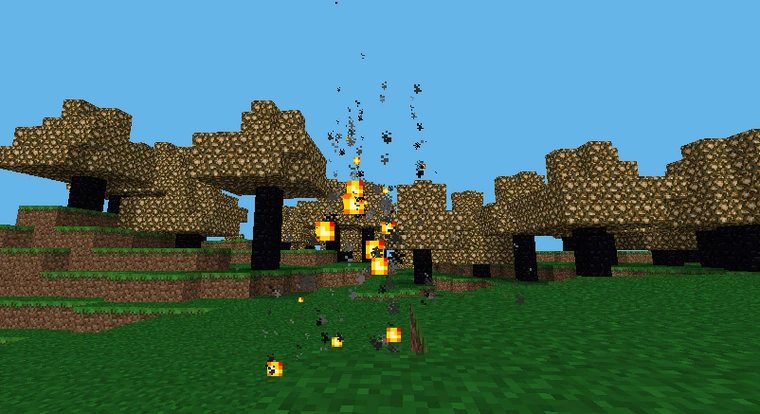
Here is a screenshot of using overrides and particles:
Here is a screenshot of using entity spawning with arrows and direction:

Here is a screenshot of using TNT entities and falling bedrock entities to make a cannon:

1 maintainer

Metadata
1 maintainer
Release files for MCPI-Addons 1.2.5
For a detailed explanation of source distributions (sdists) and built distributions (wheels), please see the package formats documentation.
Source distribution (sdist)
| File | Size | Uploaded | Provenance | |
|---|---|---|---|---|
| MCPI-Addons-1.2.5.tar.gz | 13.6 kB | Without provenance | Details |
Built distribution (wheel)
| File | Interpreter | ABI | Platform | Reset |
|---|---|---|---|---|
| MCPI_Addons-1.2.5-py3-none-any.whl | Python 3 | none | any | Details |
Total release size: 28.8 kB
Release files / MCPI-Addons-1.2.5.tar.gz
| Download URL | MCPI-Addons-1.2.5.tar.gz |
|---|---|
| Size | 13.6 kB |
| Tags | Source |
|
SHA-256 checksum How to use checksums |
5b5a8d457ef5ad3ee95a9a901c9c5a844c8dff0bacffbccc99c71cd4dcadbc40
|
|
BLAKE2b-256 checksum How to use checksums |
714b473a59b552b9e9e4e82ff0a872404e235a1072040cb4414d0dac8b014ce3
|
| Upload date | |
|
Uploaded using Trusted Publishing? What is trusted publishing? |
No |
| Uploaded via |
twine/4.0.2 CPython/3.9.2
|
Release files / MCPI_Addons-1.2.5-py3-none-any.whl
| Download URL | MCPI_Addons-1.2.5-py3-none-any.whl |
|---|---|
| Size | 15.2 kB |
| Tags | Python 3 |
|
SHA-256 checksum How to use checksums |
e6f289e59cb285353666d447274d9146fa20a48ff11d157e980bd51a7e24714c
|
|
BLAKE2b-256 checksum How to use checksums |
4da5d3d12f28d48858d5dc526fb39981a038b46c87f472cf8c1c659a7bd811fe
|
| Upload date | |
|
Uploaded using Trusted Publishing? What is trusted publishing? |
No |
| Uploaded via |
twine/4.0.2 CPython/3.9.2
|
Security for MCPI-Addons 1.2.5
Provenance
Provenance describes where a file came from. On PyPI, provenance is shared via attestations, which provide a verifiable record of the build or publishing details. View details, limitations and caveats.
No provenance found
None of the files in this release were uploaded with provenance metadata.
A note on package security
PyPI is a repository for distributing packages, not a service for auditing them. While third-party security researchers and our staff do their best to detect and remove malicious packages, PyPI cannot guarantee the quality, security or suitability of any given package.
To learn more about protecting yourself from malicious actors, visit our package security documentation.














