
MRRpy



Rainfall–runoff and flood routing for any basin on Earth, from a DEM and a storm.
MRRpy, the Multi-Mechanism Runoff and Routing model, is a distributed, physics-based flood model in Python. It traces the drainage network of a DEM, works out how much rain runs off (SCS Curve Number, or Green–Ampt infiltration, saturated source areas (VSA-OPM) and impervious cities in any combination), and routes the water through every grid cell and sub-grid river channel with a kinematic, Muskingum–Cunge or semi-implicit diffusion wave. You get the outlet hydrograph, flood maps and a water-balance check. It runs offline with your own data, or fetches DEMs, NASA IMERG rain, soil and land cover from Google Earth Engine. Set it up in a Jupyter form, a terminal wizard, Python or QGIS; it runs on a CPU or an NVIDIA GPU.
📖 Documentation
Full docs, guides and API reference → mrrpy.readthedocs.io
Learn the science interactively → the MRRpy course
Installation
pip install MRRpy            # core (CPU)
pip install "MRRpy[gpu]"     # + CuPy/CUDA acceleration
pip install "MRRpy[gee]"     # + Google Earth Engine forcing
Quick example
from MRRpy import Config, run_pipeline

cfg = Config(DEM_PATH="dem.tif", OUTPUT_DIR="results/",
             OUTPUT_POINT=(27.632, 85.293),   # (lat, lon) of the outlet
             TARGET_CRS_EPSG="EPSG:32645")    # a projection in metres (UTM zone)
run_pipeline(cfg)                             # → results/hydrograph.csv
Or from the command line:
MRRpy wizard                    # answer a few questions → run.yaml
MRRpy run -c run.yaml           # process_dem + routing
Prefer a form? In Jupyter, MRRpy.ConfigForm() is a step-by-step form like the QGIS
plugin (pip install "MRRpy[notebook]").
Prefer a file? MRRpy init-config -o run.yaml writes a commented template, and
MRRpy explain <SETTING> explains any setting.
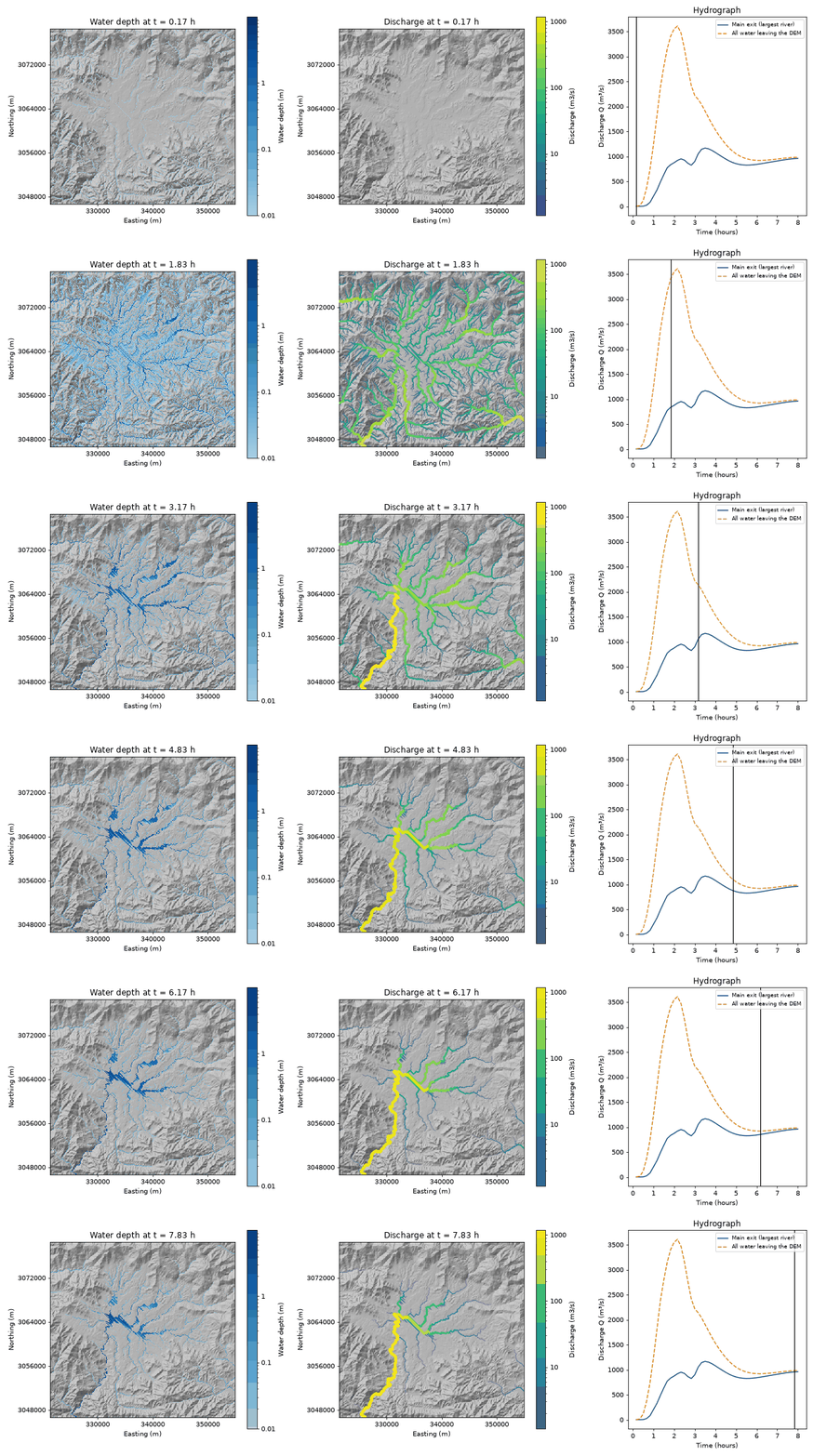
One storm over a whole DEM, animated with MRRpy.animate_fields(out, ["depth", "discharge"]):
water depth, river flow drawn wider where it is larger, and the hydrograph.
What it offers
- DEM → watershed — reproject, pit-fill, D8 flow direction/accumulation and
delineation (
pyshedsorpyflwdir) — or route the whole DEM with no outlet (MODEL_AREA="whole_dem"). - Flood maps — save depth/discharge maps over time, then animate the flow
spreading (
animate_fields) or export peak-depth GeoTIFFs (export_peak_maps). - Runoff generation —
none · coefficient · raster · scs_cn · physical; forphysical, VSA saturation-excess + Green-Ampt + impervious as composable mechanisms. - Flood routing — kinematic wave, Muskingum–Cunge, or a semi-implicit diffusion wave (backwater, flat valleys, large stable steps), with sub-grid river channels sized from the 2-year flood and an always-on water-balance check.
- Satellite forcing — optional DEM download, IMERG rainfall, GCN250 curve numbers, SERVES soil deficit, SoilGrids, HiHydroSoil, LULC/LCZ via Google Earth Engine (every option also works offline with your own files).
- CPU / GPU — one code path (NumPy or CuPy), automatic CPU fallback.
- Interfaces for every taste — Python API, a
MRRpyCLI with a question-and-answerwizard, a Jupyter form, and a QGIS plugin, all driven by oneConfigobject.
Links
- Documentation: https://mrrpy.readthedocs.io
- Interactive course: https://sauravbhattarai19.github.io/MRRpy/
- Source & issues: https://github.com/SauravBhattarai19/MRRpy
License
MIT © Saurav Bhattarai.
1 maintainer

Metadata
1 maintainer
Release files for MRRpy 0.3.0
For a detailed explanation of source distributions (sdists) and built distributions (wheels), please see the package formats documentation.
Source distribution (sdist)
| File | Size | Uploaded | |
|---|---|---|---|
| mrrpy-0.3.0.tar.gz | 238.7 kB | Details |
Built distribution (wheel)
| File | Interpreter | ABI | Platform | Reset |
|---|---|---|---|---|
| mrrpy-0.3.0-py3-none-any.whl | Python 3 | none | any | Details |
Total release size: 501.7 kB
Release files / mrrpy-0.3.0.tar.gz
| Download URL | mrrpy-0.3.0.tar.gz |
|---|---|
| Size | 238.7 kB |
| Tags | Source |
|
SHA-256 checksum How to use checksums |
c325aaf0dde35f7b6b036697007703579cc54a3fdcfa48d95c1752252a35ebc9
|
|
BLAKE2b-256 checksum How to use checksums |
95dbc540e841beebc99265bb2e2ee5d880abe82ac64d71ffa1fb082c1e7a7b3f
|
| Upload date | |
|
Uploaded using Trusted Publishing? What is trusted publishing? |
Yes |
| Uploaded via |
twine/7.0.0 CPython/3.13.14
|
Provenance
Provenance describes where a file came from. On PyPI, provenance is shared via attestations, which provide a verifiable record of the build or publishing details. View details, limitations and caveats.


PyPI Publish Attestation
PyPI verified that this artifact, at this checksum, originated from the publisher listed below.
Signed by GitHub Actions, verified by PyPI on Oct 6, 2026.
Transparency logRelease files / mrrpy-0.3.0-py3-none-any.whl
| Download URL | mrrpy-0.3.0-py3-none-any.whl |
|---|---|
| Size | 263.0 kB |
| Tags | Python 3 |
|
SHA-256 checksum How to use checksums |
a1457f7ecd22af95c8a2b6a8864e480bca102f398d858169c833784a128378cf
|
|
BLAKE2b-256 checksum How to use checksums |
07ba4d0c916fa2ed4c5d35c9b90c167ca9d86d55fb12f34a88d5c6f041f99f5d
|
| Upload date | |
|
Uploaded using Trusted Publishing? What is trusted publishing? |
Yes |
| Uploaded via |
twine/7.0.0 CPython/3.13.14
|
Provenance
Provenance describes where a file came from. On PyPI, provenance is shared via attestations, which provide a verifiable record of the build or publishing details. View details, limitations and caveats.
PyPI Publish Attestation
PyPI verified that this artifact, at this checksum, originated from the publisher listed below.
Signed by GitHub Actions, verified by PyPI on Oct 6, 2026.
Transparency log













