
An automated CLI tool using AI to solve Menti quiz questions.

Project description




MentAI
An automated CLI tool using AI to solve Menti quiz questions.
Table of Contents
- Getting Started
- Functionality
- Use Cases
- Other
Installation
pip3 install mentai-cli
Usage
First Steps
After installing MentAI you need to run it once to create the config file. You can just provide a random 8-digit number:
➜ mentai 12345678
OpenAI API key is missing.
Please fix the error and restart the program.
You can find your settings file in: "/Users/<YourUser>/Library/Application Support/Mentai/config.toml".
Opening it...
The config.toml will be opened in your default editor. Add an OpenAI API key and save it. All other values can be left as is. Here is a quick example of a config.toml:
[SOLVER]
OPEN_AI_API_KEY = "youropenapikeyhere"
OPEN_AI_MODEL = "gpt-5"

[QUIZ]
PLAYER_NAME = "MentiBot"
MINIMUM_DELAY_IN_MS = 500
MAXIMUM_DELAY_IN_MS = 3000
CONTEXT = "/Path/To/TextFile.txt"
- SOLVER:
- OPEN_AI_API_KEY: your OpenAI API key
- OPEN_AI_MODEL: OpenAI model to use (you can find all models here)
- QUIZ:
- PLAYER_NAME: name to use if custom names are allowed (leave empty if you always want to use a random generated username)
- MINIMUM_DELAY_IN_MS: shortest time to wait before submitting an answer
- MAXIMUM_DELAY_IN_MS: longest time to wait before submitting an answer
- CONTEXT: path to a plain text file with additional context to use when solving the quiz questions
DELAYS: This setup would generate a random delay from 500 to 3000 milliseconds for each answer submission.
Solving Quizzes
You can call mentai --help for an overview of all possible options:
➜ mentai --help

 Usage: mentai [OPTIONS] Participation Details

 An automated CLI tool using AI to solve Menti quiz questions.

╭─ Arguments ─────────────────────────────────────────────────────╮
│ *    participation_d…      Participation      Participation     │
│                            Details            code / link of    │
│                                               the Menti quiz.   │
│                                               [required]        │
╰─────────────────────────────────────────────────────────────────╯
╭─ Options ───────────────────────────────────────────────────────╮
│ --name             -n      Name               Name to use for   │
│                                               the player if     │
│                                               custom names are  │
│                                               allowed.          │
│ --additional-con…  -a      Addtional Context  Path to a text    │
│                                               file containing   │
│                                               additional        │
│                                               context to add to │
│                                               the prompt for    │
│                                               solving           │
│                                               questions.        │
│ --help                                        Show this message │
│                                               and exit.         │
╰─────────────────────────────────────────────────────────────────╯
The default use is mentai 12345678 with 12345678 being the participation code. You can also use the participation link to join a quiz: https://www.menti.com/abcdefghijkl.
All other flags can be configured using the config.toml. However, the value of the flags will be prioritized. This means if you have the name MentAI set in your config.toml but run mentai 12345678 -n John you will join the Menti quiz as John.
What this tool can do
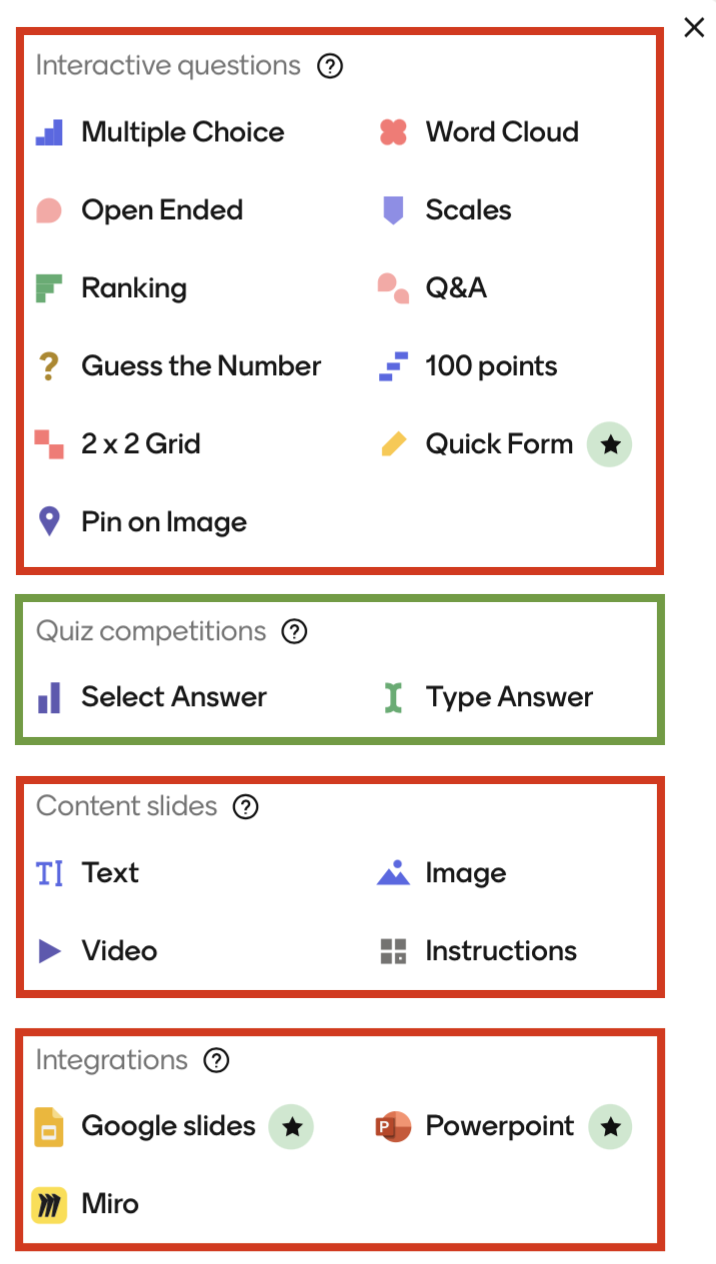
This tool can handle all slides for "Quiz competitions" which is "Select Answer" (single choice) and "Type Answer" (free text question). Please note that "Select Answer" questions can have multiple correct answers. The participant however can only ever pick one.
What this tool can't do
This tool cannot handle any slides on Menti that are not of the category "Quiz competitions". This includes slides such as "Word Cloud", "Guess the Number" and "Multiple Choice" which does not give players a score either.
This tool does not guarantee you a perfect score.
When to use this tool
This tool can only be used for Menti presentation that use "Quiz competitions" slides.
As a student / participant, you can use it to automatically solve quizes.
As a teacher / presenter, you can use it to prepare the quiz to be unsolvable for AI.
Please make sure to use this tool in a fair manner.
Disclaimer
MentAI is in no way affilliated with, authorized, maintained or endorsed by Menti or any of its affiliates or subsidiaries. It is an independent and unofficial project. Use it at your own risk.
Release history Release notifications | RSS feed


Download files
Download the file for your platform. If you're not sure which to choose, learn more about installing packages.
Source Distribution
Built Distribution
Filter files by name, interpreter, ABI, and platform.
If you're not sure about the file name format, learn more about wheel file names.
Copy a direct link to the current filters
File details
Details for the file mentai_cli-0.1.2.tar.gz.
File metadata
- Download URL: mentai_cli-0.1.2.tar.gz
- Upload date:
- Size: 26.3 kB
- Tags: Source
- Uploaded using Trusted Publishing? No
- Uploaded via: uv/0.8.17
File hashes
| Algorithm | Hash digest | |
|---|---|---|
| SHA256 |
2548d359878d403b84b6269caf1f78d79befa74ef824e1aabe0755777483a1fa
|
|
| MD5 |
34fd74a89f5449d7effadcd12867c0ab
|
|
| BLAKE2b-256 |
7739c8107e8a6033986c1c78e661ac77fd76228127b7feebe3e975c0c6127797
|
File details
Details for the file mentai_cli-0.1.2-py3-none-any.whl.
File metadata
- Download URL: mentai_cli-0.1.2-py3-none-any.whl
- Upload date:
- Size: 25.4 kB
- Tags: Python 3
- Uploaded using Trusted Publishing? No
- Uploaded via: uv/0.8.17
File hashes
| Algorithm | Hash digest | |
|---|---|---|
| SHA256 |
f83cab0c233d7f129aec5bee0d7830e503cc4d368d32f77abc74533cc8706fcf
|
|
| MD5 |
10c0417f8c20cfd273995f792090c60a
|
|
| BLAKE2b-256 |
525ee5935e650ea7f42507c1a35f74ca11c0bfd884a845972994c7e0a94263d7
|






