
MindsDB's goal is to make it very simple for developers to use the power of artificial neural networks in their projects.


Project description






 Linux |
 Windows |
 macOS |
|---|---|---|
 |
 |
 |
MindsDB is an Explainable AutoML framework for developers, built on top of Pytorch.

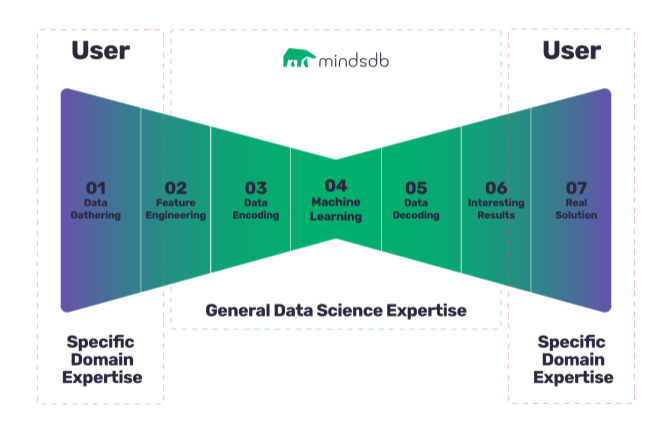
With MindsDB you can build, train and use state of the art ML models in as simple as one line of code.
- Installing MindsDB
- Learning from Examples
- MindsDB Explainability GUI
- Frequently Asked Questions
- Provide Feedback to Improve MindsDB
Try it out
Installation
- Desktop: You can use MindsDB on your own computer in under a minute, if you already have a python environment setup, just run the following command:
pip install mindsdb --user
Note: Python 64 bit version is required. Depending on your environment, you might have to use
pip3instead ofpipin the above command.*
If for some reason this fail, don't worry, simply follow the complete installation instructions which will lead you through a more thorough procedure which should fix most issues.
- Docker: If you would like to run it all in a container simply:
sh -c "$(curl -sSL https://raw.githubusercontent.com/mindsdb/mindsdb/master/distributions/docker/build-docker.sh)"
Usage
Once you have MindsDB installed, you can use it as follows:
Import MindsDB:
from mindsdb import Predictor
One line of code to train a model:
# tell mindsDB what we want to learn and from what data
Predictor(name='home_rentals_price').learn(
    to_predict='rental_price', # the column we want to learn to predict given all the data in the file
    from_data="https://s3.eu-west-2.amazonaws.com/mindsdb-example-data/home_rentals.csv" # the path to the file where we can learn from, (note: can be url)
)
One line of code to use the model:
# use the model to make predictions
result = Predictor(name='home_rentals_price').predict(when={'number_of_rooms': 2,'number_of_bathrooms':1, 'sqft': 1190})

# you can now print the results
print('The predicted price is ${price} with {conf} confidence'.format(price=result[0]['rental_price'], conf=result[0]['rental_price_confidence']))
Visit the documentation to learn more
- Google Colab: You can also try MindsDB straight here

Video Tutorial
Please click on the image below to load the tutorial:

(Note: Please manually set it to 720p or greater to have the text appear clearly)
MindsDB Graphical User Interface
You can also work with mindsdb via its graphical user interface (download here). Please click on the image below to load the tutorial:

MindsDB Lightwood: Machine Learning Lego Blocks
Under the hood of mindsdb there is lightwood, a Pytorch based framework that breaks down machine learning problems into smaller blocks that can be glued together seamlessly. More info about MindsDB lightwood's on GITHUB.
Contributing
In order to make changes to mindsdb, the ideal approach is to fork the repository than clone the fork locally PYTHONPATH.
For example: export PYTHONPATH=$PYTHONPATH:/home/my_username/mindsdb.
To test if your changes are working you can try running the CI tests locally: cd tests/ci_tests && python3 full_test.py
Once you have specific changes you want to merge into master, feel free to make a PR.
Report Issues
Please help us by reporting any issues you may have while using MindsDB.
License
Release history Release notifications | RSS feed


Download files
Download the file for your platform. If you're not sure which to choose, learn more about installing packages.
Source Distribution
File details
Details for the file MindsDB-1.14.2.tar.gz.
File metadata
- Download URL: MindsDB-1.14.2.tar.gz
- Upload date:
- Size: 63.4 kB
- Tags: Source
- Uploaded using Trusted Publishing? No
- Uploaded via: twine/3.1.1 pkginfo/1.5.0.1 requests/2.23.0 setuptools/46.0.0 requests-toolbelt/0.9.1 tqdm/4.43.0 CPython/3.7.1
File hashes
| Algorithm | Hash digest | |
|---|---|---|
| SHA256 |
230e2165b4ee4111cd3ac991fcc5917e3d3e9f6d9a4a30bb0bf268568369819d
|
|
| MD5 |
669a2e60f84e9979cc4dfef14537e3dd
|
|
| BLAKE2b-256 |
db1a7ea17afddd0fb1def6b7ec566399ebf984fe21a579db5ef4754a82a911f0
|






