
MonitorLog
Python 监控日志!
安装
pip install MonitorLog
简介
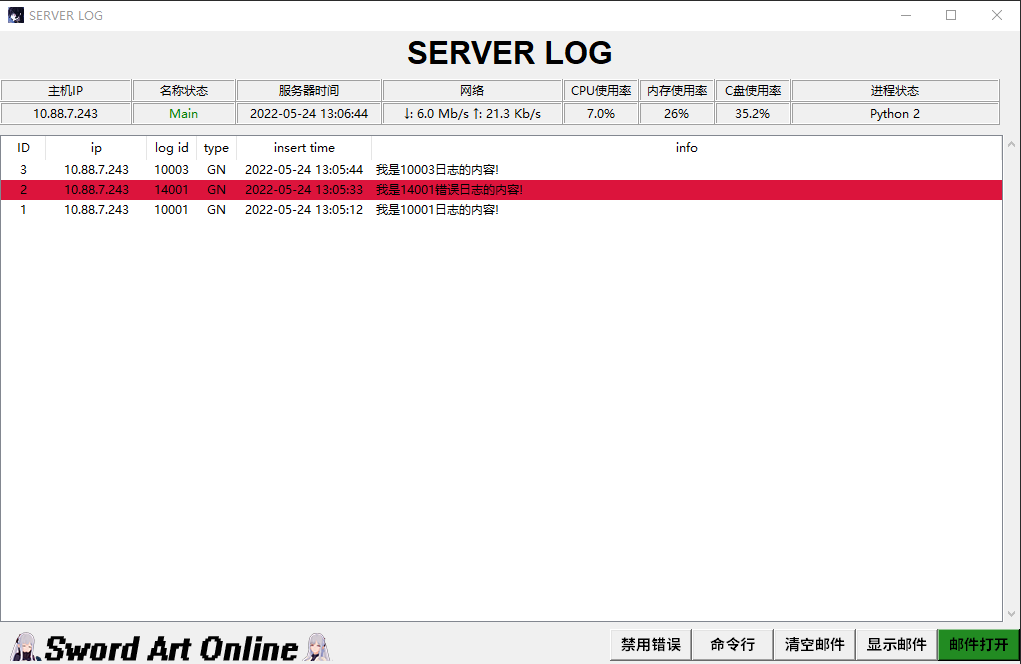
监控多台机器程序运行情况,普通日志,错误日志,警告日志,管理员日志,错误邮件通知等功能!
使用
客户端
# 客户端
import MonitorLog

# 日志对象
Mlog = MonitorLog.Log()

# 错误日志id
Mlog.logid(404)

# 记录id为10002的
Mlog.logid(10002)

# 记录id为20001, 日志信息为"TEST INFO!"的日志
Mlog.log("TEST INFO!", 20001)
import MonitorLog 会自动创建日子进程和监控端保持连接,并发送自身机器的一些基本状态信息,创建日志对象 Mlog 会自动在当前目录新建数据库文件 runtime_log.db 用于记录日志信息.
会新建 LOG_ID_INFO.py 文件让用户自定义日志id以使用 Mlog.logid 简化的发送日志消息
监控端
项目里的 server 文件夹是监控端的源码,可以直接调用使用,也可以使用编译好的二进制文件 run_server.exe,注意配置自己的 log_server_config.json 文件,填入自己的邮件服务器的用户密码以此使用邮件功能,建议多配置几个不同的邮件服务器以此在频繁发送邮件通知的时候不会被邮件厂商ban,或者自己搭建自己的邮件服务器.
{
    "PASSWORD" : "UOCP2P3KheLphV",
    "PORT" : 12701,
    "CLIENT_IP_LIST": ["192.168.1.7"],
    "CLIENT_IP_LIST_LOCAL": ["192.168.1.7"],
    "CLIENT_NAME_LIST" : ["Main"],
    "smtp_server_ip" : ["smtp.qq.com", "smtpdm.aliyun.com"],
    "smtp_server_port" : [465, 465],
    "my_sender" : [],
    "my_pass" : [],
    "my_user_list" : []
}
- PASSWORD: 该监控端的密码,普通用户收不到管理员消息
- PORT: 连接的客户端的端口
- CLIENT_IP_LIST: 连接的客户端的id地址列表
- CLIENT_IP_LIST_LOCAL: 连接的客户端的局域网id地址列表
- CLIENT_NAME_LIST: 客户端名称列表
- smtp_server_ip: smtp服务器地址列表
- smtp_server_port: smtp服务器端口列表
- my_sender: smtp账户列表
- my_pass: smtp账户密码列表
- my_user_list: 需要把日志错误通知发送的邮箱列表
请根据需要自己配置json配置文件,然后启动监控端就可以使用了.
监控端有一个禁用id的功能,比如
注释1
*14001:no[15:00-01:00]
注释2
14004:ok[23:10-07:00]
注释内容自己定,# 号开头表示注释,* 号开头表示固定这个禁用id不会因为每天的重置功能而时效
后面的no和yes这种是选填的设置,yes后面的时间段表示这个配置只有在这个时间段内有效,no后面的时间段表示这个配置在这个时间段内无效.
其他功能我记不太清了,基本使用就这样,其他的自己看看源码.
1 maintainer

Metadata
1 maintainer
Release files for MonitorLog 1.0.0
For a detailed explanation of source distributions (sdists) and built distributions (wheels), please see the package formats documentation.
Source distribution (sdist)
| File | Size | Uploaded | |
|---|---|---|---|
| MonitorLog-1.0.0.tar.gz | 3.0 kB | Details |
Built distribution (wheel)
| File | Interpreter | ABI | Platform | Reset |
|---|---|---|---|---|
| MonitorLog-1.0.0-py3-none-any.whl | Python 3 | none | any | Details |
Total release size: 18.5 kB
Release files / MonitorLog-1.0.0.tar.gz
| Download URL | MonitorLog-1.0.0.tar.gz |
|---|---|
| Size | 3.0 kB |
| Tags | Source |
|
SHA-256 checksum How to use checksums |
0c14aebb19e782e6543694dfac8d5ddf1633484e4e322b65e806d119390a77b2
|
|
BLAKE2b-256 checksum How to use checksums |
4ef292b901997e1d565b2b04a2d73ee796abbf0b419d7ba4e163fdf8f8817ff3
|
| Upload date | |
|
Uploaded using Trusted Publishing? What is trusted publishing? |
No |
| Uploaded via |
twine/3.4.2 importlib_metadata/4.11.1 pkginfo/1.7.1 requests/2.23.0 requests-toolbelt/0.9.1 tqdm/4.44.1 CPython/3.7.9
|
Release files / MonitorLog-1.0.0-py3-none-any.whl
| Download URL | MonitorLog-1.0.0-py3-none-any.whl |
|---|---|
| Size | 15.5 kB |
| Tags | Python 3 |
|
SHA-256 checksum How to use checksums |
b9e2fe2987751bf6ae5052a7792d0e02739fd1596593be3e8ee5b818589a0289
|
|
BLAKE2b-256 checksum How to use checksums |
6a4c8ca198e1f56de9ac28c907484826a89b27885bc4997b339083c0634d8b2a
|
| Upload date | |
|
Uploaded using Trusted Publishing? What is trusted publishing? |
No |
| Uploaded via |
twine/3.4.2 importlib_metadata/4.11.1 pkginfo/1.7.1 requests/2.23.0 requests-toolbelt/0.9.1 tqdm/4.44.1 CPython/3.7.9
|













