

Web client providing a clean and ergonomic interface to Mopidy.
Presentation
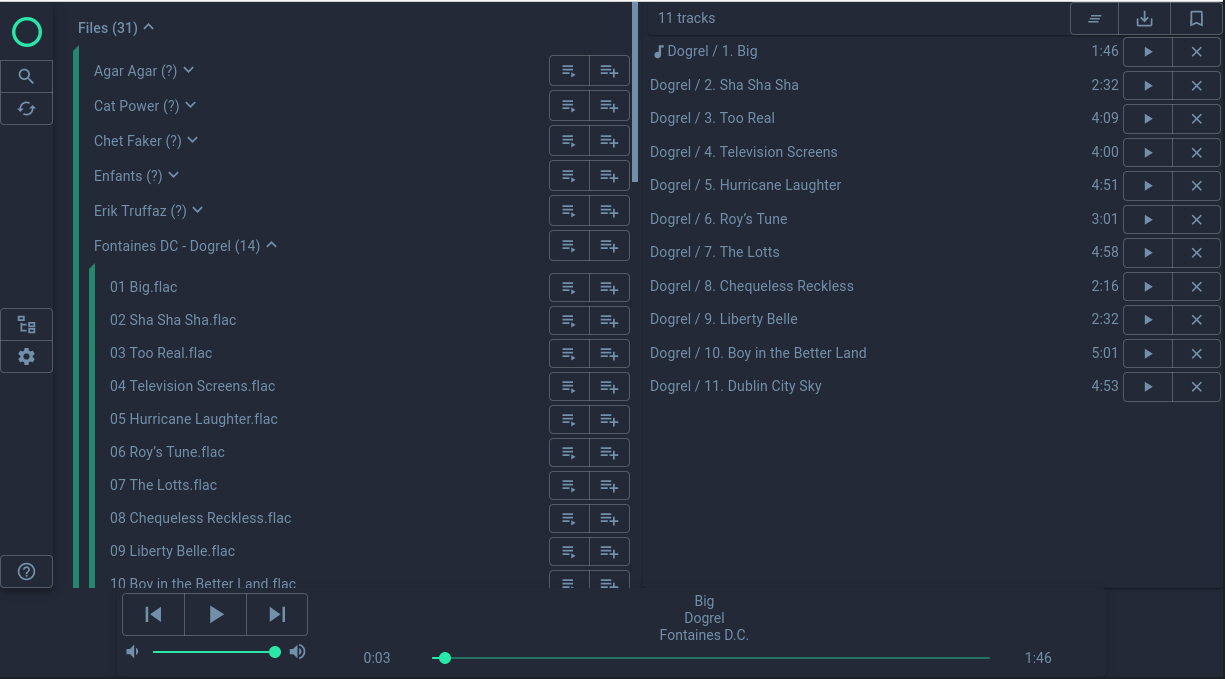
Dual panel library / tracklist
Library / playlists / search results displayed as a single tree view
Reorder tracklist with drag and drop
Uses the bookmarks extension
Configurable hotkeys for playback and volume control
Basic color theming
Both global and per-client configuration
Implementation
Mopidy-Mowecl is written in Javascript, and is built upon React, Redux and Material-ui.
Installation
Depending on your setup, install either by running:
# When mopidy was installed with pip
python3 -m pip install Mopidy-Mowecl
or:
# When mopidy was installed as a package or pip using sudo
sudo python3 -m pip install Mopidy-Mowecl
Configuration
Mowecl can both be configured in-app, and through the mopidy configuration file. Values set in the configuration files will act as default values for the clients, that can then override theme as they wish (clients configuration is stored in the browser data).
Here is are the available settings (and default values) of Mowecl in the Mopidy configuration file:
[mowecl]
enabled = true

# generic config
seek_update_interval = 500
search_history_length = 10
## set to true for touch_screens
disable_dnd = false
small_screen = false

# theme config
## light or dark
theme_type = light
background_color = #fdf6e3
text_color = #002b36
primary_color = #268bd2

# Hotkeys, use web config to find the right parameters
key_play_pause = space+Control
key_next_track = ArrowRight
key_previous_track =
key_rewind_track = ArrowLeft
key_volume_up = ArrowUp
key_volume_down = ArrowDown
Theming
Basic theming is available in the configuration, with the following options:
Background color
Text color
Highlight color
For example, you can use the following settings:
Solarized (light) |
Blueberry (dark) |
|
|---|---|---|
Background color |
#fdf6e3 |
#232937 |
Text color |
#002b36 |
#7390aa |
Highlight color |
#268bd2 |
#27e8a7 |
Building
Mowecl is a React application served by a python app. Building the application thus requires tools from both the javascript and the python ecosystem.
Requirements
The pnpm program
The pdm python package
Steps
From the root of Mowecl directory, running the following commands will build the web application,, and then build the mowecl python package in the dist folder.
cd mowecl_react
pnpm install
pnpm build
cd ..
pdm build
You can then install the built package with pip, e.g.
pip3 install dist/Mopidy_Mowecl-X.X.X-py3-none-any.whl
Development
To run Mowecl in develop mode, do the following:
cd mowecl_react
pnpm install
pnpm dev
Changelog
v0.6.1
Features: - better tidal integration ( artist page, lastfm & musicbrainz data) - add “play shuffled” option for playlists
v0.5.1
Features:
display album image
playback notifications
- Tidal integration:
explore artist
add_to_playlist feature
Fixes:
fix search
misc ui fixes and improvements
v0.5.0
small ui fixes
tracklist item template
some tidal integration (explore given artist) - more to come !
v0.4.3
fix release
v0.4.2
Note: release file on pypi is bugged, do not install this version from pypi !
update javascript dependancies
v0.4.0
Favorites
repeat/single/random playback buttons
Option to disable drag’n drop (usefull for touch screens)
Small screen option (single panel, smaller buttons). Far from perfect but better than nothing.
Many performance optimizations
v0.3.6
Use mopidy-bookmarks extension
Confirm dialog for playlist delete and overwrite
Some UI improvements
v0.3.5
Parse configuration from mopidy
Add uri button
Fix volume increase/decrease
v0.3.4
Configurable hotkeys for playback and volume control
Some performance improvements
v0.3.3
Color theming
v0.3.2
Global hotkeys: space for play/pause
Display track length in tracklist
Light/dark theme
New version notification
v0.3.1
Search history
Highlight of hovered library / tracklist item
Some fixes
v0.2.0
Initial release.
PROJECT resources
Credits
Original author: Mathias Millet
Current maintainer: Mathias Millet
1 maintainer

Metadata
1 maintainer
Release files for Mopidy-Mowecl 0.6.1
For a detailed explanation of source distributions (sdists) and built distributions (wheels), please see the package formats documentation.
Source distribution (sdist)
| File | Size | Uploaded | |
|---|---|---|---|
| mopidy_mowecl-0.6.1.tar.gz | 679.1 kB | Details |
Built distribution (wheel)
| File | Interpreter | ABI | Platform | Reset |
|---|---|---|---|---|
| mopidy_mowecl-0.6.1-py3-none-any.whl | Python 3 | none | any | Details |
Total release size: 1.4 MB
Release files / mopidy_mowecl-0.6.1.tar.gz
| Download URL | mopidy_mowecl-0.6.1.tar.gz |
|---|---|
| Size | 679.1 kB |
| Tags | Source |
|
SHA-256 checksum How to use checksums |
e0ad92882fe7f8acc2044d15a5eedb9a0325bb7317da549e1a5e90d713ab5f0b
|
|
BLAKE2b-256 checksum How to use checksums |
d3a20b22b49eec69ab867a10b9d53a9802698b90c73e44f095bd05e5e031b709
|
| Upload date | |
|
Uploaded using Trusted Publishing? What is trusted publishing? |
Yes |
| Uploaded via |
twine/6.1.0 CPython/3.12.9
|
Provenance
Provenance describes where a file came from. On PyPI, provenance is shared via attestations, which provide a verifiable record of the build or publishing details. View details, limitations and caveats.


PyPI Publish Attestation
PyPI verified that this artifact, at this checksum, originated from the publisher listed below.
Signed by GitHub Actions, verified by PyPI on May 2, 2025.
Transparency logRelease files / mopidy_mowecl-0.6.1-py3-none-any.whl
| Download URL | mopidy_mowecl-0.6.1-py3-none-any.whl |
|---|---|
| Size | 689.9 kB |
| Tags | Python 3 |
|
SHA-256 checksum How to use checksums |
96e6a77390d9c60e12b146d0343d05e415456c968d80d5f934647b4af5a8727e
|
|
BLAKE2b-256 checksum How to use checksums |
f1e44d754632c10b2bab4d2d07ab0c7c373e423fa604f6bbff255af558a368f5
|
| Upload date | |
|
Uploaded using Trusted Publishing? What is trusted publishing? |
Yes |
| Uploaded via |
twine/6.1.0 CPython/3.12.9
|
Provenance
Provenance describes where a file came from. On PyPI, provenance is shared via attestations, which provide a verifiable record of the build or publishing details. View details, limitations and caveats.
PyPI Publish Attestation
PyPI verified that this artifact, at this checksum, originated from the publisher listed below.
Signed by GitHub Actions, verified by PyPI on May 2, 2025.
Transparency log













