
Musculoskeletal environments simulated in MuJoCo

Project description










MyoSuite is a collection of musculoskeletal environments and tasks simulated with the MuJoCo physics engine and wrapped in the OpenAI gym API to enable the application of Machine Learning to bio-mechanic control problems.
Documentation | Tutorials | Task specifications
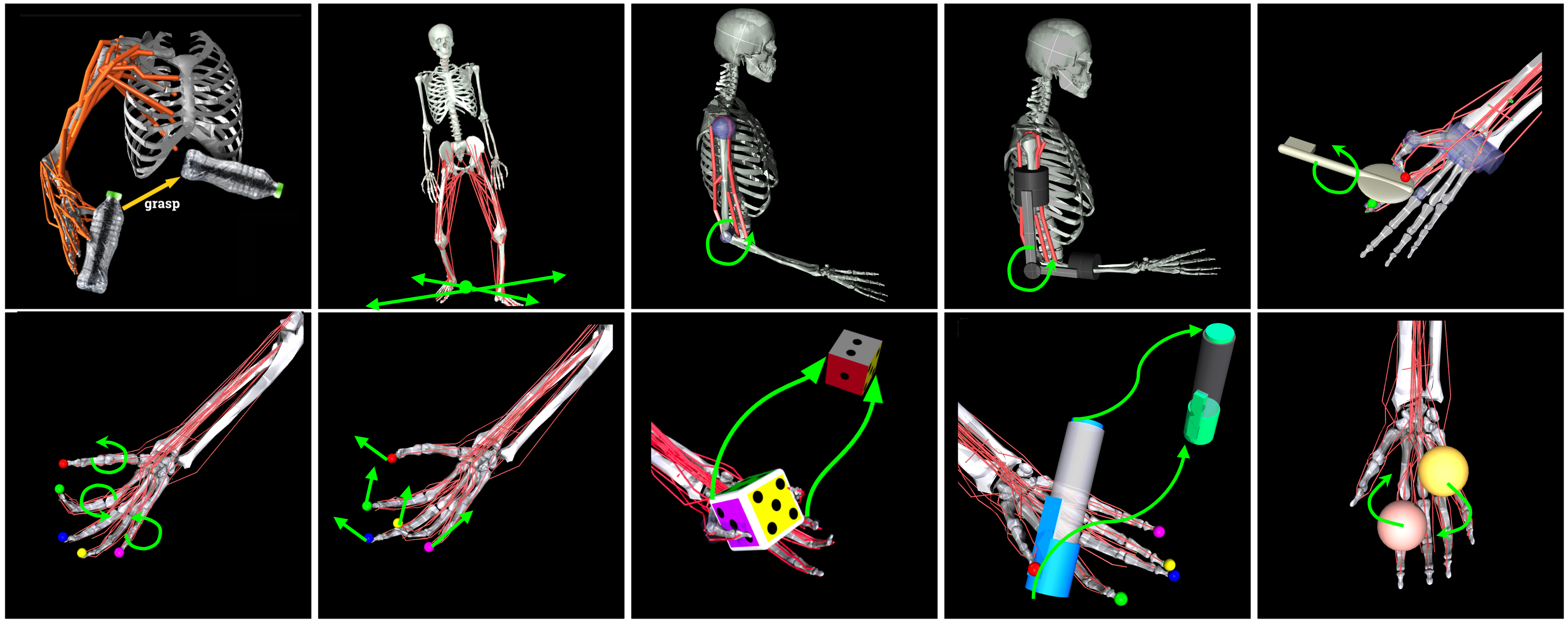
Below is an overview of the tasks in the MyoSuite.
Installations
You will need Python 3.10 or later versions.
Using uv
uv is a fast Python package manager. Install MyoSuite with:
uv sync -p 3.10
Using conda
It is recommended to use Miniconda and to create a separate environment with:
conda create --name myosuite python=3.10
conda activate myosuite
pip install -U myosuite
Using uv (recommended)
For faster installation, you can use uv, a fast Python package installer:
# Install uv (if not already installed)
curl -LsSf https://astral.sh/uv/install.sh | sh

# Create and activate a virtual environment
uv venv
source .venv/bin/activate  # On Windows: .venv\Scripts\activate

# Install MyoSuite
uv pip install -U myosuite
For installation from source with uv:
git clone --recursive https://github.com/myohub/myosuite.git
cd myosuite
uv pip install -e .
For advanced installation options, see here.
Test your installation using the following command (this will return also a list of all the current environments):
# With uv:
uv run python -m myosuite.tests.test_myo

# With pip/conda:
python -m myosuite.tests.test_myo
You can also visualize the environments with random controls using the command below:
# With uv:
uv run python -m myosuite.utils.examine_env --env_name myoElbowPose1D6MRandom-v0

# With pip/conda:
python -m myosuite.utils.examine_env --env_name myoElbowPose1D6MRandom-v0
NOTE: On MacOS, we moved to mujoco native launch_passive which requires that the Python script be run under mjpython:
mjpython -m myosuite.utils.examine_env --env_name myoElbowPose1D6MRandom-v0
It is possible to take advantage of the latest MyoSkeleton. Once added (follow the instructions prompted by uv run myoapi_init or python -m myosuite_init), run:
# With uv:
uv run python -m myosuite.utils.examine_sim -s myosuite/simhive/myo_model/myoskeleton/myoskeleton.xml

# With pip/conda:
python -m myosuite.utils.examine_sim -s myosuite/simhive/myo_model/myoskeleton/myoskeleton.xml
Examples
It is possible to create and interface with MyoSuite environments just like any other OpenAI gym environments. For example, to use the myoElbowPose1D6MRandom-v0 environment, it is possible simply to run:
from myosuite.utils import gym
env = gym.make('myoElbowPose1D6MRandom-v0')
env.reset()
for _ in range(1000):
  env.mj_render()
  env.step(env.action_space.sample()) # take a random action
env.close()
You can find our tutorials on the general features and the ICRA2023 Colab Tutorial
License
MyoSuite is licensed under the Apache License.
Citation
If you find this repository useful in your research, please consider giving a star ⭐ and cite our arXiv paper by using the following BibTeX entrys.
@Misc{MyoSuite2022,
  author =       {Vittorio, Caggiano AND Huawei, Wang AND Guillaume, Durandau AND Massimo, Sartori AND Vikash, Kumar},
  title =        {MyoSuite -- A contact-rich simulation suite for musculoskeletal motor control},
  publisher = {arXiv},
  year = {2022},
  howpublished = {\url{https://github.com/myohub/myosuite}},
  doi = {10.48550/ARXIV.2205.13600},
  url = {https://arxiv.org/abs/2205.13600},
}
Release history Release notifications | RSS feed


Download files
Download the file for your platform. If you're not sure which to choose, learn more about installing packages.
Source Distribution
Built Distribution
Filter files by name, interpreter, ABI, and platform.
If you're not sure about the file name format, learn more about wheel file names.
Copy a direct link to the current filters
File details
Details for the file myosuite-2.12.2.tar.gz.
File metadata
- Download URL: myosuite-2.12.2.tar.gz
- Upload date:
- Size: 90.3 MB
- Tags: Source
- Uploaded using Trusted Publishing? No
- Uploaded via: twine/6.1.0 CPython/3.13.12
File hashes
| Algorithm | Hash digest | |
|---|---|---|
| SHA256 |
51d8eb64c21c5540ca45e210c708f5b572d30f62ef4798eda8c3b3f365c6600d
|
|
| MD5 |
81d583fca23ad5b387591fee4fa9a152
|
|
| BLAKE2b-256 |
6313f1838d955dc8ac44a823f992f79014451d2bb520a93f6a2f3807b884f127
|
File details
Details for the file myosuite-2.12.2-py3-none-any.whl.
File metadata
- Download URL: myosuite-2.12.2-py3-none-any.whl
- Upload date:
- Size: 90.6 MB
- Tags: Python 3
- Uploaded using Trusted Publishing? No
- Uploaded via: twine/6.1.0 CPython/3.13.12
File hashes
| Algorithm | Hash digest | |
|---|---|---|
| SHA256 |
bec0133d9d4ba0249aeccdd7de632eead4749436ffb4e5a3c44a8f9cedafd9ea
|
|
| MD5 |
5891d432f95fd5b38c6a16bc21404fb0
|
|
| BLAKE2b-256 |
b735755f9ba4a593a91f5453473cde0eea256a0092adf1e2eff57a01d8675517
|






