
Network Embedding Experimentation Toolkit - A powerful framework for graph analysis, embedding computation, and machine learning on graph-structured data


Project description
NEExT
Network Embedding Experimentation Toolkit
An open-source Python framework for network science and graph machine learning.





Documentation · Website · Issues
What is NEExT?
NEExT is an experimentation framework for graph and network data. It takes you from a collection of graphs to predictive and scientific results through one pipeline you can inspect and reproduce at every step:
Graphs → Features → Embeddings → Evidence
Load graphs from CSV, pandas, or NetworkX into a unified GraphCollection; compute
structural node features (or write your own in plain Python); turn them into graph-level
embeddings with Wasserstein/Sinkhorn optimal transport or a GNN; then train classifiers
or regressors and read feature importance to see which structure drives the result. It's
built on the standard scientific Python stack — NumPy, pandas, scikit-learn, XGBoost,
NetworkX, iGraph — and works the same in a script, a notebook, or the Workbench.
There are two ways to use NEExT:
- The Library — a lightweight Python package for scripting and notebook workflows.
- The Workbench — a local, desktop-style GUI over the same NEExT workflows, with
versioned artifacts and job tracking. It runs entirely on your machine (
127.0.0.1, no accounts, no uploads) and is MCP-native, so an agent like Claude can drive it.
Installation
pip install NEExT
Optional extras:
pip install "NEExT[gnn]"            # Graph Neural Network embeddings (pure PyTorch)
pip install "NEExT[workbench-mcp]"  # local Workbench + MCP integration
See the docs for the full list of extras.
Quick start
from NEExT import NEExT

nxt = NEExT()

# Load a collection of graphs from CSV
graph_collection = nxt.read_from_csv(
    edges_path="edges.csv",
    node_graph_mapping_path="node_graph_mapping.csv",
    graph_label_path="graph_labels.csv",
)

# Features → Embeddings → Evidence
features = nxt.compute_node_features(graph_collection, feature_list=["all"])
embeddings = nxt.compute_graph_embeddings(
    graph_collection, features, embedding_algorithm="approx_wasserstein"
)
results = nxt.train_ml_model(graph_collection, embeddings, model_type="classifier")
Custom features, GNN embeddings, large-graph sampling, feature importance, and the full API are covered in the documentation.
The Workbench
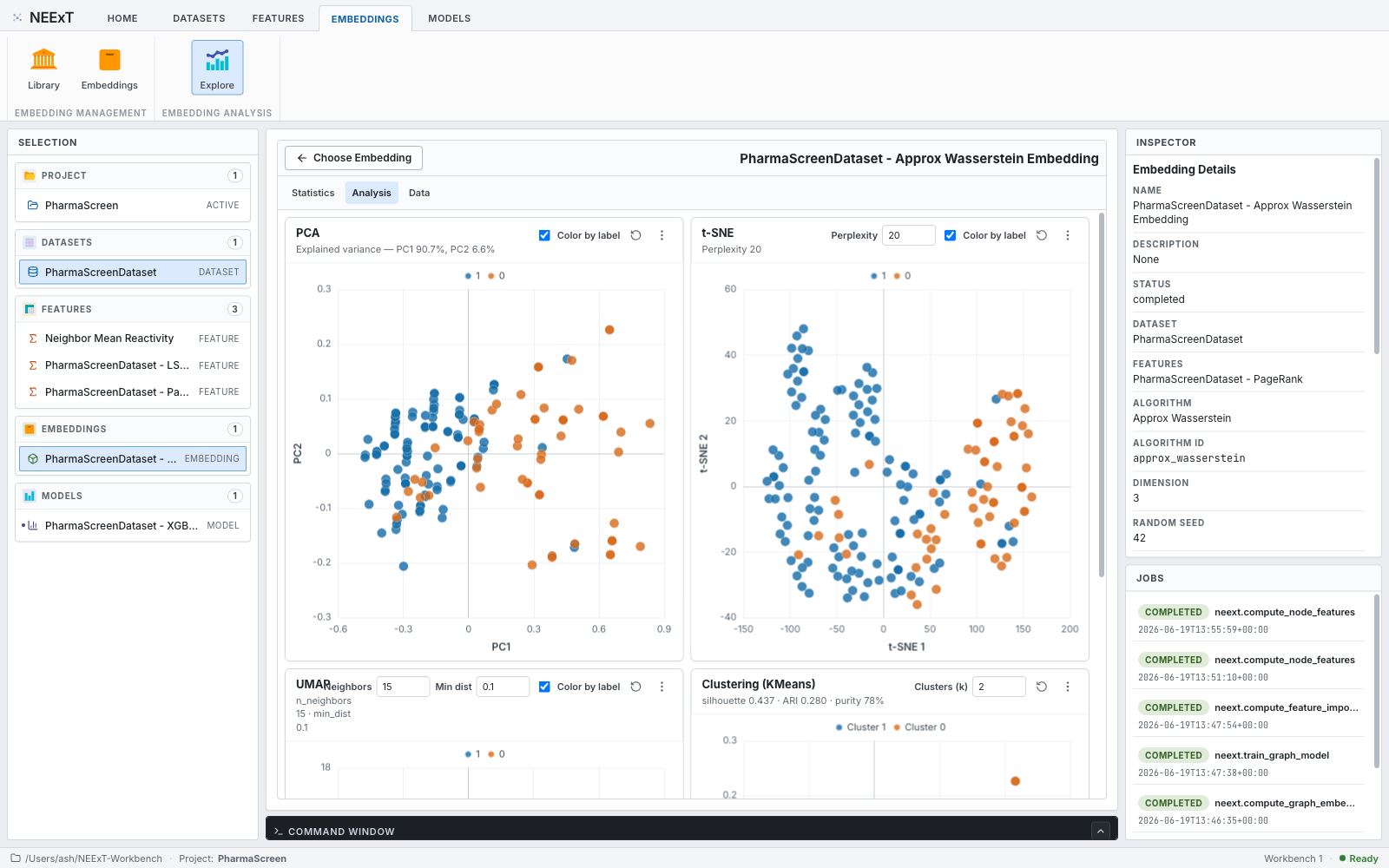
The NEExT Workbench is a local, single-user FastAPI + React application that exposes the NEExT workflows — datasets, features, embeddings, models, and analysis — as a desktop-style UI. Everything stays on your machine, and it speaks MCP, so you can drive the whole pipeline from an MCP client.
neext-workbench          # installed package
make neext-workbench     # from a development checkout
Then open http://127.0.0.1:8765. Projects are stored under ~/NEExT-Workbench by
default (override with NEEXT_WORKBENCH_HOME or neext-workbench --workspace <path>).
The full Workbench tour, including MCP client setup, lives in the
documentation.
Learn more
- 📚 Documentation — guides, API reference, and the Workbench tour: neext.app/docs
- 🌐 Website — neext.app
- 🐛 Issues & support — github.com/ashdehghan/NEExT/issues
Citing NEExT
If you use NEExT in your research, please cite it. The primary, open-access reference is the arXiv paper:
@article{dehghan2025neext,
  title   = {Network Embedding Exploration Tool (NEExT)},
  author  = {Dehghan, Ashkan and Pra{\l}at, Pawe{\l} and Th{\'e}berge, Fran{\c{c}}ois},
  journal = {arXiv preprint arXiv:2503.15853},
  year    = {2025},
  url     = {https://arxiv.org/abs/2503.15853}
}
A peer-reviewed version appeared at the 19th Workshop on Algorithms and Models for the Web Graph (WAW 2024):
@inproceedings{dehghan2024neext,
  title     = {Network Embedding Exploration Tool (NEExT)},
  author    = {Dehghan, Ashkan and Pra{\l}at, Pawe{\l} and Th{\'e}berge, Fran{\c{c}}ois},
  booktitle = {Modelling and Mining Networks (WAW 2024)},
  series    = {Lecture Notes in Computer Science},
  pages     = {65--79},
  year      = {2024},
  publisher = {Springer},
  doi       = {10.1007/978-3-031-59205-8_5}
}
- 📄 arXiv (open access): arxiv.org/abs/2503.15853
- 📄 Springer (peer-reviewed): doi.org/10.1007/978-3-031-59205-8_5
Acknowledgements
NEExT is created, maintained, and owned by Ashkan Dehghan. The NEExT paper is co-authored with Paweł Prałat and François Théberge. Thanks to the contributors who have helped build NEExT, including Kamil Kulesza and Lourens Touwen.
The community-aware βstar feature is based on Kamiński, Prałat, Théberge, and Zając, "Predicting Properties of Nodes via Community-Aware Features" (arXiv:2311.04730, doi:10.1007/s13278-024-01281-2).
License
NEExT is released under the MIT License. Created and maintained by Ashkan Dehghan.
Release history Release notifications | RSS feed


Download files
Download the file for your platform. If you're not sure which to choose, learn more about installing packages.
Source Distribution
Built Distribution
Filter files by name, interpreter, ABI, and platform.
If you're not sure about the file name format, learn more about wheel file names.
Copy a direct link to the current filters
File details
Details for the file neext-0.3.5.tar.gz.
File metadata
- Download URL: neext-0.3.5.tar.gz
- Upload date:
- Size: 686.1 kB
- Tags: Source
- Uploaded using Trusted Publishing? No
- Uploaded via: uv/0.8.15
File hashes
| Algorithm | Hash digest | |
|---|---|---|
| SHA256 |
0505def106a01f88a0bea9a2c8ebfb2a6bdfeb4f477618a9fa59ab78d7b6fa87
|
|
| MD5 |
3d1389512a2ef2b51198622ba504c08f
|
|
| BLAKE2b-256 |
973ae4c920b689751d40aa38d2d67fdc2dab8d21d029383df266027a53953bc8
|
File details
Details for the file neext-0.3.5-py3-none-any.whl.
File metadata
- Download URL: neext-0.3.5-py3-none-any.whl
- Upload date:
- Size: 666.8 kB
- Tags: Python 3
- Uploaded using Trusted Publishing? No
- Uploaded via: uv/0.8.15
File hashes
| Algorithm | Hash digest | |
|---|---|---|
| SHA256 |
e4bf6c1051d85c3feb091dfcf59ba71c19bd22305bb6f7bfe29c9c4a7dac70d0
|
|
| MD5 |
c850932e1b90f2a7fce87ef3d34144df
|
|
| BLAKE2b-256 |
9891c93844580edcce1692fa5b286e3f939231db3d7d06bcc4f483d593ca2631
|






