
Estimates atom counts in monometallic nanoparticles given radius and contact angle

Project description
Treating a supported nanoparticle as a spherical cap, NanoparticleAtomCounter rapidly estimates the number of Total, Surface, Perimeter, and Interfacial atoms (see below). Only two inputs are mandatory: the radius and contact angle, readily obtainable from Transmission Electron Microscopy (TEM) images.
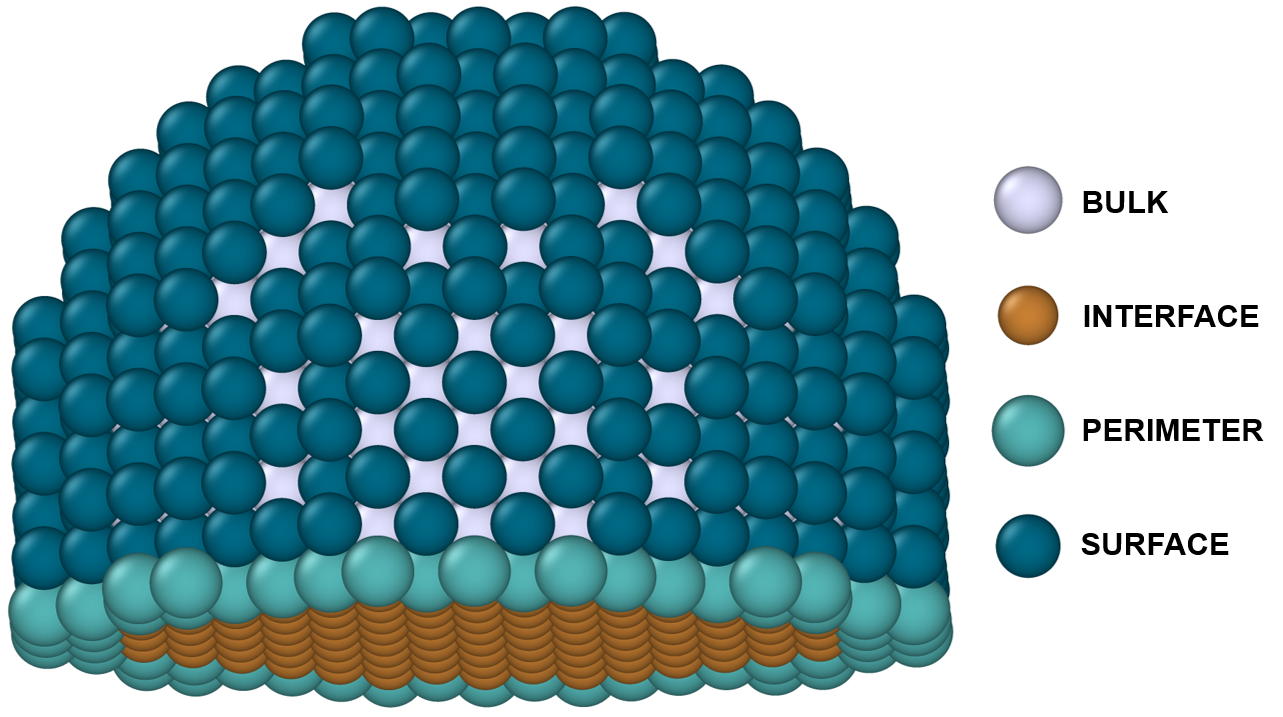
Can be used on the web app or on a command line.
Requirements
numpy>=1.20,<2.3
pandas>=1.4
streamlit>=1.4,<2
openpyxl>=3.1.0
xlrd>=2.0.1
For testing, these are also required
pytest>=8,<9
ascii-colors
For benchmarking, these are also required
ase>=3.22.0,<3.25
tqdm<=4.67.1
joblib<=1.5.1
Installation
First create and activate a new environment:
mamba create --name env_name "python>=3.10,<3.15"
mamba activate env_name
To install the latest version:
pip install NanoparticleAtomCounter
Alternatively:
git clone https://github.com/szilvasi-group/NanoparticleAtomCounter.git
cd NanoparticleAtomCounter/
pip install -e .
To be able to run tests:
pip install NanoparticleAtomCounter[test]
To be able to run benchmarks along with tests:
pip install NanoparticleAtomCounter[benchmark]
Usage
1) Prepare your input CSV
Upload a .csv with these headers:
r (A), R (A), Theta, Element, Interface Facet, Surface Facet
Definitions:
r (A) = footprint radius (in Angstrom); R (A) = radius of curvature (in Angstrom)
r vs R
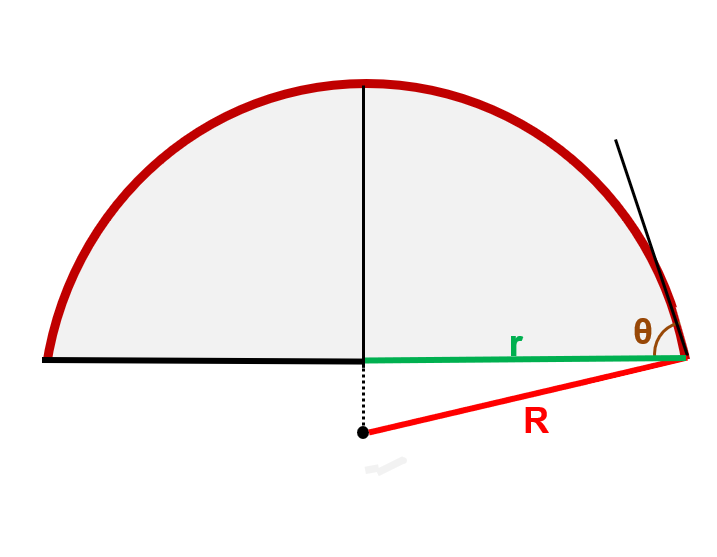
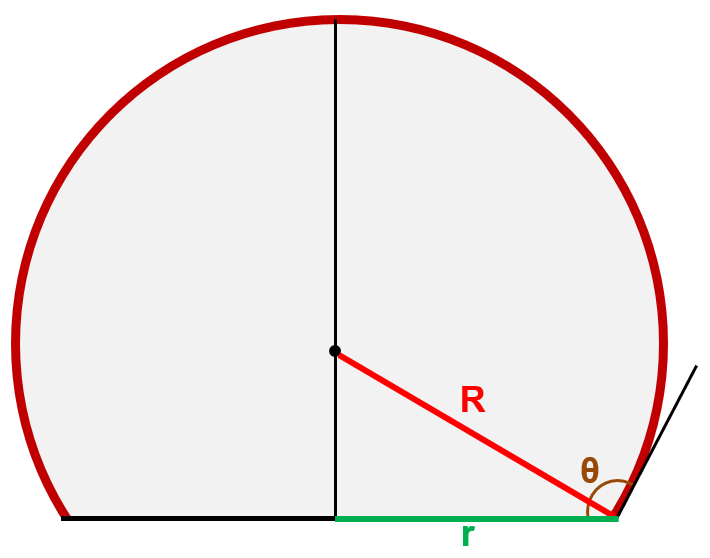
Provide either r (A) or R (A) (if both are present, R (A) is ignored).
Theta = contact angle (in degrees)
Element = chemical symbol of the element that comprises the nanoparticle, e.g. Cr
- Interface Facet and Surface Facet are OPTIONAL; leave blank if unknown.
Interface Facet = facet at the nanoparticle-support interface, e.g. (1,1,1)
Surface Facet = dominant facet at the nanoparticle-gas/vacuum interface, e.g. (1,0,0)
Here’s a sample input file
2) Use the web app
Upload your input file and download the output.
OR
2) Use the command line
nanoparticle-atom-count -i input_file.csv -o output_file.csv
Testing
If you have it installed with the tests, then run the following test and please let me know if there are any errors:
atom-count-test
If you have it installed with the benchmarks, then run the following and please let me know if there are any errors:
atom-count-benchmark
Contact
Any problems or questions?
Email me at giolajide@crimson.ua.edu
Or raise an issue right here


Download files
Download the file for your platform. If you're not sure which to choose, learn more about installing packages.
Source Distribution
Built Distribution
Filter files by name, interpreter, ABI, and platform.
If you're not sure about the file name format, learn more about wheel file names.
Copy a direct link to the current filters
File details
Details for the file nanoparticleatomcounter-0.1.6.tar.gz.
File metadata
- Download URL: nanoparticleatomcounter-0.1.6.tar.gz
- Upload date:
- Size: 51.8 kB
- Tags: Source
- Uploaded using Trusted Publishing? No
- Uploaded via: twine/6.2.0 CPython/3.9.18
File hashes
| Algorithm | Hash digest | |
|---|---|---|
| SHA256 |
051756ffac5ba69aa2a44ee1553adf135e7f4729cb6e606ebacf003bb99d3ba4
|
|
| MD5 |
565556a2e4cce81343363d13f07f4a0d
|
|
| BLAKE2b-256 |
25bc725cf347edf44f770375d5829c981946a7c6684029c7feaef2d7e3f538d3
|
File details
Details for the file nanoparticleatomcounter-0.1.6-py3-none-any.whl.
File metadata
- Download URL: nanoparticleatomcounter-0.1.6-py3-none-any.whl
- Upload date:
- Size: 56.2 kB
- Tags: Python 3
- Uploaded using Trusted Publishing? No
- Uploaded via: twine/6.2.0 CPython/3.9.18
File hashes
| Algorithm | Hash digest | |
|---|---|---|
| SHA256 |
f57f00b61dc7610fc9fc21404a3f12b0fa1d7a4d2813ff4dd670acee35dc9b9b
|
|
| MD5 |
3975ac0e73ab252a765c6a92f2181fb8
|
|
| BLAKE2b-256 |
cfa4c70377d1c62683fb1b3891d32804cc1b9b0287fb8f14857458110052adba
|






