
PYPI package creation written by NexR-qc

Project description
NexR_qc

요구사항
- python >= 3.7
- numpy
- pandas
- openpyxl
설치
pip 설치
#!/bin/bash
pip install NexR_qc
디렉토리 기본 구성
- documents 하위 항목(테이블정의서, 컬럼정의서, 코드정의서)은 필수 항목은 아니지만, 테이블별 정확한 정보를 얻기위해서 작성되는 문서임 (Github 링크의 document 폴더 내 문서 양식 참고)
- log, output 폴더는 초기에 생성되어 있지않아도 수행 결과로 자동 생성됨
- config.json 파일은 데이터 내 결측값을 커스텀하기 위한 파일로 초기에 생성되어 있지않아도 수행 결과로 자동 생성됨 (결측처리 default 값: "?", "na", "null", "Null", "NULL", " ", "[NULL]")
.
├── data/ (optional)
│   ├── 데이터_001.csv
│   ├── 데이터_002.csv
│   ├── 데이터_003.xlsx
│   ├── ...
├── documents/
│   ├── 테이블정의서.xlsx
│   ├── 컬럼정의서.xlsx
│   └── 코드정의서.xlsx
├── log/
│   ├── QualityCheck_yyyymmdd_hhmmss.log
│   ├── ...
├── output/
│   └── QC결과서_yyyymmdd_hhmmss.xlsx
└── config.json
예제 실행
#!bin/usr/python3
from NexR_qc.QualityCheck import *

# 데이터 불러오기 (데이터 파일 활용 시)
PathDict = {}
PathDict["ROOT"] = os.getcwd()
PathDict["DATA"] = os.path.join(PathDict["ROOT"], "data")  # 데이터 파일이 있는 디렉토리 경로

# 데이터 불러오기 (DB 활용시)
# DB에 적재된 데이터를 데이터프레임 형태로 불러와 하단 DataDict 형태에 맞게 준비

DataDict = {}  # DataDict: 데이터명(key)-데이터프레임(value)로 이루어짐
for path in [i for i in os.listdir(PathDict["DATA"]) if not i.startswith(".")]:
    data_name = os.path.splitext(os.path.basename(path))[0].upper()
    DataDict[data_name] = pd.read_csv(os.path.join(PathDict["DATA"], path))

Process = QualityCheck(DataDict)
Process.data_check()
Process.document_check()
Process.na_check()
Process.run()
Process.save()
Input / Output 정보
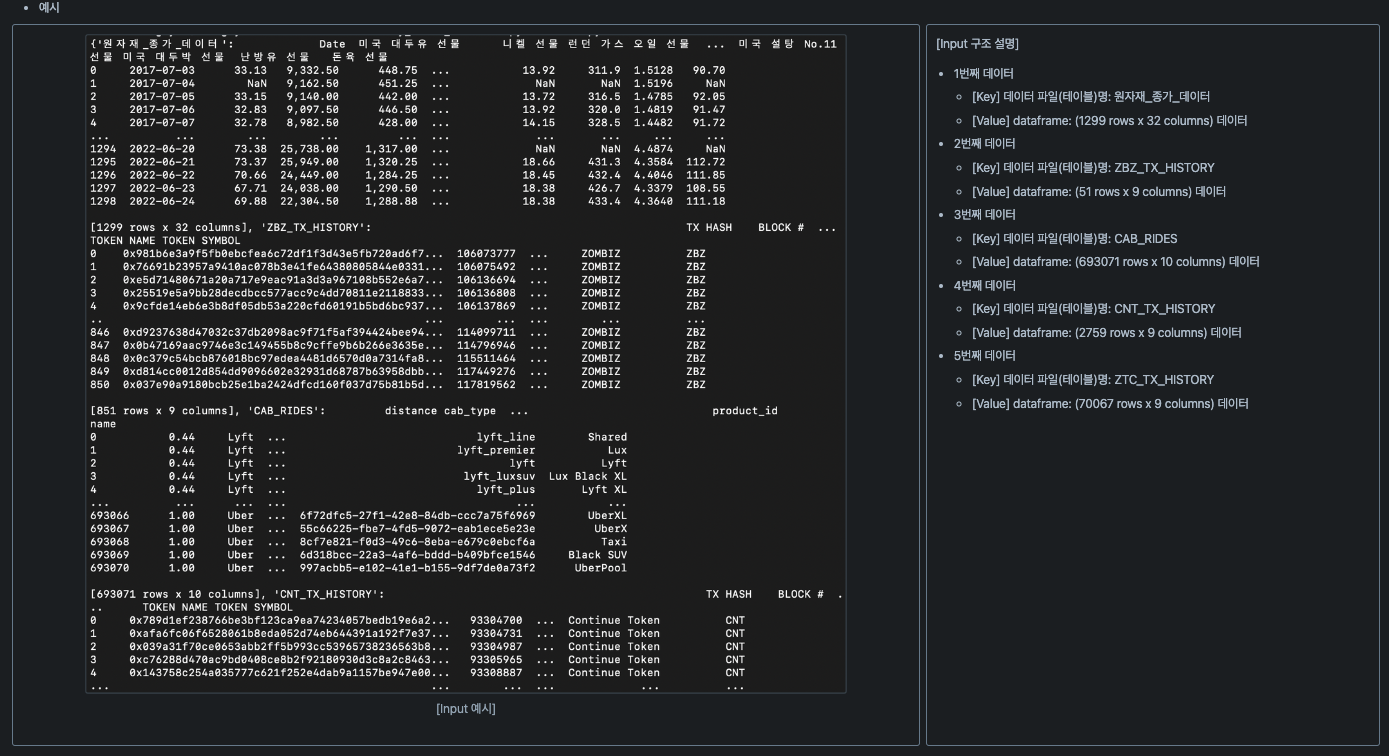
Input
- 데이터 타입: Dictionary 형태
- 상세 형상: {data_name1: Dataframe1, data_name2: Dataframe2,…}
- data_name: 데이터 테이블명 or 데이터 파일명
- Dataframe: 데이터를 불러온 Dataframe 형상
- 상세 형상: {data_name1: Dataframe1, data_name2: Dataframe2,…}
- 예시
Output
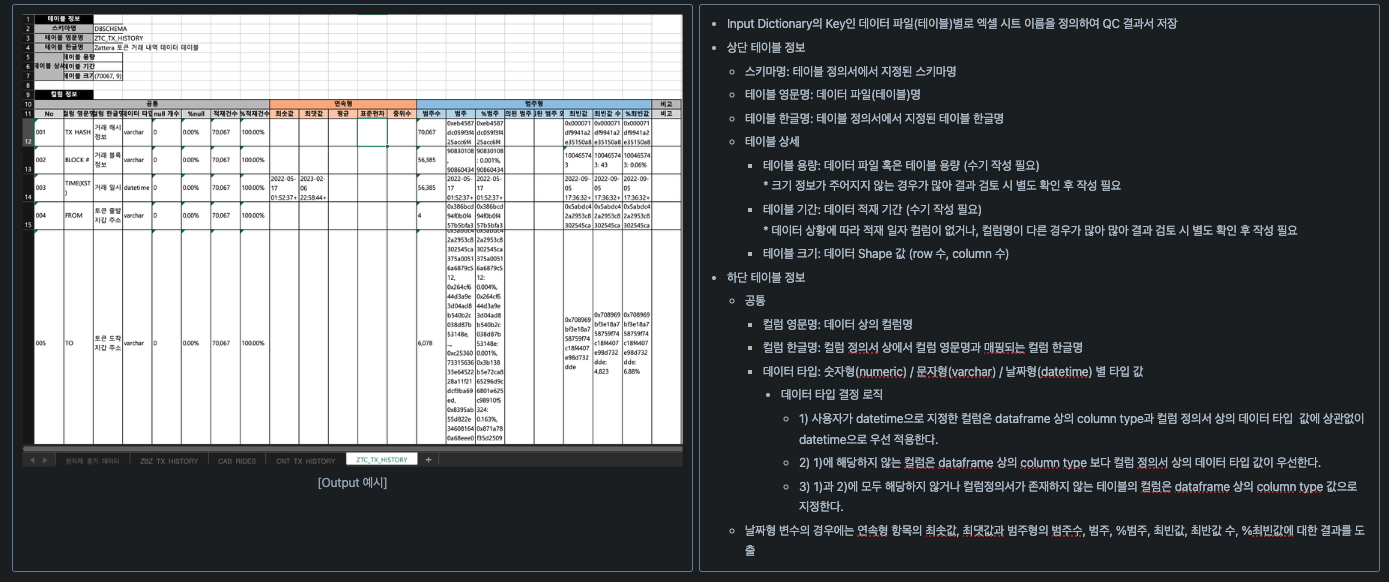
- 결과 파일 경로: output/QC_결과서.xlsx
- 예시
-
예시 1: 테이블 리스트 시트
-
예시 2: 데이터 별 QC 수행 결과 시트

Release history Release notifications | RSS feed


Download files
Download the file for your platform. If you're not sure which to choose, learn more about installing packages.
Source Distribution
NexR_qc-0.0.10.tar.gz
(10.5 kB
view details)
Built Distribution
Filter files by name, interpreter, ABI, and platform.
If you're not sure about the file name format, learn more about wheel file names.
Copy a direct link to the current filters
NexR_qc-0.0.10-py3-none-any.whl
(12.6 kB
view details)
File details
Details for the file NexR_qc-0.0.10.tar.gz.
File metadata
- Download URL: NexR_qc-0.0.10.tar.gz
- Upload date:
- Size: 10.5 kB
- Tags: Source
- Uploaded using Trusted Publishing? No
- Uploaded via: twine/5.0.0 CPython/3.9.6
File hashes
| Algorithm | Hash digest | |
|---|---|---|
| SHA256 |
b068e954d7ea1c0996d6d012347b7dd4452535847bf89dc32ee88a8d9259ccf2
|
|
| MD5 |
c7b0f2553cfc265971002858c765722b
|
|
| BLAKE2b-256 |
1afd3b4d4f5995e493277500a46548acf8a6e4bdb6aa01ed54c876fec04d6050
|
File details
Details for the file NexR_qc-0.0.10-py3-none-any.whl.
File metadata
- Download URL: NexR_qc-0.0.10-py3-none-any.whl
- Upload date:
- Size: 12.6 kB
- Tags: Python 3
- Uploaded using Trusted Publishing? No
- Uploaded via: twine/5.0.0 CPython/3.9.6
File hashes
| Algorithm | Hash digest | |
|---|---|---|
| SHA256 |
686f4d036e594ec0645321bfdac85f870d30280b73c82dae9e5c2e1b19a29d3d
|
|
| MD5 |
f3ca95911876b74e885fff6ac2346fb2
|
|
| BLAKE2b-256 |
85b36659077d59276f95105d8c4b5a4ab2c7b33942c2ca27f12b6eb57bde7699
|






