
OSpRad
An open source, low cost, high sensitivity spectroradiometer built around the Hamamatsu C12880MA. Covers roughly 310 to 880 nm at about 9 to 12 nm resolution, with tested sensitivity down to ~0.001 cd/m² (radiance) and ~0.005 lx (irradiance).
A heavily modified fork of OSpRad: housing STL files, Arduino Nano firmware, and an app for Windows, macOS, Linux and Android. Free software under GPL 3.0, without warranty of any kind.
Get the app
Download from the releases:
| File | Platform |
|---|---|
OSpRad-<version>-windows-x64.exe |
Windows |
OSpRad-<version>-macos-arm64.zip / -macos-x86_64.zip |
macOS, Apple Silicon / Intel (unsigned: right click → Open the first time) |
OSpRad-<version>-linux-x86_64.AppImage |
Linux (chmod +x, then run; .tar.gz without FUSE) |
OSpRad-<version>-android-arm64.apk |
Android (sideload) |
Or pip install osprad, or from a checkout: pip install -r app/requirements.txt
then python app/OSpRad.py.
On Windows the Nano's USB serial chip (CH340 or FTDI) may need a driver. On Linux, add
yourself to the group owning the port (dialout, or uucp on Arch) and log in again.
Use the app
Plug the OSpRad in over USB and launch the app. It has four sections: Measure, History, Calibrate and More (monitor calibration, updates, settings, log, about). The chip in the header ("Unit 1") opens the connection panel.
Measure has three modes, one open at a time: Measurement for a single radiance or irradiance reading, Continuous mode for a live plot (nothing is saved), and Automatic repeat to save a reading every N seconds. Continuous mode fixes the exposure so it can reuse the dark reference, and re measures the dark every 30 s as the sensor warms; Hold dark reference skips that, for demonstrations only, as readings then drift too high and cannot be saved.
App and firmware must share a major version (1.x). Readings are saved to data.csv
next to the app (in a per user folder for pip installs and on macOS).
Build one
Parts
- Hamamatsu C12880MA
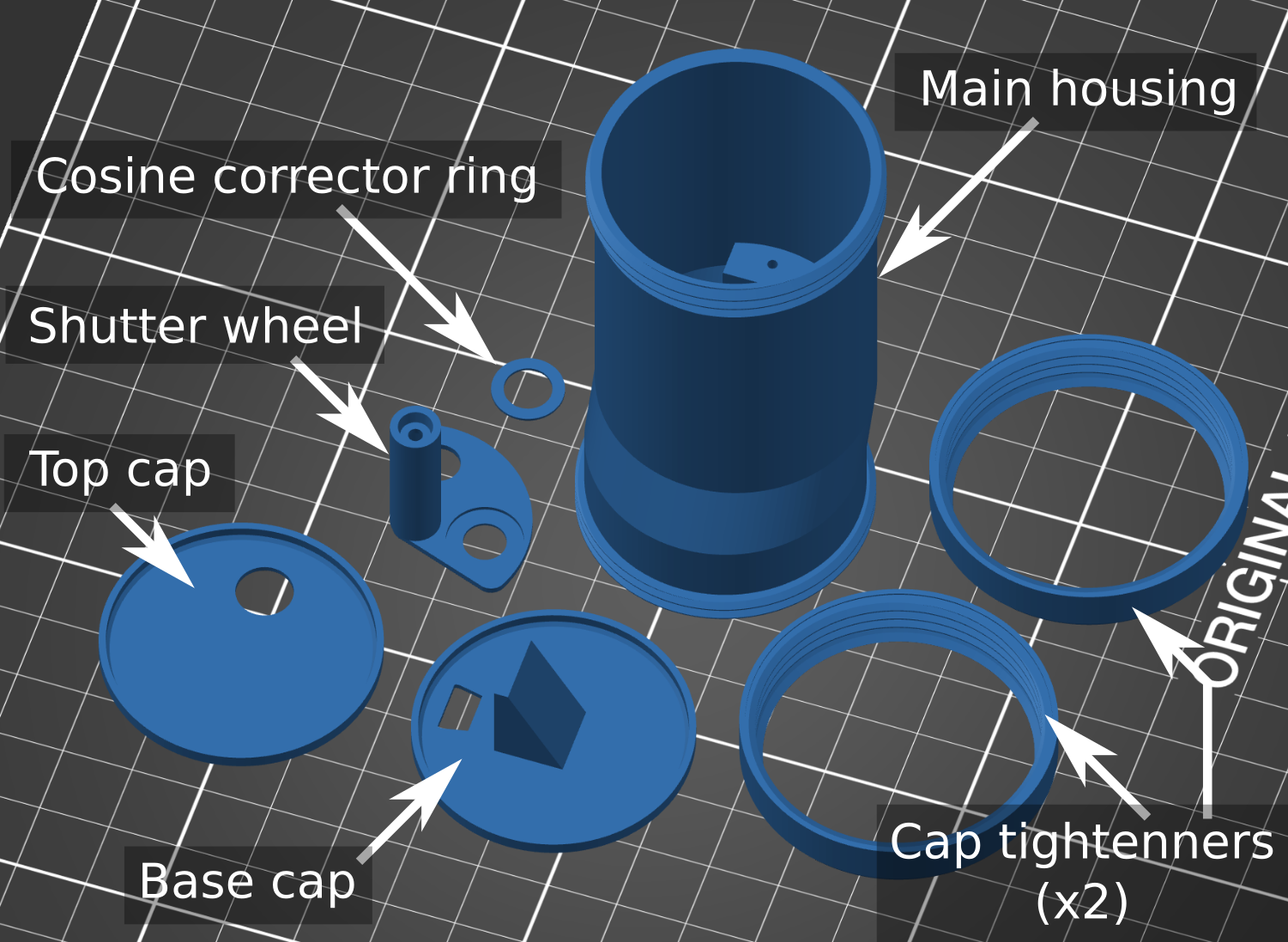
- 3D printed housing (black PLA or ABS; not PET, which is IR transparent)
- Arduino Nano
- Cosine corrector: 8 mm diameter, 0.5 mm thick virgin PTFE, sanded circularly with 180 grit, fixed with UV curing glue
- Digital micro servo (Savox SH 0256 recommended)
- A short USB cable (USB C to USB A female + USB A to mini USB works on a phone)
- Thin wire (lengths stripped from an old Ethernet cable are ideal)
- Optional: a fused silica cover slip or UV transmitting PMMA disk for protection
Print and assemble
The printed parts need filing for a snug fit. File the shutter wheel shaft smooth and round, open the housing hole with a round file until the shaft turns without play, and warm the shaft end to press fit it onto the servo.
Wire it up
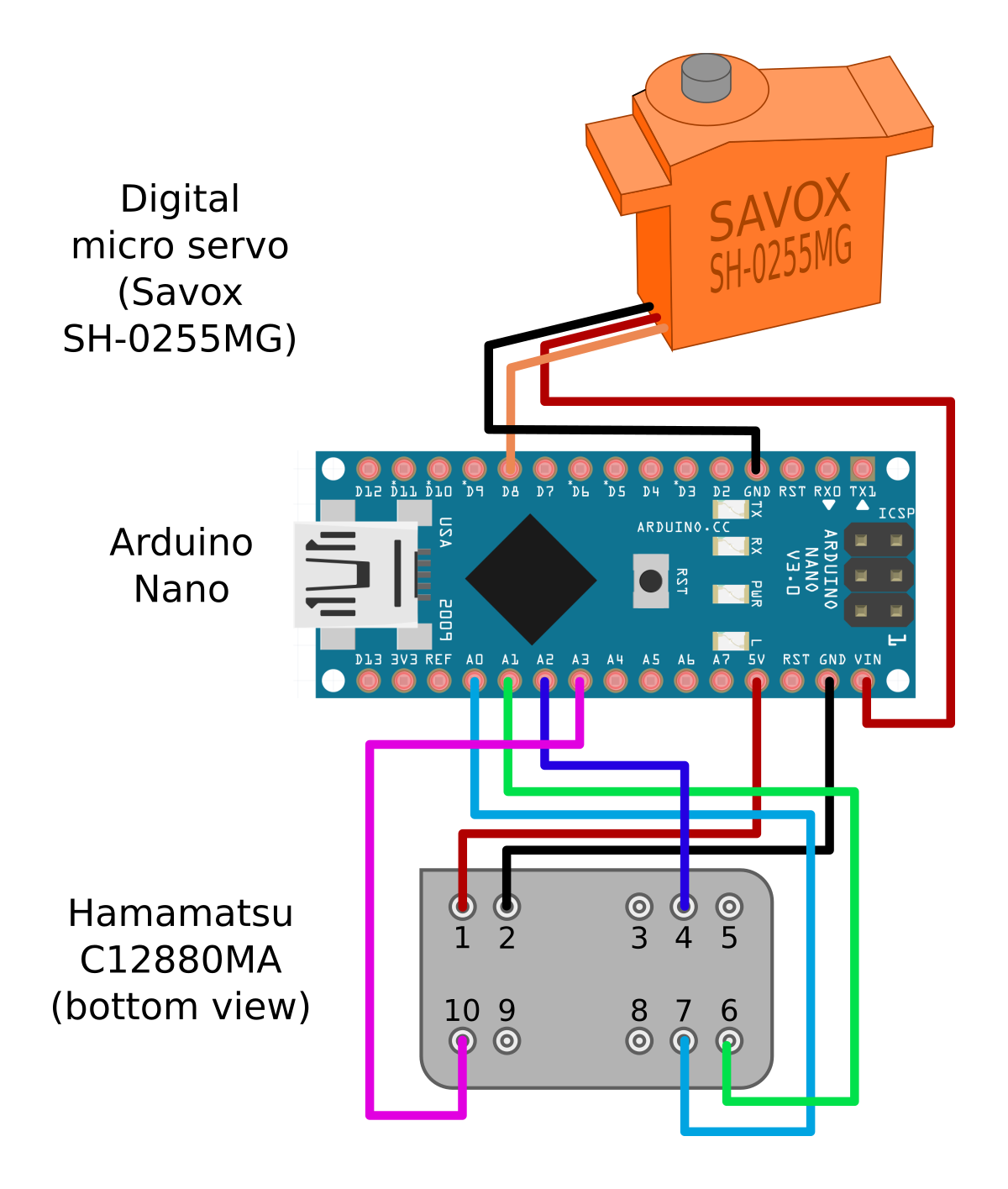
Use separate 5 V supplies for the servo and the sensor: the VIN pin's protective diode leaves it just under what the sensor needs. Keep the video wire short and away from the clock wires.
Flash the firmware
In the app, More → Updates → Flash writes the firmware it was released with, on
any platform; the Arduino IDE works too (firmware/OSpRad_firmware/). The unit number
and wheel positions live in EEPROM, so reflashing keeps them. Updates also checks
GitHub for new app and firmware versions, can flash a .hex file of your own, and
replaces the AppImage or .exe in place.
Calibrate it
Every C12880MA differs: by several nm in wavelength and by tens of percent in sensitivity. Calibrate walks through it once per unit, in order:
- Unit & wheel. A new unit reports number 1, which is the calibration the app ships, so give yours another number and Save to unit. Then set the shutter wheel: move it to 90 degrees, refit it on the servo as close to closed as possible, and press Set as Dark, Set as Irradiance and Set as Radiance as each position lines up.
- Wavelength. Hamamatsu measures every sensor and lists its coefficients A0 to B5
on a Final Inspection Sheet, on the CD-ROM in the sensor's box (folder
C12880MA_<order number>, fileC12880MA FINAL INSPECTION SHEET_....xlsx). Load inspection sheet... and pick it, or type the six numbers as printed. Check its serial number matches the one on your sensor; if the sheet is lost, ask the seller or Hamamatsu for it. A unit without calibration starts one here; its sensitivity and linearisation are placeholders until steps 3 and 4. - Linearisation. Point it at a steady, non flickering light (daylight on a white wall, or a halogen bulb; most LED and fluorescent lights flicker) and run it.
- Spectral sensitivity, for radiance and irradiance. Best: measure a steady lamp with a calibrated spectroradiometer and with the OSpRad, and load the reference spectrum. Otherwise rescale to a known reading (a lux meter), which corrects the overall level only.
- Cosine response checks the irradiance diffuser against angle.
- Import & export backs a unit's whole calibration up as one file.
Calibration is stored in calibration_data.csv, rows keyed by unit number. The app
ships unit 1, the maintainers' unit: its wavelengths are its own (its inspection sheet
is in docs/, names and serial removed), its sensitivity and linearisation are
still placeholders from the original author's unit. The sensor's manual is in
docs/ too.
Measuring well
- Let it warm up a few minutes before calibrating or measuring dim scenes: sensitivity and dark current change with temperature.
- Avoid saturation, which clips the peak and reads too low. The shortest exposure is 1 ms; for the sun or a bare lamp up close, use a neutral density filter.
- Resolution is 9 to 15 nm: narrower lines read that wide, with a lower peak.
- Range is 340 to 850 nm. Window glass blocks most UV.
- Dim scenes have a floor of about ±0.03 cd/m² at 1 s exposures; longer exposures lower it.
Calibrate a monitor
More → Monitor calibration steps a fullscreen patch through black and a ladder of
levels for red, green and blue, measuring each (radiance mode, pointed at the screen),
and Export for Psychtoolbox... writes a PsychCal .mat file for
cal = LoadCalFile(...). Work in a dark room; the black screen is subtracted as
Psychtoolbox does.
License and credits
GNU General Public License v3.0 (see LICENSE), no warranty of any kind. Original
OSpRad by Jolyon Troscianko, 2022 (troscianko/OSpRad);
forked and heavily modified in 2026.
If you use OSpRad in published work, please cite: Troscianko, J. (2023) OSpRad: an open-source, low-cost, high-sensitivity spectroradiometer. Journal of Experimental Biology. https://doi.org/10.1242/jeb.245416
1 maintainer

Metadata
1 maintainer
Release files for OSpRad 1.3.0
For a detailed explanation of source distributions (sdists) and built distributions (wheels), please see the package formats documentation.
Source distribution (sdist)
| File | Size | Uploaded | Provenance | Actions |
|---|---|---|---|---|
| osprad-1.3.0.tar.gz | 672.8 kB | With provenance | Details for osprad-1.3.0.tar.gz |
Built distribution (wheel)
| File | Interpreter | ABI | Platform | Actions Reset |
|---|---|---|---|---|
| osprad-1.3.0-py3-none-any.whl | Python 3 | none | any | Details for osprad-1.3.0-py3-none-any.whl |
Total release size: 1.4 MB
Release files / osprad-1.3.0.tar.gz
| Download URL | osprad-1.3.0.tar.gz |
|---|---|
| Size | 672.8 kB |
| Tags | Source |
|
SHA-256 checksum How to use checksums |
5574dde413f697b284ee5a23d5c733104ea21490f4cc1f341ecf421960337855
|
|
BLAKE2b-256 checksum How to use checksums |
761e6b7946a0532aee88654349d1a84fa4847b5a0496b3d5c761515067ed2525
|
| Upload date | |
|
Uploaded using Trusted Publishing? What is trusted publishing? |
Yes |
| Uploaded via |
twine/7.0.0 CPython/3.13.14
|
Provenance
Provenance describes where a file came from. On PyPI, provenance is shared via attestations, which provide a verifiable record of the build or publishing details. View details, limitations and caveats.


PyPI Publish Attestation
PyPI verified that this artifact, at this checksum, originated from the publisher listed below.
Signed by GitHub Actions, verified by PyPI on Oct 2, 2026.
Transparency logRelease files / osprad-1.3.0-py3-none-any.whl
| Download URL | osprad-1.3.0-py3-none-any.whl |
|---|---|
| Size | 680.8 kB |
| Tags | Python 3 |
|
SHA-256 checksum How to use checksums |
708bf18f07eb5d79030fefa142b24df4d256875b66f4c8cb9329b6a03762f570
|
|
BLAKE2b-256 checksum How to use checksums |
6d2a7a2cd03e5877c6bd6a5ee6bb0a214a2386158686dec72dd6ca3e220015dc
|
| Upload date | |
|
Uploaded using Trusted Publishing? What is trusted publishing? |
Yes |
| Uploaded via |
twine/7.0.0 CPython/3.13.14
|
Provenance
Provenance describes where a file came from. On PyPI, provenance is shared via attestations, which provide a verifiable record of the build or publishing details. View details, limitations and caveats.
PyPI Publish Attestation
PyPI verified that this artifact, at this checksum, originated from the publisher listed below.
Signed by GitHub Actions, verified by PyPI on Oct 2, 2026.
Transparency logSecurity for OSpRad 1.3.0
Provenance
Provenance describes where a file came from. On PyPI, provenance is shared via attestations, which provide a verifiable record of the build or publishing details. View details, limitations and caveats.
Full provenance
All 2 files in this release have been uploaded with provenance metadata.
Attestation for osprad-1.3.0.tar.gz
PyPI Publish Attestation
PyPI verified that this artifact, at this checksum, originated from the publisher listed below.
Signed by GitHub Actions, verified by PyPI on Oct 2, 2026.
Transparency logA note on package security
PyPI is a repository for distributing packages, not a service for auditing them. While third-party security researchers and our staff do their best to detect and remove malicious packages, PyPI cannot guarantee the quality, security or suitability of any given package.
To learn more about protecting yourself from malicious actors, visit our package security documentation.














