
Onya is a knowledge graph data model and expression format, with a Python implementation. This repository combines the data model and format spec with the Python implementation. Onya grew out of a long-standing observation from the RDF community: the triple is too expressively weak in practice. Quads and named graphs are insufficient RDF-based workarounds; property graphs solve it for relationships but abandon the web: no IRIs, no shared vocabularies, no dereferenceability.
Onya takes annotatable, first-class relationships from the property graph world and keeps what RDF got right: IRIs throughout, and vocabulary reuse (schema.org works out of the box). Its key structural idea is recursive assertion: every edge and property can itself carry edges and properties, uniformly, with no RDF-style reification ceremony. Qualified values, relationship metadata, and n-ary relations work well through the same mechanism.
The Onya Literate format is Markdown-native, so easy for humans to write, and easy for LLMs to emit and consume, which makes Onya a natural interchange for LLMOps (extracted knowledge, agent context and more).
Note: Using our provided onya-graph.SKILL.md with your favorite AI coding agent is a good way to automate Onya authoring and explore the format. Try providing a text document and asking it to generate a graph therefrom.
The model in thirty seconds
Here's a complete, valid knowledge graph, first visualized:
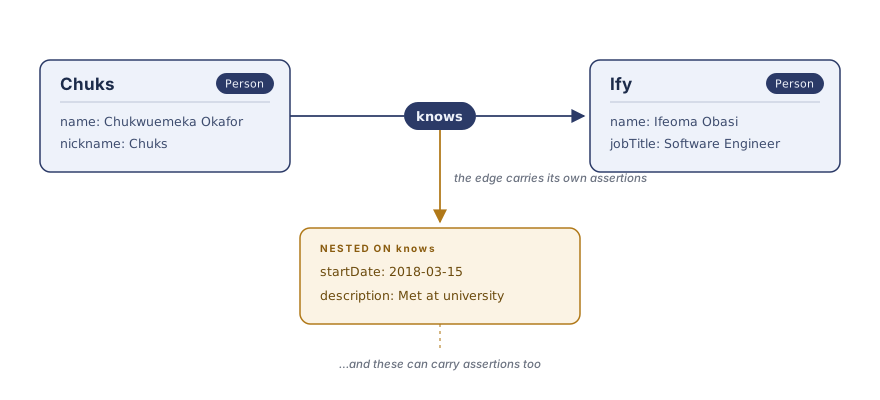
Then in Onya Literate format:
# @docheader

* @document: http://example.org/friendship-graph
* @nodebase: http://example.org/people/
* @schema: https://schema.org/

# Chuks [Person]

* name: Chukwuemeka Okafor
* knows -> Ify
  * startDate: 2018-03-15
  * description: Met at university

# Ify [Person]

* name: Ifeoma Obasi
* jobTitle: Software Engineer
Notice how the knows edge carries its
own assertions: a start date and a description of the relationship itself.
No reification ceremony, no separate "edge properties" mechanism with its own
rules. Every edge and every property can carry further edges and properties,
recursively, through one uniform mechanism. Node IDs resolve against
@nodebase; bare labels and types resolve against @schema, so schema.org
(or any vocabulary) works out of the box.
How Onya relates to its conceptual neighbors
| RDF 1.1 | RDF 1.2 / RDF-star | Property graphs (Neo4j, GQL) | Onya | |
|---|---|---|---|---|
| Identifiers | IRIs | IRIs | Opaque internal IDs | IRIs throughout |
| Shared vocabularies (e.g. schema.org) | Native | Native | Ad hoc strings | Native |
| Metadata on relationships | Reification ceremony | Triple terms | Edge properties | Nested assertions |
| Metadata on property values | Reification ceremony | Awkward | Not expressible | Same nested assertions |
| Edges from a property/edge | No | No | No | Yes — the mechanism is uniform |
| Assertion identity | Statements are types (set semantics) | Contested (type vs. occurrence) | Edges are instances | Assertions are instances |
| Blank nodes | Yes | Yes | — | None |
| Value types in core | XSD literal system | XSD literal system | Implementation-defined | Strings; data contracts layered above (@as) |
| Human-writable serialization | Turtle | Turtle-star | None standard | Markdown-native |
| Query orientation | SPARQL (aggregate/pattern) | SPARQL-star | Cypher/GQL (path-first) | Traversal API; path language planned |
Two rows carry the heart of the distinction. Onya assertions are occurrences
by construction — each edge or property is an instance, sidestepping the
type-versus-occurrence ambiguity that complicated RDF-star standardization.
And the mechanism is uniform all the way down: a property value can carry
edges (a temperature with a measurementMethod link), which has no clean
analogue in either the RDF or property-graph lineage.
Values are strings, with data contracts layered above
Every Onya value is a string, and the string layer is unconditionally valid:
birthDate: spring 1958 is welcome exactly as written. Onya deliberately has
no built-in type system — in the XSD/OWL lineage, types describe how computers
store things, not what the things are, and data models built on them end up
rejecting true statements that don't fit the machinery.
Instead, an author may attach an interpretation: a recorded promise about
how a value is meant to be read, declared inline with @as or once per
property label in the docheader. Contracts are honored at boundaries, on
demand — never enforced ambiently by the model:
from onya.graph import graph
from onya.serial.literate import LiterateParser
from onya import interp

onya_text = '''
# @docheader

* @document: http://example.org/people-graph
* @nodebase: http://example.org/people/
* @schema: https://schema.org/
* @interpretations:
    * age: number

# Chuks [Person]

* age: 28
* birthDate: spring 1958
  * @as: datetime
'''

g = graph()
LiterateParser().parse(onya_text, g)
chuks = g['http://example.org/people/Chuks']

age = next(chuks.getprop('https://schema.org/age'))
age.value               # '28' — the model always stores the string
interp.value_of(age)    # 28 — the contract, honored where you ask

report = interp.validate(g)
report.ok               # False: 'spring 1958' fails its datetime contract —
print(report)           # a reported finding, never a parse error or rejection
An interpretation your software doesn't recognize is data, not an error: it
parses, merges, and round-trips untouched. The built-in starter set (number,
integer, datetime, boolean, iri, text) is deliberately modest, and the plugin
registry lets any community define its own. If you're arriving from data
engineering, note that this is the value-level slice of "data contract":
what a graph should look like is the separate shapes
layer, and ownership and SLAs would be further layers, deliberately not these.
The design rationale is in
doc/design-interpretations-strings-vs-typing.md.
Python quick start


Requires Python 3.12 or later. The package is still in active development, so you can install directly from source:
git clone https://github.com/OoriData/Onya.git
cd Onya
pip install -U .
The base install is dependency-light. Optional extras pull in peripherals only when you need
them: pip install "onya[nx]" for the networkx projection (analytics) and
pip install "onya[postgres]" for the PostgreSQL store backend.
Parse a small graph in Onya Literate format, then work with it, including adding assertions on an edge:
from onya.graph import graph
from onya.serial.literate import LiterateParser, write

onya_text = '''
# @docheader

* @document: http://example.org/friendship-graph
* @nodebase: http://example.org/people/
* @schema: https://schema.org/

# Chuks [Person]

* name: Chukwuemeka Okafor

# Ify [Person]

* name: Ifeoma Obasi
'''

g = graph()
LiterateParser().parse(onya_text, g)

chuks = g['http://example.org/people/Chuks']
ify = g['http://example.org/people/Ify']

# Edges are first-class: they can carry their own assertions
friendship = chuks.add_edge('https://schema.org/knows', ify)
friendship.add_property('https://schema.org/startDate', '2018-03-15')

# Traverse, reading nested assertions along the way
for edge in chuks.traverse('https://schema.org/knows'):
    for name in edge.target.getprop('https://schema.org/name'):
        print(f'Chuks knows: {name.value}')
    for since in edge.getprop('https://schema.org/startDate'):
        print(f'  Friends since: {since.value}')

# Round-trip back to Onya Literate
write(g)
Finding the node a user means
Label arguments take a full IRI, a CURIE, or a bare @schema name, resolved against the
prefixes the parsed document declared (g.prefixes; an undeclared prefix raises rather than
guessing). g.search() is a ranked, typo-tolerant lookup by property value, and g.inbound()
answers "what points here?" from a reverse index instead of a scan:
chuks.any_prop_value('name')             # -> 'Chukwuemeka Okafor' (same as 'schema:name')
chuks.values('telephone')                # -> all values, as a sorted list
chuks.one('name')                        # -> the value, or None; CardinalityError if several

hits = g.search('chukwuemka', types=['Person'])   # tiers: exact > prefix > word > fuzzy
hits[0].node_id, hits[0].tier, hits[0].score      # ranked list; ambiguity is the caller's call

[e.origin.id for e in g.inbound(ify, label='knows')]   # -> ['http://example.org/people/Chuks']
Once you've found the node, onya.view turns "show me this thing" into data — which
fields, in what order, which links to follow (outbound, inbound, or edges on the link itself),
and what to show of each — leaving the rendering to you:
from onya import view

specs = view.load([{'type': 'Person', 'fields': ['name'],
                    'follow': [{'edge': 'knows', 'show': ['name']}]}])
view.project(g, chuks, specs)
# {'id': '.../Chuks', 'type': 'Person', 'title': 'Chukwuemeka Okafor',
#  'fields': [('name', 'Chukwuemeka Okafor')],
#  'knows': [{'id': '.../Ify', 'title': 'Ifeoma Obasi', 'fields': [('name', 'Ifeoma Obasi')]}]}
# (Each item still carries a deprecated 'label' copy of 'title';
#  pass legacy_label=False to drop it.)
Stores offer the same lookup without loading a graph (await store.search(name, 'chukwuemka', labels=[...]), store.nodes_by_type(name, type_iri)); PostgreSQL serves it from a pg_trgm
trigram index. await view.project_from_store(store, name, node_id, specs)
fetches just the neighborhood a view needs, so "search → project" is a handful of small queries.
Shapes: what should a graph look like?
A shape says what a class of node is expected to carry. Shapes are ordinary nodes in the same document: # Person [@Class] declares a class, and # name [@Property] declares a property label, with @appliesTo (which class), @as (how to read its values), @cardinality (1, 0..1, 1..*, n..m), @range (which class an edge points to) and @oneOf (a closed set). The label's declaration node has the label's own IRI as its id.
# Person [@Class]

# name [@Property]
* @appliesTo -> Person
* @as: text
* @cardinality: 1

# status [@Property]
* @appliesTo -> Person
* @oneOf: active
* @oneOf: closed
from onya.shape import validate

for f in validate(g).findings:       # shapes in g itself, or validate(g, shapes=other_graph)
    print(f.severity, f.kind, f.node, f.label, f.detail)    # e.g. error cardinality ... has 0, declared 1
Shapes only report: they never infer a type or change a value, and nothing runs until you ask (onya validate kg/ --shapes=shapes/). To check a proposed change before merging it, validate(fragment, against=base) resolves the fragment's types and cardinality through the base graph. Other layers read the same declarations, which is why the next section needs no column list. See doc/design-shapes.md.
Ordered values and the content digest
Assertions are a set, so a label's values have no order. When sequence is the point (address lines, authors, steps), declare the label with * @ordered: author in the docheader, and the parser numbers the values from document order: n.ordered_values('author'). See doc/design-ordering.md.
onya.digest.digest(g) hashes what a graph says, so it is equal for one file or three, in any order, with any prefixes, and after a store round trip, and different if any value, target, interpretation or id changes. node_digests(g) finds which nodes changed between two versions. See doc/design-digest.md.
Persistence
onya.store keeps graphs across sessions and processes. It is a peripheral, not
an organ: the core model never imports it, and a store is correct exactly when
a round trip through it is indistinguishable from an in-memory graph union —
put(merge=True) unions with any stored graph under the SPEC merge rules. Three
backends ship, all behind one async protocol and selected by URL scheme:
import asyncio
from onya.store import connect
from onya.serial.literate import read

r = read(open('test/resource/schemaorg/thingsfallapart.onya'))
g, name = r.graph, r.doc_iri

async def main():
    # Filesystem — one Onya Literate file per graph; the default, and the testing fake.
    async with await connect('file:/tmp/onya-graphs') as store:
        await store.put(name, g)                 # merge=True by default
        again = await store.get(name)            # -> onya.graph.graph
        print([str(n) async for n in store.names()])

    # SQLite — stdlib, zero added dependencies; also an AssertionStore.
    async with await connect('sqlite:/tmp/onya.db') as store:
        await store.put(name, g)
        async for origin, rel, target, ann in store.match(name, 'http://example.org/classics/CAchebe'):
            print(origin, rel, target)

    # PostgreSQL — pip install "onya[postgres]"; SQL/PGQ property graphs on PG >= 19.
    async with await connect('postgresql://user:pass@localhost/onya') as store:
        await store.put(name, g)

asyncio.run(main())
connect(url, max_size=3) passes options to asyncpg for a pooler with a connection cap, PostgresStore.from_pool(pool) builds a store on a pool you already have, and await store.version(name) is a cheap token a cache can compare to see whether a graph changed.
A blocking facade (from onya.store.sync import connect) mirrors the API with
with/plain calls for scripts and REPL use. Design and schema details are in
doc/design-persistence-architecture.md.
Circumstances: facts held in tables
What a thing is belongs in the graph; what is true of it right now and in volume (a GPA, a fee, readings) belongs in a traditional DB table. onya.circum keeps the two connected. A property's shape can also declare where its values live, and the graph can be projected into those tables, shown with the table values filled in, or used to write new values back:
# gpa [@Property]
* @appliesTo -> Student
* @as: number
* @circumQuery -> students-db

# students-db [@Sidecar]
* @table: student
gpa is an ordinary shape plus one line, @circumQuery, saying its values are held in the students-db sidecar (here a table) rather than in the graph.
from onya.circum import Registry, augment, emit, from_shapes, materialize, strip, table_resolvers, table_writers

p = from_shapes(g, 'https://example.org/Student')   # the tables, derived from the graph's shapes
await materialize(conn, p, g)                        # project the graph into them

reg = Registry()
reg.resolvers.update(table_resolvers(p))             # read and write the tables just built
reg.writers.update(table_writers(p))
view = await augment(g, registry=reg, conn=conn)     # a new graph, with table values marked @method / @asOf
await emit(g, ['https://example.org/dede'], registry=reg, conn=conn)   # a node's table values: graph -> table
A property with a value per period (compensation by quarter, say) adds @qualifier -> period to its declaration, and the qualifier becomes the table's key. See Ledgers.
A view is never stored, strip(view) gets the original graph back exactly, and Redis, MongoDB or any other store plugs in with a resolver you write. Walkthrough: doc/python-tutorial.md; design: doc/design-circum.md.
Visualize / export
The CLI converts Onya Literate (.onya) files to diagram formats:
onya convert test/resource/schemaorg/thingsfallapart.onya > out.mmd        # Mermaid (default)
onya convert test/resource/schemaorg/thingsfallapart.onya --dot > out.dot  # Graphviz DOT
View Mermaid output instantly at mermaid.live, producing e.g.:

networkx projection + analytics round trip
For graph analytics, onya.viz.nx (extras-gated: pip install "onya[nx]") projects a graph
into a networkx.MultiDiGraph, and write_back records results — centrality, community, any
networkx output — back into the Onya graph as typed, merge-safe assertions. The projection is
lossy by design (first-level structure) and reflects the graph as-is; call g.merge() first
for a normalized view.
import networkx
from onya.viz import nx
from onya.terms import ONYA_INTERP

mg = nx.to_networkx(g)                                          # -> networkx.MultiDiGraph
scores = networkx.betweenness_centrality(mg)
nx.write_back(g, 'https://example.org/betweenness', scores, interp=ONYA_INTERP('number'))
# scores are now first-class Onya assertions: queryable via g.select, merge-safe on store.put
See demo/nx_analytics/ for a runnable end-to-end example.
For the full API walkthrough — modifying and removing properties, querying by type, data contracts and validation, explicit graph merge, the serializer modules and their options — see doc/python-tutorial.md.
Acknowledgments
 |
Onya is primarily developed by the crew at Oori Data. We offer LLMOps, data pipelines and software engineering services around AI/LLM applications. |
Background
Onya is based on experience from developing Versa and also working on the MicroXML spec and implementations thereof.
The URL used for metavocabulary is managed via purl.org.
The name is from Igbo "ọ́nyà", web, snare, trap, and by extension, network. The expanded sense is ọ́nyà úchè, web of knowledge.
Contributing
Contributions welcome! We're interested in feedback from the community about what works and what doesn't in real-world usage. To get help with the code implementation, read CONTRIBUTING.md.
License
- Code (Python library): Apache 2.0 - See LICENSE
- Specification (SPEC.md): Creative Commons Attribution 4.0 International (CC BY 4.0) - See LICENSE-spec
The specification is under CC BY 4.0 to encourage broad adoption and derivative work while ensuring attribution. We want the format itself to be as open and reusable as possible, allowing anyone to create implementations in any language or adapt the format for their specific needs.
Related Work
- networkx: Network Analysis in Python — Onya bridges to it directly via
onya.viz.nx(projection + analytics write-back) - Apache AGE: PostgreSQL Extension for graphs. ANSI SQL & openCypher over the same DB.


Release files for Onya 0.6.2
For a detailed explanation of source distributions (sdists) and built distributions (wheels), please see the package formats documentation.
Source distribution (sdist)
| File | Size | Uploaded | Provenance | Actions |
|---|---|---|---|---|
| onya-0.6.2.tar.gz | 489.8 kB | With provenance | Details for onya-0.6.2.tar.gz |
Built distribution (wheel)
| File | Interpreter | ABI | Platform | Actions Reset |
|---|---|---|---|---|
| onya-0.6.2-py3-none-any.whl | Python 3 | none | any | Details for onya-0.6.2-py3-none-any.whl |
Total release size: 687.1 kB
Release files / onya-0.6.2.tar.gz
| Download URL | onya-0.6.2.tar.gz |
|---|---|
| Size | 489.8 kB |
| Tags | Source |
|
SHA-256 checksum How to use checksums |
6fccb762480858f2286f0baa2fa593060469404747ea3f0026f6cbe889254d01
|
|
BLAKE2b-256 checksum How to use checksums |
a422d05f9eb8c2f5d2b65a4eeb73c856825fa4c96e7929ba986e22f72bb6e317
|
| Upload date | |
|
Uploaded using Trusted Publishing? What is trusted publishing? |
Yes |
| Uploaded via |
twine/7.0.0 CPython/3.13.16
|
Provenance
Provenance describes where a file came from. On PyPI, provenance is shared via attestations, which provide a verifiable record of the build or publishing details. View details, limitations and caveats.


PyPI Publish Attestation
PyPI verified that this artifact, at this checksum, originated from the publisher listed below.
Signed by GitHub Actions, verified by PyPI on Nov 11, 2026.
Transparency logRelease files / onya-0.6.2-py3-none-any.whl
| Download URL | onya-0.6.2-py3-none-any.whl |
|---|---|
| Size | 197.3 kB |
| Tags | Python 3 |
|
SHA-256 checksum How to use checksums |
20d67ff92558a9fb972f9955a2988412e70b2ea36f9d2bf466c11dcaee472f01
|
|
BLAKE2b-256 checksum How to use checksums |
0df827ebc3eef5a723a158174f0920df09688f58dc78858051d48fc2b92b1e13
|
| Upload date | |
|
Uploaded using Trusted Publishing? What is trusted publishing? |
Yes |
| Uploaded via |
twine/7.0.0 CPython/3.13.16
|
Provenance
Provenance describes where a file came from. On PyPI, provenance is shared via attestations, which provide a verifiable record of the build or publishing details. View details, limitations and caveats.
PyPI Publish Attestation
PyPI verified that this artifact, at this checksum, originated from the publisher listed below.
Signed by GitHub Actions, verified by PyPI on Nov 11, 2026.
Transparency logSecurity for Onya 0.6.2
Provenance
Provenance describes where a file came from. On PyPI, provenance is shared via attestations, which provide a verifiable record of the build or publishing details. View details, limitations and caveats.
Full provenance
Both files in this release have been uploaded with provenance metadata.
Attestation for onya-0.6.2.tar.gz
PyPI Publish Attestation
PyPI verified that this artifact, at this checksum, originated from the publisher listed below.
Signed by GitHub Actions, verified by PyPI on Nov 11, 2026.
Transparency logA note on package security
PyPI is a repository for distributing packages, not a service for auditing them. While third-party security researchers and our staff do their best to detect and remove malicious packages, PyPI cannot guarantee the quality, security or suitability of any given package.
To learn more about protecting yourself from malicious actors, visit our package security documentation.














