
OpenMiChroM








Documentation | Install | Tutorials | Forum
Overview
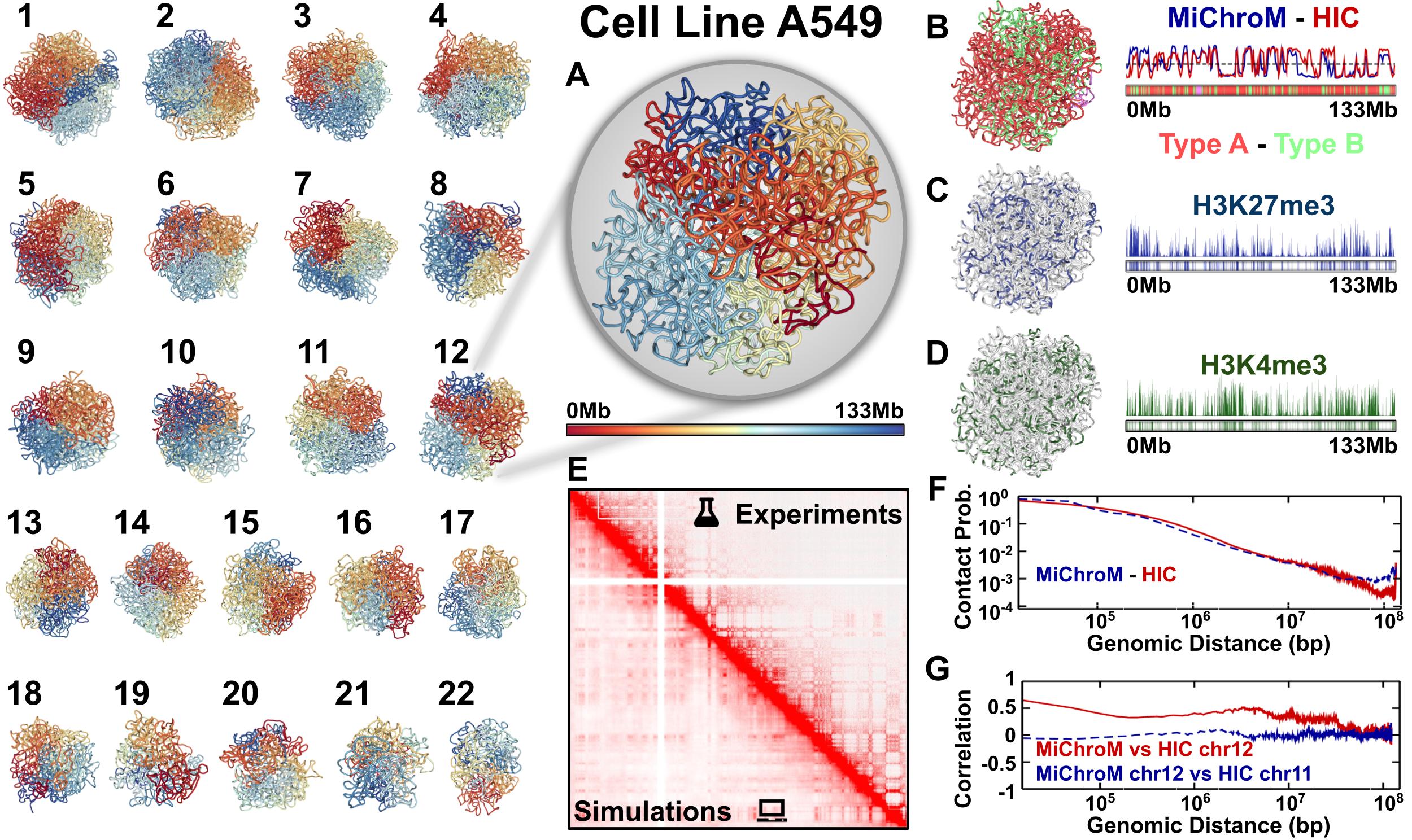
OpenMiChroM is a Python library for performing chromatin dynamics simulations and analyses. OpenMiChroM uses the OpenMM Python API employing the MiChroM (Minimal Chromatin Model) energy function. The chromatin dynamics simulations generate an ensemble of 3D chromosomal structures that are consistent with experimental Hi-C maps. OpenMiChroM also allows simulations of a single or multiple chromosome chain using High-Performance Computing in different platforms (GPUs and CPUs). It is a highly flexible framework that can be extended for chromatin modeling and simulations of different species across the tree of life, as well as more general cases of biomolecule simulations.
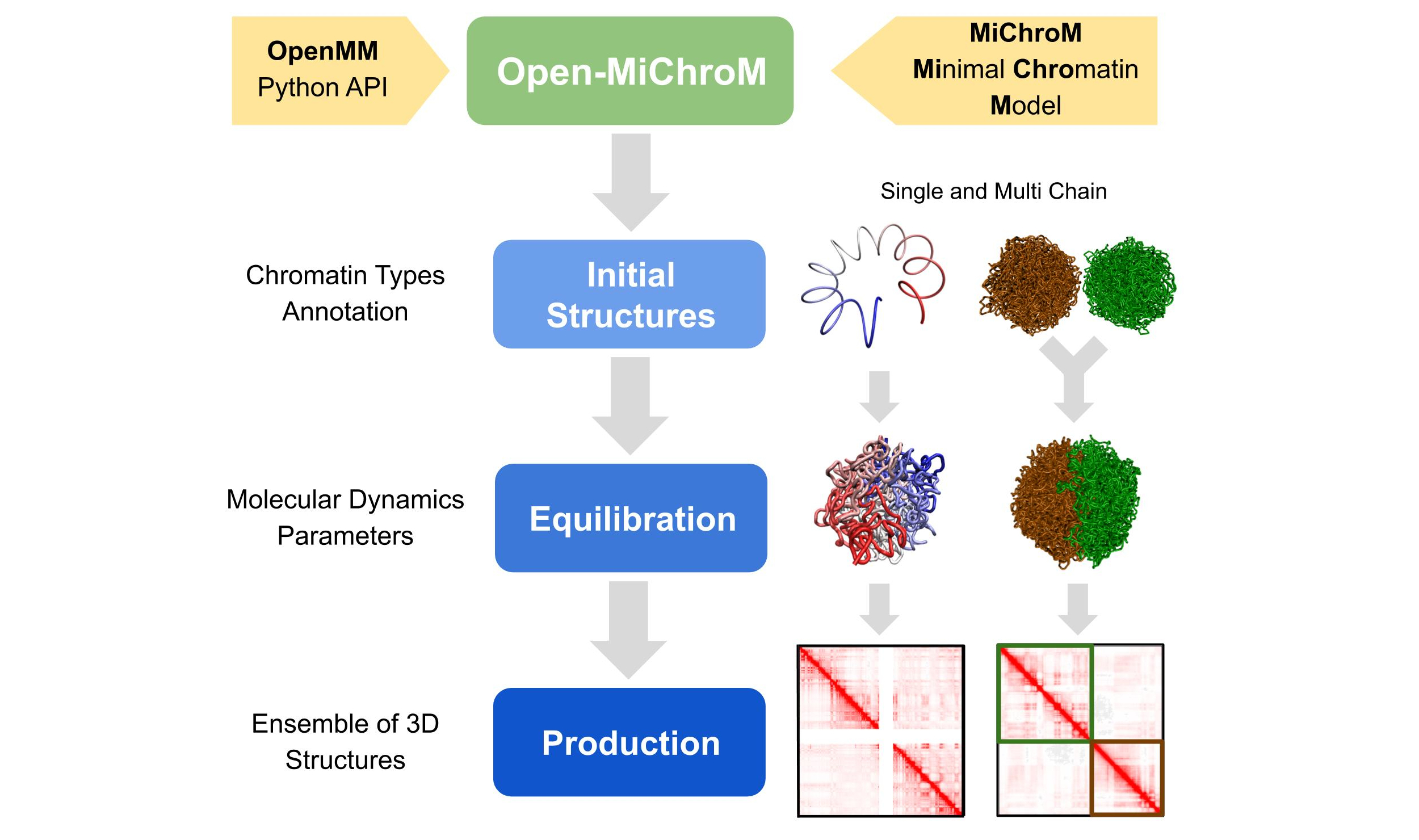
The chromatin dynamics simulations can be performed for different human cell lines, cell phases (interphase to metaphase), and different organisms from DNAzoo. Chromatin subcompartment annotations are available at the NDB (Nucleome Data Bank). OpenMiChroM package receives the chromatin sequence of compartments and subcompartments as input to create and simulate a chromosome polymer model. Examples of running the simulations and generating the in silico Hi-C maps can be found here
Usage
The following code snippet shows how to generate a single chromosome polymer model and run a chromatin dynamics simulation using OpenMiChroM.
from OpenMiChroM.ChromDynamics import MiChroM
sim = MiChroM(name='stomach_GRCh38', temperature=1.0, timeStep=0.01)
sim.setup(platform="cuda")
sim.saveFolder('stomach_GRCh38_chr10_simulation')
sim.buildClassicMichrom(ChromSeq='inputs/stomach_GRCh38.bed', chromosome='chr10')

sim.createReporters(statistics=True, traj=True, outputName=None, trajFormat="cndb", energyComponents=True, interval=10**3)
sim.run(nsteps=10**5, report=True, interval=10**4)
Resources
Reference Documentation: Examples, tutorials, and class details.
Installation Guide: Instructions for installing OpenMiChroM.
GitHub repository: Download the OpenMiChroM source code.
Issue tracker: Report issues/bugs or request features.
Citation
When using OpenMiChroM to perform chromatin dynamics simulations or analyses, please use this citation.
We also thank the Polychrom where part of this code was inspired. You can use this citation.
Installation
The OpenMiChroM library can be installed via conda or pip, or compiled from source.
Install via conda
The code below will install OpenMiChroM from conda-forge.
conda install -c conda-forge OpenMiChroM
Note: Often, the installation via conda happens to be stuck. If this is the case, it is recommended to update conda/anaconda using the command line below and try to install OpenMiChroM again.
conda update --prefix /path/to/anaconda3/ anaconda
Install via pip
The code below will install OpenMiChroM from PyPI.
pip install OpenMiChroM
Note:
The OpenMiChroM library uses OpenMM API to run the chromatin dynamics simulations.
These requirements can be met by installing the OpenMM package from the conda-forge channel:
conda install -c conda-forge openmm
The following are libraries required for installing OpenMiChroM:
1 maintainer

Release files for OpenMiChroM 1.1.1
For a detailed explanation of source distributions (sdists) and built distributions (wheels), please see the package formats documentation.
Source distribution (sdist)
| File | Size | Uploaded | |
|---|---|---|---|
| openmichrom-1.1.1.tar.gz | 49.2 kB | Details |
Release files / openmichrom-1.1.1.tar.gz
| Download URL | openmichrom-1.1.1.tar.gz |
|---|---|
| Size | 49.2 kB |
| Tags | Source |
|
SHA-256 checksum How to use checksums |
21b6fa2d345adef1ec3253b5e7e4ce5388e85220acca04ab4472290a0d524ec8
|
|
BLAKE2b-256 checksum How to use checksums |
e9b303e1da409c03cfa7e15313e9be84f566fa73c7a7f610fa2782ce899efc9b
|
| Upload date | |
|
Uploaded using Trusted Publishing? What is trusted publishing? |
No |
| Uploaded via |
twine/5.0.0 CPython/3.12.3
|














