
OpenModelica compiler (omc) interface for Python

Reason this release was yanked:
Dependency 'modelicalang>=0.1.0a0,<0.1.0a2' not specified
Project description
OpenModelicaCompilerForPython 


OpenModelica compiler (omc) interface for Python
Change log
Quick tour
Setup
Make sure that OpenModelica is installed on your system.
$ omc --version
OpenModelica official page https://openmodelica.org/
Install OpenModelicaCompiler with pip.
$ python3 -m pip install OpenModelicaCompiler
omc4py is acutual package name. omc4py.open_session() will return session object which interfaces to omc.
#!/usr/bin/env python3
import omc4py

with omc4py.open_session() as session:
    print(session.getVersion())
More usage about open_session(...)
If omc4py.open_session cannot find omc, such as if you have not added OpenModelica to your PATH environment variable, you can specify a valid omc command name or omc executable path by str.
import omc4py

with omc4py.open_session(
    "C:/OpenModelica1.13.0-64bit/bin/omc.exe"
) as session:
    print(session.getVersion())
It is also possible to open multiple sessions with different versions of omc at the same time by explicitly specifying omc.
import omc4py

with \
    omc4py.open_session(
        "C:/OpenModelica1.13.0-64bit/bin/omc.exe"
    ) as session_13, \
    omc4py.open_session(
        "C:/Program Files/OpenModelica1.14.0-64bit/bin/omc.exe"
    ) as session_14:

    print("v1.13.0:", session_13.getVersion())
    print("v1.14.0:", session_14.getVersion())
As shown above, it is recommended to ensure that session is closed by calling omc4py.open_session() via with-statement.
However, sometimes you want to use session interactively, like OMShell. omc4py closes all unclosed sessions when exiting the python interpreter.
>>> from omc4py import *
>>> session = open_session()
>>> session.loadString("""
... package A
...     package B
...             package C
...             end C;
...     end B;
... end A;
... """)
True
>>> list(session.getClassNames("A", recursive=True))
[TypeName('A'), TypeName('A.B'), TypeName('A.B.C')]
>>>
>>>
>>> exit()  # session will be closed internally
Besides, session object has __close__ method to explicitly close session.
>>> from omc4py import *
>>> session = open_session()
>>> session.__close__()
>>>
>>> exit()
About session API
All session methods are OpenModelica.Scripting.* functions. The names and types of arguments and return values are the same as the original modelica function, and session internally converts between the python class and the modelica class.
If you want to know more about each session method, you can display it with the help () function.
Documentation in OpenModelica build server shows exhaustive information about OpenModelica.Scripting. You will find sub-packages not explained user guide.
- OpenModelica.Scripting.Internal.*
- OpenModelica.Scripting.Experimental.*
They are available from absolute reference
# Example for "timerTick" and "timerTock"
# in "OpenModelica.Scripting.Internal.Time"
from omc4py import open_session
from time import sleep

timer_index: int = 1

with open_session() as session:
    session.OpenModelica.Scripting.Internal.Time.timerTick(timer_index)

    sleep(0.1)

    # show elapsed time from last timerTick
    print(session.OpenModelica.Scripting.Internal.Time.timerTock(timer_index))
Let me introduce typical API functions!
loadModel
Load library and returns True if success. You can specify versions by second argument
import omc4py

with omc4py.open_session() as session:
    assert(session.loadModel("Modelica"))  # load MSL
import omc4py

with omc4py.open_session() as session:
    assert(session.loadModel("Modelica", ["3.2.3"]))  # load MSL 3.2.3
getClassNames
Returns array of class names in the given class
import omc4py

with omc4py.open_session() as session:
    assert(session.loadModel("Modelica"))
    for className in session.getClassNames("Modelica"):
        print(className)
By default, getClassNames() only returns "sub" classes. If you want to know all classes belongs to the class set recursive=True.
import omc4py

with omc4py.open_session() as session:
    assert(session.loadModel("Modelica"))
    for className in session.getClassNames("Modelica", recursive=True):
        print(className)  # many class names will be printed
getComponents
Returns array of component (variable, parameter, constant, ...etc) profiles
import omc4py

with omc4py.open_session() as session:
    assert(session.loadModel("Modelica", ["3.2.3"]))
    for component in session.getComponents("Modelica.Constants"):
        print(
            f"{component.className.last_identifier!s:<20}"
            f"{component.name!s:<15}"
            f"{component.comment!r}"
        )
Exception handling
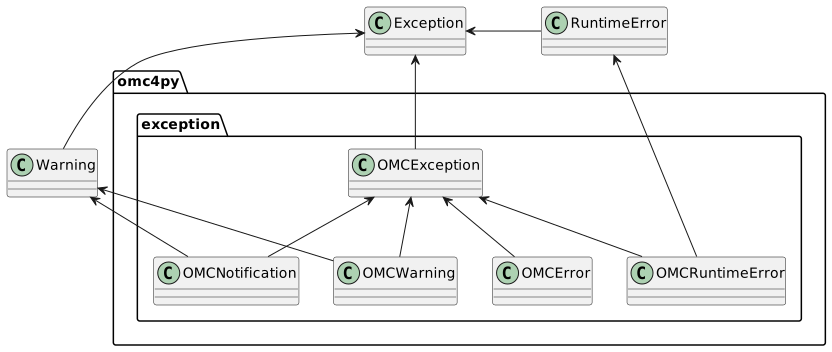
OMCNotification,OMCWarning,OMCErrorare raised from omcOMCRuntimeErroris raised fromomc4pypython implementation (not from omc)
We are not sure about whole OpenModelica's exception handling policy.
Through omc4py project, We found that there are 4 situation for expection caused by function calls.
omc behavior
- Function returns "\n" instead of valid value (no exception info)
- Function returns formatted error messages (contains sourceInfo, level, kind, message) instead of valid value
- Function returns unformatted error message (typically, startswith "* Error") instead of valid value
- Function returns valid value and set exception messages internally
omc4py behavior
- function returns
Noneinstead of valid result (no exception will be sent) - function send
OMCNotificationorOMCWarning, or raiseOMCError - function raise
OMCRuntimeErrorwith the message returned by the omc - function returns valid value. You can check exceptions explicitly by
session.__check__()
Normally, 4th case seems to be notification or warning. If you want to be sure to check for exceptions, call session.__check__() before exit doubtful context.
from omc4py import open_session

def doubtful_task(session):
    # session.doubtful_API1(...)
    # session.doubtful_API2(...)
    # session.doubtful_API3(...)
    session.__check__()

with open_session() as session:
    doubtful_task(session)
Release history Release notifications | RSS feed


Download files
Download the file for your platform. If you're not sure which to choose, learn more about installing packages.
Source Distribution
Built Distribution
Filter files by name, interpreter, ABI, and platform.
If you're not sure about the file name format, learn more about wheel file names.
Copy a direct link to the current filters
File details
Details for the file openmodelicacompiler-0.2.1.tar.gz.
File metadata
- Download URL: openmodelicacompiler-0.2.1.tar.gz
- Upload date:
- Size: 294.6 kB
- Tags: Source
- Uploaded using Trusted Publishing? No
- Uploaded via: poetry/1.3.2 CPython/3.10.6 Linux/5.15.79.1-microsoft-standard-WSL2
File hashes
| Algorithm | Hash digest | |
|---|---|---|
| SHA256 |
1d122fc11d419e27ad2ee2c07e08b6b8dd6f2c266467d1348bc2fec0e8a3bda4
|
|
| MD5 |
2a5d8387e5b04ad4e89a558e5eb69276
|
|
| BLAKE2b-256 |
2f57fb097b142ba297253432765eebabe6b084062ceacf733472e2dbd94b7701
|
File details
Details for the file openmodelicacompiler-0.2.1-py3-none-any.whl.
File metadata
- Download URL: openmodelicacompiler-0.2.1-py3-none-any.whl
- Upload date:
- Size: 310.1 kB
- Tags: Python 3
- Uploaded using Trusted Publishing? No
- Uploaded via: poetry/1.3.2 CPython/3.10.6 Linux/5.15.79.1-microsoft-standard-WSL2
File hashes
| Algorithm | Hash digest | |
|---|---|---|
| SHA256 |
ba6ead81bd3cd7207018919248747b7a1065d7da1b17f64fd2f2d83d6adfc772
|
|
| MD5 |
0445f62dede56e10b98d55028792b881
|
|
| BLAKE2b-256 |
3b3837bd7a8e7ce7bc51d59d785eee1abed2ca66fb1512c66f684e25d88395be
|






