
Create relational databases, in neo4j, of an OpenShift cluster.

Project description
OpenShift Enumeration
OpenShiftGrapher is used to enumerate OpenShift clusters.
OpenShiftGrapher
What it is
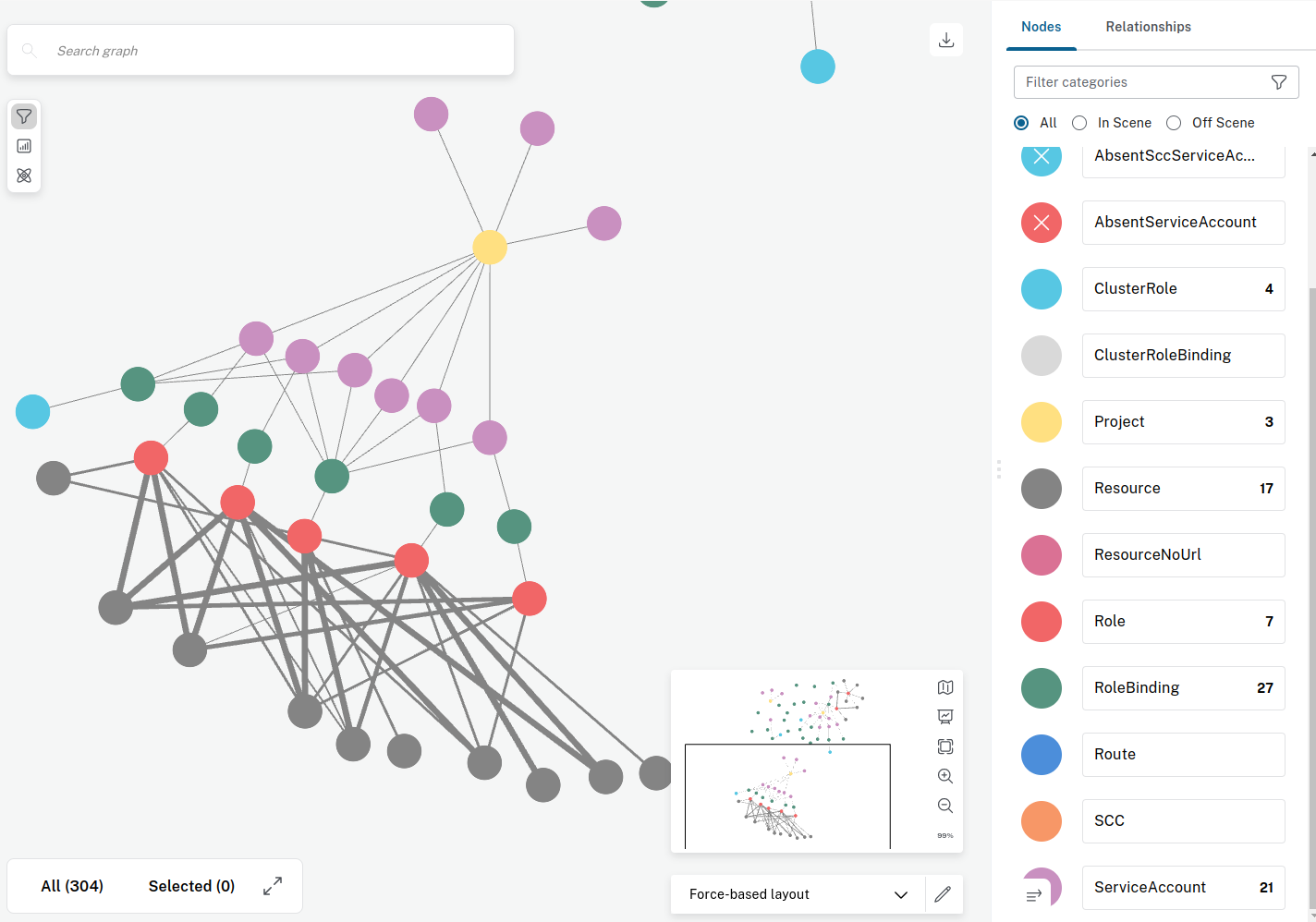
The script is mean to create relational databases, in neo4j, of an OpenShift cluster.
It extracts objects and relationships for information like projects, service accounts, scc and others.
The neo4j query system can then be used to spot inconsistency in the database that could lead to vulnerabilities.
Installation
pip install OpenShiftGrapher
Optional: Install with uv
If you prefer to manage isolated environments with Astral's uv, you can install and run OpenShiftGrapher with the following workflow:
# Install uv (see the uv documentation for alternative installation methods)
curl -LsSf https://astral.sh/uv/install.sh | sh

# Create and activate a fresh virtual environment
uv venv
source .venv/bin/activate

# Install OpenShiftGrapher into the active environment
uv pip install .

# Run the command line interface
OpenShiftGrapher -h
The script needs to communicate with the neo4j database, and the OpenShift cluster in python.
To install the neo4j database we recommend to install neo4j desktop, which contain the database and bloom for visualisation:
Usage
Then script can be launched with the following command:
OpenShiftGrapher -h
usage: OpenShiftGrapher.py [-h] [-r] -a APIURL -t TOKEN [-c COLLECTOR [COLLECTOR ...]] [-u USERNEO4J] [-p PASSWORDNEO4J]

Exemple:
    GenClusterGraph -a "https://api.cluster.net:6443" -t "eyJhbGciOi..."
    GenClusterGraph -a "https://api.cluster.net:6443" -t $(cat token.txt)
    GenClusterGraph -a "https://api.cluster.net:6443" -t $(cat token.txt) -c scc role route

options:
  -h, --help            show this help message and exit
  -r, --resetDB         reset the neo4j db.
  -a APIURL, --apiUrl APIURL
                        api url.
  -t TOKEN, --token TOKEN
                        service account token.
  -c COLLECTOR [COLLECTOR ...], --collector COLLECTOR [COLLECTOR ...]
                        list of collectors. Possible values: all, project, scc, sa, role, clusterrole, route, pod
  -u USERNEO4J, --userNeo4j USERNEO4J
                        neo4j database user.
  -p PASSWORDNEO4J, --passwordNeo4j PASSWORDNEO4J
                        neo4j database password.
  -x PROXYURL, --proxyUrl PROXYURL
                        proxy url.
OpenShiftGrapher -a "https://api.cluster.net:6443" -t $(cat quota.token) -c all
Exemples of Queries
MATCH (n:AbsentServiceAccount {name:"servicenow-sa"}) RETURN n LIMIT 25

MATCH p=(n1:Project) WHERE NOT (n1.name =~ ('openshift.*') OR n1.name =~ ('test'))  RETURN p LIMIT 25

MATCH p=(n:AbsentServiceAccount {name:"servicenow-sa"})-[]->()-[r:`HAS CLUSTERROLE`]->() RETURN p LIMIT 25

MATCH p=(n1:AbsentProject)-[r1:`CONTAIN SA`]->(n2:AbsentServiceAccount)-[]->()-[r2:`HAS CLUSTERROLE`]->() RETURN p LIMIT 25

MATCH p=(n1:AbsentProject)-[r1:`CONTAIN SA`]->(n2:AbsentServiceAccount)-[]->()-[]->()-[r2:`get`]->(n4:Resource) WHERE (n4.name =~ ('secrets')) RETURN p LIMIT 25

MATCH p=(n1:Project)-[r1:`CONTAIN SA`]->(n2:ServiceAccount)-[]->()-[]->()-[r2:`get`]->(n4:Resource) WHERE (n4.name =~ ('secrets')) RETURN p LIMIT 25

MATCH p=(n1:AbsentProject)-[r1:`CONTAIN SA`]->(n2:AbsentServiceAccount)-[]->()-[r2:`CAN USE SCC`]->() RETURN p LIMIT 25

MATCH p=(n2:AbsentServiceAccount)-[]->()-[r2:`CAN USE SCC`]->() RETURN p LIMIT 25

MATCH p=()-[r2:`HAS CLUSTERROLE`]->()-[r1:`create`]->() RETURN p LIMIT 25

MATCH p=(n1:Role)-[r1:`create`]->() RETURN p LIMIT 25

MATCH p=(n2:ServiceAccount)-[]->()-[]->(n1:Role)-[]->() RETURN p LIMIT 100

MATCH p=(n2:AbsentServiceAccount)-[]->()-[]->(n1:Role)-[r1:`create`]->() RETURN p LIMIT 100

MATCH p=(n1)-[r2:`CAN USE SCC`]->(n2) WHERE NOT (n2.name =~ ('acs-splunk'))  RETURN p LIMIT 25

MATCH p=(n1)-[r2:`CAN USE SCC`]->(n2) WHERE NOT (n2.name =~ ('acs-splunk.*'))  RETURN p LIMIT 25

MATCH p=(n4:Resource) WHERE (n4.name =~ ('secrets')) RETURN p LIMIT 25

MATCH p=(n1:Project)-[]->(n2:ServiceAccount)-[]->()-[]->(n3:Role)-[r1:`*`]->(n4:Resource) WHERE NOT (n1.name =~ ('openshift.*') OR n1.name =~ ('test'))  RETURN p LIMIT 25

MATCH p=(n4:Resource) WHERE (n4.name =~ ('.*bypass.*')) RETURN p LIMIT 25

MATCH p=(n1:Project)-[]->(n2:ServiceAccount)-[]->()-[]->(n3:Role)-[]->(n4:Resource) WHERE NOT (n1.name =~ ('openshift.*'))  RETURN p LIMIT 1000

MATCH p=(n1:Project)-[]->(n2:ServiceAccount)-[]->()-[]->(n3:Role)-[]->(n4:Resource) RETURN p LIMIT 1000

MATCH p=(n1:Project)-[r1:`CONTAIN SA`]->(n2:ServiceAccount)-[]->()-[]->()-[r2:`get`]->(n4:Resource) WHERE (n4.name =~ ('secrets')) AND NOT (n1.name =~ ('openshift.*')) RETURN p LIMIT 200

MATCH p=(n1:Project)-[r1:`CONTAIN SA`]->(n2:ServiceAccount)-[]->()-[]->()-[r2:`create`]->(n4:Resource) WHERE (n4.name =~ ('namespaces')) AND NOT (n1.name =~ ('openshift.*')) RETURN p LIMIT 200
SA not in openshift* project that can use SCC
MATCH p=(n1:Project)-[]->(n2:ServiceAccount)-[]->()-[]->()-[r1:`CAN USE SCC`]->() WHERE NOT (n1.name =~ ('openshift.*')) RETURN p LIMIT 100
SA not in openshift* project that has cluster role that can read secrets
MATCH p=(n1:Project)-[]->(n2:ServiceAccount)-[]->()-[r1:`HAS CLUSTERROLE`]->()-[]->(n4:Resource) RETURN p LIMIT 25
MATCH p=(n1:Project)-[]->(n2:ServiceAccount)-[]->()-[r2:`HAS CLUSTERROLE`]->()-[r3:`get`]->(n4:Resource) WHERE (n4.name =~ ('secrets')) AND NOT (n1.name =~ ('openshift.*')) RETURN p LIMIT 200
Potential vulnerability
It happens that cluster is deployed with preconfigured template automatically setting Roles, RoleBindings and even SCC to service account that is not yet created. This can lead to privilege escalation in the case where you can create them. In this case, you would be able to get the token of the SA newly created and the role or SCC associated. Same case happens when the missing SA is part of a missing project, in this case if you can create the project and then the SA you get the Roles and SCC associated.
Absent SA that can use SCC
SCC can be given by role binding or directly:
MATCH p=(n1:AbsentProject)-[]->(n2:AbsentServiceAccount)-[]->()-[]->()-[r1:`CAN USE SCC`]->()  RETURN p LIMIT 100
MATCH p=(n1:AbsentProject)-[]->(n2:AbsentServiceAccount)-[r1:`CAN USE SCC`]->()  RETURN p LIMIT 100
Absent SA that has cluster role
MATCH p=(n1:AbsentProject)-[]->(n2:AbsentServiceAccount)-[]->()-[r1:`HAS CLUSTERROLE`]->() RETURN p LIMIT 100
MATCH p=(n1:AbsentProject)-[]->(n2:AbsentServiceAccount)-[]->()-[r2:`HAS CLUSTERROLE`]->()-[r3:`get`]->(n4:Resource) WHERE (n4.name =~ ('secrets')) AND NOT (n1.name =~ ('openshift.*')) RETURN p LIMIT 200
Absent SA that has role binding in another namespace than their own
MATCH p=(n1:AbsentProject)-[]->(n2:AbsentServiceAccount)-[r1:`HAS ROLEBINDING`]->(n3:RoleBinding)-[]->() WHERE NOT (n1.name =~ n3.namespace) RETURN p LIMIT 100
Absent SA that can bypass kyverno
MATCH p=(n1)-[]->(n2)-[r1:`CAN BYPASS KYVERNO`]->()  RETURN p LIMIT 100
MATCH p=(n1:AbsentProject)-[]->(n2:AbsentServiceAccount)-[r1:`CAN BYPASS KYVERNO`]->()  RETURN p LIMIT 100
Gatekeeper whitelist
MATCH p=(n1:GatekeeperWhitelist) RETURN p LIMIT 100
Release history Release notifications | RSS feed


Download files
Download the file for your platform. If you're not sure which to choose, learn more about installing packages.
Source Distribution
Built Distribution
Filter files by name, interpreter, ABI, and platform.
If you're not sure about the file name format, learn more about wheel file names.
Copy a direct link to the current filters
File details
Details for the file openshiftgrapher-0.4.tar.gz.
File metadata
- Download URL: openshiftgrapher-0.4.tar.gz
- Upload date:
- Size: 14.7 kB
- Tags: Source
- Uploaded using Trusted Publishing? No
- Uploaded via: twine/6.1.0 CPython/3.13.7
File hashes
| Algorithm | Hash digest | |
|---|---|---|
| SHA256 |
c3651f18601aff2affbaf737112f35fe5466991d5db57d5caa011007902b0359
|
|
| MD5 |
75e4c5ffe893983b739ed3525f45aa3e
|
|
| BLAKE2b-256 |
db8f8b667a4e5a2fa58e1a8825bc72265ed93376002e1781618b24f78fb63b84
|
File details
Details for the file openshiftgrapher-0.4-py3-none-any.whl.
File metadata
- Download URL: openshiftgrapher-0.4-py3-none-any.whl
- Upload date:
- Size: 11.8 kB
- Tags: Python 3
- Uploaded using Trusted Publishing? No
- Uploaded via: twine/6.1.0 CPython/3.13.7
File hashes
| Algorithm | Hash digest | |
|---|---|---|
| SHA256 |
487e5927f97d00276f8fad91bbd9387fb2b221426159d581c3d76646d16e358d
|
|
| MD5 |
6936780c11a7f0e73b2843eda4e2afa7
|
|
| BLAKE2b-256 |
4202b9e9a2b43989d2534b90b042a94816f5bf99cb23f3aec26dba05503e5d9b
|






