
Automatically create PowerBI dashboards using the .pbir file type
Verified details
These details have been verified by PyPIProject links
GitHub Statistics
Maintainers

Project description
Power Bpy
Do you wish you could build dashboard with python or R, but can't because the client specifically asked for Power BI or your employer only supports publishing Power BI? Do you love love love Power BI, but wish there was a way to automatically generate parts of your dashboard to speed up your development process?
Introducing Power Bpy, a python package that lets you create Power BI dashboards using functions 💪 instead of the point-and-click interface 🥹. Dashboards created using these functions can be opened, edited and saved normally in Power BI desktop.
This package uses the new .pbip/.pbir format with TMDL enabled. This stores dashboards as directories of text files instead of binary files letting you version control your dashboards! 🥳 These features are still preview features, so use this with caution until there's more clarity from microsoft about what they're going to do with .pbir and tmdl.



Features
Currently the package has functions that let you automatically 🥳 do the following:
- Create a new dashboard
- Import data from
- csv file stored locally
- csv file stored in Azure Data Lake Storage (ADLS)
- Power BI table stored as a Tabular Model Definition Language (TMDL) file
- Add a page
- Add background images to a page
- Add visuals to a page
- charts
- slicers
- cards
- maps
- text boxes
- buttons
Dependencies
Before you can start to build power BI dashboards using this package's functions you'll need the following:
- python and pip installed and on path
- git installed and on path
- Power BI Desktop (You can create the dashboards without this, but not view them).
Power BI settings:
You'll need to enable some preview features in Power BI Desktop. Navigate to File > Options and Settings > Options > Preview features and enable the following options:
- Shape map visual
- Power BI Project (.pbip) save option
- Store Semantic Model using TMDL format
- Store reports using enhanced metadata format (PBIR)
Run the example
This example assumes you are on windows. All the code below should be entered in command prompt or put in a batch script.
- Create a new folder to store all the files you'll need.
:: create a new folder
mkdir automatic_PBI_dashboards_example

:: move into the new folder
cd automatic_PBI_dashboards_example
- Clone the files from github.
git clone https://github.com/Russell-Shean/PBI_dashboard_creator
- Activate venv.
The following is taken from this tutorial. We'll use venv to install the python package in an isolated environemnt.
:: create a virtual environment
py -m venv .venv

:: activate the virtual environment
.venv\Scripts\activate

:: For extra credit, verify that venv is working
where python
- Make sure pip is installed and up-to-date.
Pip is the tool we'll use to install the package.
:: install and/or upgrade pip
py -m pip install --upgrade pip

:: check version number (and confirm it's working)
py -m pip --version
- Install the package. Install the package from pypi.
py -m pip install PBI_dashboard_creator
- Create the example dashboard. Run an example script to generate an example dashboard.
py PBI_dashboard_creator/examples/create_example_dashboard.py
- Open the dashboard.
Open the dashboard to confirm everything worked.
start test_dashboard/test_dashboard.pbip
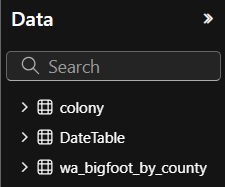
- Refresh data models
After Power BI opens, you'll see a banner that looks like this:

Click Refresh now
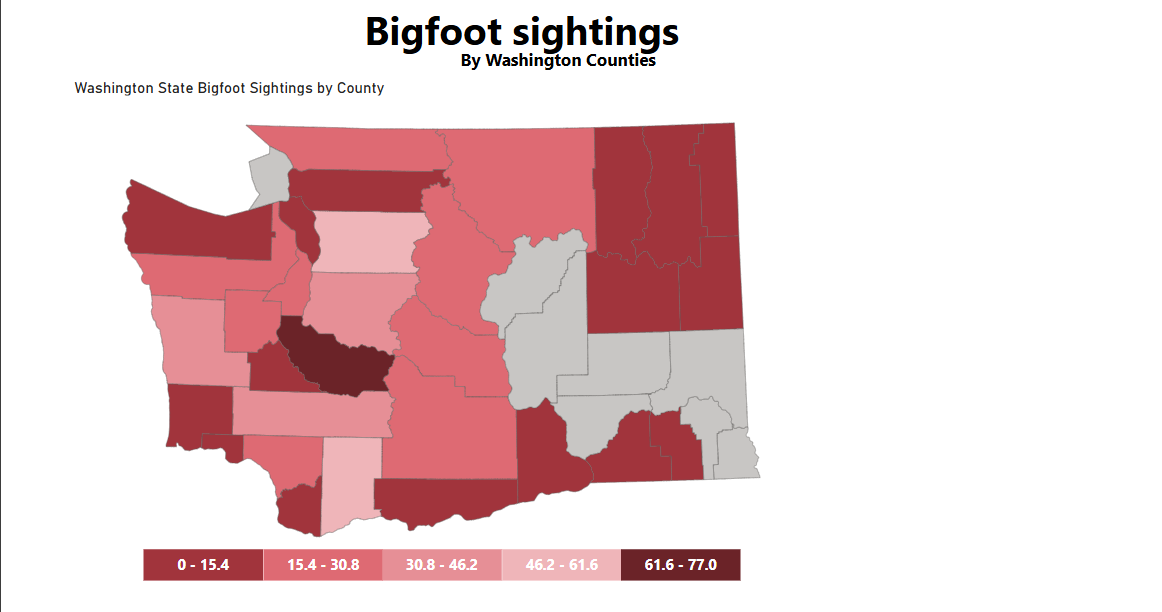
If everything worked you should have a dashboard that looks like this:

Next steps
The code used to generate the dashboard is stored here
The function documentation is stored here
Try building your own dashboards with these functions and let me know what happens!
Feedback
I welcome the following feedback:
- Pull requests to add features, add tests, fix bugs, or improve documentation. If the change is a major change create an issue first.
- Issues to suggest new features, report bugs, or tell me that the documentation is confusing 😅
- Power BI feature requests. I need help from Power BI developers who don't neccesarily have experience with python or github. I don't rely know Power BI 😅, so please feel free to suggest new features. It would be really helpful if you could include a .pbix file that has the feature or even better a git diff of the dashboard before and after the change.(Use the .pbip format)
- Tests. I need some way to test DAX, M and TMDL for validity without using Power BI desktop. If you know of a tool I could use in Github Actions let me know!
Big changes coming up:
- This package will be renamed as powerbpy and migrated to a different github and pypi location. The version will be reset to 0.1.0
- I will add a step-by-step explanation/tutorial for the example dashboard
- I will deploy to conda
- I plan to convert the functions to classes and methods
- I will add tests and input validation. I doubt this will do anything except prevent malformed dashboard files, but stricter input validation may break some edge case uses.
- I will add functions to do the following:
- Create a map with a dynamic legend
- Add cards and slicers
- list pages
Project details
Verified details
These details have been verified by PyPIProject links
GitHub Statistics
Maintainers
Release history Release notifications | RSS feed


Download files
Download the file for your platform. If you're not sure which to choose, learn more about installing packages.
Source Distribution
Built Distribution
Filter files by name, interpreter, ABI, and platform.
If you're not sure about the file name format, learn more about wheel file names.
Copy a direct link to the current filters
File details
Details for the file pbi_dashboard_creator-1.1.0.tar.gz.
File metadata
- Download URL: pbi_dashboard_creator-1.1.0.tar.gz
- Upload date:
- Size: 552.2 kB
- Tags: Source
- Uploaded using Trusted Publishing? Yes
- Uploaded via: twine/6.1.0 CPython/3.12.8
File hashes
| Algorithm | Hash digest | |
|---|---|---|
| SHA256 |
564f6807f7f955d3953980e9b055d1f85a9593f0cf7279187135a0d1a646f9fb
|
|
| MD5 |
b63a287c2640bf6039b0fbcb8a3f2759
|
|
| BLAKE2b-256 |
50e1fb12589904c21e5ec079bcaa1d3ca4e2739a3676ec371ac30de0feec615a
|
Provenance
The following attestation bundles were made for pbi_dashboard_creator-1.1.0.tar.gz:
Publisher:
python-publish.yml on Russell-Shean/PBI-dashboard-creator
-
Statement:
-
Statement type:
https://in-toto.io/Statement/v1 -
Predicate type:
https://docs.pypi.org/attestations/publish/v1 -
Subject name:
pbi_dashboard_creator-1.1.0.tar.gz -
Subject digest:
564f6807f7f955d3953980e9b055d1f85a9593f0cf7279187135a0d1a646f9fb - Sigstore transparency entry: 169052915
- Sigstore integration time:
-
Permalink:
Russell-Shean/PBI-dashboard-creator@62106292479ea84371345b02744a2c471529b0a6 -
Branch / Tag:
refs/tags/v1.1.0 - Owner: https://github.com/Russell-Shean
-
Access:
public
-
Token Issuer:
https://token.actions.githubusercontent.com -
Runner Environment:
github-hosted -
Publication workflow:
python-publish.yml@62106292479ea84371345b02744a2c471529b0a6 -
Trigger Event:
release
-
Statement type:
File details
Details for the file pbi_dashboard_creator-1.1.0-py3-none-any.whl.
File metadata
- Download URL: pbi_dashboard_creator-1.1.0-py3-none-any.whl
- Upload date:
- Size: 67.6 kB
- Tags: Python 3
- Uploaded using Trusted Publishing? Yes
- Uploaded via: twine/6.1.0 CPython/3.12.8
File hashes
| Algorithm | Hash digest | |
|---|---|---|
| SHA256 |
de594131197227ff56007cf80e85aadc30f19842031b4d7086cc83212afd78eb
|
|
| MD5 |
2528b9df6365c3acd8d8d13aa0d9850e
|
|
| BLAKE2b-256 |
c65d801b0d6adedd057e0fc04f1a2785c52aa30997a1cc3525293ab742c80f26
|
Provenance
The following attestation bundles were made for pbi_dashboard_creator-1.1.0-py3-none-any.whl:
Publisher:
python-publish.yml on Russell-Shean/PBI-dashboard-creator
-
Statement:
-
Statement type:
https://in-toto.io/Statement/v1 -
Predicate type:
https://docs.pypi.org/attestations/publish/v1 -
Subject name:
pbi_dashboard_creator-1.1.0-py3-none-any.whl -
Subject digest:
de594131197227ff56007cf80e85aadc30f19842031b4d7086cc83212afd78eb - Sigstore transparency entry: 169052918
- Sigstore integration time:
-
Permalink:
Russell-Shean/PBI-dashboard-creator@62106292479ea84371345b02744a2c471529b0a6 -
Branch / Tag:
refs/tags/v1.1.0 - Owner: https://github.com/Russell-Shean
-
Access:
public
-
Token Issuer:
https://token.actions.githubusercontent.com -
Runner Environment:
github-hosted -
Publication workflow:
python-publish.yml@62106292479ea84371345b02744a2c471529b0a6 -
Trigger Event:
release
-
Statement type:






