


PEtab-GUI
PEtab-GUI provides a graphical user interface to inspect and edit parameter estimation problems encoded in the PEtab format.
Installation
From PyPI
To install PEtab-GUI from PyPI, run:
pip install petab_gui
or, to install PEtab-GUI in a dedicated virtual environment using pipx (to be installed separately), run:
pipx install petab_gui
From GitHub
To install the latest development version from GitHub, run:
pip install git+https://github.com/PEtab-dev/PEtab-GUI/
From a local copy
-
Clone the repository:
git clone https://github.com/PEtab-dev/PEtab-GUI.git
-
Install the package from the root of the working tree:
pip install .
Usage
After installation, launch PEtab-GUI from the command line using the
petab_gui command.
Optionally, you can provide the path to an existing PEtab YAML file as an argument.
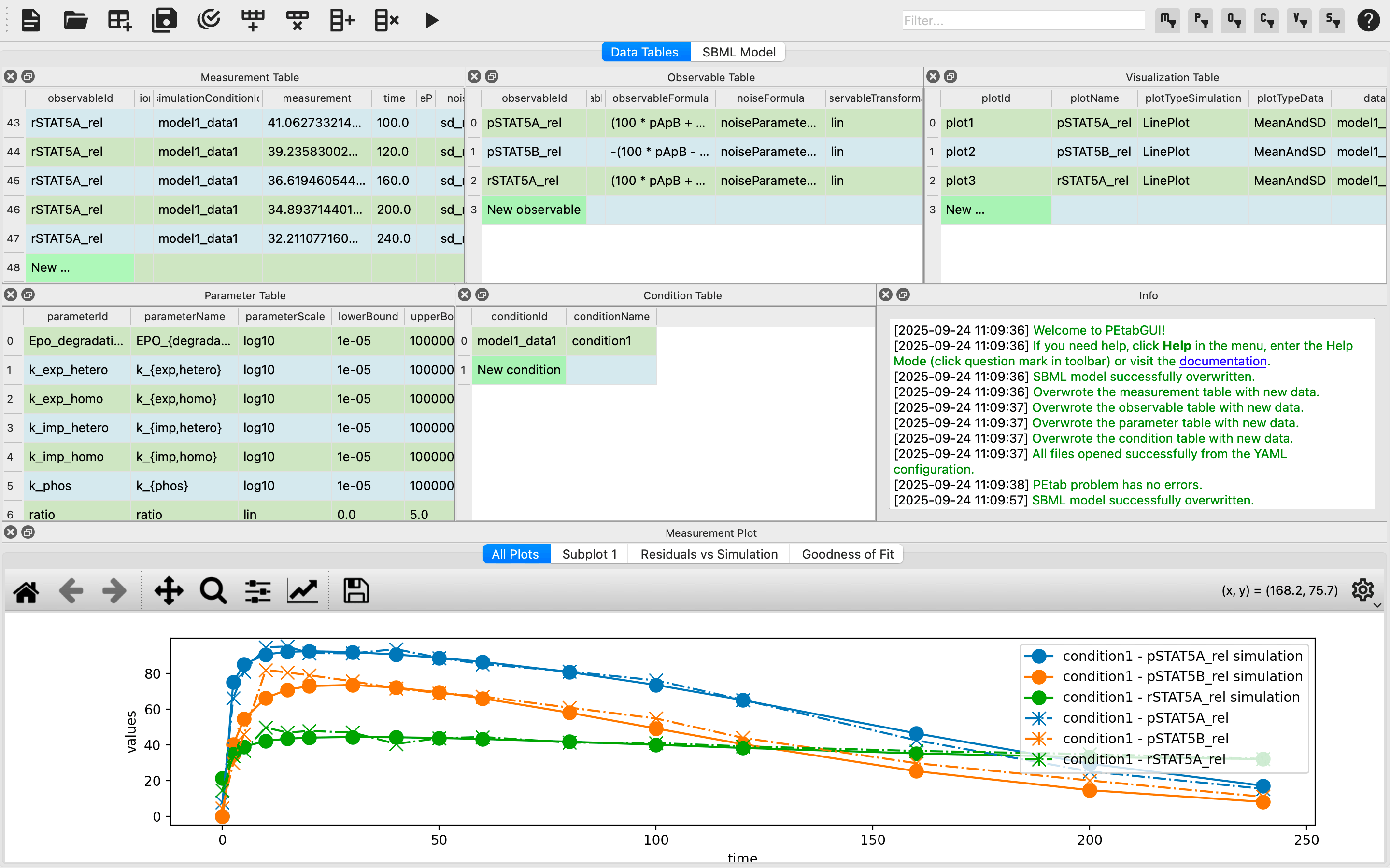
After loading a PEtab problem, PEtab-GUI will look something like this:
Examples
PEtab-GUI comes with two examples of its own, which can be immediately loaded from
the File menu.
A more extensive set of real-world PEtab problems is available in the PEtab benchmark collection.
Download and unpack the archive,
then open one of the YAML files inside Benchmark-Models/*/ using
PEtab-GUI.
Benchmark-Models/Boehm_JProteomeRes2014/Boehm_JProteomeRes2014.yaml
should serve as a good starting point.
Features
The PEtab-GUI provides a Python-based graphical user interface that simplifies the creation, editing, and validation of PEtab parameter estimation problems.
- Unified Environment
- Integrates all PEtab components (SBML models, conditions, observables, measurements, parameters, and visualization files).
- Supports drag-and-drop import of YAML or individual component files.
- Automatically resolves mismatches and converts matrix-format experimental data into valid PEtab format.
- Interactive and Intuitive Editing
- Dockable, resizable, and movable table widgets for each PEtab file.
- Context-aware editing with combo-boxes, drop-downs, and multi-cell editing.
- Automatic generation of missing observables/conditions with customizable defaults.
- Real-time validation and plausibility checks with PEtab linting tools.
- SBML view in both XML and human-readable Antimony syntax.
- Visualization and Simulation
- Interactive plots linking measurement data with model simulations.
- Bidirectional highlighting between plots and tables.
- Built-in simulation via BasiCO with one-click parameter testing.
- Intelligent defaults for visualization with optional user customization.
- Ability to disable plotting for large models to maintain responsiveness.
- Archiving and Export
- Export individual tables, the SBML model, or complete PEtab problems.
- Save as directory structures or COMBINE archives for reproducibility
3 maintainers


Release files for PEtab-GUI 0.3.0
For a detailed explanation of source distributions (sdists) and built distributions (wheels), please see the package formats documentation.
Source distribution (sdist)
| File | Size | Uploaded | |
|---|---|---|---|
| petab_gui-0.3.0.tar.gz | 4.2 MB | Details |
Built distribution (wheel)
| File | Interpreter | ABI | Platform | Reset |
|---|---|---|---|---|
| petab_gui-0.3.0-py3-none-any.whl | Python 3 | none | any | Details |
Total release size: 4.4 MB
Release files / petab_gui-0.3.0.tar.gz
| Download URL | petab_gui-0.3.0.tar.gz |
|---|---|
| Size | 4.2 MB |
| Tags | Source |
|
SHA-256 checksum How to use checksums |
143c4a6f6e2d35edc7dc9f6365075c2b1bc0fb7eb4a675b6e21f39e1f105fd44
|
|
BLAKE2b-256 checksum How to use checksums |
6698f9b1c3b89fc0c1a8541040dbf07f75b4f7fef3d6ca4cc81081bfb783bdea
|
| Upload date | |
|
Uploaded using Trusted Publishing? What is trusted publishing? |
Yes |
| Uploaded via |
twine/6.1.0 CPython/3.13.7
|
Provenance
Provenance describes where a file came from. On PyPI, provenance is shared via attestations, which provide a verifiable record of the build or publishing details. View details, limitations and caveats.


PyPI Publish Attestation
PyPI verified that this artifact, at this checksum, originated from the publisher listed below.
Signed by GitHub Actions, verified by PyPI on Mar 18, 2026.
Transparency logRelease files / petab_gui-0.3.0-py3-none-any.whl
| Download URL | petab_gui-0.3.0-py3-none-any.whl |
|---|---|
| Size | 130.6 kB |
| Tags | Python 3 |
|
SHA-256 checksum How to use checksums |
daabbc01f3fb0ecfd607a405132a1c0d1627aae35f8504864a94201131a2d044
|
|
BLAKE2b-256 checksum How to use checksums |
52e226c8023aefa8390fc86f3a27863bf085c2aa96cc63ee34bd88f34af47b97
|
| Upload date | |
|
Uploaded using Trusted Publishing? What is trusted publishing? |
Yes |
| Uploaded via |
twine/6.1.0 CPython/3.13.7
|
Provenance
Provenance describes where a file came from. On PyPI, provenance is shared via attestations, which provide a verifiable record of the build or publishing details. View details, limitations and caveats.
PyPI Publish Attestation
PyPI verified that this artifact, at this checksum, originated from the publisher listed below.
Signed by GitHub Actions, verified by PyPI on Mar 18, 2026.
Transparency log













