Like pm2 without node.js ;-)
Project description
PM3
Like pm2 without node.js ;-)
PM3 CheatSheet:
Install and update
Build a virtualenv environment (recommended)
python3.9 -m venv PM3venv
. PM3venv/bin/activate
Then:
pip install pm3 # Install pm3
pip install -U pm3 # Upgrade pm3
Start
pm3 daemon start # Start process with default ~/.pm3/config.ini configuration
pm3 ping # Ensure pm3 daemon has been launched
Create new process
pm3 new '/bin/sleep 10' -n sleep10 # Create a new process with name sleep10
pm3 new '/bin/sleep 10' -n sleep10 --autorun # Create a new process with autorun option
pm3 new "script.py" --interpreter "/venv/bin/python" --cwd "/tmp" # Create a new process with interpreter and cwd definition
pm3 new '/bin/sleep 5' --max-restart 10 --autorun # Stops restarting the process after 10 restarts
Actions
pm3 start sleep10 # Start process with name sleep10
pm3 start 1 # Start process with id 1
pm3 restart all # Restart all process
pm3 stop 2 # Stop process with id 2
pm3 rm 3 # Stop and delete process with id 3
Listing
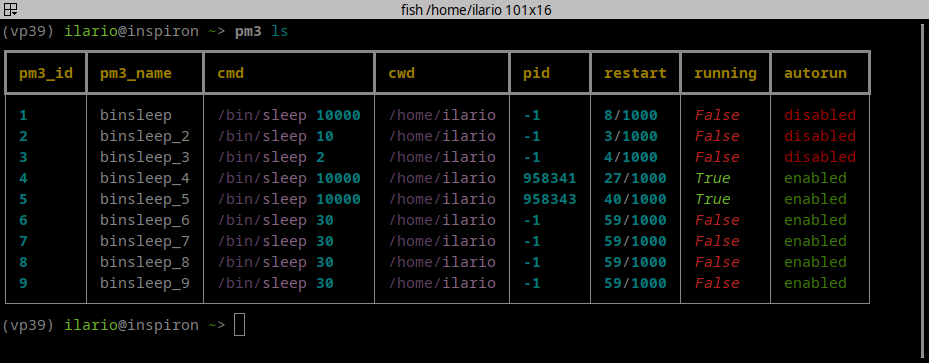
pm3 ls # Display all processes
pm3 ls -l # Display all processes in list format
pm3 ls -j # Display all processes in json format
pm3 ps 5 # Display process 5 status
pm3 ps -l ALL # Display ALL processes (hidden or not) status in list format
pm3 ps -j ALL # Display ALL processes (hidden or not) status in json format
Dump and Load
pm3 dump 2 # Print process 2 configuration in JSON
pm3 dump all -f dump.json # Save all configuration processes in dump.json file
pm3 load dump.json # Load all configuration processes from dump.json file
Logs
pm3 log # Display all processes logs
pm3 log 5 -f # Display and follow log of process 5
pm3 err 2 -n 50 # Display last 50 rows of process 5 error log
pm3 flush 1 log # Empty log file of process 1
pm3 flush all err # Empty err file of all process
Useful script generation
pm3 make_script systemd # Generate script for install startup systemd configuration
Misc
pm3 reset 2 # Reset meta data of process id 2
pm3 ping [-v] # Ensure pm3 daemon has been launched [verbose]
pm3 rename 3 -n <new_name> # Rename process id 3 with a <new_name>
pm3 -h # General help
pm3 new -h # Help of new subcommand
Daemon commands
pm3 daemon start # Start PM3 backend porcess
pm3 daemon stop # Stop PM3 backend porcess
pm3 daemon status # Check daemon status details
Configuration file:
$ cat ~/.pm3/config.ini
[main_section]
# Configurazione base
pm3_home_dir = /home/user/.pm3 # pm3 home dir
pm3_db = /home/user/.pm3/pm3_db.json # TinyDB Store File
pm3_db_process_table = pm3_procs # TinyDB process table
main_interpreter = /home/user/venv/bin/python # path of python interpreter
# Gestione dei backup
max_backups = 20 # Numero massimo di backup del database da mantenere
compress_backups = true # Abilita la compressione dei backup
verify_integrity = true # Abilita la verifica dell'integrità dei file
# Gestione dei log
log_max_bytes = 10485760 # Dimensione massima di ogni file di log in bytes (10MB)
log_backup_count = 5 # Numero di file di backup dei log da mantenere
log_compress = true # Abilita la compressione dei file di log ruotati
# Configurazione del daemon
check_interval = 5 # Intervallo di controllo dei processi in secondi
start_timeout = 30 # Timeout per l'avvio dei processi in secondi
stop_timeout = 30 # Timeout per l'arresto dei processi in secondi
# Notifiche
enable_error_notifications = true # Abilita le notifiche di errore
enable_status_notifications = true # Abilita le notifiche di avvio/arresto
[backend]
name = __backend__ # name of backend process (hidden process)
url = http://127.0.0.1:7979/ # proto://ip:port of backend (if != 127.1 is a potential RISK!!)
cmd = /home/user/venv/bin/pm3_backend # path of backend command
[cron_checker]
name = __cron_checker__ # name of backend process (hidden process)
cmd = /home/user/venv/bin/pm3_cron_checker # path of cron checker command
sleep_time = 5 # Time (in seconds) to check process
debug = False # Cron Checker debug info
Parametri di configurazione
Configurazione Base
pm3_home_dir: Directory principale di PM3pm3_db: File di storage TinyDBpm3_db_process_table: Tabella dei processi in TinyDBmain_interpreter: Percorso dell'interprete Python
Gestione dei Backup
max_backups: Numero massimo di backup del database da mantenere (default: 20)compress_backups: Abilita la compressione dei backup (default: true)verify_integrity: Abilita la verifica dell'integrità dei file (default: true)
Gestione dei Log
log_max_bytes: Dimensione massima di ogni file di log in bytes (default: 10MB)log_backup_count: Numero di file di backup dei log da mantenere (default: 5)log_compress: Abilita la compressione dei file di log ruotati (default: true)
Configurazione del Daemon
check_interval: Intervallo di controllo dei processi in secondi (default: 5)start_timeout: Timeout per l'avvio dei processi in secondi (default: 30)stop_timeout: Timeout per l'arresto dei processi in secondi (default: 30)
Notifiche
enable_error_notifications: Abilita le notifiche di errore (default: true)enable_status_notifications: Abilita le notifiche di avvio/arresto (default: true)
Backend
name: Nome del processo backend (processo nascosto)url: URL del backend (se diverso da 127.0.0.1 è un potenziale rischio!)cmd: Percorso del comando backend
Cron Checker
name: Nome del processo cron checker (processo nascosto)cmd: Percorso del comando cron checkersleep_time: Intervallo di controllo dei processi in secondidebug: Abilita le informazioni di debug del cron checker
Autocompletition (experimental)
Bash
pm3_exe=$(which pm3)
eval "$(register-python-argcomplete $pm3_exe)"
Fish
pm3_exe=$(which pm3)
register-python-argcomplete --shell fish $pm3_exe | source
or
register-python-argcomplete --shell fish $pm3_exe > ~/.config/fish/completions/pm3.fish
Other shell
visit https://kislyuk.github.io/argcomplete/
PM3 è un gestore di processi che permette di avviare, monitorare e gestire processi in background.
Installazione
pip install pm3
Configurazione
PM3 può essere configurato attraverso il file config.ini nella directory ~/.pm3/. Puoi copiare il file di esempio config.ini.sample e modificarlo secondo le tue necessità.
Esempio di configurazione
[main_section]
max_backups = 20
log_max_bytes = 10485760
log_backup_count = 5
log_compress = true
check_interval = 5
start_timeout = 30
stop_timeout = 30
verify_integrity = true
compress_backups = true
enable_error_notifications = true
enable_status_notifications = true
Utilizzo
Project details
Release history Release notifications | RSS feed
Download files
Download the file for your platform. If you're not sure which to choose, learn more about installing packages.
Source Distributions
Built Distribution
Filter files by name, interpreter, ABI, and platform.
If you're not sure about the file name format, learn more about wheel file names.
Copy a direct link to the current filters
File details
Details for the file pm3-0.4.4-py3-none-any.whl.
File metadata
- Download URL: pm3-0.4.4-py3-none-any.whl
- Upload date:
- Size: 34.7 kB
- Tags: Python 3
- Uploaded using Trusted Publishing? No
- Uploaded via: twine/6.1.0 CPython/3.12.3
File hashes
| Algorithm | Hash digest | |
|---|---|---|
| SHA256 |
6ddc8a1981aaeb722b581368361a4e3858f0474ea9e40fc88455cd48b6a76dea
|
|
| MD5 |
d3ca3b4257ec19c865e0d711828fe676
|
|
| BLAKE2b-256 |
0abc2ebc34ccd0cb92d7cdfd8d11d9e6c930378e7fb5e72992cb32ecb8579fad
|