
An Extensible Possible Worlds Explorer for Answer Set Programming
To get started (using Conda) -- recommended
-
conda create -n your-pwe-env-name -
Activate the environment created above using
conda activate your-pwe-env-nameorsource activate your-pwe-env-name(depending on the version of conda). -
Install DLV from here and ensure it is available in the path.
-
conda install -c potassco clingo -
conda install -c anaconda graphviz -
conda install -c anaconda pygraphviz -
pip install PW_explorer
(To use PWE in Jupyter Notebooks, install Jupyter)
-
conda install -c anaconda jupyter -
Install PWE-NB-Extension to activate Notebook-specific functionality like in-line editing, etc. using:
pip install PWE_NB_ExtensionLoad the extension in the notebook using
%load_ext PWE_NB_Extension
Alternatively, to get started (using venv):
-
Install clingo. PW_explorer has been tested with clingo version: 5.2.1
-
Install DLV.
-
Make sure the packages graphviz>=0.8.2 and pygraphviz>=1.5 are installed. These are required to be able to use the visualization functionality. You can find instructions to install pygraphviz here.
These commands usually work as well:
a. apt-get install python-dev graphviz libgraphviz-dev pkg-config OR brew install graphviz
b. pip3 install pygraphviz
(Might need to run them using sudo)
-
python3 -m venv /path/to/new/virtual/environment -
source /path/to/new/virtual/environment/bin/activate -
python3 -m pip install PW_explorer
To deactivate the virtualenv after you're done working:
deactivate
Repeat Step 5 to resume work and Step 7 to exit the virtualenv again.
Launch a ASP+PWE friendly computing environment on Binder

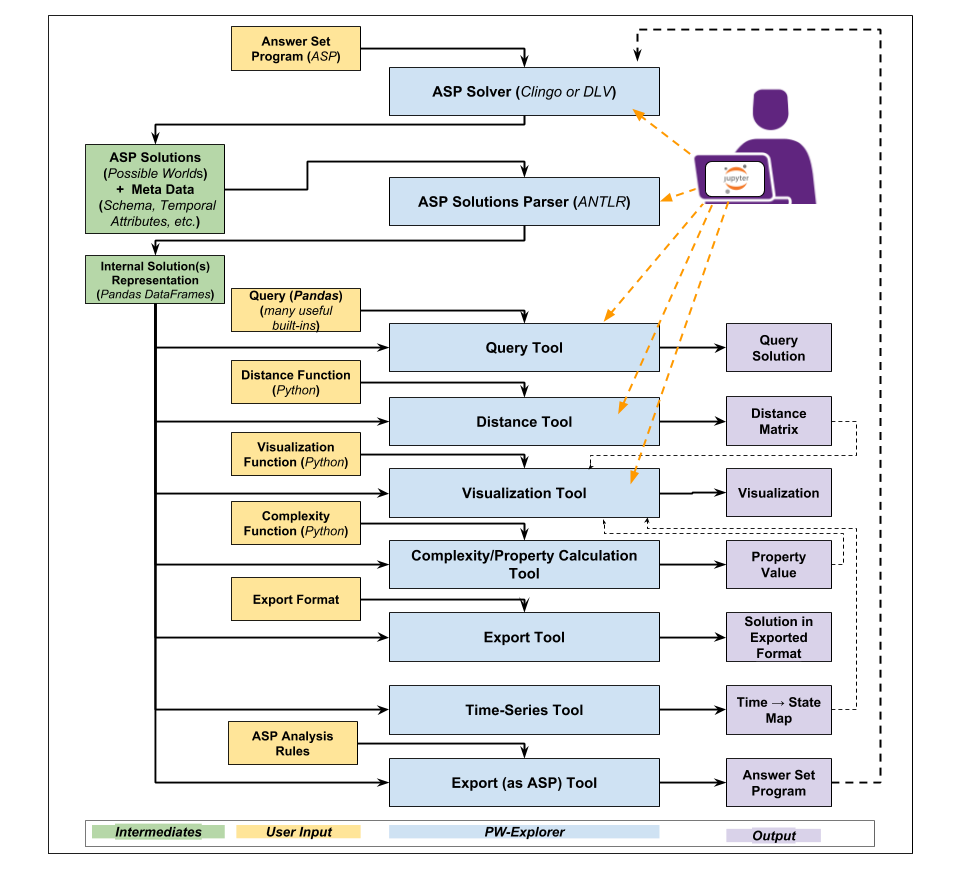
General System Architecture:
PWE Demos available here
1 maintainer

Metadata
1 maintainer
Release files for PW-explorer 0.0.25
For a detailed explanation of source distributions (sdists) and built distributions (wheels), please see the package formats documentation.
Source distribution (sdist)
| File | Size | Uploaded | Provenance | Actions |
|---|---|---|---|---|
| PW_explorer-0.0.25.tar.gz | 38.1 kB | Without provenance | Details for PW_explorer-0.0.25.tar.gz |
Built distribution (wheel)
| File | Interpreter | ABI | Platform | Actions Reset |
|---|---|---|---|---|
| PW_explorer-0.0.25-py3-none-any.whl | Python 3 | none | any | Details for PW_explorer-0.0.25-py3-none-any.whl |
Total release size: 166.1 kB
Release files / PW_explorer-0.0.25.tar.gz
| Download URL | PW_explorer-0.0.25.tar.gz |
|---|---|
| Size | 38.1 kB |
| Tags | Source |
|
SHA-256 checksum How to use checksums |
930467b0e64bd9b4a09882fa01181efc2a210412113cb0fe0fffbb24d77efe01
|
|
BLAKE2b-256 checksum How to use checksums |
e208bcbaa524e76c7613bd4d2908faebe9d7a9f6dd9d25763491ee896ed18042
|
| Upload date | |
|
Uploaded using Trusted Publishing? What is trusted publishing? |
No |
| Uploaded via |
twine/1.12.1 pkginfo/1.4.2 requests/2.19.1 setuptools/40.8.0 requests-toolbelt/0.8.0 tqdm/4.26.0 CPython/3.7.2
|
Release files / PW_explorer-0.0.25-py3-none-any.whl
| Download URL | PW_explorer-0.0.25-py3-none-any.whl |
|---|---|
| Size | 128.0 kB |
| Tags | Python 3 |
|
SHA-256 checksum How to use checksums |
891f5bdc0c9ae60fd99a4bb4b5a6a6299b30448804429ea4969b189a0dff970f
|
|
BLAKE2b-256 checksum How to use checksums |
aad18b5f0b0499ab1bb0bff6d11a3b23e2d0b362bc8d7ca55b3a75137ffe989e
|
| Upload date | |
|
Uploaded using Trusted Publishing? What is trusted publishing? |
No |
| Uploaded via |
twine/1.12.1 pkginfo/1.4.2 requests/2.19.1 setuptools/40.8.0 requests-toolbelt/0.8.0 tqdm/4.26.0 CPython/3.7.2
|
Security for PW-explorer 0.0.25
Provenance
Provenance describes where a file came from. On PyPI, provenance is shared via attestations, which provide a verifiable record of the build or publishing details. View details, limitations and caveats.
No provenance found
None of the files in this release were uploaded with provenance metadata.
A note on package security
PyPI is a repository for distributing packages, not a service for auditing them. While third-party security researchers and our staff do their best to detect and remove malicious packages, PyPI cannot guarantee the quality, security or suitability of any given package.
To learn more about protecting yourself from malicious actors, visit our package security documentation.














