
No project description provided

Project description
This library can be used to consolidate the xl's from multiple sheets into single consolidated file.
These are the parameter that needs to be passed for the functions.
Prerequisites Libraries: pandas xlsxwriter openpyxl configparser
There are some basic rules need to be followed while configuring the property file.
1 Important Points to be considered before execution.
2 Please provide the path eg: D: /folder/excel path.
3 Default HeaderColumnvaluesIndex will be considered as '0' if not provided.
4 Please provide the Column name of index worksheet which contains all the worksheets name else default value for column will be considered as WorkSheetNames.
5 Recommended: Please provide column name in IndexSheet which stores Column header for consolidation. Else, please note the column headers will be picked from one of the sheets randomly.
6 Default HeaderForConsolworksheet will be considered as '0' if not provided.
7 TransPoseConsolidationRow to be provided if any transpose consolidation needs to be done example 2,0,1 (2 represents number of rows to limit , 0 represents first column ,1 represents 1st column for transpose).
8 Default ExcelOutPath will be considered as ConSolidated.xlsx.
Example:
from Consoldation_utility import consolidateData
consolidateData("/Users/username/Downloads/Xlsx_testing/test.xlsx",
"Sheet 3",2,"Names","",3,"2,0,1","/Users/username/Downloads/Xlsx_testing/consolidated_testing.xlsx")
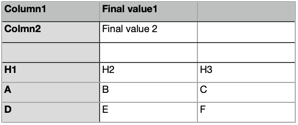
Sheet1:
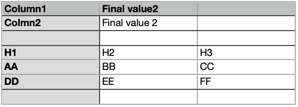
Sheet2:
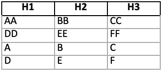
Output:
Consolidate sheet:
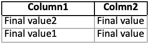
Transposed sheet:
In next release will try to incorporate some database connection to load the consolidated data into DB.
Release history Release notifications | RSS feed


Download files
Download the file for your platform. If you're not sure which to choose, learn more about installing packages.
Source Distributions
Built Distribution
Filter files by name, interpreter, ABI, and platform.
If you're not sure about the file name format, learn more about wheel file names.
Copy a direct link to the current filters
File details
Details for the file Pandas_Consolidated_Loader-0.2-py3-none-any.whl.
File metadata
- Download URL: Pandas_Consolidated_Loader-0.2-py3-none-any.whl
- Upload date:
- Size: 5.3 kB
- Tags: Python 3
- Uploaded using Trusted Publishing? No
- Uploaded via: twine/5.1.1 CPython/3.13.0
File hashes
| Algorithm | Hash digest | |
|---|---|---|
| SHA256 |
24286018eec8a4d180854bd5ac03391ad1b22a46be6028af350c29f6dc4bd06c
|
|
| MD5 |
29cf26769ff886652515e82b25959639
|
|
| BLAKE2b-256 |
78301ecb485be9cd76e37e4e1217c2ac152f1c4ad4214ac3db6f32675f877fc8
|






