
PicImageSearch APIs for Python 3.x 适用于 Python 3 以图搜源整合API

Project description
PicImageSearch
✨ 聚合识图引擎 用于以图搜源✨




支持
简要说明
详细见文档 或者demo
同步请使用from PicImageSearch.sync import ...导入
异步请使用from PicImageSearch import Network,...导入
推荐使用异步
简单示例
from loguru import logger
from PicImageSearch import SauceNAO, Network

async with Network() as client:  # 可以设置代理 Network(proxies='scheme://host:port')
    saucenao = SauceNAO(client=client, api_key="your api key")  # client, api_key 不能少
    url = "https://raw.githubusercontent.com/kitUIN/PicImageSearch/main/demo/images/test01.jpg"
    resp = await saucenao.search(url=url)
    # 搜索本地图片
    # file = "demo/images/test01.jpg"
    # resp = await saucenao.search(file=file)

    logger.info(resp.status_code)  # HTTP 状态码
    # logger.info(resp.origin)  # 原始数据
    logger.info(resp.raw[0].origin)
    logger.info(resp.long_remaining)
    logger.info(resp.short_remaining)
    logger.info(resp.raw[0].thumbnail)
    logger.info(resp.raw[0].similarity)
    logger.info(resp.raw[0].hidden)
    logger.info(resp.raw[0].title)
    logger.info(resp.raw[0].author)
    logger.info(resp.raw[0].url)
    logger.info(resp.raw[0].pixiv_id)
    logger.info(resp.raw[0].member_id)
from PicImageSearch.sync import SauceNAO

saucenao = SauceNAO(api_key="your api key")  # api_key 不能少
url = "https://raw.githubusercontent.com/kitUIN/PicImageSearch/main/demo/images/test01.jpg"
resp = saucenao.search(url=url)
# 搜索本地图片
# file = "demo/images/test01.jpg"
# resp = saucenao.search(file=file)
# 下面操作与异步方法一致
安装
- 此包需要 Python 3.7 或更新版本。
pip install PicImageSearch- 或者
pip install PicImageSearch -i https://pypi.tuna.tsinghua.edu.cn/simple
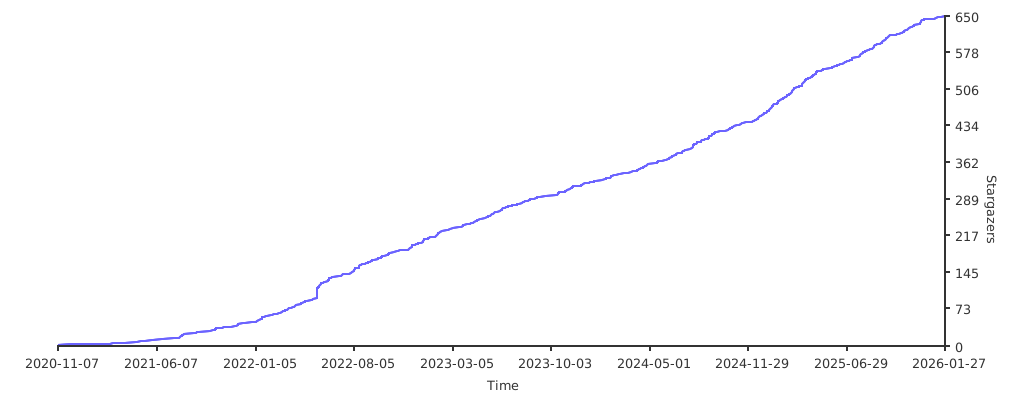
Star History
Release history Release notifications | RSS feed


Download files
Download the file for your platform. If you're not sure which to choose, learn more about installing packages.
Source Distribution
PicImageSearch-3.6.1.tar.gz
(15.3 kB
view details)
Built Distribution
Filter files by name, interpreter, ABI, and platform.
If you're not sure about the file name format, learn more about wheel file names.
Copy a direct link to the current filters
File details
Details for the file PicImageSearch-3.6.1.tar.gz.
File metadata
- Download URL: PicImageSearch-3.6.1.tar.gz
- Upload date:
- Size: 15.3 kB
- Tags: Source
- Uploaded using Trusted Publishing? No
- Uploaded via: twine/4.0.1 CPython/3.9.14
File hashes
| Algorithm | Hash digest | |
|---|---|---|
| SHA256 |
f51dc1cbfc581c02573cc27698eee2ebeb2776037860633e4306d1ed622b15f7
|
|
| MD5 |
d850f86f47477693ee4a4f445cd4ef5b
|
|
| BLAKE2b-256 |
b83fa572a00e9c64461608bd2112134051a18e10e3d118eacfa49db3f964d1d5
|
File details
Details for the file picimagesearch-3.6.1-py3-none-any.whl.
File metadata
- Download URL: picimagesearch-3.6.1-py3-none-any.whl
- Upload date:
- Size: 22.3 kB
- Tags: Python 3
- Uploaded using Trusted Publishing? No
- Uploaded via: twine/4.0.1 CPython/3.9.14
File hashes
| Algorithm | Hash digest | |
|---|---|---|
| SHA256 |
523c2904c6fe29254f976c54d764cbda86f6920b20a206b47ba20b5c7b5decfd
|
|
| MD5 |
6d770e0eeb2d70a8824d98bdb1475298
|
|
| BLAKE2b-256 |
3484fbd20ab47686f008546bdeca8e1cfbe48704d06072fb57a7fa6858bb77a8
|






