
An automatic deep learning algorithm for spot detection in fluorescence microscopy images.

Project description
Piscis

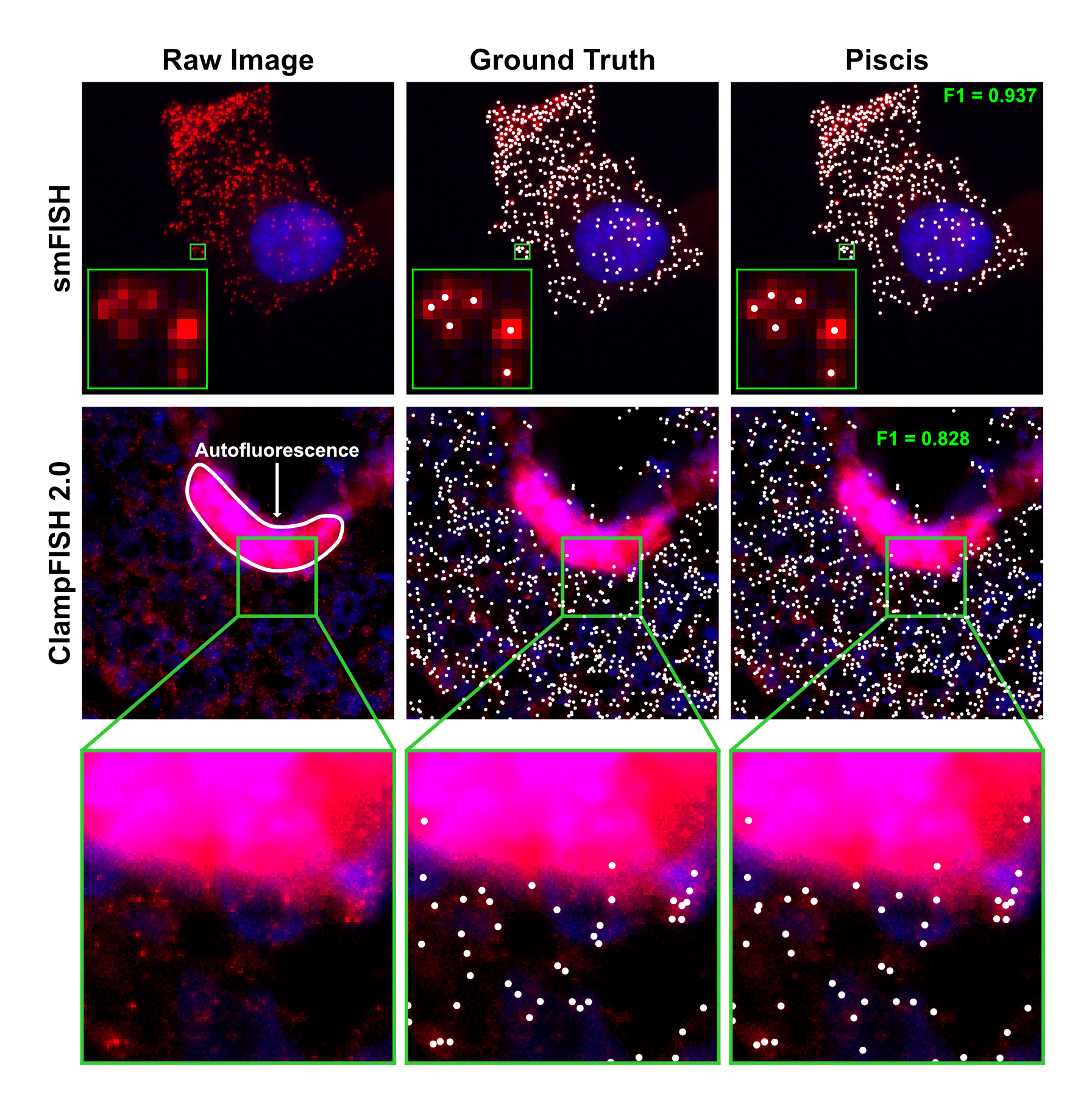
piscis is an automatic deep learning algorithm for spot detection, written in Python using the
JAX and Flax libraries. It is named after the Latin
word for fish, as it was designed specifically for microscopy images generated by RNA fluorescence in situ
hybridization (FISH). However, we have found it to be useful for other imaging methods, such as immunofluorescence (IF)
and FISH-based spatial transcriptomics. To learn more about piscis, please read our Cell Systems
paper or bioRxiv
preprint.
This Python package allows users to apply pre-trained models from Hugging Face to
both single plane images and z-stacks or to train new models using custom datasets. It provides a simple API for both
training and inference that can be used in traditional Python scripts or Jupyter notebook
environments such as on Google Colab. It also provides a command line interface
for those who prefer the terminal. For a user-friendly graphical user interface, we have implemented piscis as a
Docker image for
NimbusImage, a cloud platform for biological image analysis
enabling researchers to interactively visualize their data while leveraging state-of-the-art machine learning
algorithms.
For more information, please refer to the comprehensive documentation available at https://piscis.netlify.app.
Examples
Installation
Install piscis from PyPI with pip.
pip install piscis
By default, this will install the CPU version of JAX. If you would like to run or train piscis on a GPU or TPU, follow
JAX's instructions.
Usage
If you want to use piscis with its Python API, check out the inference example and
training example notebooks.
If you want to use piscis with its command line interface, run the following commands.
# Run Piscis.
piscis predict INPUT_PATH OUTPUT_PATH [OPTIONS]

# Train Piscis.
piscis train MODEL_NAME DATASET_PATH [OPTIONS]
To see the full list of options, run piscis predict --help or piscis train --help.
Citation
If you use piscis in your research, please cite our
paper.
Niu, Z., O’Farrell, A., Li, J., Reffsin, S., Jain, N., Dardani, I., Goyal, Y., & Raj, A. (2025). Piscis: A loss estimator of the F1 score enables accurate spot detection in fluorescence microscopy images via deep learning. Cell Systems. https://doi.org/10.1016/j.cels.2025.101448
@article{Niu2025-Piscis,
    title={Piscis: A loss estimator of the F1 score enables accurate spot detection in fluorescence microscopy images via deep learning},
    author={Niu, Zijian and O’Farrell, Aoife and Li, Jingxin and Reffsin, Sam and Jain, Naveen and Dardani, Ian and Goyal, Yogesh and Raj, Arjun},
    year=2025,
    journal="Cell Systems",
    DOI={10.1016/j.cels.2025.101448}
}
License
piscis is licensed under the MIT License. The copyright and permission notices found in the LICENSE file
shall be included in all copies or substantial portions of the Software.
Release history Release notifications | RSS feed


Download files
Download the file for your platform. If you're not sure which to choose, learn more about installing packages.
Source Distribution
Built Distribution
Filter files by name, interpreter, ABI, and platform.
If you're not sure about the file name format, learn more about wheel file names.
Copy a direct link to the current filters
File details
Details for the file piscis-0.2.9.tar.gz.
File metadata
- Download URL: piscis-0.2.9.tar.gz
- Upload date:
- Size: 36.9 kB
- Tags: Source
- Uploaded using Trusted Publishing? No
- Uploaded via: twine/6.0.1 CPython/3.12.8
File hashes
| Algorithm | Hash digest | |
|---|---|---|
| SHA256 |
85b8da070133a266f514ed0500b67430018ae13a7e2f8b590d525c0b513eacaa
|
|
| MD5 |
b44365d9deb026f4d48b5b0958dda5a7
|
|
| BLAKE2b-256 |
8f4d88369b9539ea9568b434b7fac52a81ea76898989db052ccb665f44265f8f
|
File details
Details for the file piscis-0.2.9-py3-none-any.whl.
File metadata
- Download URL: piscis-0.2.9-py3-none-any.whl
- Upload date:
- Size: 43.9 kB
- Tags: Python 3
- Uploaded using Trusted Publishing? No
- Uploaded via: twine/6.0.1 CPython/3.12.8
File hashes
| Algorithm | Hash digest | |
|---|---|---|
| SHA256 |
26a7a2ad90a5359360d37d01d99c9a48009b6060abfe565d2c15539dcdec746c
|
|
| MD5 |
0b226e0f980c3c9d64867316cae798fd
|
|
| BLAKE2b-256 |
8092c98344c01747f8dd4be077d87c04c765ef46dea384ba5a7bd06a082db666
|






