
This release is a pre-release and may not be stable for production use.




Praison AI, leveraging both AutoGen and CrewAI or any other agent framework, represents a low-code, centralised framework designed to simplify the creation and orchestration of multi-agent systems for various LLM applications, emphasizing ease of use, customization, and human-agent interaction.

Different User Interfaces:
| Interface | Description | URL |
|---|---|---|
| UI | Multi Agents such as CrewAI or AutoGen | https://docs.praison.ai/ui/ui |
| Chat | Chat with 100+ LLMs, single AI Agent | https://docs.praison.ai/ui/chat |
| Code | Chat with entire Codebase, single AI Agent | https://docs.praison.ai/ui/code |
Google Colab Multi Agents
| Cookbook | Open in Colab | |
|---|---|---|
| Basic | PraisonAI |  |
| Include Tools | PraisonAI Tools | |
Install
| PraisonAI | PraisonAI Code | PraisonAI Chat |
|---|---|---|
pip install praisonai |
pip install "praisonai[code]" |
pip install "praisonai[chat]" |
Key Features
- Automated AI Agents Creation
- Use CrewAI or AutoGen Framework
- 100+ LLM Support
- Chat with ENTIRE Codebase
- Interactive UIs
- YAML-based Configuration
- Custom Tool Integration
TL;DR Multi Agents
pip install praisonai
export OPENAI_API_KEY="Enter your API key"
praisonai --init create a movie script about dog in moon
praisonai
Table of Contents
- Installation
- Initialise
- Run
- Full Automatic Mode
- User Interface
- Praison AI Chat
- Create Custom Tools
- Agents Playbook
- Include praisonai package in your project
- Commands to Install Dev Dependencies
- Other Models
- Contributing
- Star History
Installation Multi Agents
pip install praisonai
Initialise
export OPENAI_API_KEY="Enter your API key"
Generate your OPENAI API KEY from here: https://platform.openai.com/api-keys
Note: You can use other providers such as Ollama, Mistral ... etc. Details are provided at the bottom.
praisonai --init create a movie script about dog in moon
This will automatically create agents.yaml file in the current directory.
To initialise with a specific agent framework (Optional):
praisonai --framework autogen --init create movie script about cat in mars
Run
praisonai
or
python -m praisonai
Specify the agent framework (Optional):
praisonai --framework autogen
Full Automatic Mode
praisonai --auto create a movie script about Dog in Moon
User Interface
PraisonAI User Interfaces:
| Interface | Description | URL |
|---|---|---|
| UI | Multi Agents such as CrewAI or AutoGen | https://docs.praisonai.com/ui/ui |
| Chat | Chat with 100+ LLMs, single AI Agent | https://docs.praisonai.com/ui/chat |
| Code | Chat with entire Codebase, single AI Agent | https://docs.praisonai.com/ui/code |
pip install -U "praisonai[ui]"
export OPENAI_API_KEY="Enter your API key"
chainlit create-secret
export CHAINLIT_AUTH_SECRET=xxxxxxxx
praisonai ui
or
python -m praisonai ui
Praison AI Chat
pip install "praisonai[chat]"
export OPENAI_API_KEY="Enter your API key"
praisonai chat
Praison AI Code
pip install "praisonai[code]"
export OPENAI_API_KEY="Enter your API key"
praisonai code
Create Custom Tools
Agents Playbook
Simple Playbook Example
framework: crewai
topic: Artificial Intelligence
roles:
  screenwriter:
    backstory: "Skilled in crafting scripts with engaging dialogue about {topic}."
    goal: Create scripts from concepts.
    role: Screenwriter
    tasks:
      scriptwriting_task:
        description: "Develop scripts with compelling characters and dialogue about {topic}."
        expected_output: "Complete script ready for production."
Use 100+ Models
Include praisonai package in your project
Option 1: Using RAW YAML
from praisonai import PraisonAI

# Example agent_yaml content
agent_yaml = """
framework: "crewai"
topic: "Space Exploration"

roles:
  astronomer:
    role: "Space Researcher"
    goal: "Discover new insights about {topic}"
    backstory: "You are a curious and dedicated astronomer with a passion for unraveling the mysteries of the cosmos."
    tasks:
      investigate_exoplanets:
        description: "Research and compile information about exoplanets discovered in the last decade."
        expected_output: "A summarized report on exoplanet discoveries, including their size, potential habitability, and distance from Earth."
"""

# Create a PraisonAI instance with the agent_yaml content
praisonai = PraisonAI(agent_yaml=agent_yaml)

# Run PraisonAI
result = praisonai.run()

# Print the result
print(result)
Option 2: Using separate agents.yaml file
Note: Please create agents.yaml file before hand.
from praisonai import PraisonAI

def basic(): # Basic Mode
    praisonai = PraisonAI(agent_file="agents.yaml")
    praisonai.run()

if __name__ == "__main__":
    basic()
Commands to Install Dependencies:
-
Install all dependencies, including dev dependencies:
poetry install -
Install only documentation dependencies:
poetry install --with docs
-
Install only test dependencies:
poetry install --with test
-
Install only dev dependencies:
poetry install --with dev
This configuration ensures that your development dependencies are correctly categorized and installed as needed.
Contributing
- Fork on GitHub: Use the "Fork" button on the repository page.
- Clone your fork:
git clone https://github.com/yourusername/praisonAI.git - Create a branch:
git checkout -b new-feature - Make changes and commit:
git commit -am "Add some feature" - Push to your fork:
git push origin new-feature - Submit a pull request via GitHub's web interface.
- Await feedback from project maintainers.
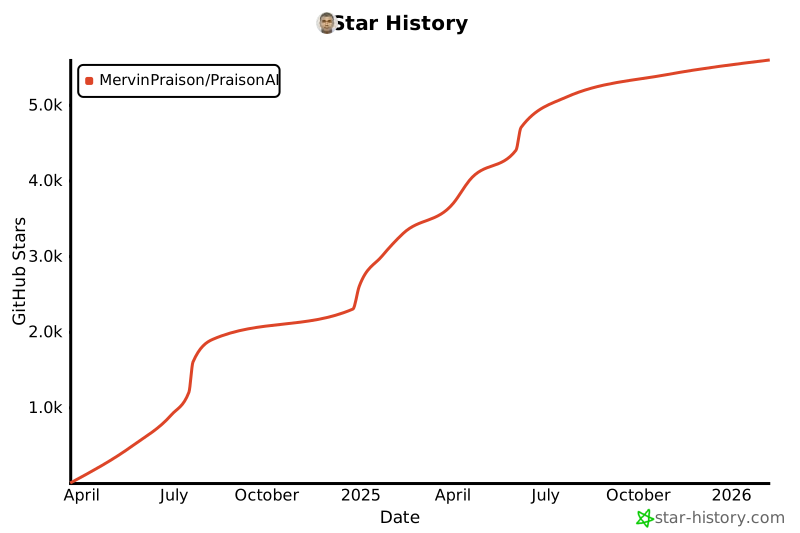
Star History
License
Praison AI is an open-sourced software licensed under the MIT license.
1 maintainer

Metadata
1 maintainer
Release files for PraisonAI 0.0.59rc11
For a detailed explanation of source distributions (sdists) and built distributions (wheels), please see the package formats documentation.
Source distribution (sdist)
| File | Size | Uploaded | |
|---|---|---|---|
| praisonai-0.0.59rc11.tar.gz | 149.0 kB | Details |
Built distribution (wheel)
| File | Interpreter | ABI | Platform | Reset |
|---|---|---|---|---|
| praisonai-0.0.59rc11-cp312-cp312-manylinux_2_35_x86_64.whl | CPython 3.12 | CPython 3.12 | Linux glibc 2.35+ x86-64 | Details |
Total release size: 307.5 kB
Release files / praisonai-0.0.59rc11.tar.gz
| Download URL | praisonai-0.0.59rc11.tar.gz |
|---|---|
| Size | 149.0 kB |
| Tags | Source |
|
SHA-256 checksum How to use checksums |
9f18d0bbb1f4232e235dc8dfcb16fff274099a813ee7d447cddfbac233af9fe9
|
|
BLAKE2b-256 checksum How to use checksums |
6bcfa50d9a0c84416a5d1f65525031da36e26f64bc6d06a1bebdf174febf0341
|
| Upload date | |
|
Uploaded using Trusted Publishing? What is trusted publishing? |
No |
| Uploaded via |
twine/5.1.1 CPython/3.9.19
|
Release files / praisonai-0.0.59rc11-cp312-cp312-manylinux_2_35_x86_64.whl
| Download URL | praisonai-0.0.59rc11-cp312-cp312-manylinux_2_35_x86_64.whl |
|---|---|
| Size | 158.5 kB |
| Tags | CPython 3.12 Linux glibc 2.35+ x86-64 |
|
SHA-256 checksum How to use checksums |
1976d8e46e1b0e4eef64a364b58e02819ade9af1d14dc8763789ff6331ccdf11
|
|
BLAKE2b-256 checksum How to use checksums |
0b68f057c6420d174ce53c25d376c16cd83335ed6dcd08dbb0204a87a40fca31
|
| Upload date | |
|
Uploaded using Trusted Publishing? What is trusted publishing? |
No |
| Uploaded via |
twine/5.1.1 CPython/3.9.19
|














