
Print3D
自托管 3D 打印 MCP 服务 —— 从一句话到真正打印出来的零件。
MIT · Python 3.11+ · macOS / Linux / Windows · 使用手册 · English
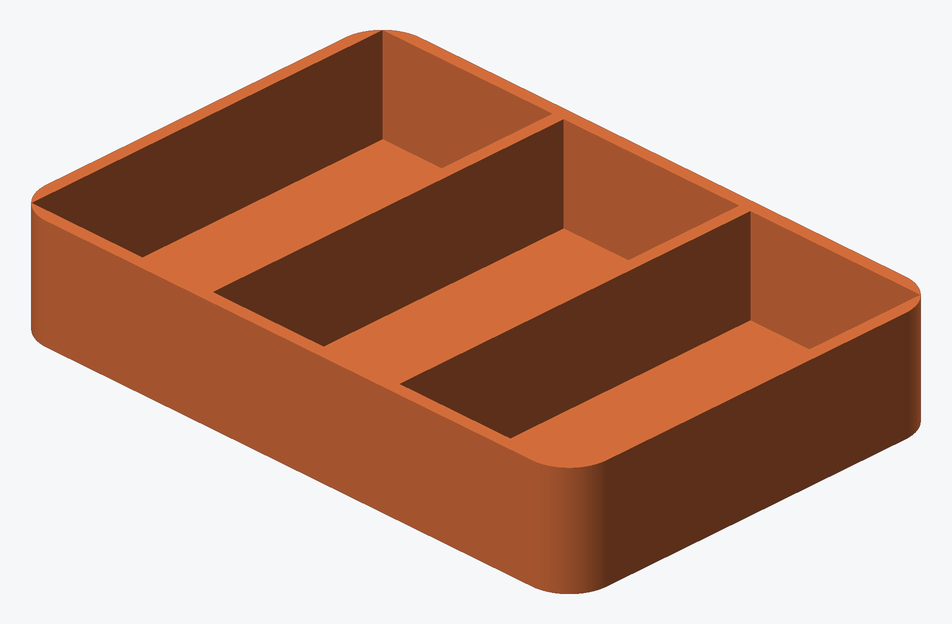
120 × 80 × 22 mm 三格收纳盘 · build123d 脚本生成 · model_preview 渲染
功能
| 能力 | 说明 |
|---|---|
| 参数化建模 | 用 build123d 写脚本,输出 STL + STEP,返回水密性、壁厚、包围盒等真实几何检查 |
| 多种输入 | 文字直接建模(默认,不需要图片)、概念图、参考图/草图、STL/GLB/OBJ、STEP、Blender bpy 脚本 |
| 模型生成 | 云端:腾讯混元 3D(hunyuan)、Tripo AI(tripo);本地部署:generate_local;本机 Blender:blender_run 执行 bpy 脚本生成 mesh |
| 资产与版本 | 每个资产保留多个 revision、脚本、参考图和检查结果;四视图 PNG 和可旋转的 HTML 查看器 |
| 工程图 | 从 STEP 投影第三角四视图,导出 SVG / DXF,带隐藏线 |
| 可打印性 | 水密性、悬垂、支撑体积、薄壁、热床接触、0–100 评分,以及 24 向摆放排序 |
| 切片 | 调用 OrcaSlicer CLI,可覆盖层高、填充、墙数、温度、流量、压力提前、线宽、风扇 |
| 打印 | Moonraker/Klipper、OctoPrint、Bambu LAN、PrusaLink、通用 HTTP;支持多工具头和多材料槽 |
| 安全 | 工作区路径沙箱、脚本静态审查 + 子进程资源限额、写操作确认串、密钥脱敏 |
安装
需要 Python 3.11+ 和 uv;支持 macOS、Linux、Windows 10/11 x64。推荐从 PyPI 安装,不需要 clone 仓库。
推荐:uvx
uvx --python 3.11 --from print3d==0.1.1 print3d init
uvx --python 3.11 --from print3d==0.1.1 print3d capabilities
uvx 在隔离环境运行,不会全局安装。首次启动要下载 Python/CAD 依赖(约 250 MB),可能超过某些客户端的默认超时;可以先用 uv tool install print3d==0.1.1 预热,然后把 command 改成 print3d。
把 Print3D 加到 Agent(DSH、Claude Desktop、Codex、WorkBuddy、Trae 等):
{
  "mcpServers": {
    "print3d": {
      "command": "uvx",
      "args": ["--python", "3.11", "--from", "print3d==0.1.1", "print3d", "serve", "--stdio"]
    }
  }
}
command 必须能被 Agent 找到:放在 PATH 上,或写绝对路径(Windows 用 uvx.exe)。从 GUI 启动的 Agent 可能没有 ~/.local/bin,这时用 command -v uvx 的结果。若改用 uv tool install,把 command 换成 print3d,args 换成 ["serve", "--stdio"]。
本地建模、预览和导出不需要任何 API key;只有使用概念图、云端生成等功能时需要你预先开通相应的付费账号:
export TRIPO_API_KEY=...          # Tripo AI
export HUNYUAN3D_API_KEY=...      # 腾讯混元 3D
export OPENAI_API_KEY=...         # 概念图 / images provider
本地部署模型不需要云端 key,在 providers.local 里配置命令即可。Agent 接入、HTTP 模式、密钥管理和排错见使用手册。
交给 Agent 安装(推荐新手)
不用自己逐条敲命令。复制下面这段(GitHub 代码块右上角有复制按钮)交给能执行命令的 Agent:
你是我的安装助手。请在这台 macOS / Linux / Windows 机器上安装 Print3D MCP 服务:

仓库:https://github.com/ThinkArtWork/Print3D
依赖:Python 3.11+、uv;源码安装另需 git。

1. 检查系统和依赖;缺 uv 就按官方方式安装;Python 版本不够就告诉我,不要擅自改系统 Python。
2. 运行 uvx --python 3.11 --from print3d==0.1.1 print3d init。
3. 运行 print3d capabilities(源码安装用 uv run print3d capabilities),报告 CAD、渲染、切片器、打印机状态。
4. 检查 OrcaSlicer 和 Blender 是否安装;缺失只报告,不要自动下载大文件。
5. 根据我的 Agent(DSH / Claude Desktop / Codex / WorkBuddy / Trae)生成 stdio 配置,优先用 uvx;如果 GUI 找不到 uvx,用 command -v uvx 的绝对路径。写入前先给我确认。
6. 不要索要 API key,核心功能不需要。最后给我一条测试提示词。
从源码安装(开发)
git clone https://github.com/ThinkArtWork/Print3D.git
cd Print3D
uv sync
uv run print3d init
Windows 用同一套命令,只是入口在 .venv\Scripts\(PowerShell):
git clone https://github.com/ThinkArtWork/Print3D.git
cd Print3D
uv sync
.\.venv\Scripts\print3d.exe init
print3d init 会创建 ~/.print3d/ 工作区(Windows 上是 %USERPROFILE%\.print3d)。源码方式下,Agent 配置的 command 指向仓库虚拟环境里的可执行文件:
{
  "mcpServers": {
    "print3d": {
      "command": "/绝对路径/Print3D/.venv/bin/print3d",
      "args": ["serve", "--stdio"]
    }
  }
}
command 必须能被 Agent 找到,且不能含 ~;Windows 换成 .venv\Scripts\print3d.exe 的绝对路径,JSON 里的反斜杠要写成 \\。源码安装仅用于开发,普通用户优先用上面的 uvx。
支持什么
- 输入:一句话/尺寸约束、概念图、参考图与手绘草图、现有 STL/GLB/OBJ、STEP 文件、Blender bpy 脚本。
- 建模与生成:build123d 参数化 CAD;腾讯混元 3D、Tripo AI 云端生成;TripoSR、Hunyuan3D、ComfyUI 等本地部署模型(只要能写出 STL);本机 Blender 通过
blender_run执行 bpy 脚本生成 mesh。 - 复杂造型:有机雕刻、角色和复杂曲面可走 Blender bpy(
blender_run)或 mesh(mesh_fit)路径;这类工作流比参数化建模更复杂,效果取决于 Agent 和 Blender 脚本。 - 资产能力:版本管理、四视图预览、交互式 HTML 查看器、SVG/DXF 工程图、STL/STEP/脚本导出。
- 可打印性:水密性与开放边检查、悬垂与支撑估计、薄壁检查、热床接触、摆放评分和 24 向排序。
- 切片与打印:OrcaSlicer;Moonraker/Klipper(含 Snapmaker U1 实机验证)、OctoPrint、Bambu LAN、PrusaLink、通用 HTTP;多工具头/多材料槽。
- 平台与 Agent:macOS、Linux、Windows 10/11 x64;Python 3.11+;MCP stdio 与 streamable HTTP;DSH、Claude Desktop、Claude Code、Codex、WorkBuddy、Trae 等 Agent。
尚未实现
- 自带大模型或聊天界面:Print3D 是 MCP server,理解需求、写脚本、看图由 Agent 完成。
- 托管的云端建模平台:它是单用户、自托管服务;HTTP 模式不应直接暴露到公网。
⚠️注意
- 不保证打印成功:几何检查和可打印性评分是决策辅助,不是结构仿真或认证。
- Windows 的隔离强度:Windows 没有 POSIX
rlimit的等价物,生成代码只受墙钟超时和进程树终止约束;macOS / Linux 上还有 CPU 时间、文件大小和句柄数限额。print3d capabilities的sandbox字段会如实报告这台机器能做什么。 - Bambu LAN / PrusaLink 的真机验证:适配器已有模拟测试,但尚未在对应硬件上完整验证,目前完成的验证的硬件:Snapmaker U1。
- 正式发行版:项目仍是 Alpha;
0.1.1已发布到 PyPI,可直接用上面的uvx安装。
License
MIT © 2026 ThinkArtWork
1 maintainer

Metadata
1 maintainer
Release files for Print3D 0.1.1
For a detailed explanation of source distributions (sdists) and built distributions (wheels), please see the package formats documentation.
Source distribution (sdist)
| File | Size | Uploaded | Provenance | Actions |
|---|---|---|---|---|
| print3d-0.1.1.tar.gz | 215.2 kB | Without provenance | Details for print3d-0.1.1.tar.gz |
Built distribution (wheel)
| File | Interpreter | ABI | Platform | Actions Reset |
|---|---|---|---|---|
| print3d-0.1.1-py3-none-any.whl | Python 3 | none | any | Details for print3d-0.1.1-py3-none-any.whl |
Total release size: 384.9 kB
Release files / print3d-0.1.1.tar.gz
| Download URL | print3d-0.1.1.tar.gz |
|---|---|
| Size | 215.2 kB |
| Tags | Source |
|
SHA-256 checksum How to use checksums |
7937b22877440ea53bd52fbdd03233427ac72f3093e2c79f652ad615951f0415
|
|
BLAKE2b-256 checksum How to use checksums |
ab3884d3dfcc58a5b08efca9ec94d6dd8724c14bbffdb883afcbcafa1e5a4369
|
| Upload date | |
|
Uploaded using Trusted Publishing? What is trusted publishing? |
No |
| Uploaded via |
uv/0.9.28 {"installer":{"name":"uv","version":"0.9.28","subcommand":["publish"]},"python":null,"implementation":{"name":null,"version":null},"distro":{"name":"macOS","version":null,"id":null,"libc":null},"system":{"name":null,"release":null},"cpu":null,"openssl_version":null,"setuptools_version":null,"rustc_version":null,"ci":null}
|
Release files / print3d-0.1.1-py3-none-any.whl
| Download URL | print3d-0.1.1-py3-none-any.whl |
|---|---|
| Size | 169.7 kB |
| Tags | Python 3 |
|
SHA-256 checksum How to use checksums |
38d9bdab409507eb71c195e8311443e890cd08576213d3eaf90fc05abeb4c454
|
|
BLAKE2b-256 checksum How to use checksums |
2db6af6febd790fab467e5c316e28488edb716a549d1d60343a0b35356cac60a
|
| Upload date | |
|
Uploaded using Trusted Publishing? What is trusted publishing? |
No |
| Uploaded via |
uv/0.9.28 {"installer":{"name":"uv","version":"0.9.28","subcommand":["publish"]},"python":null,"implementation":{"name":null,"version":null},"distro":{"name":"macOS","version":null,"id":null,"libc":null},"system":{"name":null,"release":null},"cpu":null,"openssl_version":null,"setuptools_version":null,"rustc_version":null,"ci":null}
|
Security for Print3D 0.1.1
Provenance
Provenance describes where a file came from. On PyPI, provenance is shared via attestations, which provide a verifiable record of the build or publishing details. View details, limitations and caveats.
No provenance found
None of the files in this release were uploaded with provenance metadata.
A note on package security
PyPI is a repository for distributing packages, not a service for auditing them. While third-party security researchers and our staff do their best to detect and remove malicious packages, PyPI cannot guarantee the quality, security or suitability of any given package.
To learn more about protecting yourself from malicious actors, visit our package security documentation.














