
A decentralized iterable, function and log tracker
Verified details
These details have been verified by PyPIProject links
GitHub Statistics
Maintainers

Project description






This project provides an easy-to-use tool for tracking the progress of Python iterables, functions, and log messages to an independent log server. It allows users to monitor multiple Python scripts from any device with an internet connection. With this decentralized approach, users can collaborate and monitor the real-time progress of various scripts running on different devices and processes. This tool enables seamless tracking across distributed systems, making it ideal for collaborative projects and remote monitoring.
Key Features
- Progress Tracking: Track the progress of Python iterables, functions, and log messages in real-time (0.5 - 2 ms overhead).
- Decentralized Monitoring: Monitor multiple Python scripts from any device with an internet connection.
- Collaborative Projects: Collaborate and monitor the real-time progress of various scripts running on different devices and processes.
- Distributed Systems: Track progress across distributed systems for seamless monitoring and remote collaboration.
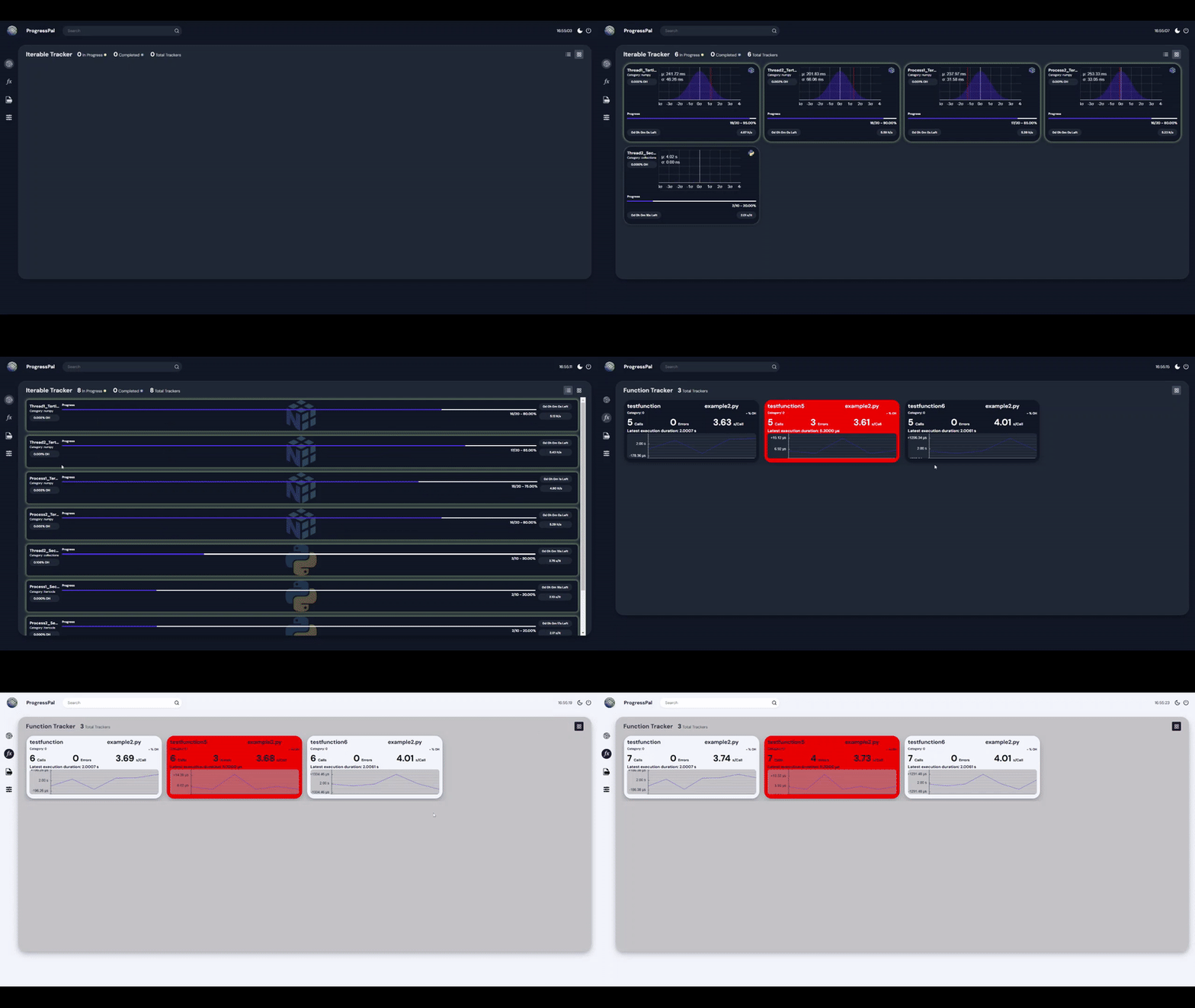
- Function Tracking: Track the call-count, execution time distribution, execution history, time between calls, error count, function file origin, and function name.
- Iterable Tracking: Track the progress of iterables and generators with a progress bar. Additionally, track the total number of iterations, current iteration, and percentage completion, time remaining, iteration execution time, and iteration rate.
- Log Server: Start a log server to receive progress updates from Python scripts. The log server can be accessed from any device with an internet connection.
- Threading support: Track the progress of multiple threads and processes simultaneously.
- Search Functionality: Search for specific functions and iterables in the log server.
Installation
Clone
Navigate to your desired installation directory and clone the repository using the following command:
git clone https://github.com/levi2234/Progresspal
Navigate to the installation directory and use either a pip install or python setup.py install to install the package.
Pip Install
pip install .
Python Setup
python setup.py install
Pip Install
pip install ProgressPal
Usage
Log server
The progresspal package reports the progress of iterables, functions, and log messages to a log server. The log server can be started by running the following command in the terminal (by default can be found on http://127.0.0.1:5000).
ProgressPal start
If this command does not work it is possible to start the log server by running the following code in a Python script.
from ProgressPal.webapp.webapp import start_web_server

start_web_server()
Iterables and generators
Using ProgressPal is simple and might even feel familiar to those who have used tqdm and the logging module in Python. The following is a simple example of how to use ProgressPal to track the progress of a for loop.
from ProgressPal import ltrack
import time

for i in ltrack(np.arange(100)):
    time.sleep(0.1)
Which will report the progress of the for loop to the ProgressPal server. This can be done with any iterable or generator.
from ProgressPal import ltrack
import time

for i in ltrack(range(100), total=100): # providing a total is required for generators
    time.sleep(0.1)
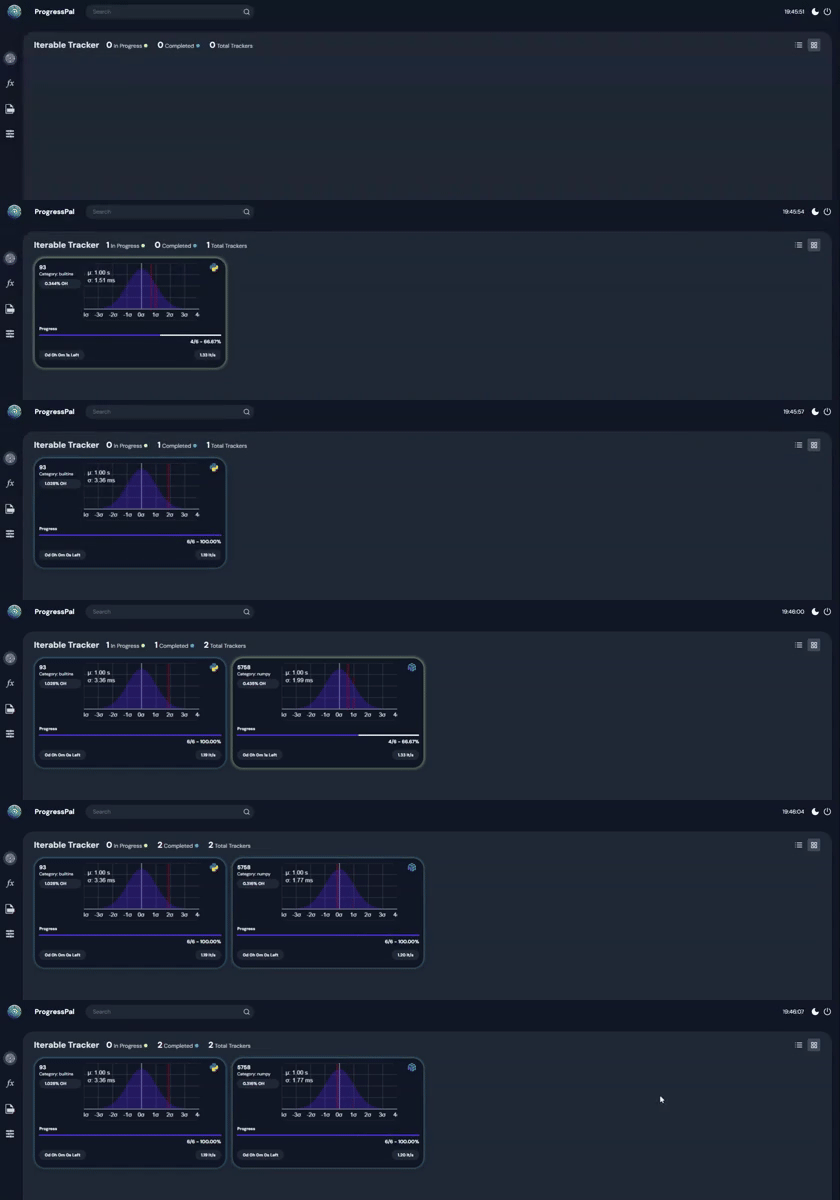
The result of the above code can be seen in the ProgressPal server as such:
Functions
ProgressPal can also be used to track the execution functions . The following is an example of how to use ProgressPal to track the progress of a function
from ProgressPal import ftrack

@ftrack()             # Decorator to track the progress of the function
def test_function():
    time.sleep(1)

for i in range(10):
    test_function()
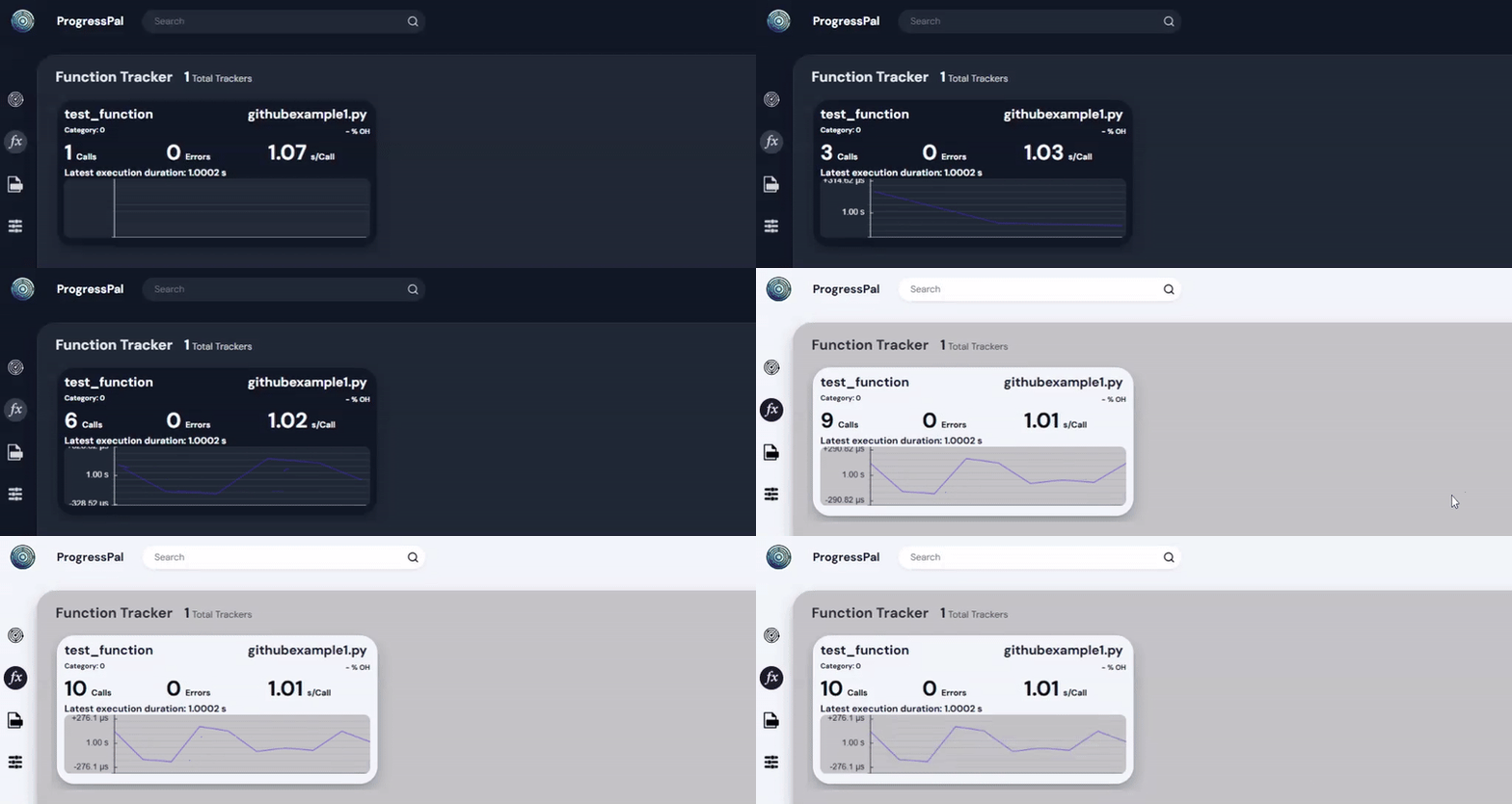
The result of the above code can be seen in the ProgressPal server as such:
Collaborate using ProgressPal
ProgressPal is designed to be a collaborative tool that allows users to monitor the progress of various scripts running on different devices and processes. Through this approach it is possible to monitor the progress of multiple scripts in real-time, making it ideal for collaborative projects and remote monitoring. To do this the logserver needs to be publically hosted in order to be accessed by people outside of the local network. This can be done by port forwarding the logserver or by hosting the logserver on a cloud service.
A free and easy way to host the logserver is through the built in vscode port forwarding which can be accessed as such:

After the logserver is publically hosted other users can access the logserver by redirecting their progresspal to the publically hosted logserver. This can be done by including the following arguments in ftrack ltrack and Plog functions:
from ProgressPal import ftrack, ltrack, Plog

# FTRACK
@ftrack(host = 'yourhost', port = 'yourport')             # Decorator to track the progress of the function
def test_function():
    time.sleep(1)

# LTRACK
for i in ltrack([1,2,3,4], host ='yourhost', port ='yourport'):
    time.sleep(0.1)

# PLOG
logger = Plog(host = 'yourhost', port = 'yourport')
logger.info('This is a test message')
License
MIT
Project details
Verified details
These details have been verified by PyPIProject links
GitHub Statistics
Maintainers


Download files
Download the file for your platform. If you're not sure which to choose, learn more about installing packages.
Source Distribution
Built Distribution
Filter files by name, interpreter, ABI, and platform.
If you're not sure about the file name format, learn more about wheel file names.
Copy a direct link to the current filters
File details
Details for the file progresspal-0.0.5.tar.gz.
File metadata
- Download URL: progresspal-0.0.5.tar.gz
- Upload date:
- Size: 736.9 kB
- Tags: Source
- Uploaded using Trusted Publishing? Yes
- Uploaded via: twine/5.1.1 CPython/3.12.7
File hashes
| Algorithm | Hash digest | |
|---|---|---|
| SHA256 |
bb9d6e185daec601a0f1c7f6158592b420a3e0d043bd3243dd53b12e57fa0d5f
|
|
| MD5 |
8443797ff5db0f46c74da4172fb88fb7
|
|
| BLAKE2b-256 |
e4fdf6c8c8bc89bcbbfb1651850778bb6784a8635022764df2a98721290350c5
|
Provenance
The following attestation bundles were made for progresspal-0.0.5.tar.gz:
Publisher:
release.yaml on levi2234/Progresspal
-
Statement:
-
Statement type:
https://in-toto.io/Statement/v1 -
Predicate type:
https://docs.pypi.org/attestations/publish/v1 -
Subject name:
progresspal-0.0.5.tar.gz -
Subject digest:
bb9d6e185daec601a0f1c7f6158592b420a3e0d043bd3243dd53b12e57fa0d5f - Sigstore transparency entry: 153691684
- Sigstore integration time:
-
Permalink:
levi2234/Progresspal@a24e0caf8b7ef1e3148244105c307a97dc4b6bc4 -
Branch / Tag:
refs/tags/0.0.19 - Owner: https://github.com/levi2234
-
Access:
public
-
Token Issuer:
https://token.actions.githubusercontent.com -
Runner Environment:
github-hosted -
Publication workflow:
release.yaml@a24e0caf8b7ef1e3148244105c307a97dc4b6bc4 -
Trigger Event:
push
-
Statement type:
File details
Details for the file ProgressPal-0.0.5-py3-none-any.whl.
File metadata
- Download URL: ProgressPal-0.0.5-py3-none-any.whl
- Upload date:
- Size: 737.6 kB
- Tags: Python 3
- Uploaded using Trusted Publishing? Yes
- Uploaded via: twine/5.1.1 CPython/3.12.7
File hashes
| Algorithm | Hash digest | |
|---|---|---|
| SHA256 |
83a8f59a7e6fd749905489b44fbfac04f34d67bdfd5e880997c89e955487c716
|
|
| MD5 |
a20a187a4428fb52b5949a45a870228d
|
|
| BLAKE2b-256 |
1a902391fef7a31837289cfbc69d79cc52dcfbe105a52797d82c4d9fcfbe7536
|
Provenance
The following attestation bundles were made for ProgressPal-0.0.5-py3-none-any.whl:
Publisher:
release.yaml on levi2234/Progresspal
-
Statement:
-
Statement type:
https://in-toto.io/Statement/v1 -
Predicate type:
https://docs.pypi.org/attestations/publish/v1 -
Subject name:
progresspal-0.0.5-py3-none-any.whl -
Subject digest:
83a8f59a7e6fd749905489b44fbfac04f34d67bdfd5e880997c89e955487c716 - Sigstore transparency entry: 153691685
- Sigstore integration time:
-
Permalink:
levi2234/Progresspal@a24e0caf8b7ef1e3148244105c307a97dc4b6bc4 -
Branch / Tag:
refs/tags/0.0.19 - Owner: https://github.com/levi2234
-
Access:
public
-
Token Issuer:
https://token.actions.githubusercontent.com -
Runner Environment:
github-hosted -
Publication workflow:
release.yaml@a24e0caf8b7ef1e3148244105c307a97dc4b6bc4 -
Trigger Event:
push
-
Statement type:






