
ProjectiveGeometry23
Projective Geometry of Two- and Three-space
ProjectiveGeometry23 is a collection of numpy-based utilities for projective geometry of real two- and three-space, including homogeneous coordinates of point, lines and planes, Plücker coordinates and projection matrices.
The package has been converted from an existing C++ implementation LibProjectiveGeometry, which is well-tested and obviously faster.
The main use of this code is for the visualization or X-Ray source-detector geometries but applied generally to geometric computer vision problems.
Features:
- Computing with points, lines and planes
- Plücker coordinates, Plücker matrices
- Projection matrices, intrinsic and extrinsic parameters
- Decomposition of projection matrices, backprojection
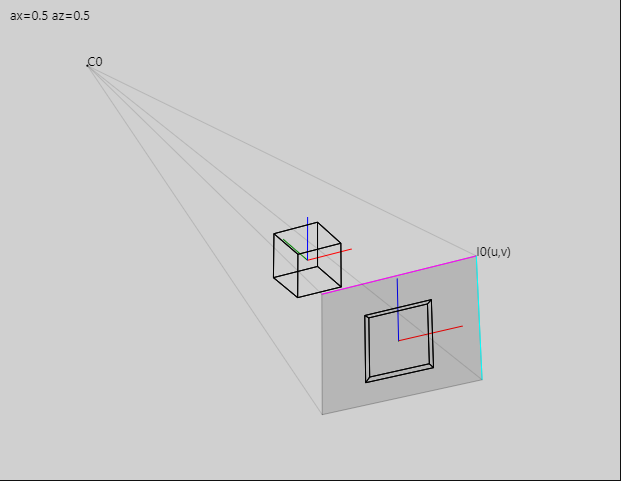
- Visualization of X-Ray source-detector geometries
- (WIP) estimation based on direct linear transform, X-ray calibraion
General recommendation for better readibility of outputs:
from rich import print
np.set_printoptions(suppress=True)
Example of an interactive visualization, using the optional svg_snip package:
from svg_snip.Jupyter import CanvasWithOverlay
from svg_snip.Composer import Composer
import svg_snip.Elements as e2d
import svg_snip.Elements3D as e3d

from ProjectiveGeometry23.homography import rotation_x, rotation_z, scale
from ProjectiveGeometry23.svg_utils import svg_source_detector, svg_world_geometry

vis = CanvasWithOverlay(int(target.image_size[0]), int(target.image_size[1]))

# World transformation
ax, az = 0.5, 0.5
s = 0.2

def handle_draw(vis):
    global ax
    global az
    x,y = vis.mouse_state.pos()
    svg = Composer((vis.w, vis.h))

    svg.add(svg_world_geometry)
    svg.add(svg_source_detector, projection=target,
            draw_on_detector=svg_world_geometry,
            label_source='C0', label_detector='I0(u,v)')

    svg.add(e2d.star, x=x, y=y, size=8,
        fill="red" if vis.mouse_state.clicked else "blue")

    svg.add(e2d.text, x=10, y=20, content=f'ax={ax:.3} az={az:.3}')

    T = scale(s) @ rotation_x(ax) @ rotation_z(az)
    raw_svg_code = svg.render(P=target.P@T)
    vis.html_overlay.value = raw_svg_code

    if vis.mouse_state.clicked:
        az += vis.mouse_state.dx * 0.01
        ax += vis.mouse_state.dy * 0.01

vis.handle_draw = handle_draw

vis.display()
Installation
Using pip
You can install ProjectiveGeometry23 using pip:
pip install ProjectiveGeometry23
Using setup.py
git clone https://github.com/aaichert/ProjectiveGeometry23
cd ProjectiveGeometry23
python setup.py install
Testing and Publication on PyPy
Two useful code snippets
python -m unittest discover tests
python setup.py sdist bdist_wheel
pip install twine
twine upload dist/*
References
- LibProjectiveGeometry (c++). GitHub https://github.com/aaichert/EpipolarConsistency/tree/master/code/LibProjectiveGeometry
- Hartley, Richard, and Andrew Zisserman. Multiple view geometry in computer vision. Cambridge university press, 2003. https://www.robots.ox.ac.uk/~vgg/hzbook/
- Coxeter, Harold Scott Macdonald. Projective geometry. Springer Science & Business Media, 2003.
- Stolfi, Jorge. "Oriented projective geometry." Proceedings of the third annual symposium on Computational geometry. 1987.
1 maintainer

Metadata
1 maintainer
Release files for ProjectiveGeometry23 1.2.1
For a detailed explanation of source distributions (sdists) and built distributions (wheels), please see the package formats documentation.
Source distribution (sdist)
| File | Size | Uploaded | Provenance | Actions |
|---|---|---|---|---|
| projectivegeometry23-1.2.1.tar.gz | 46.6 kB | Without provenance | Details for projectivegeometry23-1.2.1.tar.gz |
Built distribution (wheel)
| File | Interpreter | ABI | Platform | Actions Reset |
|---|---|---|---|---|
| projectivegeometry23-1.2.1-py3-none-any.whl | Python 3 | none | any | Details for projectivegeometry23-1.2.1-py3-none-any.whl |
Total release size: 69.6 kB
Release files / projectivegeometry23-1.2.1.tar.gz
| Download URL | projectivegeometry23-1.2.1.tar.gz |
|---|---|
| Size | 46.6 kB |
| Tags | Source |
|
SHA-256 checksum How to use checksums |
2d3dd65700391a488c38160410833ba23862983269d0866ae7c5826df4ac413a
|
|
BLAKE2b-256 checksum How to use checksums |
5c98de9c90eec6987afbbf6c009774f60e26b4a5f54157a333ea3b9594c9762d
|
| Upload date | |
|
Uploaded using Trusted Publishing? What is trusted publishing? |
No |
| Uploaded via |
twine/6.1.0 CPython/3.13.12
|
Release files / projectivegeometry23-1.2.1-py3-none-any.whl
| Download URL | projectivegeometry23-1.2.1-py3-none-any.whl |
|---|---|
| Size | 23.0 kB |
| Tags | Python 3 |
|
SHA-256 checksum How to use checksums |
5456571a84d8c86919f1b5f8f87e467281b647dcce9787113e46288eea026c83
|
|
BLAKE2b-256 checksum How to use checksums |
46938248a920a1429dfaaff5a5cdb89b05bc85f941b1548320df12c7dbc702f5
|
| Upload date | |
|
Uploaded using Trusted Publishing? What is trusted publishing? |
No |
| Uploaded via |
twine/6.1.0 CPython/3.13.12
|
Security for ProjectiveGeometry23 1.2.1
Provenance
Provenance describes where a file came from. On PyPI, provenance is shared via attestations, which provide a verifiable record of the build or publishing details. View details, limitations and caveats.
No provenance found
None of the files in this release were uploaded with provenance metadata.
A note on package security
PyPI is a repository for distributing packages, not a service for auditing them. While third-party security researchers and our staff do their best to detect and remove malicious packages, PyPI cannot guarantee the quality, security or suitability of any given package.
To learn more about protecting yourself from malicious actors, visit our package security documentation.














