
PyOMA
This software was created to perform output-only modal identification (Operational Modal Analysis, OMA).
OMA allows the experimental estimation of the modal parameters (natural frequencies, mode shapes, damping ratios) of a structure from measurements of the vibration response in operational condition.
PyOMA Team Presentation

What is PyOMA?
PyOMA is a python module that allows to perform OMA on ambient vibration measurments datasets.
PyOMA include the following algorithms:
-
Frequency Domain Decomposition (FDD)
1a. Original Frequency Domain Decomposition (FDD)
2a. Enhanced Frequency Domain Decomposition (EFDD)
3a. Frequency Spatial Domain Decomposition (FSDD)
-
Stochastic Subspace Identification (SSI)
2a. Covariance-driven Stochastic Subspace Identification (cov-SSI)
2b. Data-driven Stochastic Subspace Identification (dat-SSI)
To better untersdand the workflow of the functions, see the workflow here.
Installing PyOMA
As a prerequisite to install PyOMA, you need to install Anaconda first. You should install a Python version greather equal 3.5 or the software may run in troubles.
To fully install PyOMA, you need to run the following commands (in the following order):
-
pip install pandas
-
pip install scipy
-
pip install matplotlib
-
pip install seaborn
-
pip install mplcursors
-
pip install Py-OMA
To import PyOMA in your workspace, simply type:
- import PyOMA
Dependencies
- numpy (https://numpy.org/)
- pandas (https://pandas.pydata.org/)
- scipy -> signal (https://www.scipy.org/)
- scipy.optimize -> curve_fit (https://www.scipy.org/)
- scipy->linalg (https://www.scipy.org/)
- matplotlib.pyplot (https://matplotlib.org/)
- matplotlib.ticker -> [MultipleLocator,FormatStrFormatter] (https://matplotlib.org/)
- matplotlib.patches (https://matplotlib.org/)
- seaborn (https://seaborn.pydata.org/)
- mplcursors (https://mplcursors.readthedocs.io/en/stable/)
Workflow
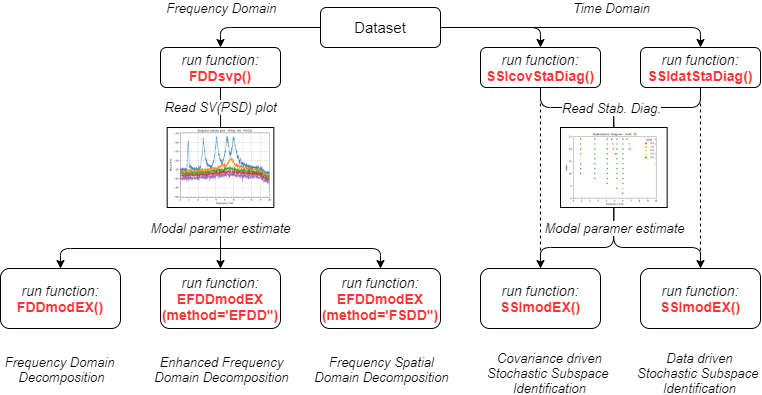
FDD:
1. run FDDsvp

	2.a run FDDmodEX to run original FDD

		and/or

	2.b run EFDDmodEX(method='EFDD') to run EFDD

		and/or

	2.c run EFDDmodEX(method='FSDD') to run FSDD
SSI
1.a run SSIcovStaDiag

	2. run SSImodEX to run cov-SSI

		and/or

1.b run SSIdatStaDiag

	2. run SSImodEX to run dat-SSI
Function Description
A complete description of the functions available in PyOMA can be found in the page Function Description.
What is PyOMA_GUI? A brief software overview
PyOMA_GUI is a graphical user interface software developed in PyQt5, which implements in a single integrated tool the operational modal analysis of civil structures with output-only measurement data. This software utilises the aforementioned functionalities offered by the PyOMA python module. Therefore, PyOMA_GUI provides a remarkably user-friendly interface to improve the accessibility of the PyOMA module, ensuring widespread usage both for scientists, researchers, and even for applied civil and structural engineers. The main features PyOMA_GUI provides are listed below:
- Importing data tab;
- Definition of the geometry of the structure and the monitoring system (channels and degrees of freedom, DOFs);
- Preprocessing of signals tool with detrending and decimation options;
- Dynamic identification algorithms with visualization of the results (graphs, modal shapes);
- Post-processing tabs and output exportation functionalities;
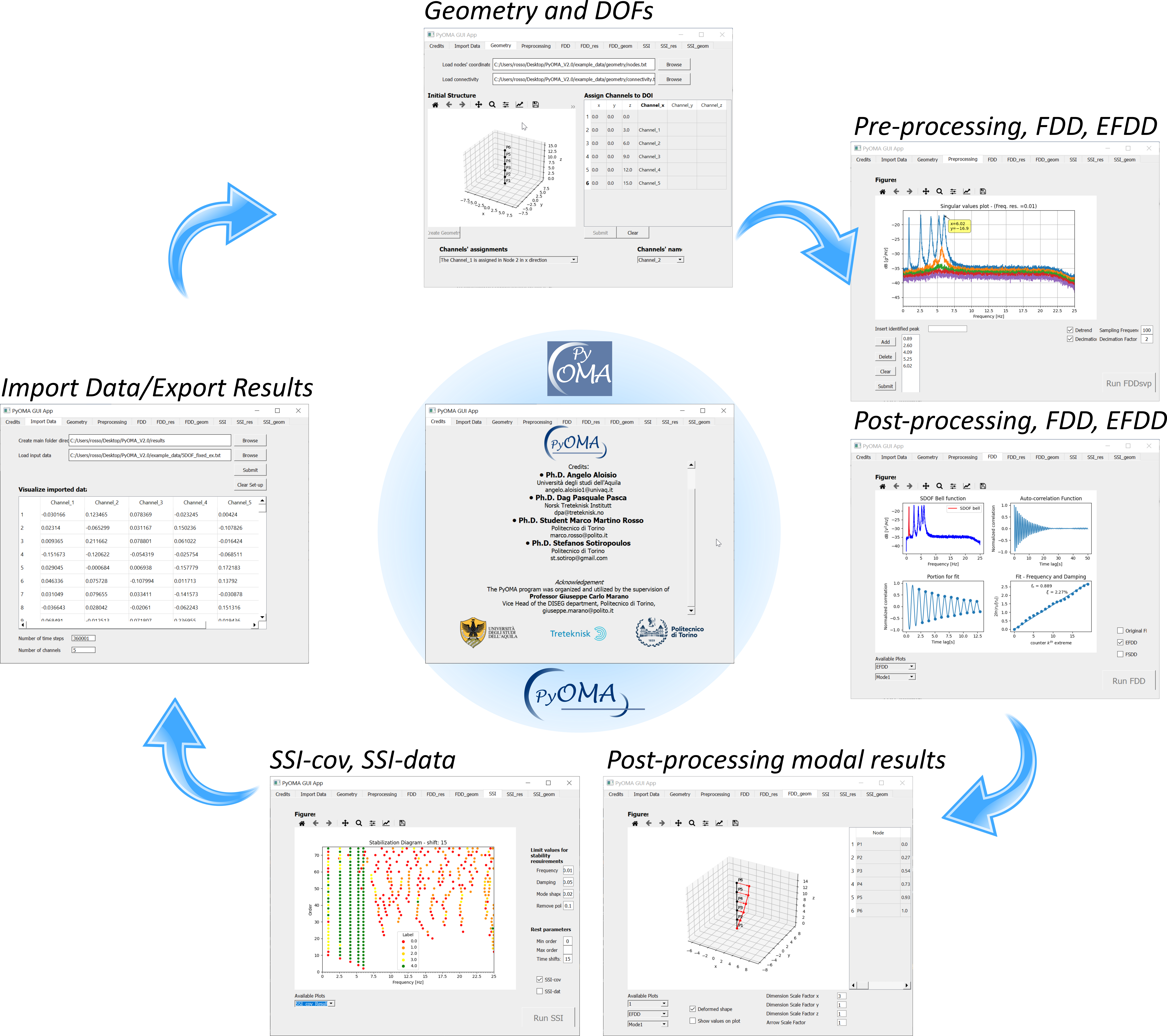
The executable file PyOMA_GUI.exe for windows is already available here.
A short manual to guide the user into an introductory example is available here.
Acknowledgements
The developers acknowledge the meaningful contribution of Professor Rocco Alaggio from Università degli Studi dell'Aquila, who encouraged the authors to study and develop these topics. Furthermore, the developers acknowledge the meaningful contribution of Professor Giuseppe Carlo Marano from Politecnico di Torino for promoting the Graphical User Interface programming and coordinating the team activities.
How to cite
If you use this code, please don't forget to cite this work:
Pasca, D. P., Aloisio, A., Rosso, M. M., & Sotiropoulos, S. (2022). PyOMA and PyOMA_GUI: A Python module and software for Operational Modal Analysis. Software X, (In press)
2 maintainers


Metadata
2 maintainers
Release files for Py-OMA 1.5
For a detailed explanation of source distributions (sdists) and built distributions (wheels), please see the package formats documentation.
Source distribution (sdist)
| File | Size | Uploaded | |
|---|---|---|---|
| Py-OMA-1.5.tar.gz | 30.0 kB | Details |
Built distribution (wheel)
| File | Interpreter | ABI | Platform | Reset |
|---|---|---|---|---|
| Py_OMA-1.5-py3-none-any.whl | Python 3 | none | any | Details |
Total release size: 57.9 kB
Release files / Py-OMA-1.5.tar.gz
| Download URL | Py-OMA-1.5.tar.gz |
|---|---|
| Size | 30.0 kB |
| Tags | Source |
|
SHA-256 checksum How to use checksums |
25bc0f817d9e77b3ad62fe6ac86e528694ad329ad6fb934ac2a81af011dec7ed
|
|
BLAKE2b-256 checksum How to use checksums |
b2502e9302f30e45f1e1a0a19cb1b94b5ce7e15978a9b67d2678d657f8e57fe7
|
| Upload date | |
|
Uploaded using Trusted Publishing? What is trusted publishing? |
No |
| Uploaded via |
twine/4.0.1 CPython/3.10.6
|
Release files / Py_OMA-1.5-py3-none-any.whl
| Download URL | Py_OMA-1.5-py3-none-any.whl |
|---|---|
| Size | 27.9 kB |
| Tags | Python 3 |
|
SHA-256 checksum How to use checksums |
359e0b2725fb4d1f3efea3c412db8fba99958d6ba631b551d2745482ed58c513
|
|
BLAKE2b-256 checksum How to use checksums |
f095235fb5e5899c09b09b1aa147e74e03819252004d47c3837ced62c9d877c7
|
| Upload date | |
|
Uploaded using Trusted Publishing? What is trusted publishing? |
No |
| Uploaded via |
twine/4.0.1 CPython/3.10.6
|














