

A Python3 implementation of PyADRecon using ADWS instead of LDAP for Pentesters, Red and Blue Teams
PyADRecon is a tool which gathers information about MS Active Directory and generates an XSLX + HTML report to provide a holistic picture of the current security state of the target AD environment.
[!TIP] Queries Active Directory Web Services (ADWS) over TCP/9389 instead of LDAP to fly under the EDR radar.
Table of Contents
- Installation
- Usage
- Docker
- Collection Modules
- HTML Dashboard
- Known Limitations
- Acknowledgements
- License
Installation
# stable release from pypi
pipx install pyadrecon-adws

# latest commit from github
pipx install git+https://github.com/l4rm4nd/PyADRecon-ADWS
Then verify installation:
pyadrecon_adws --version
Usage
usage: pyadrecon_adws.py [-h] [--version] [--generate-excel-from CSV_DIR] [-d DOMAIN] [-u USERNAME] [-p PASSWORD]
                         [-dc DOMAIN_CONTROLLER] [--port PORT] [--auth {ntlm,kerberos}] [--spn SPN]
                         [--workstation WORKSTATION] [-c COLLECT] [--only-enabled] [--page-size PAGE_SIZE]
                         [--dormant-days DORMANT_DAYS] [--password-age PASSWORD_AGE] [-o OUTPUT] [--no-excel]
                         [-v]

PyADRecon-ADWS # Active Directory Reconnaissance using ADWS

options:
  -h, --help            show this help message and exit
  --version             show program's version number and exit
  --generate-excel-from CSV_DIR
                        Generate Excel report from existing CSV files (standalone mode)
  --generate-dashboard-from CSV_DIR
                        Generate HTML dashboard from existing CSV files (standalone mode)
  -d, --domain DOMAIN   Domain name (e.g., example.com)
  -u, --username USERNAME
                        Username (DOMAIN\user or user@domain.com)
  -p, --password PASSWORD
                        Password or LM:NTLM hash (will prompt if not provided)
  -dc, --domain-controller DOMAIN_CONTROLLER
                        Domain controller hostname or IP
  --port PORT           ADWS port (default: 9389)
  --auth {ntlm,kerberos}
                        Authentication method: ntlm or kerberos (default: ntlm)
  --spn SPN             Service Principal Name override (default: HTTP/dc.fqdn)
  --workstation WORKSTATION
                        NTLM authentication workstation name (default: empty string, bypasses userWorkstations restrictions)
  -c, --collect COLLECT
                        Comma-separated modules to collect (default: all)
  --only-enabled        Only collect enabled users/computers
  --page-size PAGE_SIZE
                        ADWS query page size (default: 256)
  --dormant-days DORMANT_DAYS
                        Users/Computers with lastLogon older than X days are dormant (default: 90)
  --password-age PASSWORD_AGE
                        Users with pwdLastSet older than X days have old passwords (default: 180)
  -o, --output OUTPUT   Output directory (default: PyADRecon-Report-<timestamp>)
  --no-excel            Skip Excel export
  --no-dashboard        Skip interactive HTML dashboard generation
  -v, --verbose         Enable verbose output

Examples:
  # Basic usage with NTLM authentication
  pyadrecon_adws.py -dc 192.168.1.1 -u admin -p password123 -d DOMAIN.LOCAL

  # With Kerberos authentication (only works on Linux with gssapi atm)
  pyadrecon.py -dc dc01.domain.local -u admin -p password123 -d DOMAIN.LOCAL --auth kerberos

  # Only collect specific modules
  pyadrecon_adws.py -dc 192.168.1.1 -u admin -p pass -d DOMAIN.LOCAL --collect users,groups,computers

  # Output to specific directory
  pyadrecon_adws.py -dc 192.168.1.1 -u admin -p pass -d DOMAIN.LOCAL -o /tmp/adrecon_output

  # Generate Excel report from existing CSV files (standalone mode)
  pyadrecon_adws.py --generate-excel-from /path/to/CSV-Files -o report.xlsx
Docker
There is also a Docker image available on GHCR.IO.
docker run --rm -v /etc/krb5.conf:/etc/krb5.conf:ro -v /etc/hosts:/etc/hosts:ro -v ./:/tmp/pyadrecon_output ghcr.io/l4rm4nd/pyadrecon-adws:latest -dc dc01.domain.local -u admin -p password123 -d DOMAIN.LOCAL -o /tmp/pyadrecon_output
Collection Modules
As default, PyADRecon-ADWS runs all collection modules. They are referenced to as default or all.
Though, you can freely select your own collection of modules to run:
| Icon | Meaning |
|---|---|
| 🛑 | Requires administrative domain privileges (e.g. Domain Admins) |
| ✅ | Requires regular domain privileges (e.g. Authenticated Users) |
| 💥 | New collection modul in beta state. Results may be incorrect. |
Forest & Domain
forest✅domain✅trusts✅sites✅subnets✅schemaorschemahistory✅
Domain Controllers
dcsordomaincontrollers✅
Users & Groups
users✅userspns✅groups✅groupmembers✅protectedgroups✅💥krbtgt✅asreproastable✅kerberoastable✅
Computers & Printers
computers✅computerspns✅printers✅
OUs & Group Policy
ous✅gpos✅gplinks✅
Passwords & Credentials
passwordpolicy✅fgpporfinegrainedpasswordpolicy🛑laps🛑bitlocker🛑💥
Managed Service Accounts
gmsaorgroupmanagedserviceaccounts✅💥dmsaordelegatedmanagedserviceaccounts✅💥- Only works for Windows Server 2025+ AD schema
Certificates
adcsorcertificates✅💥- Detects ESC1, ESC2, ESC3, ESC4 and ESC9
DNS
dnszones✅dnsrecords✅
HTML Dashboard
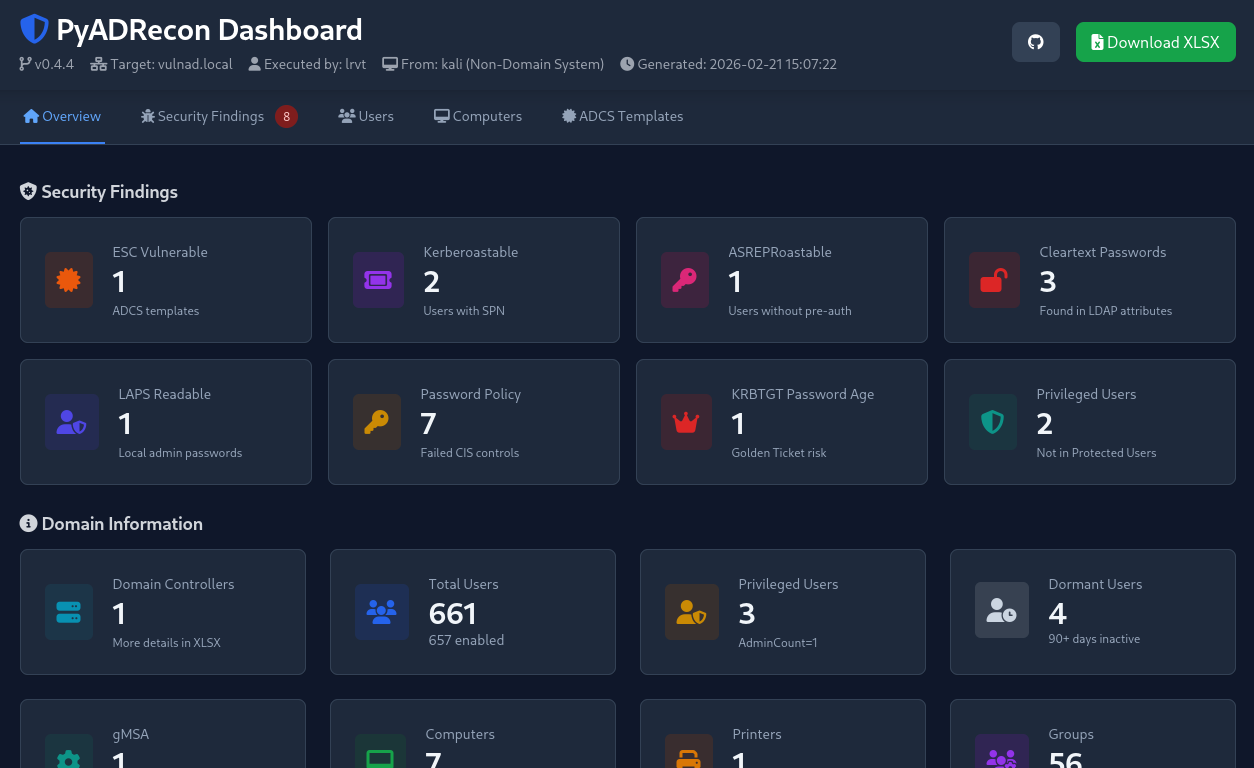
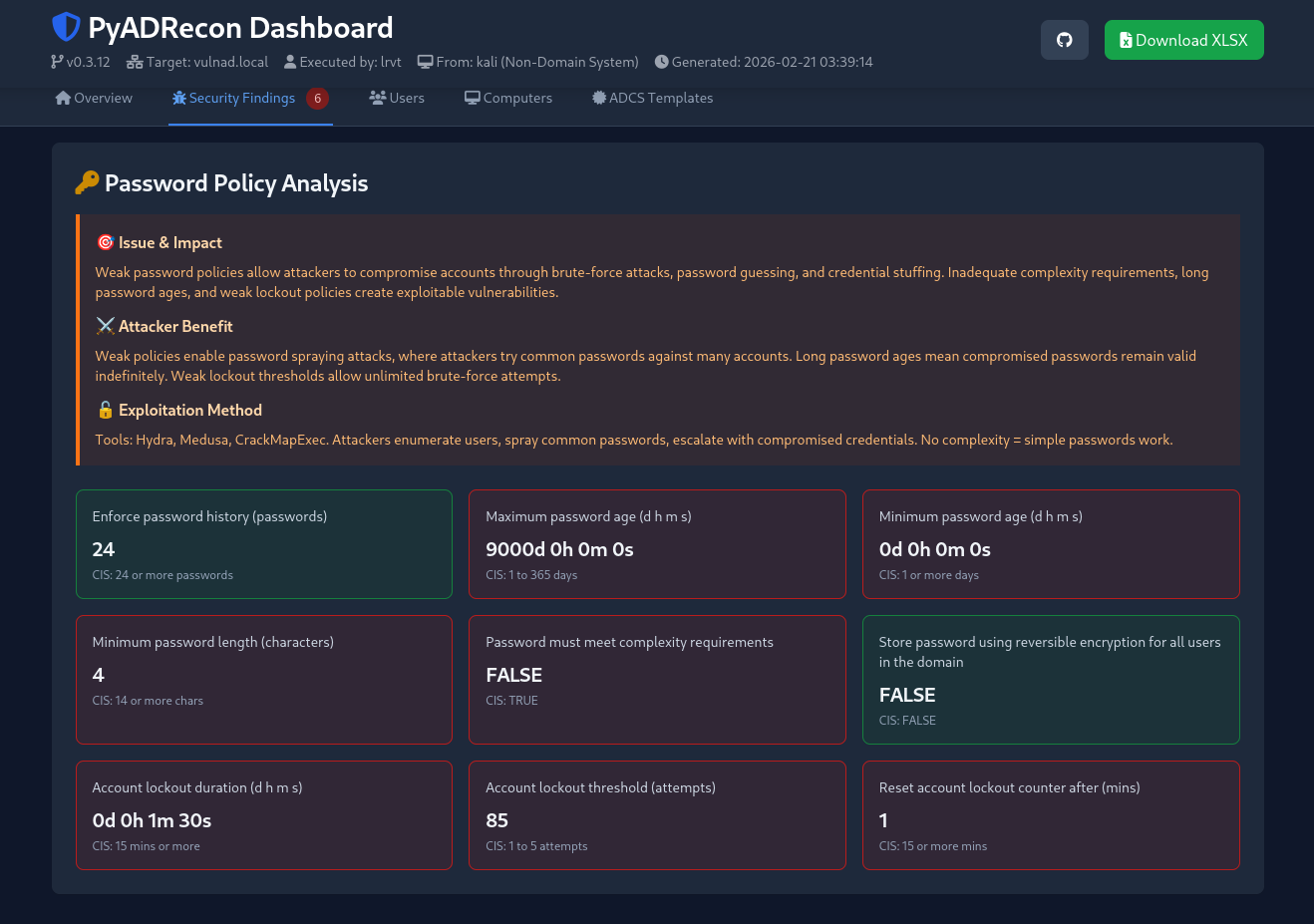
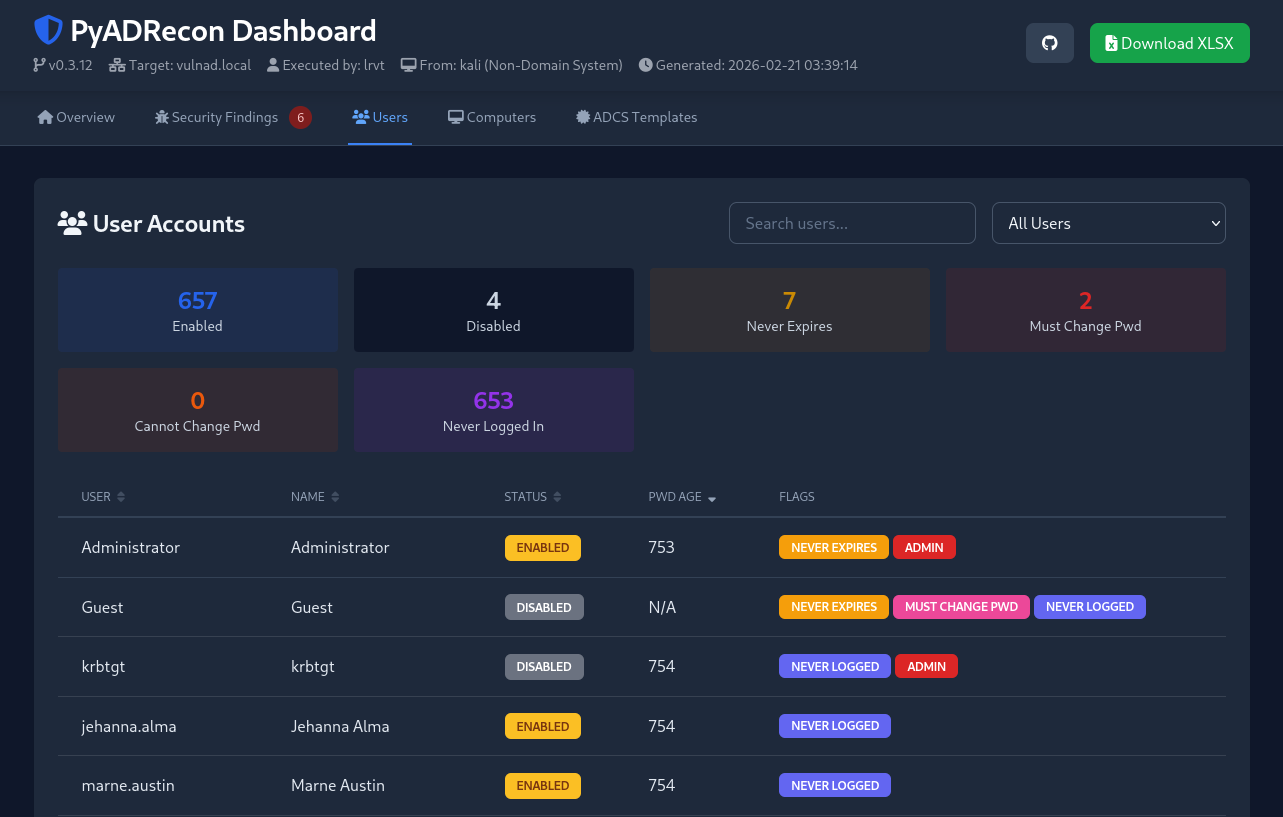
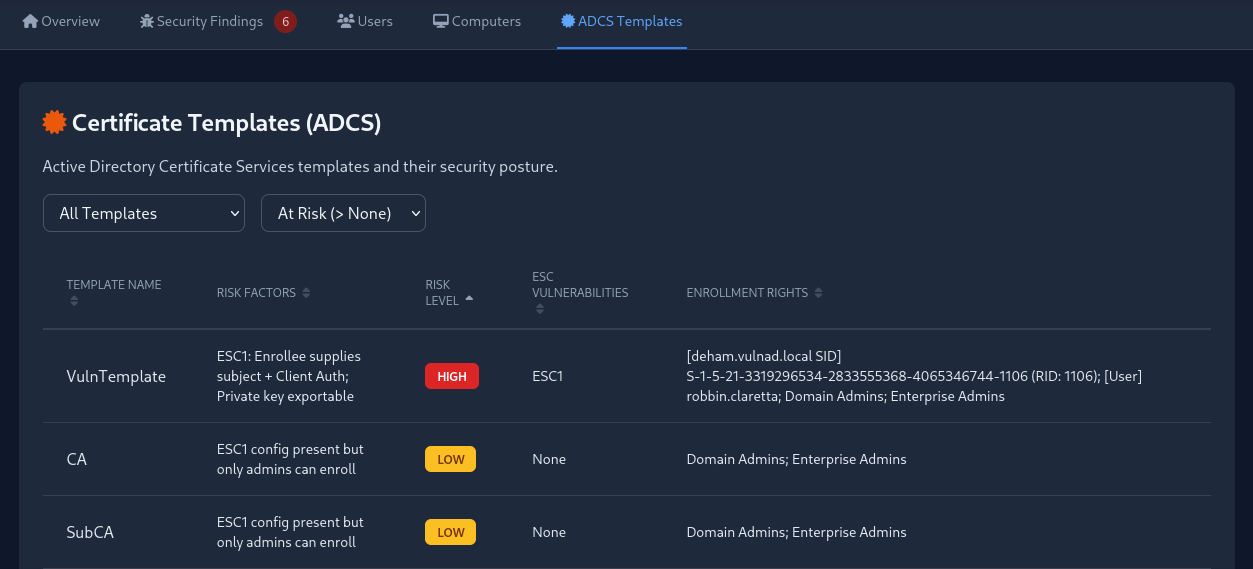
PyADRecon-ADWS automatically generates an HTML dashboard containing key statistics and security findings when all collection modules are executed.
If needed, you can disable dashboard creation during initial data collection using --no-dashboard. The dashboard can later be generated from existing CSV files with --generate-dashboard-from <CSV_DIR>.
[!CAUTION] This is a beta feature. Displayed data may be falsely parsed or reported as issue. Take it with a grain of salt!
Known Limitations
Multi-Domain Forests – Security Descriptors
Show details
When querying child domains in a multi-domain forest, ADWS returns incomplete security descriptors for forest-wide objects like certificate templates.
Issue:
- Certificate template ACLs (enrollment rights, write permissions) may not show principals from the child domain itself
- Only parent domain principals will appear in enrollment rights
- This is an ADWS protocol limitation, not a PyADRecon-ADWS bug
Example:
- Querying from child domain (
child.domain.local): Shows parent domain principals only - Querying from parent domain (
domain.local): Shows all principals including child domain
Solution:
- For complete certificate template ACL data, connect to the forest root domain controller instead of a child DC
Multi-Domain Forests – LDAP Referrals
Show details
When querying a child domain in a multi-domain forest, ADWS may return LDAP referrals for objects that reside in a different naming context (for example, the forest root domain).
Issue:
- Queries for forest-root objects (e.g., Enterprise Admins, Schema Admins, or root-domain users/groups) may return LDAP referrals
- PyADRecon does not chase LDAP referrals
- Referred objects are therefore not collected automatically
Solution:
- To ensure complete forest-wide enumeration, run PyADRecon separately against:
- The child domain
- The forest root domain
- Combine results manually if full forest visibility is required
Acknowledgements
Many thanks to the following folks:
- S3cur3Th1sSh1t for a first Claude draft of PyADRecon using LDAP
- Sense-of-Security for the original ADRecon script in PowerShell
- dirkjanm for the original ldapdomaindump script
- mverschu for his port of ldapdomaindump using ADWS (adwsdomaindump). PyADRecon-ADWS heavily makes use of the ldap-to-adws wrapper.
- Forta for the awesome impacket suite
- Anthropic for Claude LLMs
License
PyADRecon-ADWS is released under the MIT License.
The following third-party libraries are used:
| Library | License |
|---|---|
| openpyxl | MIT |
| impacket | Apache 2.0 |
| adwsdomaindump ADWS Wrapper | MIT |
Please refer to the respective licenses of these libraries when using or redistributing this software.
1 maintainer

Download files
Download the file for your platform. If you're not sure which to choose, learn more about installing packages.
Source Distribution
Built Distribution
Filter files by name, interpreter, ABI, and platform.
If you're not sure about the file name format, learn more about wheel file names.
Copy a direct link to the current filters
File details
Details for the file pyadrecon_adws-0.5.7.tar.gz.
File metadata
- Download URL: pyadrecon_adws-0.5.7.tar.gz
- Upload date:
- Size: 1.9 MB
- Tags: Source
- Uploaded using Trusted Publishing? Yes
- Uploaded via:
twine/6.1.0 CPython/3.13.12
File hashes
| Algorithm | Hash digest | |
|---|---|---|
| SHA256 |
ee890055d7393c486c65b954665c1a083f36b25ff975b2f40f351854e777ab5d
|
|
| MD5 |
4af9aaa2cf50a65c21ca9d3f90cf1854
|
|
| BLAKE2b-256 |
efa6fbb0f954be5af8ca920d3b538a15efdb5df0340ee8b0634ac0aa9db4f409
|
Provenance
The following attestation bundles were made for pyadrecon_adws-0.5.7.tar.gz:
Publisher:
pypi.yml on l4rm4nd/PyADRecon-ADWS
-
Statement:
-
Statement type:
https://in-toto.io/Statement/v1 -
Predicate type:
https://docs.pypi.org/attestations/publish/v1 -
Subject name:
pyadrecon_adws-0.5.7.tar.gz -
Subject digest:
ee890055d7393c486c65b954665c1a083f36b25ff975b2f40f351854e777ab5d - Sigstore transparency entry: 2138160859
- Sigstore integration time:
-
Permalink:
l4rm4nd/PyADRecon-ADWS@60cba536227e2924a99768219213639c9df45929 -
Branch / Tag:
refs/tags/v0.5.7 - Owner: https://github.com/l4rm4nd
-
Access:
public
-
Token Issuer:
https://token.actions.githubusercontent.com -
Runner Environment:
github-hosted -
Publication workflow:
pypi.yml@60cba536227e2924a99768219213639c9df45929 -
Trigger Event:
release
-
Statement type:
File details
Details for the file pyadrecon_adws-0.5.7-py3-none-any.whl.
File metadata
- Download URL: pyadrecon_adws-0.5.7-py3-none-any.whl
- Upload date:
- Size: 159.3 kB
- Tags: Python 3
- Uploaded using Trusted Publishing? Yes
- Uploaded via:
twine/6.1.0 CPython/3.13.12
File hashes
| Algorithm | Hash digest | |
|---|---|---|
| SHA256 |
81e184cc5f9e1e8c1aefeff84b0c34955bbb601dc429b70df00bd60faaf52937
|
|
| MD5 |
9efb1fb29f4d37cb37e1ea04f75618b7
|
|
| BLAKE2b-256 |
d86f7c18904814d652f3bb0a7eeadf742158fbde1645c57e1b547e68cd7a2a94
|
Provenance
The following attestation bundles were made for pyadrecon_adws-0.5.7-py3-none-any.whl:
Publisher:
pypi.yml on l4rm4nd/PyADRecon-ADWS
-
Statement:
-
Statement type:
https://in-toto.io/Statement/v1 -
Predicate type:
https://docs.pypi.org/attestations/publish/v1 -
Subject name:
pyadrecon_adws-0.5.7-py3-none-any.whl -
Subject digest:
81e184cc5f9e1e8c1aefeff84b0c34955bbb601dc429b70df00bd60faaf52937 - Sigstore transparency entry: 2138160868
- Sigstore integration time:
-
Permalink:
l4rm4nd/PyADRecon-ADWS@60cba536227e2924a99768219213639c9df45929 -
Branch / Tag:
refs/tags/v0.5.7 - Owner: https://github.com/l4rm4nd
-
Access:
public
-
Token Issuer:
https://token.actions.githubusercontent.com -
Runner Environment:
github-hosted -
Publication workflow:
pypi.yml@60cba536227e2924a99768219213639c9df45929 -
Trigger Event:
release
-
Statement type:














