
A Python package for forward and inverse Abel transforms


Project description


Note: This readme is best viewed as part of the PyAbel Documentation.
Introduction
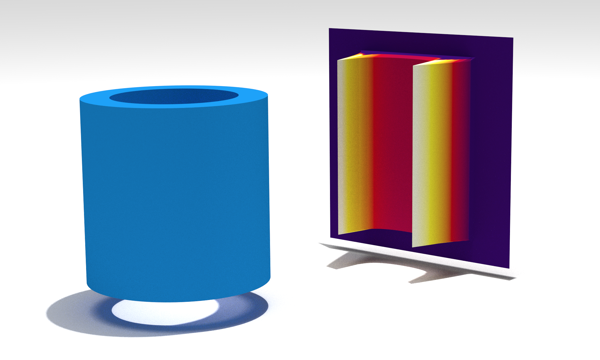
PyAbel is a Python package that provides functions for the forward and inverse Abel transforms. The forward Abel transform takes a slice of a cylindrically symmetric 3D object and provides the 2D projection of that object. The inverse abel transform takes a 2D projection and reconstructs a slice of the cylindrically symmetric 3D distribution.
Inverse Abel transforms play an important role in analyzing the projections of angle-resolved photoelectron/photoion spectra, plasma plumes, flames, and solar occultation.
PyAbel provides efficient implementations of several Abel transform algorithms, as well as related tools for centering images, symmetrizing images, and calculating properties such as the radial intensity distribution and the anisotropy parameters.
Transform Methods
The outcome of the numerical Abel Transform depends on the exact method used. So far, PyAbel includes the following transform methods:
basex - Gaussian basis set expansion of Dribinski and co-workers.
hansenlaw - recursive method of Hansen and Law.
direct - numerical integration of the analytical Abel transform equations.
two_point - the “two point” method of Dasch and co-workers.
three_point - the “three point” method of Dasch and co-workers.
onion_peeling - the “onion peeling” deconvolution method of Dasch and co-workers.
onion_bordas - “onion peeling” or “back projection” method of Bordas et al. based on the MatLab code by Rallis and Wells et al.
fh - Fourier–Hankel method (not yet implemented).
pop - polar onion peeling method (not yet implemented).
Installation
PyAbel requires Python 2.7 or 3.3-3.5. Numpy and Scipy are also required, and Matplotlib is required to run the examples. If you don’t already have Python, we recommend an “all in one” Python package such as the Anaconda Python Distribution, which is available for free.
With pip
The latest release can be installed from PyPi with
pip install PyAbel
With setuptools
If you prefer the development version from GitHub, download it here, cd to the PyAbel directory, and use
python setup.py install
Or, if you wish to edit the PyAbel source code without re-installing each time
python setup.py develop
Example of use
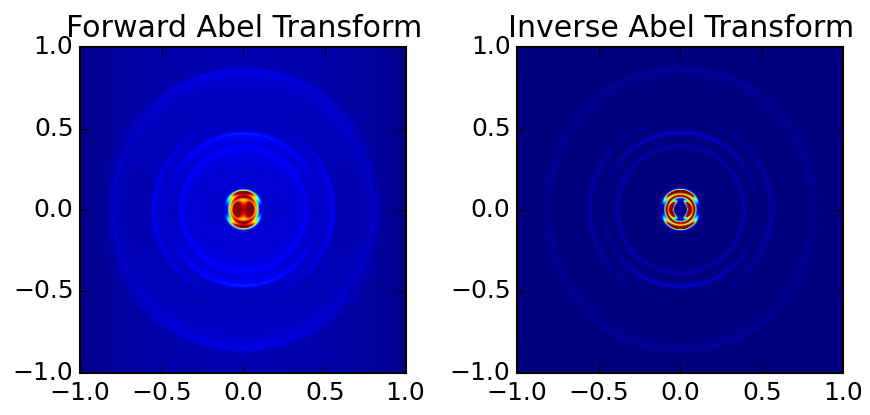
Using PyAbel can be simple. The following Python code imports the PyAbel package, generates a sample image, performs a forward transform using the Hansen–Law method, and then a reverse transform using the Three Point method:
import abel
original     = abel.tools.analytical.sample_image()
forward_abel = abel.transform(original, direction='forward', method='hansenlaw').transform
inverse_abel = abel.transform(forward_abel, direction='inverse', method='three_point').transform
Note: the abel.Transform() class returns a Python class object, where the 2D Abel transform is accessed through the .transform attribute.
The results can then be plotted using Matplotlib:
import matplotlib.pyplot as plt
import numpy as np

fig, axs = plt.subplots(1, 2, figsize=(6, 4))

axs[0].imshow(forward_abel, clim=(0, np.max(forward_abel)*0.6), origin='lower', extent=(-1,1,-1,1))
axs[1].imshow(inverse_abel, clim=(0, np.max(inverse_abel)*0.4), origin='lower', extent=(-1,1,-1,1))

axs[0].set_title('Forward Abel Transform')
axs[1].set_title('Inverse Abel Transform')

plt.tight_layout()
plt.show()
Output:
Documentation
General information about the various Abel transforms available in PyAbel is available at the links above. The complete documentation for all of the methods in PyAbel is hosted at https://pyabel.readthedocs.org.
Support
If you have a question or suggestion about PyAbel, the best way to contact the PyAbel Developers Team is to open a new issue.
Contributing
We welcome suggestions for improvement! Either open a new Issue or make a Pull Request.
Contributing.md has more information on how to contribute, such as how to run the unit tests and how to build the documentation.
License
PyAble is licensed under the MIT license, so it can be used for pretty much whatever you want! Of course, it is provided “as is” with absolutely no warrenty.
Citation
First and foremost, please cite the paper(s) corresponding to the implementation of the Abel Transform that you use in your work. The references can be found at the links above.
If you find PyAbel useful in you work, it would bring us great joy if you would cite the project.

Have fun!
Release history Release notifications | RSS feed


Download files
Download the file for your platform. If you're not sure which to choose, learn more about installing packages.
Source Distribution
Built Distributions
Filter files by name, interpreter, ABI, and platform.
If you're not sure about the file name format, learn more about wheel file names.
Copy a direct link to the current filters
File details
Details for the file PyAbel-0.7.3.tar.gz.
File metadata
- Download URL: PyAbel-0.7.3.tar.gz
- Upload date:
- Size: 201.5 kB
- Tags: Source
- Uploaded using Trusted Publishing? No
File hashes
| Algorithm | Hash digest | |
|---|---|---|
| SHA256 |
d7eccca007e61d4da12998ca30a8875b38376172e02c6e39ed76aa02fa07fff0
|
|
| MD5 |
db93578c7028557cf0392a086b5b2a90
|
|
| BLAKE2b-256 |
6224b4244d5cbbba7567fceff37a526ebcd4e8a8919be4a001a9f1a3ecddc75a
|
File details
Details for the file PyAbel-0.7.3-py3.5-linux-x86_64.egg.
File metadata
- Download URL: PyAbel-0.7.3-py3.5-linux-x86_64.egg
- Upload date:
- Size: 359.7 kB
- Tags: Egg
- Uploaded using Trusted Publishing? No
File hashes
| Algorithm | Hash digest | |
|---|---|---|
| SHA256 |
f98fcf363b33819c542fc57a011e86d88b3ff523be1561393ef8b2f6475a1bc1
|
|
| MD5 |
6d5bb7096dadb3a42ae64cb06f70520b
|
|
| BLAKE2b-256 |
d7a94ef33defe727642f9c4c2dd3569d82020f9e27b4422e8d5192cb930ca11f
|
File details
Details for the file PyAbel-0.7.3-py3.4-linux-x86_64.egg.
File metadata
- Download URL: PyAbel-0.7.3-py3.4-linux-x86_64.egg
- Upload date:
- Size: 364.3 kB
- Tags: Egg
- Uploaded using Trusted Publishing? No
File hashes
| Algorithm | Hash digest | |
|---|---|---|
| SHA256 |
8769771e24680648daddcdeb674fc4dc9f65b8d09bafa2959fc51b256819924d
|
|
| MD5 |
7bded626fb9fab3dc4b97d36a260e0be
|
|
| BLAKE2b-256 |
6537e18b7b9cc7d277a74be41335a41b8db50f642db71574034bf6c05b534d2f
|
File details
Details for the file PyAbel-0.7.3-py3.3-linux-x86_64.egg.
File metadata
- Download URL: PyAbel-0.7.3-py3.3-linux-x86_64.egg
- Upload date:
- Size: 339.5 kB
- Tags: Egg
- Uploaded using Trusted Publishing? No
File hashes
| Algorithm | Hash digest | |
|---|---|---|
| SHA256 |
4c63575476f44f863574acb0fd5e21084c9e6dac211343ca4740c98388a2025d
|
|
| MD5 |
1091b30b2790f19cab1d34ec8c758e26
|
|
| BLAKE2b-256 |
f0e69038f73daf219f59733e6cb1f3504daf592fa607b2f7f6d88a74b55377b7
|
File details
Details for the file PyAbel-0.7.3-py2.7-linux-x86_64.egg.
File metadata
- Download URL: PyAbel-0.7.3-py2.7-linux-x86_64.egg
- Upload date:
- Size: 359.2 kB
- Tags: Egg
- Uploaded using Trusted Publishing? No
File hashes
| Algorithm | Hash digest | |
|---|---|---|
| SHA256 |
e3223343c216dd6346f49e1b94fd191e58b4a9415b7247db5bd7022efa6b6e45
|
|
| MD5 |
d6c04fd30512ce9ef41019b7104dd772
|
|
| BLAKE2b-256 |
2ba0496a52383fb434b488cb210db51c8665c61639d2d61084aca68f68ee3876
|
File details
Details for the file PyAbel-0.7.3-cp27-none-macosx_10_5_x86_64.whl.
File metadata
- Download URL: PyAbel-0.7.3-cp27-none-macosx_10_5_x86_64.whl
- Upload date:
- Size: 166.9 kB
- Tags: CPython 2.7, macOS 10.5+ x86-64
- Uploaded using Trusted Publishing? No
File hashes
| Algorithm | Hash digest | |
|---|---|---|
| SHA256 |
615749a7131e333d4c99c46c09f1cae58d633fc8da0f00728aaedea4028b22b6
|
|
| MD5 |
826acff66ff2d6c03926a60ec6728186
|
|
| BLAKE2b-256 |
d4dfe93ca3a57d1c5ea59d3dd2e1a7efbfda3a004f3293d29b59912796358bcf
|






