
Pyforms is a Python framework to develop GUI applications based on pyqt


Project description
If you find this project useful, please, do not forget to 

Pyforms GUI
Pyforms GUI is a software layer, part of the Pyforms main library. This layer implements the execution of a Pyforms application as Windows GUI.
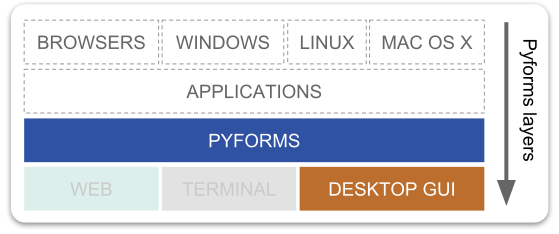
Pyforms
Pyforms is a Python 3 cross-enviroment framework that aims the boost the development productivity. The library provides an API in Python to develop applications that can be executed in Windows GUI mode, Web mode, or in Terminal mode.

Advantages
- With a minimal API, interfaces are easily defined using a short Python code.
- Avoid the constant switching between the GUI designers and the Python IDE.
- It is designed to allow the coding of advanced functionalities with a minimal effort.
- The code is organized in modules and prepared to be reused by other applications.
- It makes the applications maintenance easier.
- Turn the prototyping much easier and fast.
- Due to its simplicity it has a low learning curve.
Examples of applications developed in Pyforms GUI
Installation
Check the documentation at pyforms.readthedocs.org and pyforms-gui.readthedocs.org
Rationale behind the framework
The development of this library started with the necessity of allowing users with low programming skills to edit parameters from my python scripts. The idea was to transform scripts which had already been developed into GUI applications with a low effort and in a short time.
For example in my computer vision applications in the majority of the times there were variables that had to be set manually in the scripts for each video, to adjust the thresholds, blobs sizes, and other parameters to the environment light conditions... To test each set of parameters the script had to be executed. With GUI applications, users would be able to set the parameters using a GUI interface and visualize the results instantly without the need of restarting the script. That was the idea.
After looking into the several python options for GUI interfaces, PyQt was the one that seemed the best tool for a fast development with the QtDesigner, but after a while developing in Qt, switching between the designer and the python IDE was becoming too costly in terms of time because the interfaces were constantly evolving.
Being a Django developer, I did get inspiration on it for this framework. In the Django Models we just need to define the type of variables and their disposition in the form (in ModelAdmin) to generate a HTML form for data edition. For the GUIs that I wanted to build in my python scripts, I would like to have the same simplicity, so I could focus on the algorithms and not on GUIs developing.
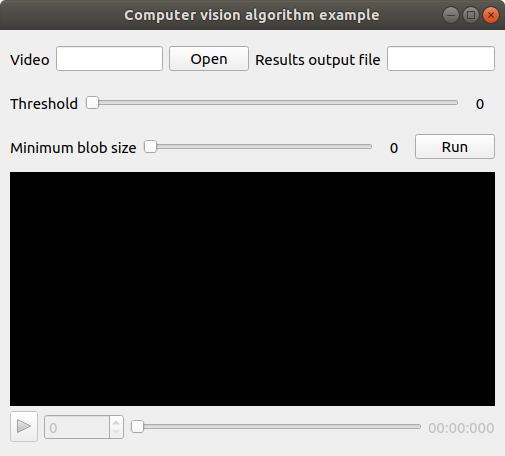
The result was the simplicity you can see in the example below:
from pyforms.basewidget import BaseWidget
from pyforms.controls   import ControlFile
from pyforms.controls   import ControlText
from pyforms.controls   import ControlSlider
from pyforms.controls   import ControlPlayer
from pyforms.controls   import ControlButton

class ComputerVisionAlgorithm(BaseWidget):

    def __init__(self, *args, **kwargs):
        super().__init__('Computer vision algorithm example')

        self.set_margin(10)

        #Definition of the forms fields
        self._videofile  = ControlFile('Video')
        self._outputfile = ControlText('Results output file')
        self._threshold  = ControlSlider('Threshold', default=114, minimum=0, maximum=255)
        self._blobsize   = ControlSlider('Minimum blob size', default=110, minimum=100, maximum=2000)
        self._player     = ControlPlayer('Player')
        self._runbutton  = ControlButton('Run')

        #Define the function that will be called when a file is selected
        self._videofile.changed_event     = self.__videoFileSelectionEvent
        #Define the event that will be called when the run button is processed
        self._runbutton.value       = self.__runEvent
        #Define the event called before showing the image in the player
        self._player.process_frame_event    = self.__process_frame

        #Define the organization of the Form Controls
        self._formset = [
            ('_videofile', '_outputfile'),
            '_threshold',
            ('_blobsize', '_runbutton'),
            '_player'
        ]


    def __videoFileSelectionEvent(self):
        """
        When the videofile is selected instanciate the video in the player
        """
        self._player.value = self._videofile.value

    def __process_frame(self, frame):
        """
        Do some processing to the frame and return the result frame
        """
        return frame

    def __runEvent(self):
        """
        After setting the best parameters run the full algorithm
        """
        pass


if __name__ == '__main__':

    from pyforms import start_app
    start_app(ComputerVisionAlgorithm)
Result of runnning the application in the terminal:
$> python test.py
Release history Release notifications | RSS feed


Download files
Download the file for your platform. If you're not sure which to choose, learn more about installing packages.
Source Distribution
Built Distribution
Filter files by name, interpreter, ABI, and platform.
If you're not sure about the file name format, learn more about wheel file names.
Copy a direct link to the current filters
File details
Details for the file PyForms GUI-4.901.2.tar.gz.
File metadata
- Download URL: PyForms GUI-4.901.2.tar.gz
- Upload date:
- Size: 94.6 kB
- Tags: Source
- Uploaded using Trusted Publishing? No
- Uploaded via: twine/1.13.0 pkginfo/1.5.0.1 requests/2.21.0 setuptools/41.0.1 requests-toolbelt/0.9.1 tqdm/4.31.1 CPython/3.6.3
File hashes
| Algorithm | Hash digest | |
|---|---|---|
| SHA256 |
05610aea2af5f11619fb7be6f156be4843b4d5280e4a3a402dca794b6c84810b
|
|
| MD5 |
4a8224fd8c79429a66d1a7c908e99f9a
|
|
| BLAKE2b-256 |
0dd41b094f40d490fa37a177311f0b2388ffef1a944a2ebe14fcc82249207386
|
File details
Details for the file PyForms_GUI-4.901.2-py3-none-any.whl.
File metadata
- Download URL: PyForms_GUI-4.901.2-py3-none-any.whl
- Upload date:
- Size: 134.5 kB
- Tags: Python 3
- Uploaded using Trusted Publishing? No
- Uploaded via: twine/1.13.0 pkginfo/1.5.0.1 requests/2.21.0 setuptools/41.0.1 requests-toolbelt/0.9.1 tqdm/4.31.1 CPython/3.6.3
File hashes
| Algorithm | Hash digest | |
|---|---|---|
| SHA256 |
84437568806b10db1b6a0b68a1396f484d8af2cc4b726e0c69bee26499ffbfa8
|
|
| MD5 |
b45ace709c21113cb5ac474a693978d4
|
|
| BLAKE2b-256 |
f964e65a0f277976bd70a99b95268c3c93f61d1f496d25acd3446ab17c3a3f07
|






