
PyIncucyte
Download images off an Incucyte live-cell imaging system — from a desktop app, a command line, or a Python script. It replaces click-by-click downloading with a tool that knows what it already has and fetches only what is new.
Three front ends, one engine:
| You want to | Use |
|---|---|
| Pick a plate and grab the images | the desktop app — pyincucyte gui |
| Script it, or run it on a schedule | the CLI — pyincucyte download … |
| Call it from an analysis pipeline | the API — from pyincucyte import IncucyteClient |
Requirements
- Python 3.10+
- A network route to the instrument (at Imperial the Incucyte is on the internal network only — it is not reachable from outside)
- Windows with the Incucyte desktop client installed, for the login step only. The password is hashed by the vendor's own .NET assembly before it leaves the machine, and only that hash is stored. Once a machine has logged in, the saved credentials work without it.
Install
pip install PyIncucyte             # from PyPI
pip install -e .                   # from this checkout
Windows users can also install the desktop application from the GitHub release
page with PyIncucyte-<version>-Setup.exe; the portable ZIP is provided beside
it. The Python package, ZIP, and installer are built from one release commit
and checked for version parity.
One name throughout: the distribution, the import name and the command are all
pyincucyte. The desktop app is a module inside it, so pyincucyte gui and
pyincucyte download ... are the same program.
Installing does not replace py-incucyte-gui, the name this was published
under before 0.3. Uninstall that one if it is still on the machine:
pip uninstall py-incucyte-gui.
Pointing it at your instrument
There is no address built in. An Incucyte sits on somebody's internal network, and an address written into the source would be published with every release, so you supply it. Any one of these is enough:
export PYINCUCYTE_HOST=incucyte.your-lab       # once per machine
pyincucyte --host incucyte.your-lab probe      # per command (--host is global)
pyincucyte --host incucyte.your-lab login --name "Lab Incucyte"
In the app, use Sign in to add an address and optional device name; the
header chooser then switches between saved devices. Each device keeps its own
login and token. In Python,
IncucyteClient("incucyte.your-lab")
or let it read the saved login. Without one you get HostNotSetError before
anything reaches the network, not a failed request.
The desktop app
pyincucyte gui # or: pyincucyte-gui, python -m pyincucyte.gui
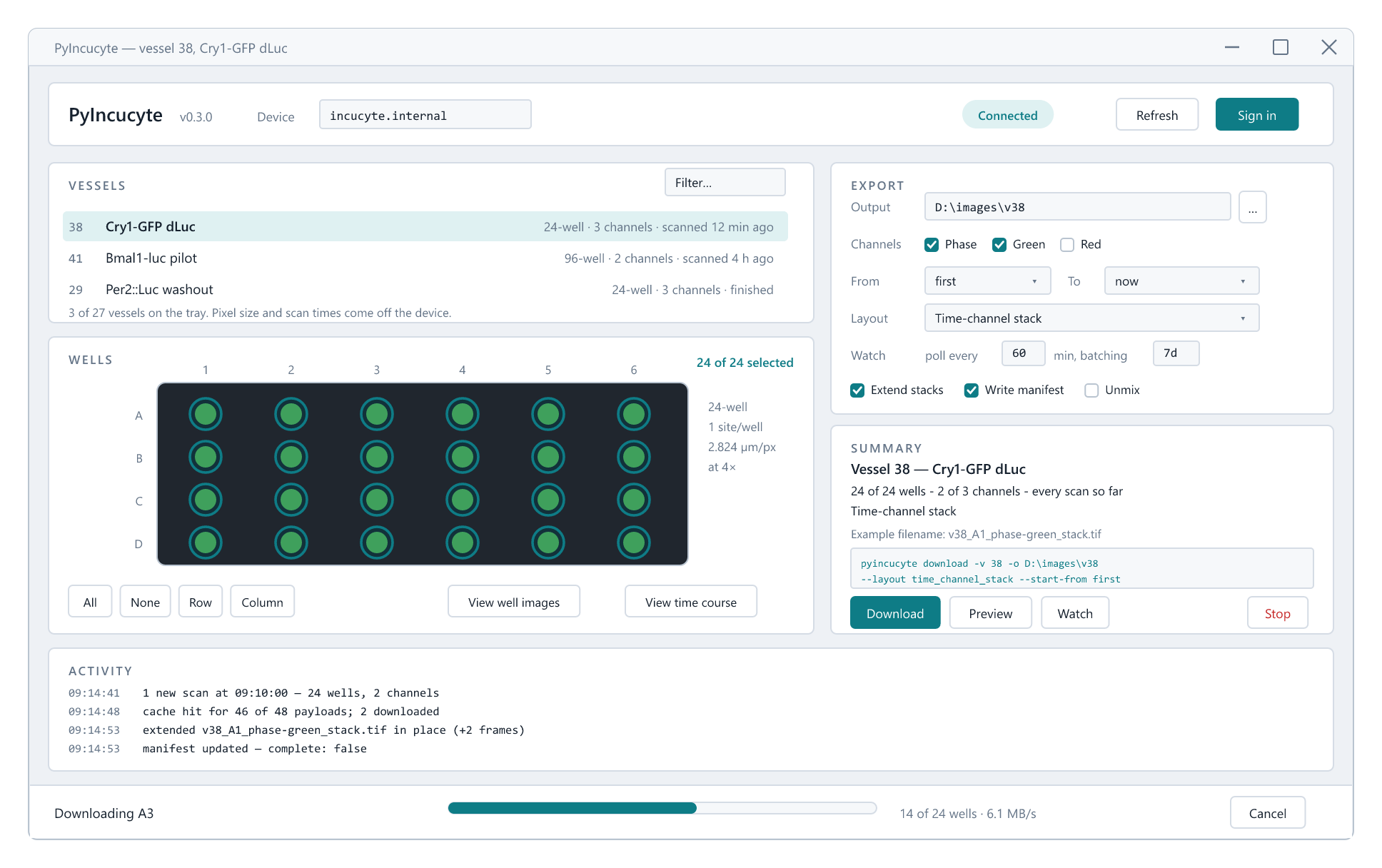
Sign in, pick a vessel, paint the wells you want, choose a layout, then choose one clearly separate action: Preview images, inspect the Preview download, Download once, keep the folder current with Sync, or create a Scheduled download. Everything long-running happens on a worker thread, so the window stays usable and Cancel in the status bar always works.
Worth knowing:
- Preview images (Ctrl+P, Ctrl+I, or double-click a vessel) puts the selected wells into their physical plate grid. Phase, Green, and Red are selected one at a time, and the Z-stack control scrolls through the image positions in the most recent scan without laying channels out as separate tiles.
- Preview download (Ctrl+E) counts exactly what would be downloaded and lists the filenames, without fetching a single image.
- Sync (Ctrl+W) remains open, checks for new scans at the chosen interval, and downloads them as they appear.
- Scheduled download asks Windows to run one synchronization at a chosen interval. It survives closing PyIncucyte and rebooting the computer.
- View time course (Ctrl+T) opens one image with a time slider, playback, well/channel selectors and contrast controls. It samples at most 100 frames initially and loads uncached positions only when they are requested.
- Scanned only keeps just the wells the instrument actually imaged in the most recent scan — wells with no data are shown dimmed on the plate.
- Copy Python code and Copy CLI command (Tools menu, and in the confirm
dialog) turn the current settings into either a runnable
IncucyteClientscript or the equivalentpyincucytecommand-line interface command. - Presets (File menu) save the whole recipe as JSON. The same file works as
pyincucyte download --preset my-run.jsonand asExportOptions.load(...). - The plate picker takes click, drag-to-paint, shift-click for a block, and a click on a row letter or column number to flip a whole line.
- Light and dark themes follow Windows, and the Dark mode header option overrides the system choice.
- Settings, window size and per-vessel well selections are remembered. Settings saved by earlier versions are migrated on first run.
The command line
pyincucyte probe                       # is the instrument reachable?
pyincucyte login                       # saves credentials for the active device
pyincucyte --host incucyte-2 login --name "Incucyte 2"
pyincucyte --host incucyte-2 vessels  # use that saved device explicitly
pyincucyte vessels                     # what is on the device
pyincucyte find Cry1                   # which plate is that, and when
pyincucyte preview -v 38 -w A1-B3      # look at the wells before fetching
pyincucyte preview -v 38 --unmix green:12%red   # try a ratio before using it
pyincucyte timeline -v 38 -w A1 -c phase        # scrub through the run lazily
pyincucyte protocol -v 38              # how the run was set up, drawn
pyincucyte protocol -v 38 -o run.svg   # ...as a figure
pyincucyte --json preview-probe -v 38            # prove the tile route read-only
pyincucyte plan -v 38 -o ./images --start-from first     # dry run

pyincucyte download -v 38 -o ./images --start-from first
pyincucyte download -v 38 -o ./images --wells D2-D5 --channels phase,green \
                    --layout time_stack
pyincucyte watch    -v 38 -o ./images -i 10 --start-from first
pyincucyte watch    -v 38 -o ./images -i 60 --start-from first --batch-after 7d
pyincucyte watch    -v 38 -o ./images --start-from first --batch-after 7d --once
pyincucyte schedule -v 38 -o D:\runs\plate38 --batch-after 7d --every 1h

pyincucyte download -v 38 -o ./images --calibrate --unmix device

pyincucyte status                      # what is the instrument doing?
pyincucyte scan-now -v 38 --yes        # scan this plate now (changes the device)
Useful anywhere: --json for machine-readable output, --preset FILE to load a
saved recipe, --save-preset FILE to write one, --dry-run, --quiet.
pyincucyte manifest ./images summarises what a folder already contains.
Time windows
--start-from and --end-at both take a date, a date and time, or a relative
offset. Both ends are inclusive.
| Written as | Means |
|---|---|
first |
the experiment's own first scan, at its real time of day |
today / now |
midnight this morning / this instant |
2026-03-05 |
start: 00:00 that day. End: the whole of that day |
2026-03-05 14:30 |
exactly that minute (T instead of a space also works) |
-48h (start only) |
a rolling window: 48 hours before now |
+72h (end only) |
72 hours after the start |
-50f (start only) |
the last 50 frames |
+100f (end only) |
the first 100 frames from the start |
So the first three days of an experiment that began at 14:30 is
--start-from first --end-at +72h, and it correctly excludes that morning's
scans. Time units are s, m, h, d, w, and the sign is required so an
offset can never be mistaken for a date.
Frame counts measure the same window in scan times rather than clock time —
-50f, +100 frames, -24 scans all work. Use them when the length of the
stack is what matters, which is usually the case for a video: --start-from
-100f gives a 100-frame stack whatever the scan interval was, where -48h
gives however many frames happened to fall in two days.
A frame is one scan time, so the count is unaffected by how many wells or channels you select — five frames of two channels is five timepoints and ten files. Count from one end or the other, not both.
PyIncucyte walks the days backwards for -50f and stops as soon as it has
enough, so asking for the last 50 frames of a three-month run costs a couple of
metadata calls rather than ninety.
The instrument only lists scans one calendar day at a time, so PyIncucyte sweeps whole days and then trims to your exact window.
Layouts
--layout replaces the old --hyperstack / --time-stack flag pair, which
still works.
| Layout | Axes | One file per |
|---|---|---|
separate (default) |
YX |
well, channel and scan time |
channel_stack |
CYX |
well and scan time |
time_stack |
TYX |
well and channel |
time_channel_stack |
TCYX |
well |
Options
| Flag | Description |
|---|---|
-v, --vessel |
Vessel ID — repeat for several |
-o, --output |
Output folder |
-w, --wells |
Well filter (A1, A1,B3, A1-D4, all) |
--vessel-wells ID:WELLS |
Per-vessel well filter (-f is the old spelling) |
-c, --channels |
phase, green/color1, red/color2, all |
--layout |
See the table above |
-s, --start-from |
first, today, now, a date/time, -48h, or -50f |
--end-at |
now (default), a date/time, +72h, or +100f |
-d, --date |
Shorthand for a single day |
-t, --scan-time |
Only scan times containing this text |
--workers |
Parallel fetches (default 4) |
--calibrate / --no-calibrate |
Write fluorescence in calibrated units, 32-bit float |
--unmix |
device, or a term like green:8%red (also on preview) |
--background |
device, or a number of raw counts |
--state-scope |
auto (default), folder, global, none |
--cache |
auto (default), always, never — cache source payloads |
--no-append |
Rewrite every time stack whole, instead of extending it |
--no-manifest |
Skip writing the manifest and CSV index |
-i, --interval |
watch only: poll interval in minutes |
--batch-frames |
watch only: hold new frames until N are waiting |
--batch-after |
watch only: ...or until the oldest has waited 7d / 12h |
--once |
watch only: poll once and stop, for a scheduled task |
The Python API
This is the part an automated pipeline should use.
AI control
The public, read-only guide is available without contacting the instrument:
from pyincucyte import context

print(context.read())
print(context.search("preview"))
Agents can discover and run the same headless actions through
.claude/skills/pyincucyte/scripts/pyincucyte_runner.py or the Codex bridge at
.codex/skills/pyincucyte/scripts/pyincucyte_runner.py. The portable copies
are README_AI.md and pyincucyte_context.json.
For a single pull or scheduled poll, the package-level helpers match PyLV200:
import pyincucyte

result = pyincucyte.pull(38, out="./run-01", start_from="first")
result = pyincucyte.watch_once(38, out="./run-01", start_from="first")
Both use the saved login, close the connection when finished, and return a
DownloadResult. watch_once returns None while a requested batch is still
being held. Results, plans, vessels, scans, files, and progress events expose
to_dict() records whose values can be passed directly to json.dumps.
from pyincucyte import IncucyteClient

with IncucyteClient.from_saved() as incucyte:
    plan = incucyte.plan(
        vessel=38, output="./run-01",
        wells="A1-D6", channels="phase,green",
        layout="time_channel_stack",
        start_from="first", end_at="+72h")     # the first three days

    print(plan.summary())
    # 1 vessel - 24 wells - 118 scan times - One ImageJ TCYX stack per well
    # 24 output files - 5,664 source images - ~15.8 GB

    result = incucyte.download(plan, progress=print)

for image in result.files:
    segment(image.path,
            well=image.well,            # "A1"
            channels=image.channels,     # ["Phase", "GFP"] in stack order
            axes=image.axes,             # "TCYX"
            timepoints=image.scan_times)
incucyte.fetch(...) plans and downloads in one call. start_from and end_at
also accept date and datetime objects directly, and plan.window reports the
(start, end) the plan actually used — it is recorded in the manifest too.
Finding the right vessel, and looking at it
A vessel id is not a memorable thing, and the wrong one costs a whole download.
find_scans searches for the plate and preview shows you its wells.
scans = incucyte.find_scans("Cry1", most_recent=1)   # newest scan of that plate
scans[0].preview(wells="A1-B3").show()               # a scrollable window

incucyte.find_scans(plate=24, channel="GFP")         # every 24-well GFP plate
incucyte.find_scans(vessel=38, most_recent=3)        # its last three scans
incucyte.find_scans(vessel=38, at="-48h")            # the scan nearest 48h ago
Each result is a VesselScan: the vessel, one scan time, and the wells,
channels and sites that scan actually holds — .well_names, .elapsed,
.channel_summary, .summary(), .to_dict(). Days are walked backwards from
the vessel's own last scan, and a scan is only returned once the device confirms
it contains that vessel, so most_recent=1 means the newest usable scan and
usually costs one call.
preview takes a VesselScan (or a list of them, a Vessel, an id, a name, or
the same filters as find_scans) and returns a PreviewSet:
preview = incucyte.preview(vessel=38, wells="A1-B3", channels="phase")
preview.show()                    # blocks in a script, returns in the GUI
preview.save("./thumbs")          # PNGs, one per tile
preview.summary()                 # "6 of 6 images - 6 wells - Phase"
for tile in preview:
    tile.well, tile.channel, tile.array      # "A1", "Cry1-GFP", uint8 2-D
Compatible Incucyte releases expose an undocumented image pyramid: like the
progressively smaller copies used by an online map, it lets the viewer request
a reduced tile instead of the full TIFF. PyIncucyte detects those routes per
session and falls back to the established full-TIFF export route when they are
missing or malformed. max_images (24 by default) still bounds the static wall.
The tiles are downsampled and contrast-stretched for recognition, never
measurement.
For a long run, use the lazy timeline instead of asking the static wall to show every timepoint:
timeline = incucyte.timeline(
    38, wells="A1-B3", channels="phase", output="./run-01",
    start_from="first", end_at="now")
timeline.show()

timeline.source.get_frame("A1", 0, 1, 1337)  # native reduced values on demand
timeline.close()
The first view uses at most 100 evenly spaced frames. A cache miss fetches that
frame and the window preloads a small neighbourhood. Native and rendered caches
have separate fixed bounds, so a 2,000-frame slider never retains 2,000 arrays
or Tk images. Existing timestamp-matched exported stacks and disposable
.pyincucyte-preview/ frames are read before the device; the fallback reads a
bounded full TIFF, reduces it immediately, and releases the encoded payload.
What the run is actually doing
The Incucyte software draws an experiment as nested boxes — a time loop around a well loop around a chain of channel nodes — and locks the picture inside the vendor software on the machine beside the instrument. Every fact in it is already on the wire:
print(incucyte.protocol(38))                    # the drawing, in the terminal
incucyte.protocol(38).save("protocol.svg")      # ...as a figure
+- Time loop:  200 x 3.0 h requested   -   3.0 h achieved -----------------------+
| [############............] 61 of 200 timepoints acquired (30%), 7.0 days so far |
|                                                                                 |
| +- All wells (24)   24-well Sarstedt   2 sites each   A1, A2, A3, +21 more ---+ |
| | +-------------------+    +--------------+    +--------------+               | |
| | | Phase             |    | Cry1-GFP     |    | Per2-mCherry |               | |
| | | transmitted light | -> | 300 ms       | -> | 400 ms       |               | |
| | |                   |    | stare 180 ms |    | stare 180 ms |               | |
| | |                   |    | 524 nm GCU   |    | 635 nm RCU   |               | |
| | +-------------------+    +--------------+    +--------------+               | |
| +-----------------------------------------------------------------------------+ |
+---------------------------------------------------------------------------------+
It says three things the vendor's own graph does not. The requested cadence and the achieved interval are both on the page and labelled as different facts — enough wells at a long enough exposure overrun the schedule, and the derived number is the one that is true. It says how far the run has got, and which wells the last scan actually reached. And every value carries where it came from: the vessel record, the scan payload, or the scan times.
-o writes the drawing. .svg costs no plotting stack at all — which matters
because the packaged desktop app excludes matplotlib outright; .png and .pdf
go through matplotlib (pip install PyIncucyte[figure]). --dark matches a
dark slide. Nothing here reads a pixel, and --no-scan skips sweeping the run's
whole lifetime as well.
In the app it is Tools → Acquisition protocol (Ctrl+R).
Preprocessing
The instrument's own export wizard offers As Displayed (a picture, with everything on screen baked in) and As Stored ("the raw data" — Sartorius is explicit that "user-specified settings are not reflected in this type of export"). PyIncucyte downloads the As Stored pixels, so nothing arrives preprocessed.
What does arrive, in the scan metadata the planner already reads, are the
instrument's own coefficients — Scale/Bias per image, the ImageMedian
background it measured, and the ColorUnmixes percentages somebody set in the
Incucyte software. Three options turn those into the same corrections, without
retyping anything:
incucyte.fetch(vessel=38, output="./run-01",
               calibrate=True,        # counts -> calibrated units, 32-bit float
               background="device",   # the level the instrument measured
               unmix="device")        # the vessel's own saved percentages
| Option | Values | What it does |
|---|---|---|
calibrate |
True / False |
(raw - Bias) / Scale, written as 32-bit float in GCU/RCU |
background |
"device", a number, "" |
subtracts a background level in raw counts |
unmix |
"device", "green:8%red", an Unmixing, "" |
subtracts a fraction of the other channel |
All three default to off, apply in the order calibrate → background → unmix →
clip at zero, and never touch Phase, which has no calibration. An explicit
unmix term reads recipient:amount contributor, optionally with @2 to blur
the contributor first as the device's BlurringSigma does; several terms are
comma-separated.
Setting your own unmixing
"device" uses whatever somebody typed into the Incucyte software, which was
chosen to look right on screen — not necessarily what an analysis wants. Read
it, change it, and check it before committing:
mixing = incucyte.unmixing(38)      # an Unmixing: green:8%red
mixing["green"] = 0.12              # take more red out of green
mixing.set("red", "green", 0.02)    # and a little the other way
mixing.blur("green", sigma=2)       # blur the contributor first, as the device can

incucyte.preview(38, wells="A1", unmix=mixing).show()   # look at it
incucyte.fetch(vessel=38, output="./run-01", unmix=mixing)
Unmixing is a small mutable set of terms keyed by (recipient, contributor):
mixing["green"] reads the ratio, mixing["green"] = 0 removes the term,
mixing.scaled(0.5) halves everything at once, and str(mixing) is the spec
string a preset stores. ExportOptions(unmix=...) accepts the object, a spec
string, or a plain list of terms, and always stores the spec — so a recipe you
tuned in a notebook is the same recipe on the command line.
Previewing is how you tune it: unmixing and background removal visibly change
the thumbnails, so pyincucyte preview -v 38 --unmix green:12%red shows the
result of a ratio before an experiment is downloaded with it. Calibration is
invisible in a preview — it is a linear rescale and the contrast stretch undoes
it. pyincucyte find prints each vessel's saved unmixing in its own column.
Three things worth knowing:
- Processed files are named for it —
VID38_A1_2_00d00h00m_cal-unmix.tif. That keeps raw and corrected pixels from ever sharing a filename, and it is what lets a second run with a different recipe resume properly instead of deciding it already has the file. - Unmixing reads the other channel, so it costs an extra download per image when that channel was not selected. The payload cache is switched on automatically when unmixing to keep a time stack from re-fetching it per frame.
- It is not guaranteed bit-identical to the Incucyte's own export. Sartorius
does not publish the order it applies these in, and the direction of
Scaleis inferred from the manual's worked example. Check one well against a "Green calibrated" export before trusting a whole experiment to it.
The recipe is recorded in pyincucyte-manifest.json (under options) and on
every file entry, so a later pipeline stage can always tell what it is reading.
What you get back
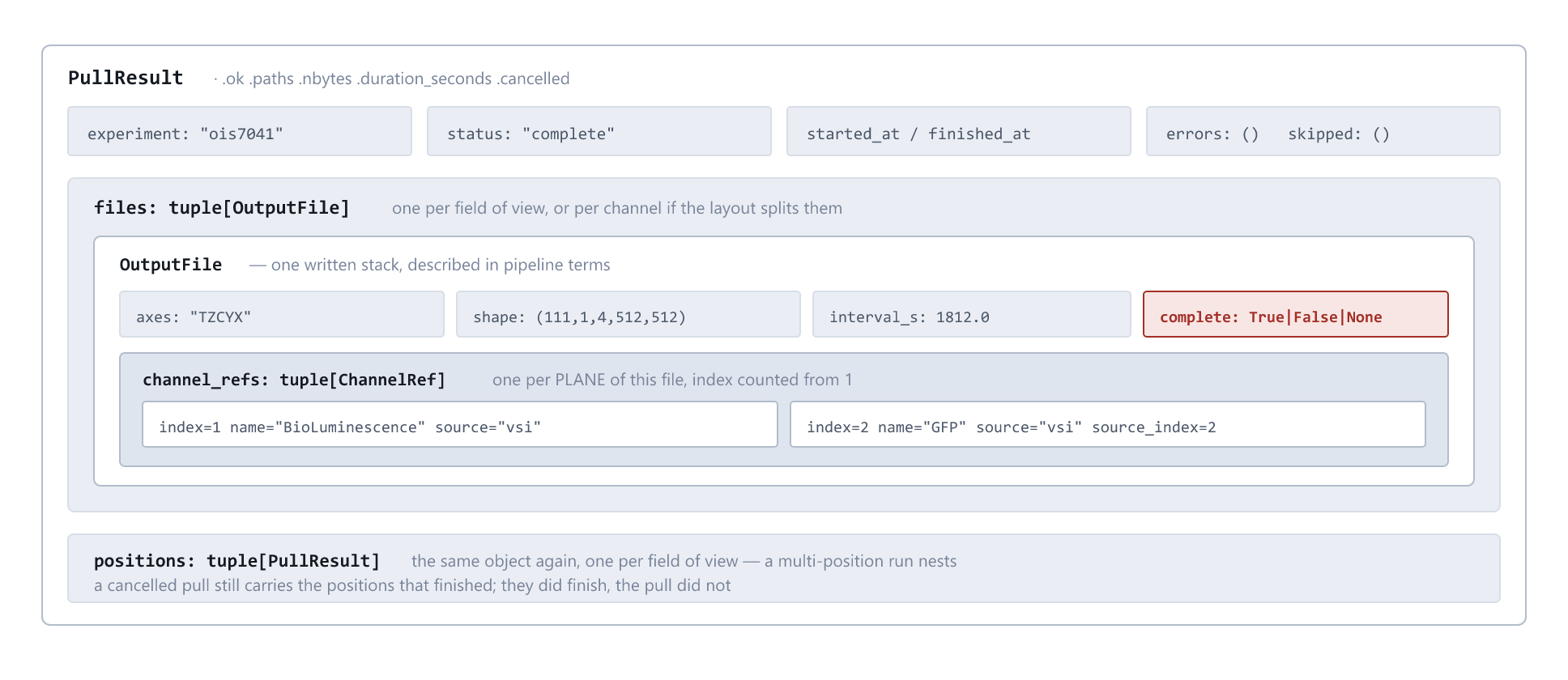
Containment is the point: one file entry answers every question about the stack
it describes, so the next stage never has to join anything. PyLV200 writes the
same shape under the names PullResult / channel_refs.
DownloadResult carries .files (typed OutputFile records), .paths,
.errors, .cancelled, .bytes_total, .duration_seconds and .summary().
Failures are collected, not raised — one unreadable well never aborts a plate.
Each OutputFile knows its vessel, well, row/column, site, channel display
names, device channel numbers, scan times, ImageJ axis order, elapsed-time label
and size.
The manifest
Every download writes pyincucyte-manifest.json and pyincucyte-index.csv into
the output folder. Read these instead of globbing the folder and re-parsing
filenames — they already say which well, channel and timepoint every file is.
Watch mode merges into the same manifest, so it stays a complete index of the
folder however many polls filled it.
import json, pandas as pd
manifest = json.load(open("run-01/pyincucyte-manifest.json"))
index = pd.read_csv("run-01/pyincucyte-index.csv")
Each file entry is written in the shared handoff contract the SCN analysis pipeline uses, so one reader serves this package, PyLV200 and Auto-Organotypic alike:
| Field | What it saves you working out |
|---|---|
channels |
{index, name, image_type, source} per plane, index counting from one as ImageJ does. The index describes the written stack, not the vessel — a well that missed a channel would otherwise shift every name after the gap by one |
frames |
Timepoints the file holds now |
complete |
Whether it can still gain frames. A time stack is extended in place on every poll, so frames is true when read and stale a moment later. null means nobody can honestly say — which is not the same as false |
frames_expected |
How many it should hold once the run finishes, so a well the instrument skipped is visible as such rather than as a short recording |
blank_planes |
Planes allocated but not acquired — always 0 here, since nothing is written until every plane is downloaded and checked |
field |
{"kind": "well", "name": "A1"} — the cross-instrument spelling of what well says in this package's own terms |
interval_s |
{"value": 1800, "source": "derived from this file's scan times"} — the cadence, and where the number came from |
pixel_size_um |
{"value": 2.824051, "source": "read from the vessel's ImageSize"} — read off the instrument, not inferred from the objective |
null with a stated reason is deliberate: a plausible number nobody can trace is
worse than an honest gap. The CSV index carries the same values with the
provenance in its own _source column, and the channel names in place of the
records a spreadsheet column cannot hold.
Two contract fields are deliberately absent. registered and valid_mask
belong to whatever aligns the pixels — an instrument does not know whether its
output was later registered, and this one produces no valid-field mask at all.
On the Python side OutputFile uses the same names, with channel_names for
when you just want ["Phase", "GFP"].
Watching, without blocking
watcher = incucyte.watch(options, on_result=lambda r: analyse(r.paths))
...                                  # your pipeline carries on
watcher.stop(wait=30, flush=True)    # flush collects the tail and marks it done
Watcher also works as a context manager, and run_forever() blocks if that is
what you want.
Starting the next step before the poll finishes
on_result fires once per poll with the whole result. A poll that collects 96
wells therefore delivers nothing until all 96 have landed. Pass on_file
instead — or as well — to be handed each file the moment it is written:
incucyte.watch(options, on_file=lambda image: outline(image.path,
                                                      well=image.well))
It works the same way on download() and fetch(), and is handed the same
OutputFile that ends up in result.files. A callback that raises is logged and
does not stop the download.
Files a watcher writes mid-run are marked complete: false; the flush that ends
the run marks them true. Pass complete= to download() to state it yourself.
Downloading in chunks instead of frame by frame
By default a frame is fetched the moment it appears. Set batch_frames and/or
batch_after and the watcher holds new frames instead, downloading only
once the chunk is worth fetching — so an experiment can be started on the Monday
and collected the following week in one pass:
watcher = incucyte.watch(options, vessel=38, output="./run-01",
                         start_from="first", batch_after="7d", interval=60)
| Setting | Meaning |
|---|---|
batch_frames=50 |
Wait until 50 new frames are ready |
batch_after="7d" |
...or until the oldest waiting frame is 7 days old |
| both | Whichever comes first — a fast run does not wait out the clock, and a stalled one still delivers what it has |
| neither (default) | Download on sight |
A frame is one moment on the time axis, not one file: 50 frames of a 24-well
plate in two channels is 2,400 images. batch_after takes 90m, 12h, 7d,
2w, and its clock runs from the waiting frame's own timestamp — so pointing
a fresh watcher at a week-old experiment collects it immediately rather than
waiting another week, and restarting a watcher does not restart the wait.
While a chunk is held nothing is written and the resume ledger is untouched, so the frames stay collectable however the watcher ends. To take a part-full chunk — the tail of an experiment that will never reach its count:
watcher.flush()                      # download what is waiting, right now
watcher.stop(flush=True)             # ...or on the way out
print(watcher.pending_frames, watcher.hold_description)
on_hold= is called with the watcher on each poll that finds work and decides
to wait. One caution: a poll re-checks the whole window whether or not the chunk
is due, so pair a long chunk with a lazy interval (an hour, not ten minutes).
One poll, from a scheduled task
--once polls a single time and exits, so the schedule belongs to Windows
rather than to a resident process. Nothing is held between firings and nothing
needs to be: batch_after runs from each frame's own acquisition time and
batch_frames counts the instrument against the resume ledger, so the poll
after a reboot decides exactly what the poll before it would have decided.
pyincucyte schedule registers that task, and registers it so it keeps
running:
pyincucyte schedule -v 38 -o D:\runs\plate38 -s first --batch-after 7d --every 1h
Windows asks for this account's credential in its own prompt — it goes straight
to Windows, never through PyIncucyte — and the task then runs on a rebooted,
locked machine. --at-logon skips the question and waits for somebody to log
in instead. --wake wakes a sleeping computer for each check, --list shows
what is scheduled and how each one is doing, and --remove <name> deletes one.
Writing the schtasks line by hand is the thing to avoid, and not for
convenience. Measured on a real Windows 11 machine, a task created from the
plain flags comes back with five defaults that quietly stop it:
| Windows default | after the computer is turned off |
|---|---|
LogonType = InteractiveToken |
runs only while that user is logged on |
StartWhenAvailable false |
a firing missed while it was off is never caught up |
DisallowStartIfOnBatteries true |
never starts unplugged |
StopIfGoingOnBatteries true |
killed mid-download when the power goes |
WakeToRun false |
a sleeping computer sleeps through every check |
None of the five can be set through schtasks flags, so schedule registers
from a task definition and then reads all five back off the registered task.
Created is not the same as will run.
The exit code is the whole interface, and they are the three pylv200 uses so
a task written for one instrument reads the same as one written for the other:
| code | meaning | what a task should do |
|---|---|---|
| 0 | a chunk was due and was downloaded | run whatever comes next |
| 1 | nothing written — still holding, or nothing new | nothing |
| 2 | the instrument could not be reached, or the poll failed | look at it |
Run it hourly and a seven-day chunk fires once a week: 167 firings in 168 write nothing and cost one metadata pass each. A bad argument exits 2, not 1, and so does an unexpected crash — exit 1 means "nothing was due", which is a normal poll, so it can never also mean "it broke".
Put the global --json option before the command for one strict JSON document
on standard output; progress stays on standard error. Success returns the same
DownloadResult.to_dict() shape as Python. Failures use
{"ok": false, "error": {"type": "...", "message": "..."}, "command": "watch"}.
pyincucyte --json watch -v 38 -o ./images --start-from first --once
Talking back to the instrument
Everything above reads. Three calls write, and they are the only ones in the package that change the Incucyte at all:
| What it does | Reaches | |
|---|---|---|
device_state() |
what the instrument is doing, how warm it is, when it next scans | read only |
begin_scan(vessel) |
asks for a scan of one plate, now | that plate |
save_unmix(vessel, spec) |
stores unmixing on a vessel, so the Incucyte's own software displays it | that plate |
Reading is free:
state = incucyte.device_state()
print(state.summary())          # "Scanning, 42% done, ~1h 12m left"
if state.has_problem:           # disk full, hot board, RAID degraded...
    alert(state.activity)
pyincucyte status               # exits non-zero if the instrument reports a fault
pyincucyte status --json        # for a monitoring script
Writing is not. The instrument is shared, so a write says so in as many words or it does not happen — there is no default that sends:
incucyte.begin_scan(38)                     # ConfirmationRequiredError, sends nothing
incucyte.begin_scan(38, confirm=True)       # goes
pyincucyte scan-now -v 38 --yes
pyincucyte unmix -v 38                      # show what the vessel has
pyincucyte unmix -v 38 --set green:8%red --yes
In the app: Tools → Device status, Scan selected vessel now, Save unmixing to instrument, each behind a dialog.
Both writes also refuse while the instrument reports a fault — starting a scan
into a full disk achieves nothing — unless you pass --force / force=True.
Two things worth knowing:
- There is no stop. The device API has no stop, pause or abort. Ending an experiment early means replacing the schedule for the whole tray, every vessel on it — someone else's plate included — so PyIncucyte does not do it.
save_unmixis never needed for downloading.fetch(..., unmix=...)does that arithmetic here, on the pixels, touching nothing. Saving is only for changing what the Incucyte's own viewer shows other people.
None of this has run against the real instrument. The route and field names
come from the vendor client assemblies rather than from guesswork, but the
first scan-now at Imperial should be watched.
Presets shared with the GUI
from pyincucyte import ExportOptions

options = ExportOptions.load("nightly.json")     # saved from the GUI
result = incucyte.fetch(options.replace(output="./tonight"))
print(options.cli_command())                     # the equivalent CLI line
Why watch mode stays cheap
A time stack has to contain every frame, so one new scan invalidates the whole file. Done naively that means re-downloading and rewriting the entire experiment on every poll, and it gets worse with every hour of the run. Two things stop it.
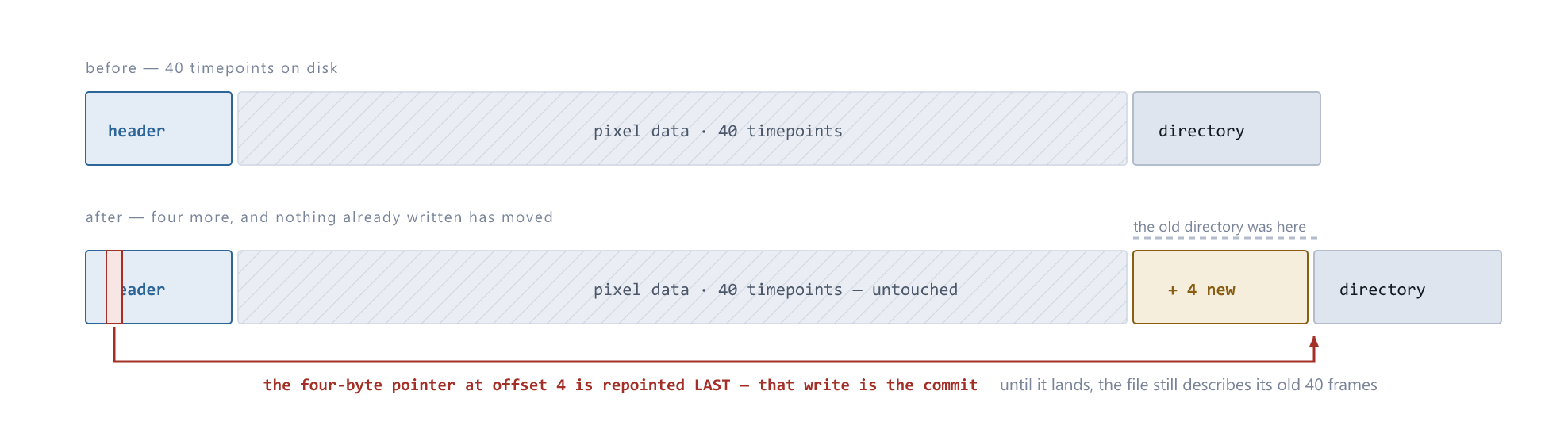
New frames are added to the file, not rewritten into a new one. An ImageJ stack keeps its directory of frames after the pixel data — like a book with its index at the back — so PyIncucyte writes the new frames on the end and reprints the index, leaving the existing pixels exactly where they are. On a 144-frame stack of 1408×1040 images that is 2.9 MB written instead of 422 MB, and unlike a rewrite the cost does not grow as the experiment does.
It happens only when the file on disk is provably the earlier part of the same
stack: the resume ledger has to say so, the frames already there have to be the
first of the ones being written, and the geometry, channels and processing
recipe all have to match. Any doubt at all — a widened time window that puts
new frames in front of old ones, a stack written by something else, a file that
will not open — and the whole file is written instead. --no-append
(append_stacks=False) forces that everywhere.
Source payloads are cached. .pyincucyte-cache/ inside the output folder
keeps each image the first time it is fetched, so the rewrites that do happen
are a disk read rather than a fresh download, and only genuinely new frames
touch the instrument. It is on automatically for the time layouts.
--cache always / --cache never (or cache_payloads= in ExportOptions)
override that; deleting the folder only costs time. result.cache.summary()
reports the hit rate.
Resume state
By default the ledger of what has already been fetched lives in the output
folder (.pyincucyte-state.json), so parallel experiments never collide and
moving a folder moves its history with it. state_scope="global" restores the
old shared file; "none" disables resume entirely.
Errors
Everything derives from IncucyteError, so a pipeline can wrap a whole run in
one except: DeviceUnreachableError, AuthenticationError,
NotLoggedInError, TokenExpiredError, ApiError, VesselNotFoundError,
EncryptionUnavailableError, ExportError, StackNotExtendable,
ConfirmationRequiredError, DeviceBusyError, HostNotSetError.
StackNotExtendable is the odd one out: it is never raised at you. It is
how the download says a time stack has to be written whole rather than
extended, and it is always handled internally.
Layout of this repository
PyIncucyte/
  pyincucyte/
    client.py       IncucyteClient - the object a pipeline imports
    options.py      ExportOptions - the recipe shared by GUI, CLI and API
    models.py       Vessel, ExportPlan, DownloadResult, OutputFile
    manifest.py     the JSON manifest and CSV index
    state.py        resume ledger, scoped to the output folder
    cache.py        source-payload cache, so rebuilt stacks do not re-download
    tiffstack.py    add frames to an ImageJ stack without rewriting it
    preview.py      find a vessel by name, and look at its wells
    pyramid.py      private reduced viewer-tile transport and decoder
    timeline.py     lazy frame provider, bounded caches and local proxy reuse
    processing.py   optional preprocessing: calibration, background, unmixing
    watch.py        Watcher - poll and download in a background thread,
                    frame by frame or in held chunks
    device.py       device state, and the only two calls that write back
    engine.py       wire-level REST and ImageJ TIFF writing
    cli.py          command line
    compat.py       the import names retired in 0.3
    gui/            desktop app: theme.py, widgets.py, dialogs.py, app.py,
                    preview.py (the thumbnail wall and time scrubber)
  tests/            run with: python -m pytest
Nothing lives outside the package any more. The loose incucyte_downloader.py
and incucyte_gui.py modules are gone, and so is the second py_incucyte_gui
package; importing pyincucyte registers all three as aliases, so this still
resolves - to the very same module object, so monkeypatching behaves as before:
import pyincucyte
from incucyte_downloader import download_scan_images
Where settings live
- Windows:
%APPDATA%\PyIncucyte - macOS/Linux:
$XDG_CONFIG_HOME/pyincucyteor~/.config/pyincucyte - Override with
PYINCUCYTE_HOME
A folder left over from before the rename (PyIncucyteGUI / pyincucytegui)
keeps being used if it holds settings, and PYINCUCYTEGUI_HOME still works, so
upgrading does not log anybody out.
A source checkout that already has a .tmp/ folder keeps using it.
PYINCUCYTE_CLIENT_DIR overrides where the Incucyte client install is looked for.
Build and publish
python -m pip install --upgrade build twine
python -m build
python -m twine check dist/*
python -m twine upload dist/*
License
BSD 3-Clause. Copyright (c) 2026, Jamie Malcolm. Ownership is personal rather than lab or institute owned.
1 maintainer

Release files for PyIncucyte 0.3.1
For a detailed explanation of source distributions (sdists) and built distributions (wheels), please see the package formats documentation.
Source distribution (sdist)
| File | Size | Uploaded | |
|---|---|---|---|
| pyincucyte-0.3.1.tar.gz | 336.6 kB | Details |
Built distribution (wheel)
| File | Interpreter | ABI | Platform | Reset |
|---|---|---|---|---|
| pyincucyte-0.3.1-py3-none-any.whl | Python 3 | none | any | Details |
Total release size: 588.0 kB
Release files / pyincucyte-0.3.1.tar.gz
| Download URL | pyincucyte-0.3.1.tar.gz |
|---|---|
| Size | 336.6 kB |
| Tags | Source |
|
SHA-256 checksum How to use checksums |
81ae676c044ec707c00c332ea0f5c4e1bb9f584dd49d3121fa4e53977c755b0d
|
|
BLAKE2b-256 checksum How to use checksums |
9f619f6ac1e3bfcc1f937c841a6ddfc27177529ddb79751c06c39f357f84b652
|
| Upload date | |
|
Uploaded using Trusted Publishing? What is trusted publishing? |
Yes |
| Uploaded via |
twine/7.0.0 CPython/3.13.14
|
Provenance
Provenance describes where a file came from. On PyPI, provenance is shared via attestations, which provide a verifiable record of the build or publishing details. View details, limitations and caveats.


PyPI Publish Attestation
PyPI verified that this artifact, at this checksum, originated from the publisher listed below.
Signed by GitHub Actions, verified by PyPI on Sep 22, 2026.
Transparency logRelease files / pyincucyte-0.3.1-py3-none-any.whl
| Download URL | pyincucyte-0.3.1-py3-none-any.whl |
|---|---|
| Size | 251.4 kB |
| Tags | Python 3 |
|
SHA-256 checksum How to use checksums |
ca6e24105c35e98396d02fefb1a517f0263881d7590d82b885aec9d472d50dca
|
|
BLAKE2b-256 checksum How to use checksums |
99216244b5f20a1676ea0301a07e68bda5c30de4b9d934aa7840f910351003f1
|
| Upload date | |
|
Uploaded using Trusted Publishing? What is trusted publishing? |
Yes |
| Uploaded via |
twine/7.0.0 CPython/3.13.14
|
Provenance
Provenance describes where a file came from. On PyPI, provenance is shared via attestations, which provide a verifiable record of the build or publishing details. View details, limitations and caveats.
PyPI Publish Attestation
PyPI verified that this artifact, at this checksum, originated from the publisher listed below.
Signed by GitHub Actions, verified by PyPI on Sep 22, 2026.
Transparency log













