
PyMemoryEditor
A pure-Python library (built on ctypes) that lets you inspect, modify and search the memory of any running process in a few lines of Python — Cheat Engine workflows on Windows, Linux and macOS!

Read, write and scan the memory of any process — straight from Python.
One unified API. Three operating systems. No C compiler. No native build step.
Runs on 🪟 Windows · 🐧 Linux · 🍎 macOS — 32-bit and 64-bit.




Tweak a value in a running game · inspect a live program's state · harvest data straight from RAM.
Install
pip install PyMemoryEditor
To also install the bundled GUI app (a Cheat Engine-style scanner), use the app extra:
pip install "PyMemoryEditor[app]"
pymemoryeditor
For faster scans on large processes, add the speed extra. It pulls in NumPy
and automatically vectorizes the numeric scan comparison loop — ~10–30× faster on
selective scans:
pip install "PyMemoryEditor[speed]"
📖 Full guide at Read the Docs.
See it in action
from PyMemoryEditor import OpenProcess

with OpenProcess(name="game.exe") as process:

    # Scan the whole process for every address holding the value 100.
    for address in process.search_by_value(int, value=100):
        print(f"Found at 0x{address:X}")

    # Read the current value, then write a new one back.
    current = process.read_int(address)
    process.write_int(address, current + 500)
That's it — read, write or scan another process in three lines, the same way on every platform.
What's inside
🐍 The Python library
Full control over another process's memory — in a few lines of Python:
- ✅ Read & write values (
int,float,bool,str,bytes) - 🔍 Value scan with eight comparison modes
- 🎯 Pattern scan (IDA-style AOB & regex)
- 🔗 Pointer chains + a live
RemotePointerhandle - 🧭 Pointer scan — find static pointers that survive ASLR
- 🗺️ Memory map, modules, threads
- 🧱 Allocate & free remote memory (Windows / macOS)
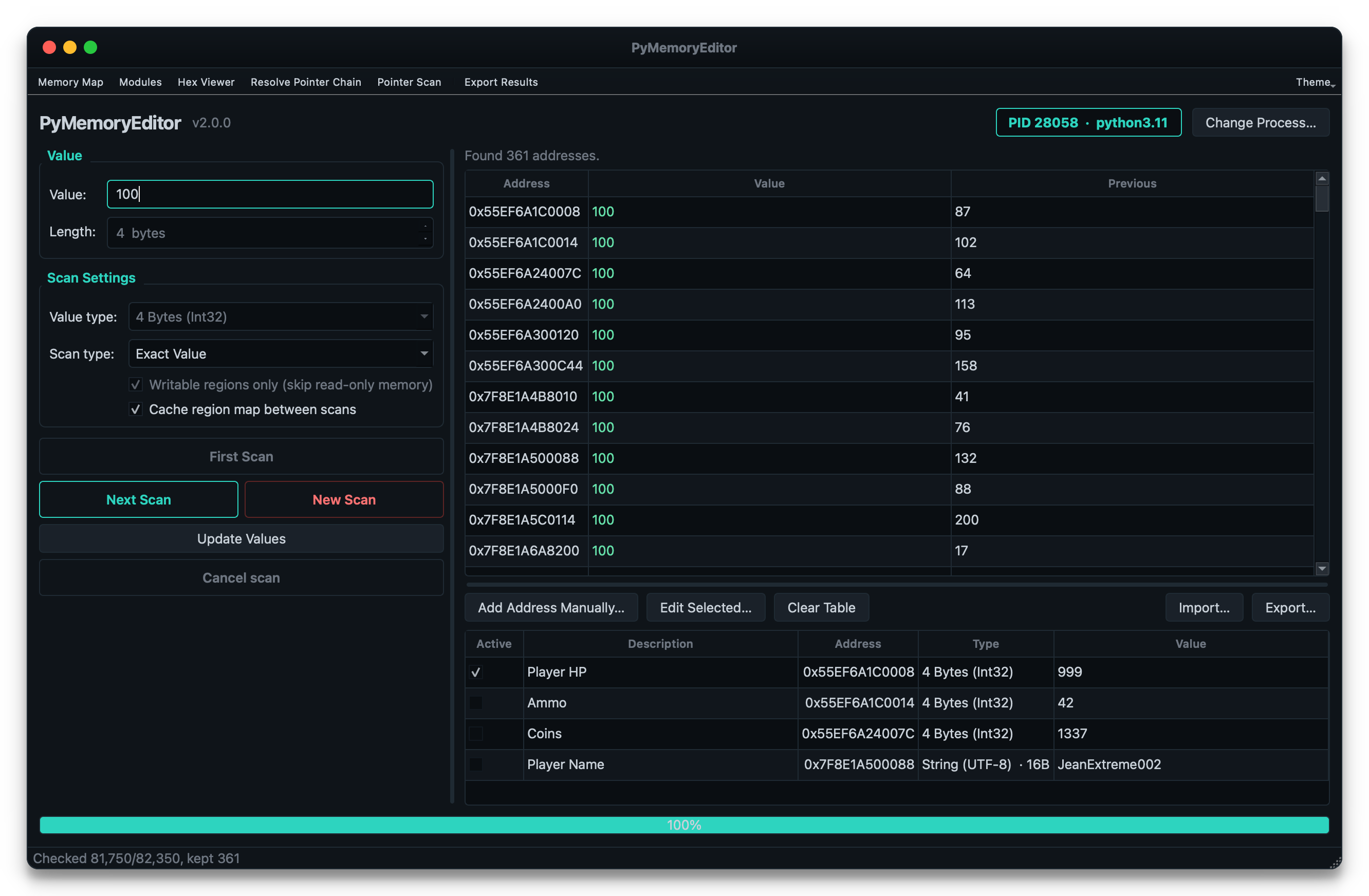
🖥️ The bundled GUI app
All the library's power — no code required:
- ⚡ Zero setup — attach to a process and start scanning in seconds
- 🧲 Refine workflow — First Scan → Next Scan with live visual feedback
- 📋 Cheat table — freeze / write values on the fly, JSON import/export
- 🔬 Hex viewer — browse raw memory and write back inline
- 🧩 Pointer scan UI — scan, export & rescan across sessions with a few clicks
- 🎨 One-click access — every feature at your fingertips, no code needed
📖 Documentation
Full documentation lives at pymemoryeditor.readthedocs.io — installation, the Cheat Engine workflow, every method and parameter, the GUI app guide, platform notes and troubleshooting.
A quick map of where to go:
| Quick Start | Open a process, read, write and run your first scan. |
| Searching memory | Value scans, ranges, refining results, the Cheat Engine loop. |
| Pattern scan | Find code/data with byte signatures (AOB) and regex. |
| Pointers | Multi-level pointer chains and the live RemotePointer. |
| Pointer scan | Find static pointers that survive ASLR. |
| The GUI app | The bundled Cheat Engine-style scanner. |
| API reference | Every public class, method and parameter. |
| Platform notes | Permissions and quirks on Windows, Linux and macOS. |
| Troubleshooting | Common errors and how to fix them. |
What can I build with this?
- 🎮 Game modding & speedrunning tools — the classic Cheat Engine use case.
- 🔬 Debugging & introspection — inspect live state without attaching a debugger.
- 📊 Observability tooling — sample variables in a running process for telemetry.
- 🔐 Security & reverse-engineering research — on systems you own or are authorized to test.
- 🎓 Learning — the bundled app is a great teaching tool for how memory scanning works.
[!NOTE] Responsible use. PyMemoryEditor talks to other processes through OS-level APIs. Only point it at processes you own or have explicit permission to inspect.
🤝 Contributing
Pull requests, bug reports and feature ideas are very welcome. Read
CONTRIBUTING.md for the development setup, test layout and
the small set of platform-specific quirks to be aware of.
If PyMemoryEditor helped your project, please ⭐ the repo — it's the easiest way to support the work and to help others discover the library.
License
Released under the MIT License — free for personal and commercial use.
1 maintainer

Download files
Download the file for your platform. If you're not sure which to choose, learn more about installing packages.
Source Distribution
Built Distribution
Filter files by name, interpreter, ABI, and platform.
If you're not sure about the file name format, learn more about wheel file names.
Copy a direct link to the current filters
File details
Details for the file pymemoryeditor-2.1.0.tar.gz.
File metadata
- Download URL: pymemoryeditor-2.1.0.tar.gz
- Upload date:
- Size: 1.6 MB
- Tags: Source
- Uploaded using Trusted Publishing? Yes
- Uploaded via:
twine/7.0.0 CPython/3.13.14
File hashes
| Algorithm | Hash digest | |
|---|---|---|
| SHA256 |
28cdcead3f9f838e70be323a49b0c1d57b3fc7d80a68d5847eabd6b1c4c026ef
|
|
| MD5 |
f07a4f2a8f23eb9fd687239e48c91ef1
|
|
| BLAKE2b-256 |
237e23a328dc14c5a1e3fbf6b2885b1405a98c42227438651f6e08b85910201d
|
Provenance
The following attestation bundles were made for pymemoryeditor-2.1.0.tar.gz:
Publisher:
publish.yml on JeanExtreme002/PyMemoryEditor
-
Statement:
-
Statement type:
https://in-toto.io/Statement/v1 -
Predicate type:
https://docs.pypi.org/attestations/publish/v1 -
Subject name:
pymemoryeditor-2.1.0.tar.gz -
Subject digest:
28cdcead3f9f838e70be323a49b0c1d57b3fc7d80a68d5847eabd6b1c4c026ef - Sigstore transparency entry: 2512602158
- Sigstore integration time:
-
Permalink:
JeanExtreme002/PyMemoryEditor@29d2f69e38ed8571adf7a92519827a83a32d20d4 -
Branch / Tag:
refs/tags/v2.1.0 - Owner: https://github.com/JeanExtreme002
-
Access:
public
-
Token Issuer:
https://token.actions.githubusercontent.com -
Runner Environment:
github-hosted -
Publication workflow:
publish.yml@29d2f69e38ed8571adf7a92519827a83a32d20d4 -
Trigger Event:
release
-
Statement type:
File details
Details for the file pymemoryeditor-2.1.0-py3-none-any.whl.
File metadata
- Download URL: pymemoryeditor-2.1.0-py3-none-any.whl
- Upload date:
- Size: 222.1 kB
- Tags: Python 3
- Uploaded using Trusted Publishing? Yes
- Uploaded via:
twine/7.0.0 CPython/3.13.14
File hashes
| Algorithm | Hash digest | |
|---|---|---|
| SHA256 |
810f191bd90d2e5b7d42faba132074b0317a329722bfc428246e84264ec0b23b
|
|
| MD5 |
eb8b96354ccbf84756dc4d9b93d374ff
|
|
| BLAKE2b-256 |
256953bc633658b2c54d811f00fcd36bc4559e2e84b522177e4f7d32a5f09d89
|
Provenance
The following attestation bundles were made for pymemoryeditor-2.1.0-py3-none-any.whl:
Publisher:
publish.yml on JeanExtreme002/PyMemoryEditor
-
Statement:
-
Statement type:
https://in-toto.io/Statement/v1 -
Predicate type:
https://docs.pypi.org/attestations/publish/v1 -
Subject name:
pymemoryeditor-2.1.0-py3-none-any.whl -
Subject digest:
810f191bd90d2e5b7d42faba132074b0317a329722bfc428246e84264ec0b23b - Sigstore transparency entry: 2512602205
- Sigstore integration time:
-
Permalink:
JeanExtreme002/PyMemoryEditor@29d2f69e38ed8571adf7a92519827a83a32d20d4 -
Branch / Tag:
refs/tags/v2.1.0 - Owner: https://github.com/JeanExtreme002
-
Access:
public
-
Token Issuer:
https://token.actions.githubusercontent.com -
Runner Environment:
github-hosted -
Publication workflow:
publish.yml@29d2f69e38ed8571adf7a92519827a83a32d20d4 -
Trigger Event:
release
-
Statement type:







