
PyOpenCRG
Unofficial implementation of the OpenCRG file format. Not affiliated with, endorsed by or supported by ASAM e.V. OpenCRG® is a registered trademark of ASAM e.V.
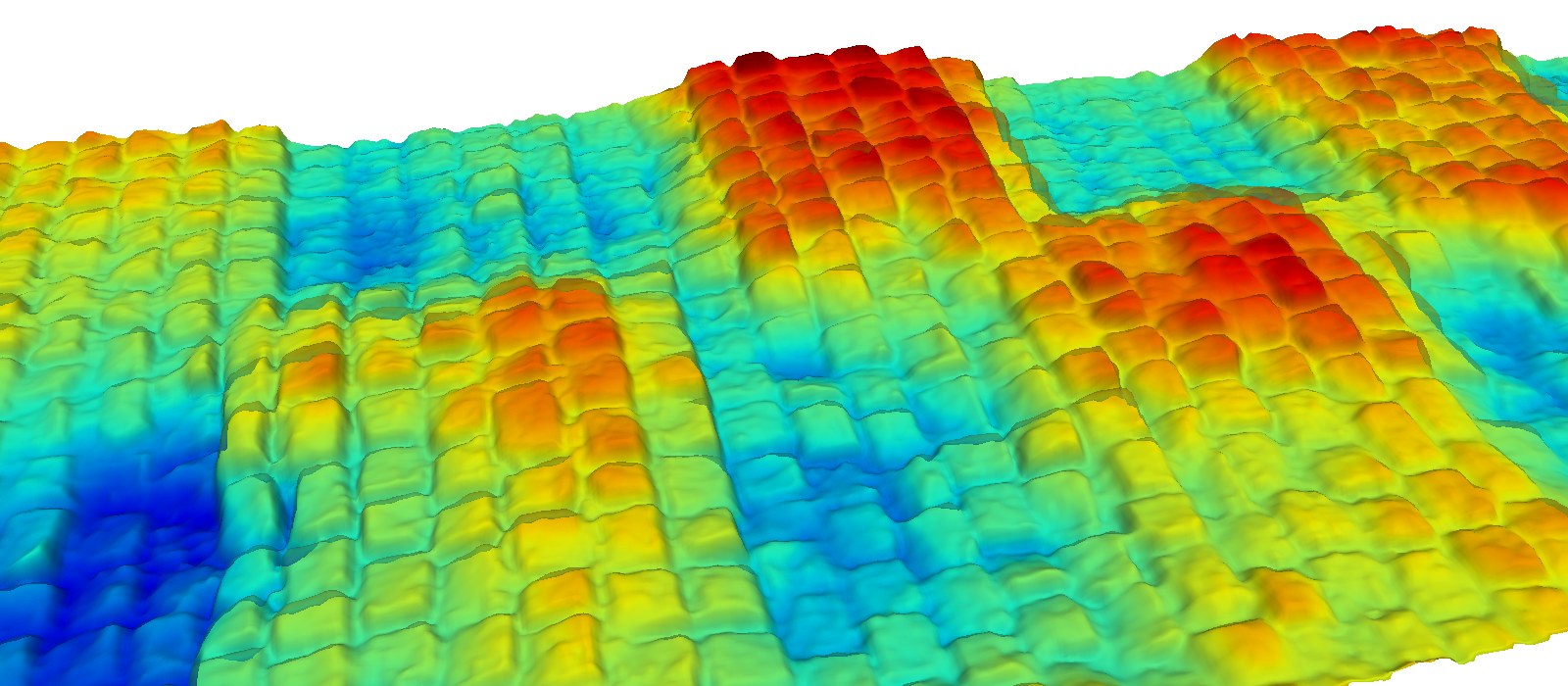
Belgian block sample road of the ASAM OpenCRG project, drawn with road.view3d(color="grid", cmap="jet", z_scale=2.5) (relief exaggerated 2.5 times).
PyOpenCRG (import pyopencrg) reads, analyses, edits, shows and writes OpenCRG
road surface files (.crg) in pure Python. You do not need to compile anything, and it runs on Windows, Linux
and macOS.
- All OpenCRG formats: binary
KRBI/KDBIand textLRFI/LDFI, with full header support (comments, options, modifiers, map projection, WGS84). - Fast: everything is vectorised with numpy. A file of 10 million values is read in 0.1 s (binary) or about 4 s (text).
- Accurate: data stays in double precision (float64). The algorithms follow the OpenCRG reference tools.
- Simple: one object,
CrgRoad, with plain-named methods. Every editing method returns a new road. - Complete: everything in the OpenCRG MATLAB tools, plus tools to clean laser scans, convert STL meshes and export to OBJ / STL / CSV / images / Simpack.
French guide: docs/guide_fr.md. Equivalence with the MATLAB tools: docs/matlab_equivalence.md.
Installation
pip install pyopencrg            # numpy, scipy and matplotlib are installed automatically
pip install "pyopencrg[image]"   # adds Pillow, needed only for engrave_image()
pip install "pyopencrg[viewer]"  # adds PyVista, for the fast interactive 3D viewer road.view3d()
In 10 lines
import pyopencrg as crg

road = crg.read("my_road.crg")          # any OpenCRG file
print(road)                              # summary: length, width, grid, slope...
print(road.check())                      # consistency checks

z = road.uv_to_z(120.0, 0.5)             # height 120 m along the road, 0.5 m left of the reference line
x, y = road.uv_to_xy(120.0, 0.5)         # where this point is in the world

part = road.crop(u=(100, 200))           # keep 100 m of road (a NEW road, `road` is unchanged)
part.save("part.crg", fmt="LDFI")        # save as a text file
road.show()                              # overview figures
road.view3d()                            # interactive 3D view (PyVista)
Files are checked when they are read: a truncated, unreadable or badly defined file raises a
CrgCheckError explaining the problem, and minor problems are shown once as a warning. Use
crg.read(path, check=False) to open a damaged file anyway (to repair it), or check="strict" to
refuse files with warnings too.
Files larger than the memory: only what you ask for is loaded.
preview = crg.read("scan.crg", step=4)        # one point out of 4 in both directions (16 x less memory)
detail = crg.read("scan.crg", u=(500, 520))   # 20 m at full resolution
Gallery
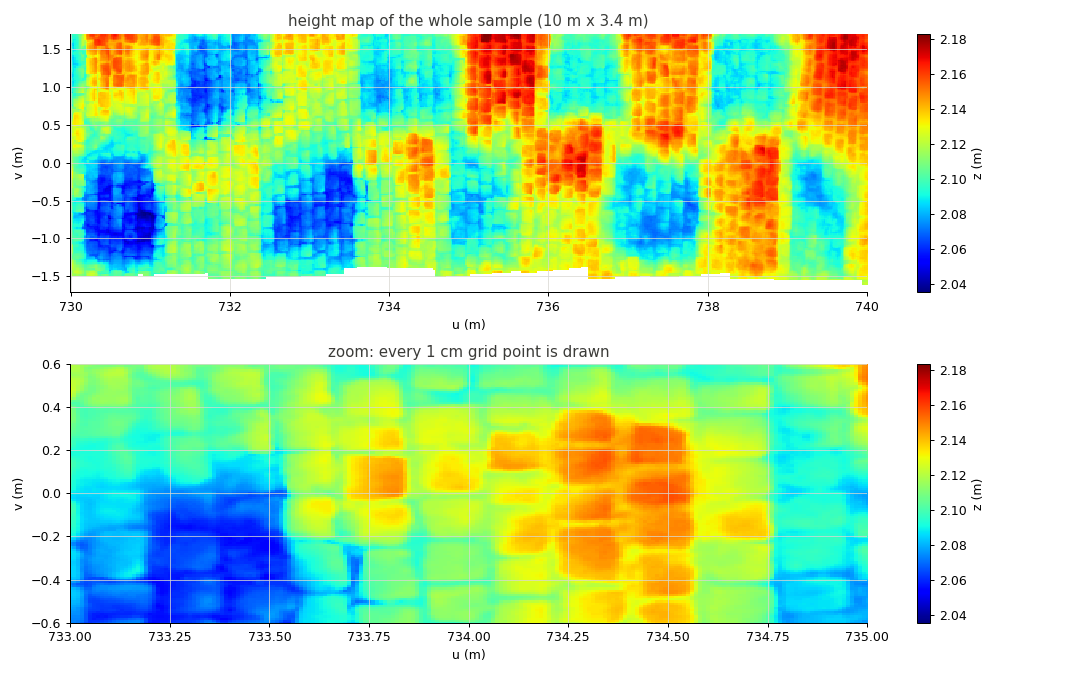
Height map of the whole road, and a zoom where every 1 cm grid point is visible
(road.plot.heightmap(cmap="jet"); zooming in a figure re-samples the image automatically):
Reference line, valid data limits, cross sections and long sections (road.plot.show_cuts_and_limits()):
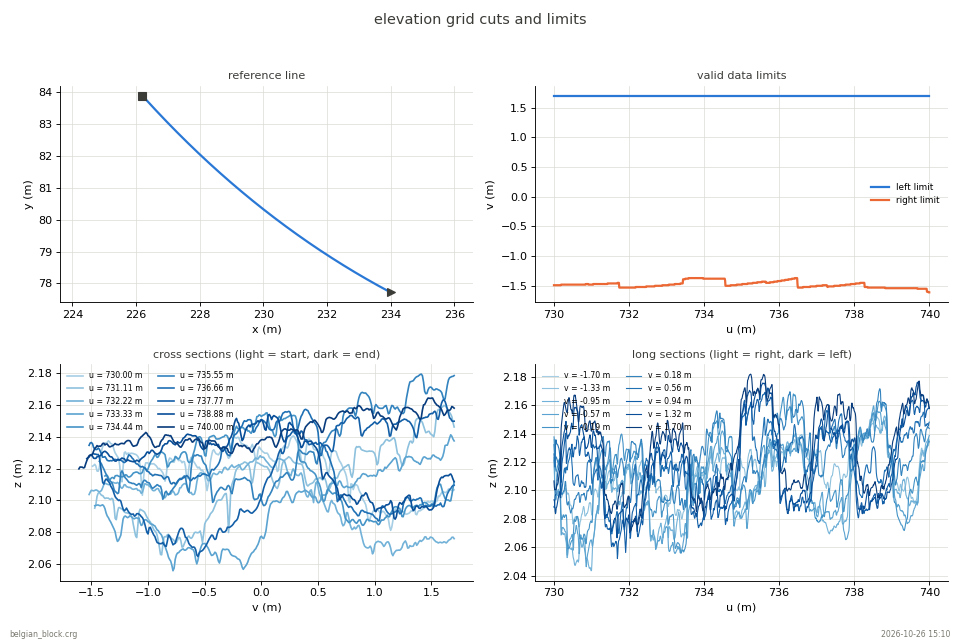
Pictures rendered from the sample belgian_block.crg of the ASAM OpenCRG project
(data provided by DaimlerChrysler, 2005; Apache License 2.0). The sample file is not distributed with PyOpenCRG;
the pictures are made with docs/make_images.py.
Coordinates in one picture
OpenCRG describes a road along a reference line (usually the road centre):
u= distance along the reference line (m),v= lateral distance to it (m, positive to the left);x, y, z= position in the world.
The data is a grid road.z of shape (nu, nv): road.z[i, j] is the height at u = road.u[i],
v = road.v[j], relative to the reference line. The absolute height of the road is
z_absolute = road.z + road.zr (reference line elevation) + road.banking * v
road.uv_to_z(u, v) always returns the absolute height.
What you can do
| Task | Code |
|---|---|
| Read / write | crg.read(path), road.save(path, fmt="KRBI"), crg.convert(a, b, "LDFI") |
| Information | print(road), road.check(), road.stats() |
| Elevation, position | uv_to_z, uv_to_xy, xy_to_uv, xy_to_z, u_to_phi, u_to_curvature |
| Profiles | road.long_section(v=0.9), road.cross_section(u=50) |
| Cut, join, flip | crop(u=..., v=...), trim(1, 1), crg.concatenate([r1, r2]), flip() |
| Re-sample | resample(u_inc=0.05, v_inc=0.05) |
| Slope / banking | extract_slope(), extract_banking(), separate_slope_banking(), set_banking() |
| Modifiers | road.mods, apply_mods(), move_to(x, y, z, phi), transform(...), scale(...) |
| Filter | filter("gauss", 5), clip_z(-0.05, 0.05) |
| Repair scans | remove_artifacts(0.3, 15), fill_holes("linear"), fill_nan(), find_peaks() |
| Synthetic roads | crg.generate.synthetic_road(...), from_function, road_from_points, trapezoid_bumps |
| Import | crg.importers.from_stl(path), from_point_cloud(x, y, z) |
| Add features | add_profile(...), add_random(...), overlay_uv(other), engrave_image("logo.png") |
| Export | to_obj, to_stl, to_csv, to_trm (Simpack), save_heightmap, to_html_map |
| Geodesy | xy_to_wgs84, xyz_to_llh, llh_to_xyz, crg.wgs84.distance(...) |
| Plots | road.show(), road.plot.heightmap() (zoom shows every grid point), road.plot.cross_sections(), ... |
| 3D viewer | road.view3d(color="z" / "grid" / "normal", z_scale=5) (millions of points, GPU) |
Every function has a detailed docstring: type help(road.crop) in Python.
Command line
pyopencrg info  road.crg
pyopencrg check road.crg
pyopencrg show  road.crg
pyopencrg view  road.crg                          # 3D viewer (PyVista)
pyopencrg convert road.crg road_text.crg --fmt LDFI
pyopencrg export road.crg road.obj --step 2       # .obj .stl .csv .png .html .trm
Examples
See the examples folder: reading and plotting, editing, synthetic roads, cleaning a laser scan, STL to CRG conversion, an obstacle test track.
Modifiers: a word of warning
The $ROAD_CRG_MODS block of a file tells a simulator how to modify the road when it loads it
(scale it, fill NaN values, move it). crg.read() returns the road as stored in the file; call
road.apply_mods() (or crg.read(path, apply_mods=True)) to get what a simulator sees. If a file
has no modifier block, OpenCRG applies default modifiers: NaN values are replaced by the last
valid value of the cross section and the road start is moved to x = y = z = 0 with heading 0.
Development
pip install -e ".[test,image]"
pytest
Citing
If you use pyopencrg in a report, a publication or another software, please cite it (see CITATION.cff):
Hardy, T. PyOpenCRG: OpenCRG road surface files in pure Python, version 0.1.0, 2026.
License
Apache License 2.0, see LICENSE and NOTICE. Parts of the algorithms are derived from the ASAM OpenCRG MATLAB tools (Apache 2.0).
1 maintainer

Metadata
1 maintainer
Release files for PyOpenCRG 0.1.0
For a detailed explanation of source distributions (sdists) and built distributions (wheels), please see the package formats documentation.
Source distribution (sdist)
| File | Size | Uploaded | Provenance | Actions |
|---|---|---|---|---|
| pyopencrg-0.1.0.tar.gz | 763.2 kB | With provenance | Details for pyopencrg-0.1.0.tar.gz |
Built distribution (wheel)
| File | Interpreter | ABI | Platform | Actions Reset |
|---|---|---|---|---|
| pyopencrg-0.1.0-py3-none-any.whl | Python 3 | none | any | Details for pyopencrg-0.1.0-py3-none-any.whl |
Total release size: 863.2 kB
Release files / pyopencrg-0.1.0.tar.gz
| Download URL | pyopencrg-0.1.0.tar.gz |
|---|---|
| Size | 763.2 kB |
| Tags | Source |
|
SHA-256 checksum How to use checksums |
826136f041a5f710e481d79f2138649182b467adc0cba6c050527c7a4bb2187c
|
|
BLAKE2b-256 checksum How to use checksums |
d9617beb8752e120ae3fa63ebe088971b532419162c36ae51b156c922c0bd338
|
| Upload date | |
|
Uploaded using Trusted Publishing? What is trusted publishing? |
Yes |
| Uploaded via |
twine/7.0.0 CPython/3.13.16
|
Provenance
Provenance describes where a file came from. On PyPI, provenance is shared via attestations, which provide a verifiable record of the build or publishing details. View details, limitations and caveats.


PyPI Publish Attestation
PyPI verified that this artifact, at this checksum, originated from the publisher listed below.
Signed by GitHub Actions, verified by PyPI on Oct 26, 2026.
Transparency logRelease files / pyopencrg-0.1.0-py3-none-any.whl
| Download URL | pyopencrg-0.1.0-py3-none-any.whl |
|---|---|
| Size | 99.9 kB |
| Tags | Python 3 |
|
SHA-256 checksum How to use checksums |
c02613037726b42bd8703090800e2dd5aa7cc0f7777f3c7b5d3f4ebcd748f5e2
|
|
BLAKE2b-256 checksum How to use checksums |
0a66f8e47f0a50a72ec3512738f6fe8558f106999adb31eea61dce8bb8960210
|
| Upload date | |
|
Uploaded using Trusted Publishing? What is trusted publishing? |
Yes |
| Uploaded via |
twine/7.0.0 CPython/3.13.16
|
Provenance
Provenance describes where a file came from. On PyPI, provenance is shared via attestations, which provide a verifiable record of the build or publishing details. View details, limitations and caveats.
PyPI Publish Attestation
PyPI verified that this artifact, at this checksum, originated from the publisher listed below.
Signed by GitHub Actions, verified by PyPI on Oct 26, 2026.
Transparency logSecurity for PyOpenCRG 0.1.0
Provenance
Provenance describes where a file came from. On PyPI, provenance is shared via attestations, which provide a verifiable record of the build or publishing details. View details, limitations and caveats.
Full provenance
Both files in this release have been uploaded with provenance metadata.
Attestation for pyopencrg-0.1.0.tar.gz
PyPI Publish Attestation
PyPI verified that this artifact, at this checksum, originated from the publisher listed below.
Signed by GitHub Actions, verified by PyPI on Oct 26, 2026.
Transparency logA note on package security
PyPI is a repository for distributing packages, not a service for auditing them. While third-party security researchers and our staff do their best to detect and remove malicious packages, PyPI cannot guarantee the quality, security or suitability of any given package.
To learn more about protecting yourself from malicious actors, visit our package security documentation.














