
Reading, displaying and writing PNM (PPM and PGM) image files, including 16 bits per channel, in pure Python

Project description
PyPNM - PPM and PGM image files reading, viewing and writing module in pure Python


Overview
PyPNM is a pure Python module, providing functions for:
-
reading PPM and PGM image files (both 8 and 16 bits per channel color depth, both binary and ASCII files) to image 3D nested lists for further editing;
Reading support for 1 bpc PBM is provided as well. Writing PBM is not supported and not planned since 1 bpc images are next to useless for editing.
-
displaying 3D list thus obtained by converting it to Tkinter-compatible data in memory;
-
writing edited image 3D list to disk as PPM or PGM file, either binary or ASCII.
Functions are detailed in "Functions description", and illustrated in "Usage example" sections below.
Justification
PPM (Portable Pixel Map) and PGM (Portable Gray Map) (particular cases of PNM aka Netpbm format group) are simplest file formats for RGB (color) and L (greyscale) images, correspondingly. Not surprisingly for this decaying Universe, such a simplicity lead to some adverse consequences:
-
lack of strict official specification. Instead, you may find words like "usual" in format description. Surely, there is always someone who implement this part of image format in unprohibited, yet a totally unusual way.
-
unwillingness of many professional software developers to spend their precious time on such a trivial task as supporting simple open format. It took years for almighty Adobe team to include PNM module in Photoshop rather than count on third-party developers (and surely they took their chance to implement a unique header scheme).
What as to PNM support in Python, say, Pillow, it's often incomplete and/or requires counterintuitive measures when dealing with specific image types (like 16 bit per channel) in rare cases such a support exist.
As a result, novice Python user (like the writer of these words) may find it difficult to get simple yet reliable input/display/output modules for PPM and PGM image formats.
Objectives
Primary goal of current project was creating a minimalistic tool for visualizing image data (and, as far as practicable, other similar continual parallelepipedal data) to facilitate developing image filtering and editing software and prototypes in pure Python from scratch, not relying on third-party software with unknown limitations and uncontrolled deprecations.
On the one hand, the only logical Python-native data structure for images seem to be nested 3D list, i.e. list(list(list(int))) (see Image representation below).
On the other hand, all current CPython distributions include Tkinter, providing image rendering via PhotoImage class. Currently PhotoImage support only two smooth color formats, namely PNG and binary PNM (PPM and PGM), with PNM being considerably simpler than PNG.
Therefore, a tool for converting Python nested lists to PPM or PGM bytes in memory is supposed to accomplish a primary task - one may edit a list with any algorithm of his/her own design, then simply feed the resulting list to such a tool, then feed resulting bytes to Tkinter, and viola, the preview.
Secondary goal is providing image data interchange with other software, that is, reading image files in some common format and converting them into Python nested lists, as well as converting edited lists back into some common image format and saving it as a file. Again, PNM have a benefit of being as simple as possible, yet provide crucial features like handling 16 bit per channel (bpc) image data.
To accomplish the objectives above, current PyPNM module was developed, combining read/write functions for binary and ASCII PGM and PPM files (i.e. P2, P5, P3 and P6 PNM file types), and suitable facilities for image display. Both greyscale and RGB color spaces with 8 bit and 16 bit per channel color depths (0..255 and 0..65535 ranges respectively) are supported directly, without limitations and without any dances with tambourine like using separate methods for different bit depths etc.
Thus, PyPNM may simplify writing image processing applications in Python, either as a part of rapid prototyping or as finalized software.
| Fig. 1. Example of pure Python image filtering application utilizing PyPNM |
|---|
 |
Adaptive image averaging application. PNM image file open/save, as well as image filtering before/after display are based on PyPNM. Nested list structure, produced by PyPNM, allows easy processing of arbitrary number of channels with the same algorithm; for example, in this filter maps are actively used to create compact omnivorous algorithm. |
Noteworthy that PyPNM is pure Python module, which makes it pretty compact and OS-independent. No third-party imports, no Numpy version conflicts (some may find it surprising, but list reshaping in Python can be done with one line without Numpy) etc.
Format compatibility
Current PyPNM module read and write capabilities are briefly summarized below.
| Image format | File format | Read | Write |
|---|---|---|---|
| 16 bits per channel RGB | P6 Binary PPM | Yes | Yes |
| 16 bits per channel RGB | P3 ASCII PPM | Yes | Yes |
| 8 bits per channel RGB | P6 Binary PPM | Yes | Yes |
| 8 bits per channel RGB | P3 ASCII PPM | Yes | Yes |
| 16 bits per channel L | P5 Binary PGM | Yes | Yes |
| 16 bits per channel L | P2 ASCII PGM | Yes | Yes |
| 8 bits per channel L | P5 Binary PGM | Yes | Yes |
| 8 bits per channel L | P2 ASCII PGM | Yes | Yes |
| 1 bit ink on/off | P4 Binary PBM | Yes | No |
| 1 bit ink on/off | P1 ASCII PBM | Yes | No |
Image representation
Is seems logical to represent an RGB image as nested 3D structure - (X, Y)-sized matrix of three-component (R, G, B) vectors. Since in Python list seem to be about the only variant for mutable structures like that, it is suitable to represent image as list(list(list(int))) structure. Therefore, it would be convenient to have module read/write image data from/to such a structure.
Note that for L images memory structure, produced by PyPNM, is still list(list(list(int))), with innermost list having only one component. Using the same consistent data structure enables further image editing with the same nested loop or map() regardless of color mode.
Note that since main PyPNM purpose is facilitating image editing, PyPNM module promotes 1 bit PBM files into image list data corresponding to 8 bit L when reading, inverting values and multiplying by 255, so that source 1 (ink on) is changed to 0 (black), and source 0 (ink off) is changed to 255 (white); so, practically, a PBM is opened as a 8 bit PGM. The reason for forced color space conversion is that any palette-based images, 1 bit included, are next to useless for general image processing, and have to be converted to smooth color anyway, therefore conversion is performed by PyPNM automatically.
Python compatibility
Current PyPNM version, created specifically for PyPI distribution, is a maximal backward compatibility build. While most of the development was performed using Python 3.12, extensive testing with other versions was carried out, and PyPNM proven to work with antique Python 3.4 (reached end of life 18 Mar 2019) under Windows XP 32-bit (reached end of support 8 Apr 2014).
What as to forward compatibility, currently PyPNM is working under stable Python 3.14, as well as Python 3.15 embryo, and supposed to keep working until Python developers deprecate arithmetics.
Note:
Tkinter, bundled with standard CPython distributions 3.10 and below have problems with 16 bpc images, ranging from silent crash to explainable exception. Although it's not PyPNM but Tkinter problem, it's still both ungood and severely discombobulating. As a workaround,
list2binfunction in PyPNM extended compatibility version (.34) includes a routine for color depth reduction from 16 bpc to 8 bpc when generating a preview.Since color remapping requires extra calculation and therefore slows the function down,
list2bintries to avoid such a remapping unless it is absolutely necessary; decision on remapping, however, is based on correlation between CPython version and bundled Tkinter version, and therefore may fail if you have custom builds of Tkinter, or Python, or both. Failure is most likely to manifest as unnecessary slowdowns, and least likely as Tkinter exception.Please notice that, to facilitate Python usage for image editing, this module is provided under Unlicense, meaning I don't care much of my copyright, so you may edit the source at will, including Python version detection criteria. Hint: Python version is detected as
python_version_tuple()[1].If you have only new versions of Python (3.11 and above) and Tkinter installed, you may consider downloading Main version of PyPNM, which doesn't have any backward compatibility fixes, and therefore doesn't waste CPU time on it.
Installation
In case of installing from PyPI via pip:
python -m pip install --upgrade PyPNM
Usage
Since version 2.21.3.4.post7 recommended import is:
import pypnm
then follow functions descriptions in section "Functions description", or just take a look at "Usage example" section below.
Note that legacy import schemes like
from pypnm import pnmlpnm
are still working, so old programs do not need rewriting after PyPNM update.
Usage example
Below is a minimal Python program, illustrating all PyPNM functions at once: reading PPM file (image files are not included into PyPI PyPNM distribution. You may use any of compatibility testing samples from Git repository) to image nested list, writing image list to disk as binary PPM, writing image list as ASCII PPM, and displaying image list using Tkinter:
#!/usr/bin/env python3

from tkinter import Button, PhotoImage, Tk

from pypnm import list2bin, list2pnm, pnm2list

X, Y, Z, maxcolors, image3D = pnm2list('example.ppm')  # Open "example.ppm"
list2pnm('binary.ppm', image3D, maxcolors, bin=True)  # Save as binary pnm
list2pnm('ascii.ppm', image3D, maxcolors, bin=False)  # Save as ascii pnm

main_window = Tk()
main_window.title('PyPNM demo')
preview_data = list2bin(image3D, maxcolors)  # Image list -> preview bytes
preview = PhotoImage(data=preview_data)  # Preview bytes -> PhotoImage object
preview_button = Button(main_window, text='Example\n(click to exit)', image=preview,
    compound='top', command=lambda: main_window.destroy())  # Showing PhotoImage
preview_button.pack()
main_window.mainloop()
With a fistful of code for widgets and events this simplistic program may be easily turned into a rather functional application.
| Fig. 2. Example of ASCII PPM displayed in Tkinter-based GUI |
|---|
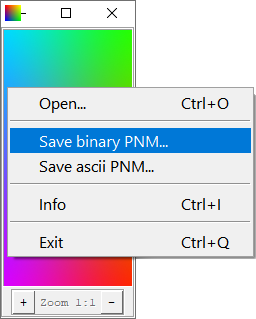 |
| Example of Tkinter-based viewer displaying ASCII PPM. Note that ASCII PNM files per se are not supported by Tkinter; in this example ASCII PPM is opened as 3D list using PyPNM, then, using PyPNM again, converted on the fly to PNM-like binary data in memory, which Tkinter can handle successfully. |
Functions description
PyPNM module contains 100% pure Python implementation of everything one may need to read and write a variety of PGM and PPM files, as well as to display corresponding image data. No non-standard dependencies used, no extra downloads needed, no dependency version conflicts expected. All the functionality is provided as functions/procedures, as simple as possible; main functions are listed below:
- pnm2list - reading binary or ASCII RGB PPM or L PGM file and returning image data as nested list of int.
- list2bin - getting image data as nested list of int and creating binary PPM (P6) or PGM (P5) data structure in memory. Suitable for generating data to display with Tkinter.
- list2pnm - getting image data as nested list of int and writing either binary or ASCII file depending on
binargument.
Detailed functions arguments description is provided below, as well as in module docstrings and PyPNM documentation bedside book (PDF).
pnm2list
X, Y, Z, maxcolors, image3D = pypnm.pnm2list(in_filename, tuplevel)
Read data from PPM/PGM file to nested image data list, where:
-
X, Y, Z- image sizes (int); -
maxcolors- maximal color value per channel for current image (int), either 255, or 65535; -
image3D- image pixel data as list(list(list(int))); -
in_filename- PPM/PGM file name (str); -
tuplevel-image3Dstructure switch:tuplevel='image':image3Dis tuple(tuple(tuple(int)));tuplevel='pixel':image3Dis list(list(tuple(int)));tuplevel=other:image3Dis list(list(list(int))).
Default
tuplevel=None, meaning no tuples are used, andimage3Dstructure is list(list(list(int))).
list2bin
image_bytes = pypnm.list2bin(image3D, maxcolors, show_chessboard)
Convert nested image data list to PGM P5 or PPM P6 (binary) data structure in memory, where:
-
image3D- list (image) of lists (rows) of lists (pixels) of ints (channel values), havingY * X * Zsize; -
maxcolors- maximal color value per channel for current image (int), either 255, or 65535; -
show_chessboard- optional bool, setTrueto show LA and RGBA images against chessboard pattern;Falseor missing show existing L or RGB data for transparent areas as opaque (see the Note below).Default is
Falsefor backward compatibility; -
image_bytes- returned PNM-structured binary data.image_bytesobject thus obtained is well compatible with TkinterPhotoImage(data=...)method and therefore may be used to (and actually was developed for) visualize any data represented as image-like 3D list.
Note:
When encountering image list with 2 or 4 channels, current version of
list2binmay treat it as LA or RGBA image correspondingly, and generate image preview for Tkinter as transparent over chessboard background (like Photoshop or GIMP). Since PNM images do not have transparency, this preview is actually either L or RGB, with image mixed with chessboard background, generated bylist2binon the fly.Pattern color match Photoshop "Light" defaults, size match Photoshop "Small" for images smaller than 65 pixels in any direction, else "Large" for images larger than 512 pixels in any direction, else "Medium".
This behaviour is controlled by
show_chessboardoption. Default setting isFalse(meaning simply ignoring alpha channel) for backward compatibility.
list2pnm
pypnm.list2pnm(out_filename, image3D, maxcolors, bin)
Write either binary or ASCII file from nested image data list, where:
-
out_filename- name of PNM file to be written. -
image3D-Y * X * Zlist (image) of lists (rows) of lists (pixels) of ints (channels); -
maxcolors- maximal color value per channel for current image (int), either 255, or 65535; -
bin- switch (bool) defining whether to write binary PNM file or ASCII one.Default is
True, meaning binary output, to provide backward compatibility.
Note that list2pnm is a switch between internal list2pnmbin and list2pnmascii functions, whose direct usage is considered legacy. Using list2pnm instead of legacy calls simplifies writing "Save as..." functions for main programs - now you can use one function for all PNM flavours. Default is bin = True since binary PNM seem to be more convenient for big programs like Photoshop.
References
-
Netpbm file formats specifications strictly followed in the course of PyPNM development.
-
PyPNM at Github contains both PyPNM module and viewer application example, illustrating using
list2binto produce data for TkinterPhotoImage(data=...)to display, and other PyPNM functions for opening/saving various portable map formats (so viewer may be used as converter between binary and ASCII variants of PPM and PGM files).Issues and discussions are open for possible bug reports and suggestions, correspondingly.
-
PyPNM for Python 3.4 at Github - same as above, but compatible with Python down to 3.4. Besides PPM and PGM support, image viewer in this branch also have PNG support, based on PyPNG, and therefore may be used as pure Python PNM <=> PNG converter.
Usage examples
-
ScaleNx is a pure Python implementation of pixel image rescaling algorithms, currently encompassing Scale2x, Scale3x, Scale2xSFX and Scale3xSFX methods (ScaleNx module is available at PyPI). Since all ScaleNx methods operate whole pixels (no channel splitting etc.),
list(list(list(int)))image structure generated by PyPNM fits these algorithms naturally.Adding
tupleveloption in recent PyPNM version provided Scale3xSFX speed increase ca. 17% on low color images due to pixel pattern caching. -
Adaptive image averager is an example of special effect image filter, necessary for POV‑Ray Thread project, but absent in normal image editors like Photoshop. As a result, filter was written in Python, and works surprisingly fast for a Python image editing.
Nested list image representation, as provided by PyPNM, allows pixel processing with a single map() in any color mode from L to RGBA, thus making the code both simple and fast.
-
Barycentric and bilinear image interpolation, rescaling, and other transformations in pure Python also utilizes map()-based approach to simplify processing images, represented by PyPNM-generated nested lists.
Apparently, PyPNM also provides displaying images being edited by means of Tkinter.
Release history Release notifications | RSS feed


Download files
Download the file for your platform. If you're not sure which to choose, learn more about installing packages.
Source Distribution
Built Distribution
Filter files by name, interpreter, ABI, and platform.
If you're not sure about the file name format, learn more about wheel file names.
Copy a direct link to the current filters
File details
Details for the file pypnm-2.30.12.34.tar.gz.
File metadata
- Download URL: pypnm-2.30.12.34.tar.gz
- Upload date:
- Size: 16.6 kB
- Tags: Source
- Uploaded using Trusted Publishing? No
- Uploaded via: twine/6.2.0 CPython/3.12.10
File hashes
| Algorithm | Hash digest | |
|---|---|---|
| SHA256 |
1c8b4033f46789760f21256b944ec369e2678abfbca1e70d577da14c64bba2de
|
|
| MD5 |
abc39442182c5986f42d1606e510b23c
|
|
| BLAKE2b-256 |
a79f07944e1b5cfb1021f658979dabff5285cde0996e96b43c52bd1e1d7a4b09
|
File details
Details for the file pypnm-2.30.12.34-py3-none-any.whl.
File metadata
- Download URL: pypnm-2.30.12.34-py3-none-any.whl
- Upload date:
- Size: 20.5 kB
- Tags: Python 3
- Uploaded using Trusted Publishing? No
- Uploaded via: twine/6.2.0 CPython/3.12.10
File hashes
| Algorithm | Hash digest | |
|---|---|---|
| SHA256 |
730124df1731c18773ba9d39e032deef8045faba2247e48ca0b2c64f71e52b93
|
|
| MD5 |
9b06aebb4b199e5b2edb494b47c6bd2a
|
|
| BLAKE2b-256 |
7bb2617b4fde804f73e98d7ec5f5e91c1bf91a5576b4d0ecda6327cdfde0c329
|






