
PyPlumIO is a native ecoNET library for Plum ecoMAX controllers.

Project description
PyPlumIO is a native ecoNET library for Plum ecoMAX controllers.







Overview
This package aims to provide complete and easy to use solution for communicating with climate devices by Plum Sp. z o.o.
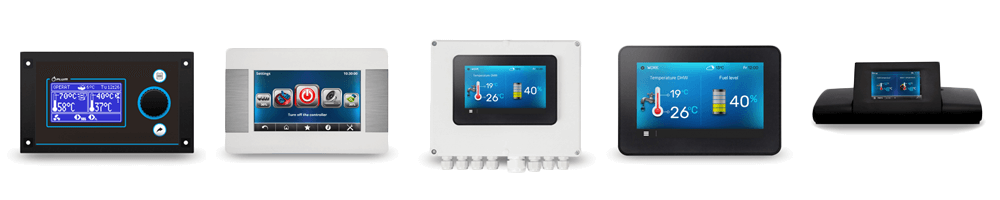
Currently it supports reading and writing parameters of ecoMAX automatic pellet boiler controllers, getting service password and sending network information to show on controller's display.
Devices can be connected directly via RS-485 to USB adapter or through network by using RS-485 to Ethernet/WiFi converter.
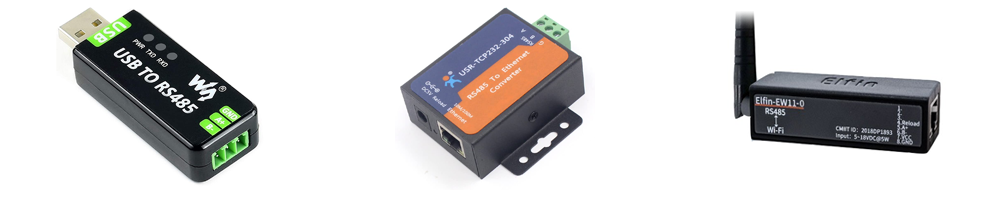
Table of contents
Usage
To interact with devices, you must first initialize connection by utilizing pyplumio.open_tcp_connection or pyplumio.open_serial_connection methods.
You can find examples for each supported connection type below.
TCP
This is intended to be used with RS-485 to Ethernet/WiFi converters, which are readily available online or can be custom built using RS-485 to USB converter and ser2net software.
import asyncio
import pyplumio

async def main():
  async with pyplumio.open_tcp_connection("localhost", 8899) as connection:
    ecomax = await connection.get_device("ecomax")
    # Do something.

asyncio.run(main())
Serial
This is intended to be used with RS-485 to USB adapters, that are connected directly to the device running PyPlumIO.
import asyncio
import pyplumio

async def main():
  async with pyplumio.open_serial_connection("/dev/ttyUSB0", baudrate=115200) as connection:
    ecomax = await connection.get_device("ecomax")
    # Do something.

asyncio.run(main())
NB: Although async with it is the preferred way to initialize the connection, this can also be done without using it:
from pyplumio import TcpConnection

async def main():
  connection = TcpConnection("localhost", 8899)
  await connection.connect()
  ecomax = await connection.get_device("ecomax")
  # Do something.

asyncio.run(main())
Data and Parameters
Data can be mutable (Parameters) or immutable (Values). Both can be accessed via instance attributes (e. g. ecomax.heating_temp, ecomax.heating_target_temp) or awaited (this is preferred) via await ecomax.get_value(name: str) and await ecomax.get_parameter(name: str) methods.
Each Plum device supports different attributes and parameters.
Reading
Interaction with the device is mainly done through async getter methods.
For example you can read current feed water temperature by awaiting for Device.get_value("heating_temp").
The following example will print out current feed water temperature and close the connection.
import asyncio
import pyplumio

async def main():
  async with pyplumio.open_tcp_connection("localhost", 8899) as connection:
    ecomax = await connection.get_device("ecomax")
    print(await ecomax.get_value("heating_temp"))

asyncio.run(main())
It's also possible to register a callback, that will be called every time value is significantly changed.
import asyncio
import pyplumio

async def my_callback(value: float) -> None:
  print(f"Heating Temperature: {value}")

async def main():
  async with pyplumio.open_tcp_connection("localhost", 8899) as connection:
    ecomax = await connection.get_device("ecomax")
    ecomax.register_callback(["heating_temp"], my_callback)

    while True:
    	# Wait in the infinite loop.
    	await asyncio.sleep(1)

asyncio.run(main())
Writing
You can easily change controller parameters by awaiting for set_value(name: str, value: int) or by getting parameter via get_parameter(name: str) method and calling set(name, value). In examples below, we will set target temperature to 65 degrees Celsius (~ 150 degrees Fahrenheit) using both methods.
async def main():
  async with pyplumio.open_tcp_connection("localhost", 8899) as connection:
    ecomax = await connection.get_device("ecomax")
    await ecomax.set_value("heating_target_temp", 65)
async def main():
  async with pyplumio.open_tcp_connection("localhost", 8899) as connection:
    ecomax = await connection.get_device("ecomax")
    target_temp = await ecomax.get_parameter("heating_target_temp")
    target.temp.set(65)
For binary parameters (that can only have 0 or 1 value), you can use string literals "on", "off" as value or use turn_on(), turn_off() methods.
async def main():
  async with pyplumio.open_tcp_connection("localhost", 8899) as connection:
    ecomax = await connection.get_device("ecomax")
    await ecomax.set_value("boiler_control", "on")
async def main():
  async with pyplumio.open_tcp_connection("localhost", 8899) as connection:
    ecomax = await connection.get_device("ecomax")
    boiler = await ecomax.get_parameter("boiler_control")
    boiler.turn_on()  # or boiler.turn_off()
Please note that each parameter has a range of acceptable values that you must check by yourself. The PyPlumIO will raise ValueError if value is not within acceptable range. You can check allowed values by reading min_value and max_value attributes of parameter object.
async def main():
  async with pyplumio.open_tcp_connection("localhost", 8899) as connection:
    ecomax = await connection.get_device("ecomax")
    target_temp = await ecomax.get_parameter("heating_target_temp")
    print(target_temp.min_value)  # Prints minimum allowed target temperature.
    print(target_temp.max_value)  # Prints maximum allowed target temperature.
Network Information
You can send ethernet and wlan info to the controller to show on it's display.
async def main():
  connection = pyplumio.open_tcp_connection("localhost", 8899)
  connection.set_eth(ip="10.10.1.100", netmask="255.255.255.0", gateway="10.10.1.1")
  connection.set_wlan(
    ip="10.10.2.100",
    netmask="255.255.255.0",
    gateway="10.10.2.1",
    ssid="My SSID",
    encryption=WLAN_ENCRYPTION_WPA2,
    quality=100,
  )
  await connection.connect()  # Initializes connection.
Protocol
ecoNET communication uses RS-485 standard. Each frame consists of header (7 bytes), message type (1 byte), message data (optional), CRC (1 byte) and frame end delimiter (1 byte). The minimum frame size therefore is 10 bytes.
Protocol supports unicast and broadcast frames. Broadcast frames will always have their recipient address set to 0x00, while unicast messages will have specific device address. ecoMAX controller address is 0x45, ecoSTER panel address is 0x51.
Frame Structure
- Header:
- [Byte] Frame start delimiter. Always
0x68. - [Unsigned Short] Byte size of the frame. Includes CRC and frame end delimiter.
- [Byte] Recipient address.
- [Byte] Sender address.
- [Byte] Sender type. PyPlumIO uses EcoNET type
0x30. - [Byte] ecoNET version. PyPlumIO uses version
0x05.
- [Byte] Frame start delimiter. Always
- Body:
- [Byte] Frame type.
- [Byte*] Message data (optional).
- [Byte] Frame CRC.
- [Byte] Frame end delimiter. Always
0x16.
Requests and Responses
Frames can be split into requests, responses and messages. See requests.py, responses.py and messages.py for a list of supported frames.
For example we can request list of editable parameters from the controller by sending frame with frame type 0x31 and receive response with frame type 0xB1 that contains requested parameters.
Communication
ecoMAX controller constantly sends ProgramVersion[type=0x40] and CheckDevice[type=0x30] requests to every known device on the network and broadcasts RegData[type=0x08] message, that contains basic controller data.
Initial exchange between ecoMAX controller and PyPlumIO library can be illustrated with following diagram:
NOTE: device network address is listed in square brackets.
ecoMAX[0x45] -> Broadcast[0x00]: RegData[type=0x08] Contains basic ecoMAX data.
ecoMAX[0x45] -> PyPlumIO[0x56]:  ProgramVersion[type=0x40] Program version request.
ecoMAX[0x45] <- PyPlumIO[0x56]:  ProgramVersion[type=0xC0] Contains program version.
ecoMAX[0x45] -> PyPlumIO[0x56]:  CheckDevice[type=0x30] Check device request.
ecoMAX[0x45] <- PyPlumIO[0x56]:  DeviceAvailable[type=0xB0] Contains network information.
ecoMAX[0x45] -> PyPlumIO[0x56]:  CurrentData[type=0x35] Contains current ecoMAX data.
Versioning
Protocol has built-in way to track frame versions. This is used to synchronize changes between devices.
Both broadcast RegData[type=0x08] and unicast CurrentData[type=0x35] frames sent by ecoMAX controller contain versioning data.
This data can be represented with following dictionary:
frame_versions: Dict[int, int] = {
  0x31: 37,
  0x32: 37,
  0x36: 1,
  0x38: 5,
  0x39: 1,
  0x3D: 40767,
  0x50: 1,
  0x51: 1,
  0x52: 1,
  0x53: 1,
}
In this dictionary keys are frame types and values are version numbers. In example above, frame Parameters[type=0x31] has version 37.
If we change any parameters either remotely or on ecoMAX itself, version number will increase, so PyPlumIO will be able to tell that it's need to request list of parameters again to obtain changes.
frame_versions: Dict[int, int] = {
  0x31: 38,  # note version number change
  0x32: 37,
  0x36: 1,
  0x38: 5,
  0x39: 1,
  0x3D: 40767,
  0x50: 1,
  0x51: 1,
  0x52: 1,
  0x53: 1,
}
Home Assistant Integration
There is companion Home Assistant integration that is being co-developed with this package and depends on it. Click button below to check it out.

Attribution
Special thanks to econetanalyze project by twkrol for initial information about protocol.
License
This product is distributed under MIT license.
Release history Release notifications | RSS feed


Download files
Download the file for your platform. If you're not sure which to choose, learn more about installing packages.
Source Distribution
Built Distribution
Filter files by name, interpreter, ABI, and platform.
If you're not sure about the file name format, learn more about wheel file names.
Copy a direct link to the current filters
File details
Details for the file PyPlumIO-0.2.1.tar.gz.
File metadata
- Download URL: PyPlumIO-0.2.1.tar.gz
- Upload date:
- Size: 27.9 kB
- Tags: Source
- Uploaded using Trusted Publishing? No
- Uploaded via: twine/4.0.1 CPython/3.9.13
File hashes
| Algorithm | Hash digest | |
|---|---|---|
| SHA256 |
9e5a8a017640a108cc2cc11c38a51fb7ddef036b63ce59242e9a108102e4f457
|
|
| MD5 |
89221b3b3e38fa5303e33d19a0938181
|
|
| BLAKE2b-256 |
757ad69254319c503bb905a0b0ee55e02999513356ec360bc98e0938818a043b
|
File details
Details for the file PyPlumIO-0.2.1-py3-none-any.whl.
File metadata
- Download URL: PyPlumIO-0.2.1-py3-none-any.whl
- Upload date:
- Size: 40.6 kB
- Tags: Python 3
- Uploaded using Trusted Publishing? No
- Uploaded via: twine/4.0.1 CPython/3.9.13
File hashes
| Algorithm | Hash digest | |
|---|---|---|
| SHA256 |
3355272be5a18dab5d9db22648d43132fbb010c1d5b4b61cbf8877c963589199
|
|
| MD5 |
841e9d12baebf063296074c4e597f503
|
|
| BLAKE2b-256 |
5cdf9114361093d59d1b44328f49e4b0e5147cce6663dc63b4c8dca79ade051e
|






