
Python bindings for the QHexEdit Widget

Project description
QHexEdit2
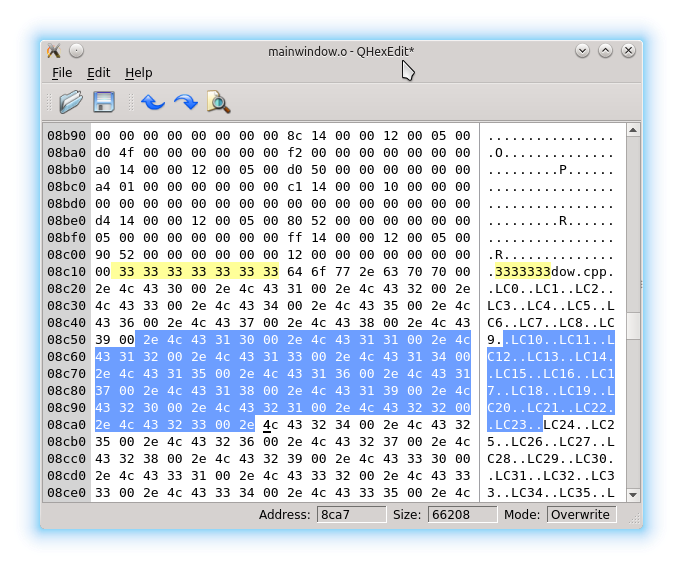
QHexEdit is a hex editor widget written in C++ for the Qt (Qt4, Qt5, Qt6) framework. It is a simple editor for binary data, just like QPlainTextEdit is for text data. There are sip configuration files included, so it is easy to create bindings for PyQt and you can use this widget also in python 2 and 3.
QHexEdit takes the data of a QByteArray (setData()) and shows it. You can use the mouse or the keyboard to navigate inside the widget. If you hit the keys (0..9, a..f) you will change the data. Changed data is highlighted and can be accessed via data().
Normally QHexEdit works in the overwrite mode. You can set overwrite mode(false) and insert data. In this case the size of data() increases. It is also possible to delete bytes (del or backspace), here the size of data decreases.
You can select data with keyboard hits or mouse movements. The copy-key will copy the selected data into the clipboard. The cut-key copies also but deletes it afterwards. In overwrite mode, the paste function overwrites the content of the (does not change the length) data. In insert mode, clipboard data will be inserted. The clipboard content is expected in ASCII Hex notation. Unknown characters will be ignored.
QHexEdit comes with undo/redo functionality. All changes can be undone, by pressing the undo-key (usually ctr-z). They can also be redone afterwards. The undo/redo framework is cleared, when setData() sets up a new content for the editor. You can search data inside the content with indexOf() and lastIndexOf(). The replace() function is to change located subdata. This 'replaced' data can also be undone by the undo/redo framework.
QHexEdit is based on QIODevice, that's why QHexEdit can handle big amounts of data. The size of edited data can be more then two gigabytes without any restrictions.
Using QHexEdit (C++)
You can read the documentation of the project here. You find in the sources a C++ example, that shows how tu use the QHexedit widget.
Using QHexEdit (Python)
To use QHexEdit with Python install it from PyPi:
$ # for PyQt5
$ pip install PyQt5-QHexEdit
$
$ # for PyQt6
$ pip install PyQt6-QHexEdit
There is also a python example available.
Contributing to QHexEdit
We love to receive contributions. You can submit bug reports here. If you are a developer, you can pick up a work item and start to realize super exciting features or fix bugs. We also like to receive enhancement proposals or translation support.
License
Copyright (C) 2015-2016 Winfried Simon

This software may be used under the terms of the GNU Lesser General
Public License version 2.1 as published by the Free Software Foundation
and appearing in the file license.txt included in the packaging of this file.

This program is distributed in the hope that it will be useful,
but WITHOUT ANY WARRANTY; without even the implied warranty of
MERCHANTABILITY or FITNESS FOR A PARTICULAR PURPOSE. See the
GNU Lesser General Public License for more details.

You should have received a copy of the GNU General Public License
along with this program.  If not, see <http://www.gnu.org/licenses/>.
Release history Release notifications | RSS feed


Download files
Download the file for your platform. If you're not sure which to choose, learn more about installing packages.
Source Distribution
Built Distribution
Filter files by name, interpreter, ABI, and platform.
If you're not sure about the file name format, learn more about wheel file names.
Copy a direct link to the current filters
File details
Details for the file pyqt5_qhexedit-0.8.10.tar.gz.
File metadata
- Download URL: pyqt5_qhexedit-0.8.10.tar.gz
- Upload date:
- Size: 29.6 kB
- Tags: Source
- Uploaded using Trusted Publishing? No
- Uploaded via: twine/6.1.0 CPython/3.12.3
File hashes
| Algorithm | Hash digest | |
|---|---|---|
| SHA256 |
1ed2f9d5602c2c4af2ad8ec1e2822ce91fcef60b14629a6e08adb48a89120138
|
|
| MD5 |
78e71cf233de389ce07512241a99fa71
|
|
| BLAKE2b-256 |
aea92081e296d96939588f83ad89d59ba06784a33258803d7fe0992dc445291a
|
File details
Details for the file pyqt5_qhexedit-0.8.10-cp312-cp312-manylinux_2_17_x86_64.whl.
File metadata
- Download URL: pyqt5_qhexedit-0.8.10-cp312-cp312-manylinux_2_17_x86_64.whl
- Upload date:
- Size: 55.1 kB
- Tags: CPython 3.12, manylinux: glibc 2.17+ x86-64
- Uploaded using Trusted Publishing? No
- Uploaded via: twine/6.1.0 CPython/3.12.3
File hashes
| Algorithm | Hash digest | |
|---|---|---|
| SHA256 |
3127cc392a29b81cd4b180a3af8ec2a48bdb928063dca712aa29f85c364c7165
|
|
| MD5 |
6404e3b2638eefda2069d0404df9071a
|
|
| BLAKE2b-256 |
3f3e1093dda55889dac4df778c26aff88817af6261367b96e9c7862552202d06
|






