



PySimpleGUIQt
The Alpha Release
Announcements of Latest Developments
Getting Started with PySimpleGUIQt
Welcome to the Alpha Release of PySimpleGUI for Qt!
You can use the exact same code that you are running on the older, tkinter, version of PySimpleGUI.
PySimpleGUIQt uses PySide2 OR PyQt5 for access to Qt.
Porting your PySimpleGUI code to PySimpleGUIQt
To "port" your code from the tkinter implementation. Follow these steps:
- Change
import PySimpleGUItoPySimpleGUIQt
That's it! OK, maybe I should have said step instead of steps.
Differences between PySimpleGUI and PySimpleGUIQt
Sizes
While you can use "Character-based" sizes like you did in tkinter, it's best to use pixel based sizes as that is what Qt uses. PySimpleGUIQt does some very rough / basic conversions from the character sizes to pixel sizes. It's enough that your elements will at least be visible. But the conversion is likely to not be ideal.
Fonts
Fonts should be in the format (font family, size). You can use the older string based too, but it will not work with setting like bold and italics. PySimpleGUIQt converts from the string 'Courier 20' to the tuple ('Courier', 20) for you.
Installing PySimpleGUIQt for Python 3
pip install --upgrade PySimpleGUIQt
On Linux systems you need to run pip3.
pip3 install --upgrade PySimpleGUIQt
Installing PySide2 or PyQt5 for Python 3
It is recommended that you use PySide2, however, if that cannot be found, then PyQt5 will be attempted. To install either of these:
pip install PySide2
or
pip install PyQt5
Testing your installation
Once you have installed, or copied the .py file to your app folder, you can test the installation using python. At the command prompt start up Python.
python3
>>> import PySimpleGUIQt
>>> PySimpleGUIQt.main()
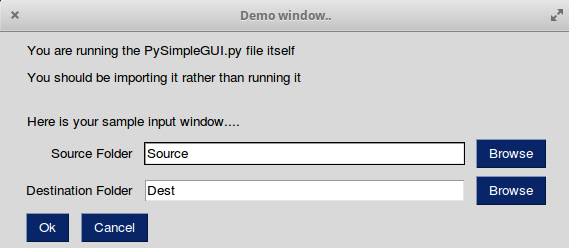
You will see a sample window in the center of your screen. If it's not installed correctly you are likely to get an error message during one of those commands
Here is the window you should see:
Prerequisites
Python 3
PySide2 or PyQt5
Using - Python 3
To use in your code, simply import....
import PySimpleGUIQt as sg
Then use the exact same code as any other PySimpleGUI program that runs on tkinter.
Status
FEATURE COMPLETE!
All of the major features are DONE. They may not have all of their options working, but they can be added to your windows. It's been an amazing week to get here.
I hope you enjoy this ALPHA release! Please post a screenshot on the GitHub site. There is an Issue where users have been posting their applications. It's a place for you to show-off and a place for others to learn from your designs. Your window does not have to be complex.... all GUIs, no matter how simple, are something we can learn from.
Functioning features
Features are being added daily to this Qt port of PySimpleGUI.
These Elements are "complete" (a relative term... more are more complete than others):
- Text
- Input single line
- Input multiline
- Output multiline (new)
- Dial (new)
- Output - reroute stdout
- Spinner
- Sliders
- Buttons - RButtons, CButtons, Short-cut Buttons
- Checkbox
- Radio Buttons
- Listbox
- ComboBox
- Labeled Frames
- Columns - enables you to make pretty much any layout!
- Alpha channel for windows
- No Title Bar setting
- Enter submits for multiline
- Fonts
- Colors for text and background
- Timeouts for Read calls
- Change Submits parametes for most Elements
- Table
- Basic display
- Read selected rows
- change_submits events
- Updates
- Image as a background (new feature)
- Graph - Draw line, draw circle, draw text
- Image Element
- Tree Element
- Tabs
- Menus
Missing Features
Notable MISSING features at the moment include:
- Graphs Element Methods - erasing, draw arc, etc
- Change submits - for radio buttons
Design
Author
MikeTheWatchGuy
Demo Code Contributors
License
GNU Lesser General Public License (LGPL 3) +
Acknowledgments
3 maintainers


Metadata
3 maintainers
Release files for PySimpleGUIQt 0.11.0
For a detailed explanation of source distributions (sdists) and built distributions (wheels), please see the package formats documentation.
Source distribution (sdist)
| File | Size | Uploaded | |
|---|---|---|---|
| PySimpleGUIQt-0.11.0.tar.gz | 46.5 kB | Details |
Built distribution (wheel)
| File | Interpreter | ABI | Platform | Reset |
|---|---|---|---|---|
| PySimpleGUIQt-0.11.0-py3-none-any.whl | Python 3 | none | any | Details |
Total release size: 91.4 kB
Release files / PySimpleGUIQt-0.11.0.tar.gz
| Download URL | PySimpleGUIQt-0.11.0.tar.gz |
|---|---|
| Size | 46.5 kB |
| Tags | Source |
|
SHA-256 checksum How to use checksums |
1f5144f7a17e061ae6b2b0321f0b9b69f0d0ee44ba40f8e45cf83f32fc44305a
|
|
BLAKE2b-256 checksum How to use checksums |
05bf3973d53c4188277997a28b1acd20ed70aba8b681f1d9e4cf6cef21ea57f0
|
| Upload date | |
|
Uploaded using Trusted Publishing? What is trusted publishing? |
No |
| Uploaded via |
twine/1.11.0 pkginfo/1.4.2 requests/2.18.4 setuptools/40.5.0 requests-toolbelt/0.8.0 tqdm/4.19.2 CPython/3.6.2
|
Release files / PySimpleGUIQt-0.11.0-py3-none-any.whl
| Download URL | PySimpleGUIQt-0.11.0-py3-none-any.whl |
|---|---|
| Size | 44.9 kB |
| Tags | Python 3 |
|
SHA-256 checksum How to use checksums |
adb95bee678cb44bb509ac94f0225271332b324f8ca62a9ed7c89ee59b66fd21
|
|
BLAKE2b-256 checksum How to use checksums |
a8e3575585bb4aec1fb2404002788eddf905e5768f43507ac447a7be19ed8c8f
|
| Upload date | |
|
Uploaded using Trusted Publishing? What is trusted publishing? |
No |
| Uploaded via |
twine/1.11.0 pkginfo/1.4.2 requests/2.18.4 setuptools/40.5.0 requests-toolbelt/0.8.0 tqdm/4.19.2 CPython/3.6.2
|














