



PySimpleGUIQt
The Pre-Alpha Release
Announcements of Latest Developments
Getting Started with PySimpleGUIQt
Welcome to the Pre-Alpha Release of PySimpleGUI for Qt!
You can use the exact same code that you are running on the older, tkinter, version of PySimpleGUI.
PySimpleGUIQt uses PySide2 for access to Qt.
Differences between PySimpleGUI and PySimpleGUIQt
Sizes
IMPORTANT NOTE if you are porting from tkinter to Qt - You will need to make one important change to your code.... You must change your size parameters to be in PIXELS instead of CHARACTERS.
Fonts
Fonts should be in the format (font family, size). The original PySimpleGUI also allowed a font string 'Family Size' but that option is not available (yet) in the Qt version. I'll add it though so the code ports straight over.
Installing PySimpleGUIQt for Python 3
pip install --upgrade PySimpleGUIQt
On some systems you need to run pip3.
pip3 install --upgrade PySimpleGUIQt
Installing PySide2 for Python 3
pip install PySide2
Testing your installation
Once you have installed, or copied the .py file to your app folder, you can test the installation using python. At the command prompt start up Python.
python3
>>> import PySimpleGUIQt
>>> PySimpleGUIQt.main()
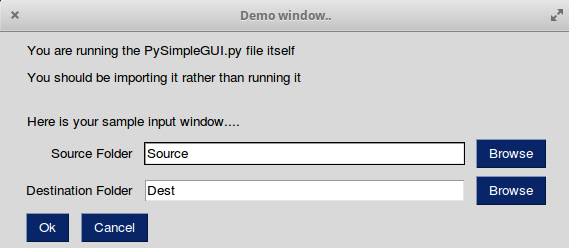
You will see a sample window in the center of your screen. If it's not installed correctly you are likely to get an error message during one of those commands
Here is the window you should see:
Prerequisites
Python 3
PySide2
Using - Python 3
To use in your code, simply import....
import PySimpleGUIQt as sg
Then use the exact same code as any other PySimpleGUI program that runs on tkinter.
Status
Functioning features
Features are being added daily to this Qt port of PySimpleGUI.
These Elements are "complete":
- Text
- Input single line
- Input multiline
- Output multiline (new)
- Dial (new)
- Output - reroute stdout
- Spinner
- Sliders
- Buttons - RButtons, CButtons, Short-cut Buttons
- Checkbox
- Radio Buttons
- Listbox
- ComboBox
- Labeled Frames
- Columns - enables you to make pretty much any layout!
- Alpha channel for windows
- No Title Bar setting
- Enter submits for multiline
- Fonts
- Colors for text and background
Complete is a relative term
Missing Features
Notable MISSING features at the moment include:
- Timeouts - nothing dealing with timeouts has been ported
- Tables, Graphs, Trees - the more complex Elements have not yet been ported. Stay tuned, new ones being added daily!
- Change submits - enter submits works for multiline
Design
Author
MikeTheWatchGuy
Demo Code Contributors
License
GNU Lesser General Public License (LGPL 3) +
Acknowledgments
3 maintainers


Metadata
3 maintainers
Release files for PySimpleGUIQt 0.4.0
For a detailed explanation of source distributions (sdists) and built distributions (wheels), please see the package formats documentation.
Source distribution (sdist)
| File | Size | Uploaded | |
|---|---|---|---|
| PySimpleGUIQt-0.4.0.tar.gz | 42.7 kB | Details |
Built distribution (wheel)
| File | Interpreter | ABI | Platform | Reset |
|---|---|---|---|---|
| PySimpleGUIQt-0.4.0-py3-none-any.whl | Python 3 | none | any | Details |
Total release size: 84.3 kB
Release files / PySimpleGUIQt-0.4.0.tar.gz
| Download URL | PySimpleGUIQt-0.4.0.tar.gz |
|---|---|
| Size | 42.7 kB |
| Tags | Source |
|
SHA-256 checksum How to use checksums |
a9a011ccd1541f31e535bcfc869697b39d68204b92a0730da2394a9644c968d8
|
|
BLAKE2b-256 checksum How to use checksums |
2af1c62e6ab74b0b29b3b84f76de91988c049905fa5dce93731070a399beaa8e
|
| Upload date | |
|
Uploaded using Trusted Publishing? What is trusted publishing? |
No |
| Uploaded via |
twine/1.11.0 pkginfo/1.4.2 requests/2.18.4 setuptools/40.5.0 requests-toolbelt/0.8.0 tqdm/4.19.2 CPython/3.6.2
|
Release files / PySimpleGUIQt-0.4.0-py3-none-any.whl
| Download URL | PySimpleGUIQt-0.4.0-py3-none-any.whl |
|---|---|
| Size | 41.6 kB |
| Tags | Python 3 |
|
SHA-256 checksum How to use checksums |
7dda3c221e6aba91ff68e1027321ab2c7504a2699a0942546eab58b2e17a5f21
|
|
BLAKE2b-256 checksum How to use checksums |
9e3fcca9c2fc626bef51a7525762ca55f7077054f8083389c905b4897100d3ca
|
| Upload date | |
|
Uploaded using Trusted Publishing? What is trusted publishing? |
No |
| Uploaded via |
twine/1.11.0 pkginfo/1.4.2 requests/2.18.4 setuptools/40.5.0 requests-toolbelt/0.8.0 tqdm/4.19.2 CPython/3.6.2
|














