
PyTorchLabFlow is a lightweight framework that simplifies PyTorch experiment management...

Project description
Streamline Your PyTorch Experiments. Offline-First, Secure, Reproducible and Portable.







PyTorchLabFlow is a lightweight, offline-first framework designed to bring structure and sanity to your deep learning experiments. It automates project setup, manages configurations, and tracks results, all while keeping your data completely private and secure on your local machine.
🤔 The Problem: Experiment Chaos
If you've worked on any deep learning project, this probably sounds familiar:
- 📂 Messy Directories: A chaotic mix of notebooks, scripts, model weights, and config files with names like
model_final_v2_best.pth. - ❓ Lost Configurations: Forgetting which hyperparameters, dataset version, or code commit produced your best results.
- 📊 Difficult Comparisons: Struggling to isolate the impact of a single change (e.g., a different learning rate) when comparing dozens of similar experiment runs that share the same model or dataset.
- 💻 Portability Nightmare: Moving your project from a laptop to a powerful cloud server requires tedious and error-prone reconfiguration.
- 🔒 Privacy Concerns: Using online experiment trackers means sending potentially sensitive code and data to third-party servers.
- 🌐 Internet Dependency: Many popular tools require a constant internet connection, hindering productivity in offline environments.
✨ The Solution: PyTorchLabFlow
PyTorchLabFlow tackles this chaos with a simple, research-first philosophy.
- Structure by Default: It enforces a clean, standardized project structure, so you always know where to find your models, datasets, configs, and results.
- Reproducibility Built-In: Every experiment is automatically saved with its unique configuration, weights, and performance history, making any result perfectly reproducible.
- Effortless Portability: The
transferfeature lets you package an entire experiment and move it to another machine with a single command. Go from local prototyping to large-scale training without friction. - 100% Offline & Private: Your work stays on your machine. Always. No data is ever sent to the cloud, ensuring complete privacy and security.
🚀 Quick Start
Get up and running in under 5 minutes.
1. Installation
pip install PyTorchLabFlow
2. Workflow
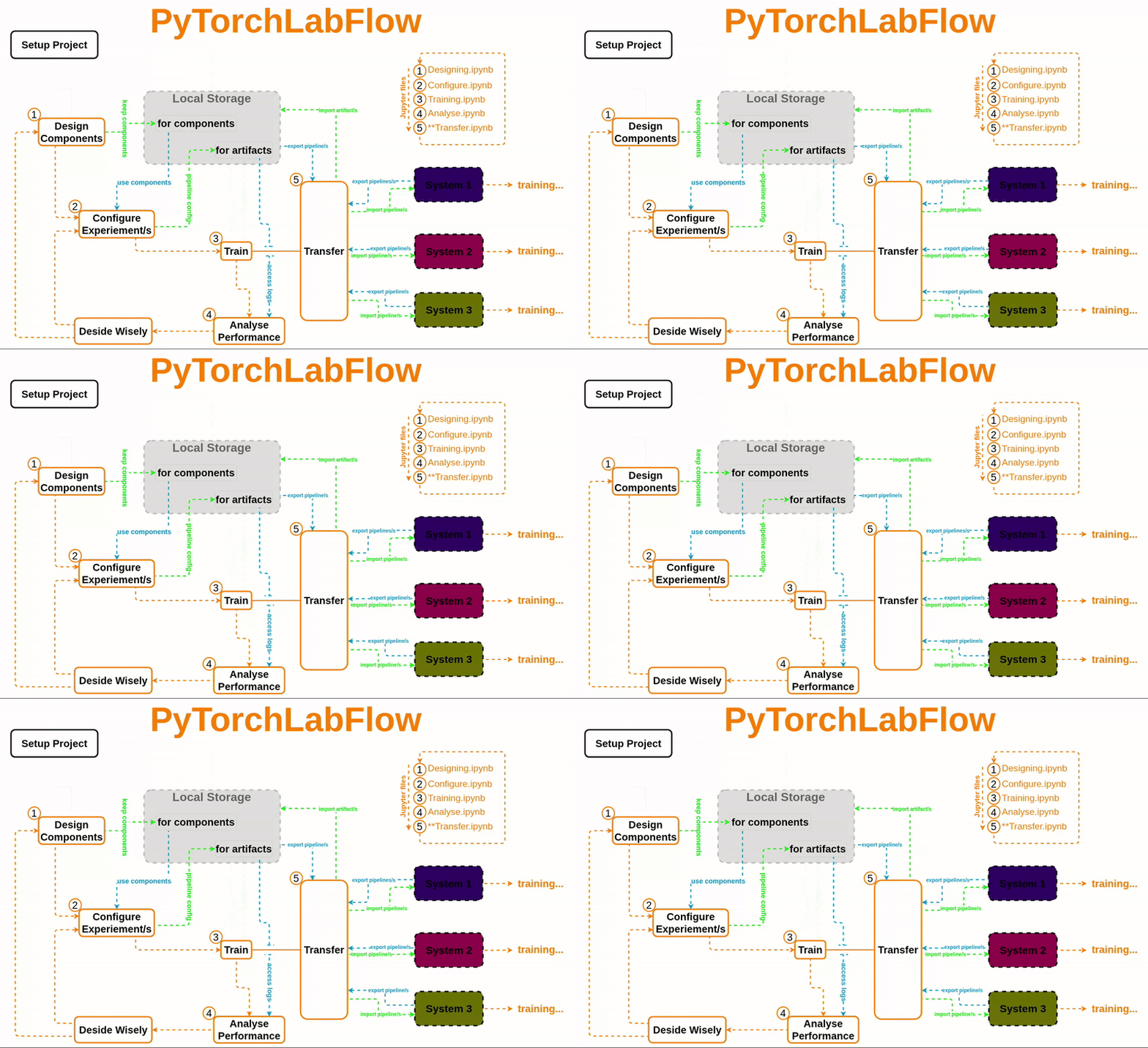
Atypical Workflow where you can do all your experiemnts/trails differ by different Component and/or parameters is some fixed number of dedicated Jupiter files. No headech of finding trials that share same code-block( here it is Componet) and analysing their performance, just use functions, PipeLine manages all these things , just focus on analysis and dicision making. refer Workflow in documentation for more details.
📚 Documentation & Resources
Dive deeper with our comprehensive resources.
- 📖 Official Documentation (Read the Docs): For complete API references, tutorials, and advanced guides.
- ✍️ Medium Articles (Deep Dive): Understand the "why" behind the framework.
- ✈️ End-to-End Example Project: See a complete, real-world application.
🤝 Contributing
Contributions are the lifeblood of open source! We welcome bug reports, feature requests, and pull requests. Whether you're a seasoned developer or just starting, your help is valued.
- Fork the repository.
- Create a new branch (
git checkout -b feature/your-feature-name). - Make your changes and commit them (
git commit -m 'Add some amazing feature'). - Push to the branch (
git push origin feature/your-feature-name). - Open a Pull Request.
Please read our CONTRIBUTING.md guide for more details on our code of conduct and the process for submitting pull requests.
📜 License
This project is licensed under the Apache License 2.0. See the LICENSE file for details.
📄 How to Cite
If you use PyTorchLabFlow in your research, please consider citing it:
@misc{PyTorchLabFlow,
  author       = {BBEK-Anand},
  title        = {PyTorchLabFlow: A Python FrameWork for Managing Deep Learning Experiments in PyTorch},
  year         = {2024},
  url          = {[https://github.com/BBEK-Anand/PyTorchLabFlow](https://github.com/BBEK-Anand/PyTorchLabFlow)},
  note         = {Version 0.2.5},
}
Release history Release notifications | RSS feed


Download files
Download the file for your platform. If you're not sure which to choose, learn more about installing packages.
Source Distribution
Built Distribution
Filter files by name, interpreter, ABI, and platform.
If you're not sure about the file name format, learn more about wheel file names.
Copy a direct link to the current filters
File details
Details for the file pytorchlabflow-0.4.7.tar.gz.
File metadata
- Download URL: pytorchlabflow-0.4.7.tar.gz
- Upload date:
- Size: 31.8 kB
- Tags: Source
- Uploaded using Trusted Publishing? No
- Uploaded via: twine/6.2.0 CPython/3.11.14
File hashes
| Algorithm | Hash digest | |
|---|---|---|
| SHA256 |
36ab9c47bbe85857928c76123367dffc87b9e83a4eefe9cc13baa1cd2f6376c1
|
|
| MD5 |
5766f2a2611b818d4849a3f89d72e6dd
|
|
| BLAKE2b-256 |
9979d59a1186273b9c0ce62249851931aa3d3b9cb6fc69b060faf467f53404f7
|
File details
Details for the file pytorchlabflow-0.4.7-py3-none-any.whl.
File metadata
- Download URL: pytorchlabflow-0.4.7-py3-none-any.whl
- Upload date:
- Size: 31.5 kB
- Tags: Python 3
- Uploaded using Trusted Publishing? No
- Uploaded via: twine/6.2.0 CPython/3.11.14
File hashes
| Algorithm | Hash digest | |
|---|---|---|
| SHA256 |
4ab58a3d8675eba28d4cf23b56e074959f38e4722bfeaa462b948d1221cd4639
|
|
| MD5 |
04d134b7c438ce8904fad46778305f7a
|
|
| BLAKE2b-256 |
ab1c5ffc8ed5dc7d91a4425121e66d8fd58ac371c7c0efe91589bcabcb8131a9
|






