
Get realtime UK trains information through a simple Python API.

Project description






PyTrains
PyTrains is a simple Python library and command-line interface to obtain realtime UK train information through Worldline's "Tiger" train API, which is unfortunately undocumented, making this library very difficult to create and maintain!
Command Line Interface
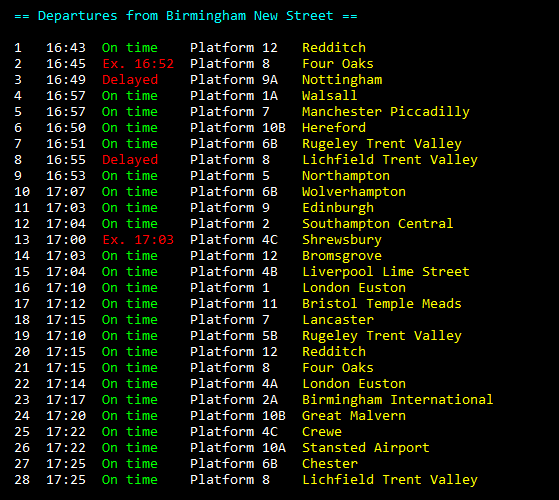
The command line interface is very simple and easy to use. You can do three things with it, the first of which is simply viewing the departure board for a certain station by running pytrains <crs code or station name>. For example, if I wanted departures from Birmingham New Street, I could type pytrains brs or pytrains birmingham new street (both case-insensitive). The second usage is to find more information about a service. When you run the first command, each service has an ID on the left. To get more information about a service with a specific ID, you can run pytrains -i <id> or pytrains --id <id>. The final usage is to find the first train calling at a certain destination from a given station, which can be done by running pytrains <origin> -d <destination> or pytrains <origin> --dest <destination>. For example, if I want to know the next train from London Paddington which stops at Exeter St Davids, I could type pytrains pad -d exd or pytrains london paddington --dest exeter st davids.
Use as a Python Module (Full Documentation)
PyTrains can also be imported and used as a Python module with easy-to-understand syntax. Here's a very simple example program to get you going:
import pytrains

station = pytrains.Station("BHM")

print("The next train from {} is the {} to {}.".format(
    station.name,
    station.services[0].departureTime.strftime("%H:%M"),
    station.services[0].destination
))
# Sample output: The next train from Birmingham New Street is the 16:45 to Four Oaks.

print("It has {} carriages, is delayed by {} minutes, and will be on Platform {}.".format(
    station.services[0].carriageCount,
    station.services[0].delay,
    station.services[0].platform
))
# Sample output: It has 6 carriages, is delayed by 9 minutes, and will be on Platform 8.
This is just scratching the surface of what PyTrains is capable of, so make sure to have a browse of the documentation to learn about its full capabilities.
How to Install
Install from PyPI:
Just run pip install pytrains to install. Dependencies will be automatically installed.
Install manually
- Clone the repo:
git clone https://github.com/w-henderson/PyTrains - Navigate to its directory:
cd PyTrains - Install dependencies:
pip install -r requirements.txt - Install the package:
python setup.py install


Download files
Download the file for your platform. If you're not sure which to choose, learn more about installing packages.
Source Distribution
Built Distribution
Filter files by name, interpreter, ABI, and platform.
If you're not sure about the file name format, learn more about wheel file names.
Copy a direct link to the current filters
File details
Details for the file PyTrains-0.0.4.tar.gz.
File metadata
- Download URL: PyTrains-0.0.4.tar.gz
- Upload date:
- Size: 20.5 kB
- Tags: Source
- Uploaded using Trusted Publishing? No
- Uploaded via: twine/3.2.0 pkginfo/1.5.0.1 requests/2.24.0 setuptools/50.3.0 requests-toolbelt/0.9.1 tqdm/4.50.0 CPython/3.8.5
File hashes
| Algorithm | Hash digest | |
|---|---|---|
| SHA256 |
2bcc0395faaa7613639f33d83f8ad6f1e7f2adf87d51bf873bb1f39c5671f9be
|
|
| MD5 |
55cb922002c33617ca95e53be985ac25
|
|
| BLAKE2b-256 |
2c4c30a9a941b8c114242d9bf13c77e03fd62f527fb8858840b028cadc2e1da6
|
File details
Details for the file PyTrains-0.0.4-py3-none-any.whl.
File metadata
- Download URL: PyTrains-0.0.4-py3-none-any.whl
- Upload date:
- Size: 34.0 kB
- Tags: Python 3
- Uploaded using Trusted Publishing? No
- Uploaded via: twine/3.2.0 pkginfo/1.5.0.1 requests/2.24.0 setuptools/50.3.0 requests-toolbelt/0.9.1 tqdm/4.50.0 CPython/3.8.5
File hashes
| Algorithm | Hash digest | |
|---|---|---|
| SHA256 |
76c9235993cd73ece85b659450dfe7bd848a77f3bf3656f8b2769b564c921545
|
|
| MD5 |
bd0775bf3811548f4e67d49cd564319f
|
|
| BLAKE2b-256 |
f5e9b4c65fe88fc0af18f2fff27ba39aeade4551c1f9c8d97347250d3bddf5d4
|






