
PyTransdec
PyTransdec is a Python library prepared for controlling TransdecEnvironment by PWr Diving Crew (KN Robocik) at Wrocław University of Science and Technology.
It wraps Unity ML-Agents library.
The project is maintained by Pwr Diving Crew software team members (Unity3D section).
Should any issues be noticed, please submit a New issue on GitHub.
Installation
Python
To use Python API Python 3.6 is required. On Windows it is recommended to use Anaconda (64-bit or 32-bit, but you can use your own preferred Python installation.
For Anaconda use default installation settings. After installation open Anaconda Navigator to finish the setup.
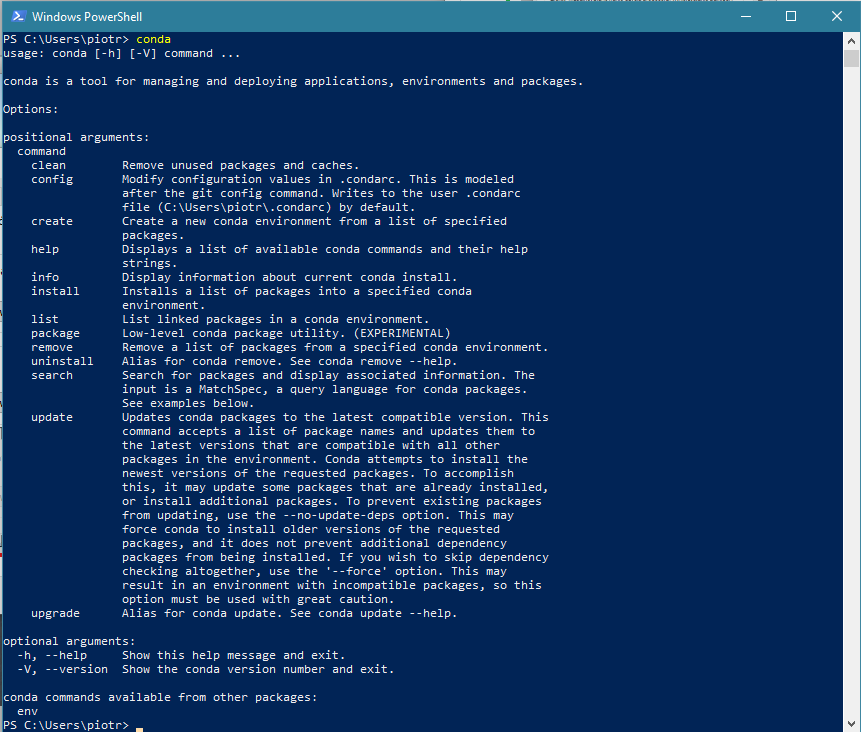
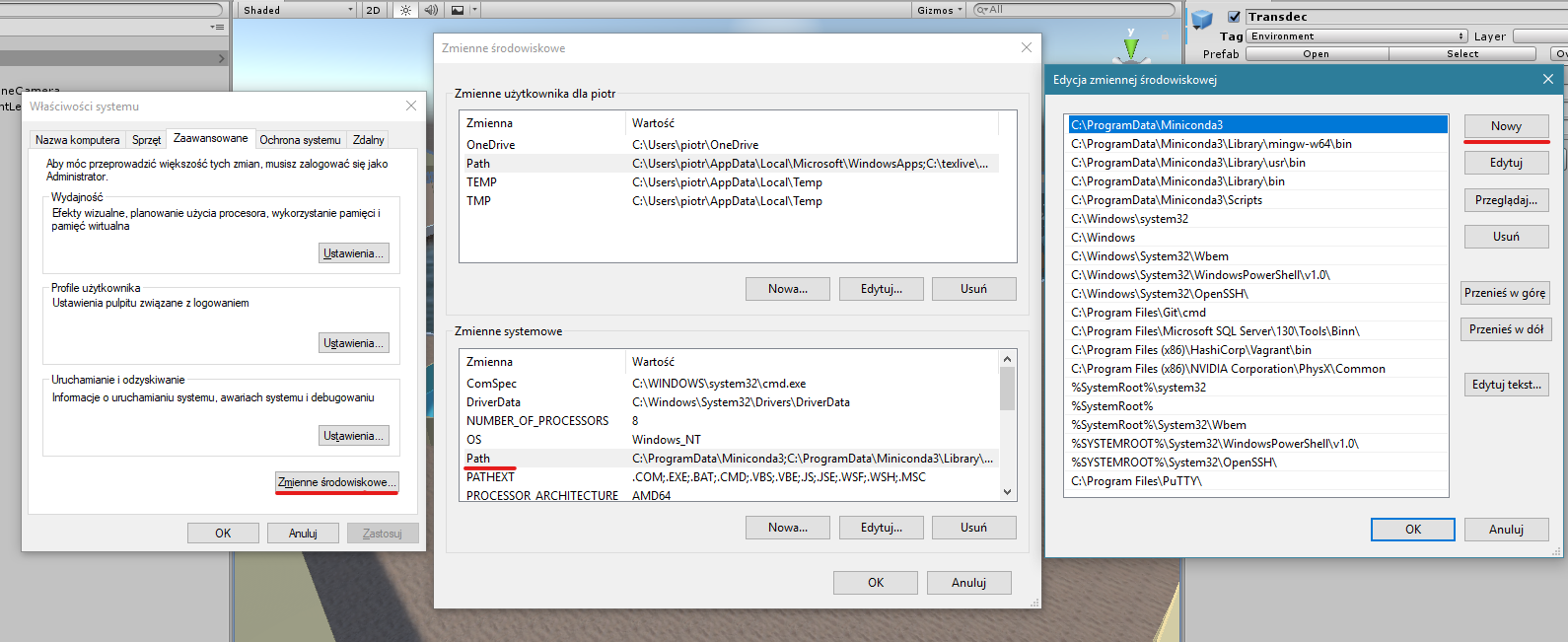
In case environment variables were not created, you will see error conda is not recognized as internal or external command when you type conda into command line. To solve this problem set the environment variables: open Edit environment variables for your account, click Environment Variables button, then double click Path under under System variable. Add the following paths using New button:
%UserProfile%\Anaconda3\Scripts
%UserProfile%\Anaconda3\Scripts\conda.exe
%UserProfile%\Anaconda3
%UserProfile%\Anaconda3\python.exe
Before proceeding check your installation by executing python --version, which should output something like this:
Python 3.6.x :: ...
You also need pip (which is installed by default in Anaconda). Check if it is correctly installed by executing pip --version. The output should look like this:
pip x.x...
If any error occurred, please check your installation.
PyTransdec package
To use the package install it using pip (it is recommended to use a virtual environment such as Pipenv (preferred), conda env or virtualenv.
Installation command:
pip install git+https://github.com/PiotrJZielinski/PyTransdec
PyTransdec package automatically installs all required dependencies.
Usage
PyTransdec package contains TransdecCommunication([file_name, worker_id]) class, which can be used to communicate with TransdecEnvironment. To import the package use following Python script:
from pytransdec import TransdecCommunication
You can then apply it using with statement:
with TransdecCommunication() as tc:
  ...
Parameters:
file_name:str, optional - Unity Environment file to operate on; defaults toNone(connect to Unity Editor)worker_id:int, optional - for more than 1 parallel workers - port incremental to be used for connection; defaults to0
Methods
| method/property | description |
|---|---|
tc.reset([message, training]) |
Reset the environment with reset message; update observations |
tc.step([action]) |
Make a step in the environment (specified with action); update observations |
tc.reward |
Current reward value |
tc.vector |
Current vector observations dictionary |
tc.visual |
Current visual observations list |
tc.collect_data(positive, add_noise, add_background, n_images[, save_dir, start_num, annotation_margin, used_observations, object_number, show_img, draw_annotations, print_annotations, progress_bar]) |
Automatically collect data from Transdec Environment |
tc.reset(self, message={}, training=True) |
[source] |
|---|
Reset the environment with reset message and update observations.
Parameters:
message:Dict[str, int], optional - a dictionary specifying TransdecEnvironment reset settings; defaults to emptyDict; available keys:'CollectData': if0- navigation mode; if1- data collection mode'EnableNoise': has effect only when'CollectData' == 1; if0- no noise added; if1- noise objects added on the image'Positive': has effect only when'CollectData' == 1; if0- collect negative examples (target object hidden); if1- collect positive examples (target object visible)FocusedObject- has effect only when'CollectData' == 1; specify which object is focused on collecting data (input: object number fromData collection settings)EnableBackgroundImage- has effect only when'CollectData' == 1; if0- transdec is background; if1- random images is backgroundForceToSaveAsNegative- focus to save image as negative example, even ifPostiveis set toTrue'AgentMaxSteps': after how many steps is the agent reset; if0- never
training:bool, optional - use TransdecEnvironment in training mode (ifTrue) or in inference mode (ifFalse); defaults totrue
tc.step(action=[0.0, 0.0, 0.0, 0.0]) |
[source] |
|---|
Make a step in the environment (specified with action) and update observations.
Parameters:
action:Tuple[float, float, float, float], optional - movement settings for the robot in range[-1, 1]; defaults to[0.0, 0.0, 0.0, 0.0]; action sequence:- longitudinal movement (
1.0: max forward,-1.0: max backward) - lateral movement (
1.0: max right,-1.0: max left) - vertical movement (
1.0: max upward,-1.0: max downward) - yaw rotation (
1.0: max right turn,-1.0: max left turn) - camera focus (
0: front camera,1: bottom camera)
- longitudinal movement (
tc.reward |
[source] |
|---|
Get current reward value.
Returns:
floatrepresenting current reward value calculated inside TransdecEnvironment
tc.vector |
[source] |
|---|
Get current vector observations dictionary.
Returns:
- The dictionary of observations with keys:
'acceleration_x'- linear acceleration value in all axes,'acceleration_y','acceleration_z','angular_acceleration_x'- angular acceleration value in all axes,'angular_acceleration_y','angular_acceleration_z','rotation_x'- rotation position value in all axes,'rotation_y','rotation_z','depth'- robot's depth measured from water surface,'bounding_box_x'- bounding box parameters (central point coordinates, width and height),'bounding_box_y','bounding_box_w','bounding_box_h','bounding_box_p'- probability of containing target (1or0),'relative_x'- robot's position relative to target in all axes,'relative_y','relative_z','relative_yaw'- robot's orientation relative to target in vertical axis
tc.visual |
[source] |
|---|
Get current visual observations list.
Returns:
Listof all available visual observations as Numpy arrays in range[0, 255]
tc.collect_data(positive, add_noise, n_images, save_dir='collected_data', start_num=1, annotation_margin=5, used_observations=('x', 'y', 'w', 'h', 'p'), show_img=False, draw_annotations=False, print_annotations=False, progress_bar=True) |
[source] |
|---|
Automatically collect data from Transdec Environment, saving images to save_dir, together with annotations.csv of preset content.
Parameters:
positive:bool- ifTruecollect positive examples (target object visible), else collect negative examples (target object hidden)add_noise:bool- if `True add noise objects on the image, else do notn_images:int- number of images to be savedsave_dir:str, optional - folder to put images and annotations file; defaults to'collected_data'start_num:int, optional - starting number to for image filename; defaults to1annotation_margin:int, optional - value added to all bounding box' dimensions; defaults to5used_observations:Union[str, Tuple[str, ...]], optional - which of the observations should be saved toannotations.csvfile; ifallsave all vector observations; defaults to('x', 'y', 'w', 'h', 'p'); available keys:'a_x'- linear acceleration value in all axes,'a_y','a_z','eps_x'- angular acceleration value in all axes,'eps_y','eps_z','phi_x'- rotation position value in all axes,'phi_y','phi_z','d'- robot's depth measured from water surface,'x'- bounding box parameters (central point coordinates, width and height),'y','w','h','p'- probability of containing target (1or0),'relative_x'- robot's position relative to target in all axes,'relative_y','relative_z','relative_yaw'- robot's orientation relative to target in vertical axis
show_img:bool, optional - show each collected image; defaults toFalsedraw_annotations:bool, optional - draw annotations on each showed image; has effect only whenshow_img==True; defaults toFalseprint_annotations:bool, optional - print each annotation in console; defaults toFalseprogress_bar:bool, optional - show neat progressbar for data collection; defaults toTrue
Example code for data collection
with TransdecCommunication() as tc:
        # collect 1000 positive examples with noise of object 0
        tc.collect_data(positive=True, add_noise=True, add_background=False, n_images=1000, save_dir='collected_data/{}/train'.format(0),
                        used_observations='all', object_number=0, show_img=True, draw_annotations=True)
        # collect 1000 positive examples with custom backgrount of object 0
        tc.collect_data(positive=True, add_noise=False, add_background=True, n_images=1000, save_dir='collected_data/{}/train'.format(0),
                        used_observations='all', object_number=0, show_img=True, draw_annotations=True)
        # collect 1000 negative examples with noise of object 0
        tc.collect_data(positive=False, add_noise=True, add_background=False, n_images=1000, save_dir='collected_data/{}/train'.format(0),
                        used_observations='all', object_number=0, show_img=True, draw_annotations=True)
1 maintainer

Metadata
1 maintainer
Release files for PyTransdec 0.2.1
For a detailed explanation of source distributions (sdists) and built distributions (wheels), please see the package formats documentation.
Built distribution (wheel)
| File | Interpreter | ABI | Platform | Reset |
|---|---|---|---|---|
| PyTransdec-0.2.1-py3-none-any.whl | Python 3 | none | any | Details |
Release files / PyTransdec-0.2.1-py3-none-any.whl
| Download URL | PyTransdec-0.2.1-py3-none-any.whl |
|---|---|
| Size | 11.3 kB |
| Tags | Python 3 |
|
SHA-256 checksum How to use checksums |
79d22f8c732e830c7bd1c63c6f065ad2b655d2638df9c007195cd80b1ef4ba37
|
|
BLAKE2b-256 checksum How to use checksums |
531db3dd097ec974d75310af49770fc6971d41a2aaa796ee2cd9e1dd9853cc51
|
| Upload date | |
|
Uploaded using Trusted Publishing? What is trusted publishing? |
No |
| Uploaded via |
twine/3.1.1 pkginfo/1.5.0.1 requests/2.22.0 setuptools/45.2.0 requests-toolbelt/0.9.1 tqdm/4.40.2 CPython/3.6.9
|














